
1. Einleitung
This manual provides comprehensive instructions for the installation, operation, and maintenance of your Speco Technologies HT5941T Intense IR HD TVI Dome Camera. This camera is designed to deliver high-definition surveillance with advanced features such as True WDR, Intense IR, and day/night operation. Please read this manual thoroughly before installation and use to ensure proper functionality and safety.
2. Sicherheitshinweise
- Stromversorgung: Use only the specified 12VDC or 24VAC power supply. Incorrect voltage kann die Kamera beschädigen.
- Installation: Ensure the camera is securely mounted to prevent accidental falls. Professional installation is recommended.
- Umfeld: Do not expose the camera to extreme temperatures, humidity, or corrosive environments beyond its specified operating conditions.
- Reinigung: Disconnect power before cleaning. Use a soft, dry cloth. Avoid harsh chemicals.
- Wartung: Versuchen Sie nicht, die Kamera selbst zu zerlegen oder zu reparieren. Überlassen Sie alle Reparaturen qualifiziertem Fachpersonal.
3. Packungsinhalt
Überprüfen Sie, ob alle Artikel in Ihrem Paket vorhanden sind:
- HT5941T Dome Camera
- Chameleon Cover
- Montagezubehör (Schrauben, Dübel)
- Kurzanleitung (falls zutreffend)
4. Einrichtung und Installation
4.1 Montage der Kamera
The HT5941T camera supports 3-axis adjustment for both wall and ceiling mounting. Ensure the mounting surface is strong enough to support the camera's weight.
- Wählen Sie einen geeigneten Montageort.
- Use the provided mounting template (if included) or the camera base to mark drilling points.
- Bohren Sie gegebenenfalls Vorbohrungen und setzen Sie Wandanker ein.
- Befestigen Sie die Kamerabasis mit den mitgelieferten Schrauben an der Montagefläche.
- Passen Sie den Kamerawinkel für optimale Ergebnisse an. viewing.
4.2 Verkabelung und Stromanschluss
The HT5941T is an HD-TVI output only camera, providing full HD resolution over coaxial cable.
- Connect a coaxial cable (RG59 or similar) from the camera's BNC output to your HD-TVI DVR or monitor.
- Connect the power cable to the camera's power input. The camera supports dual voltage operation (12VDC or 24VAC). Ensure the power supply matches the camera's requirements.
- Stellen Sie sicher, dass alle Verbindungen sicher sind, bevor Sie Strom anlegen.
4.3 Chameleon Cover Installation
The included Chameleon Cover can be painted to match your décor.
- If desired, paint the Chameleon Cover before installation. Allow it to dry completely.
- Align the cover with the camera body and snap it into place.
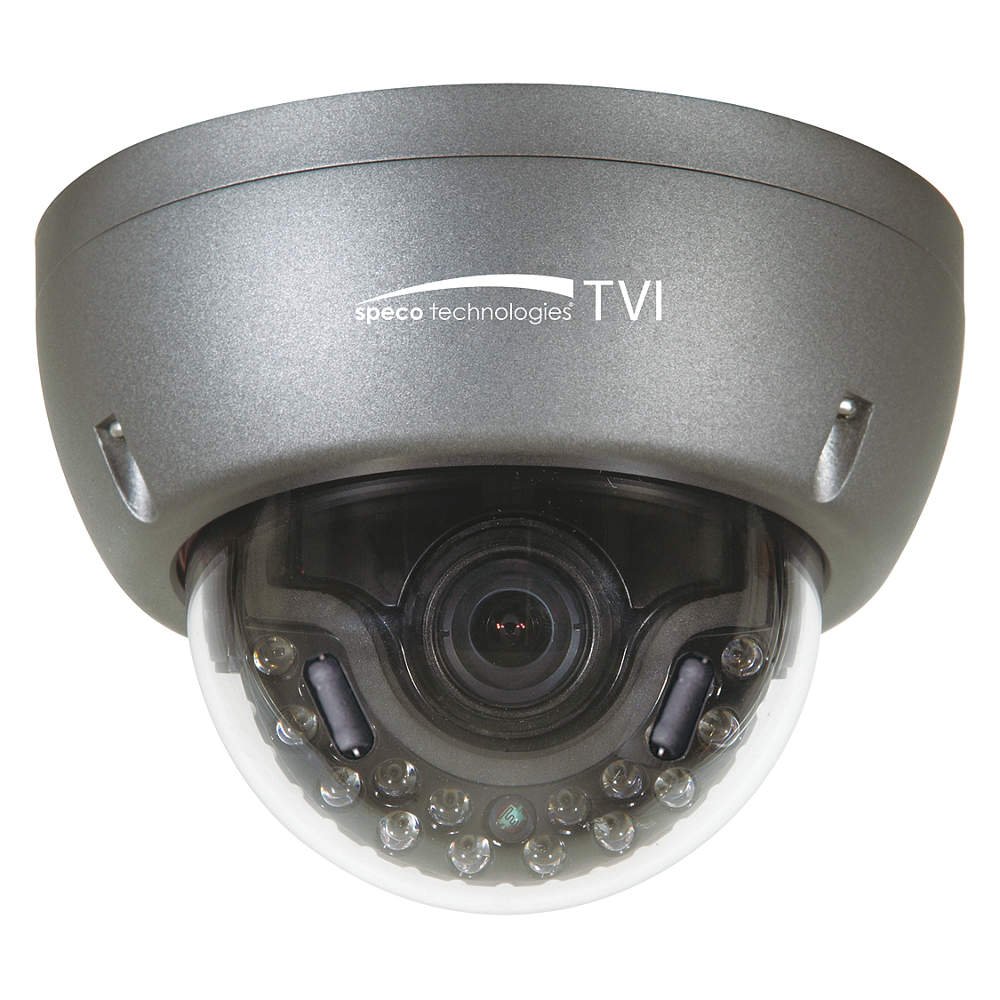
Figure 1: Speco Technologies HT5941T Dome Camera with its dark gray housing and dome design.
5. Bedienungsanleitung
5.1 Powering On and Initial View
Once the camera is properly wired and powered, it will automatically begin transmitting video. Connect your HD-TVI DVR or monitor to view das Live-Feed.
5.2 Bildschirmmenü (OSD)
The camera features a full OSD menu for configuration, accessible via on-board controls or UTC (Up The Coax) control from a compatible DVR.
- Zugriff auf OSD: Use the joystick or buttons on the camera (if present) or the UTC control function on your DVR to bring up the OSD menu.
- Navigation: Use the directional controls to navigate through menu options. Select options to adjust settings such as exposure, white balance, and image enhancements.
- Hauptmerkmale:
- Echtes WDR: Wide Dynamic Range for clear images in high-contrast lighting.
- Intense IR: Adapts IR intensity to the subject, preventing saturation and providing vivid night vision.
- Day/Night Operation: Mechanical IR cut filter automatically switches between color (day) and monochrome (night) modes for optimal image quality.
6. Wartung
6.1 Reinigung
Regular cleaning helps maintain optimal image quality.
- Gently wipe the camera lens and housing with a soft, lint-free cloth.
- Bei hartnäckigen Verschmutzungen leicht dampen the cloth with water or a mild lens cleaning solution. Avoid abrasive cleaners.
- Stellen Sie sicher, dass die Kamera vor der Reinigung ausgeschaltet ist.
6.2 Umweltaspekte
The HT5941T features heater circuitry and anti-moisture glass to reduce fog or condensation in various weather conditions. No specific user maintenance is required for these features, but ensure the camera's power supply is stable to allow these functions to operate effectively.
7. Fehlerbehebung
| Problem | Mögliche Ursache | Lösung |
|---|---|---|
| Kein Videoausgang | No power; Loose cable connection; Incorrect video format (not HD-TVI compatible DVR) | Check power supply and connections; Ensure DVR supports HD-TVI input. |
| Schlechte Bildqualität (unscharf, verzerrt) | Dirty lens; Improper focus; Cable interference; Insufficient lighting | Clean the lens; Adjust focus via OSD; Use shielded coaxial cable; Verify adequate lighting or IR function. |
| Infrarot funktioniert nachts nicht. | Insufficient power; Day/Night setting incorrect; IR sensor blocked | Check power supply; Verify Day/Night mode in OSD; Ensure nothing obstructs the IR LEDs or sensor. |
| OSD-Menü wird nicht angezeigt | Incorrect control method; DVR not compatible with UTC | Try on-board controls if available; Consult DVR manual for UTC compatibility and operation. |
8. Spezifikationen
| Besonderheit | Spezifikation |
|---|---|
| Modellnummer | HT5941T |
| Marke | Speco Technologies |
| Auflösung der Videoaufnahme | 1080p (Full HD) |
| Bildfrequenz | 30 fps |
| Konnektivitätstechnologie | HD-TVI (Coaxial) |
| Stromquelle | 12VDC & 24VAC Dual Voltage |
| Montagetyp | Wall Mount (3-axis adjustment) |
| Formfaktor | Kuppel |
| Low-Light-Technologie | Day/Night, Intense IR |
| Besondere Merkmale | True WDR, Heater circuitry, Anti-moisture glass, Chameleon Cover |
| Internationale Schutzbewertung | IP67 |
| Abmessungen (L x B x H) | 5.12 x 4.84 x 3.66 Zoll |
| Artikelgewicht | 1.5 Pfund |
| Material | Glas (Linse) |
9. Garantie und Support
For warranty information and technical support, please refer to the official Speco Technologies webBesuchen Sie die Website oder kontaktieren Sie den Kundendienst. Bewahren Sie Ihren Kaufbeleg als Kaufnachweis für Garantieansprüche auf.
Speco Technologies Official WebWebsite: www.specotech.com