
1. Einleitung
This manual provides instructions for the LaView LV-PB932F4 IP Bullet Camera. This camera is designed for surveillance applications, offering 1080P HD resolution for both indoor and outdoor use. It features day and night vision capabilities, with infrared (IR) night vision up to 100 feet. The camera is weatherproof with an IP66 rating and operates in temperatures from -13°F to 140°F (-25°C to 60°C).

Image 1.1: LaView LV-PB932F4 IP Bullet Camera features.
2. Packungsinhalt
Überprüfen Sie, ob alle Artikel in Ihrem Paket vorhanden sind:
- 1 x LaView LV-PB932F4 2MP 1080P IP Bullet Camera
- (Additional accessories such as mounting screws, anchors, and Ethernet cable may vary by package and are often sold separately.)
3. Einrichtung und Installation
3.1 Vor der Installation
Ensure your Network Video Recorder (NVR) system is compatible with IP 2MP cameras. Plan the camera's placement to maximize coverage and minimize obstructions.
3.2 Physische Installation
The camera is designed for wall mounting. Select a suitable location that provides the desired field of view and protection from direct impact.
Montageschritte:
- Mark drilling points using the camera's base as a template.
- Drill pilot holes appropriate for your mounting surface.
- Secure the camera to the mounting surface using appropriate screws and anchors (not included).
- Passen Sie den Kamerawinkel für eine optimale Abdeckung an.
3.3 Anschluss
This camera utilizes Power over Ethernet (PoE) for simplified installation. A single network cable provides both power and data connection.
- Connect one end of an Ethernet cable (Cat 5e or Cat 6 recommended) to the camera's Ethernet port.
- Connect the other end of the Ethernet cable to a PoE-enabled port on your NVR or a PoE switch.
- The camera should automatically power on and attempt to connect to your NVR system.
Notiz: For systems that do not automatically configure, refer to your NVR's manual for adding IP cameras and network configuration.
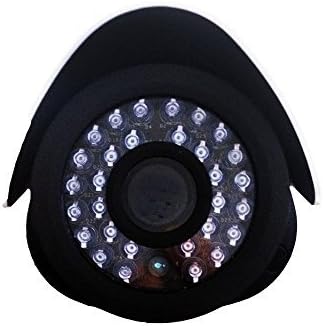
Bild 3.1: Vorderseite view der Kameralinse und der IR-LEDs.
4. Bedienung
4.1 Day/Night Vision
The camera automatically switches between day (color) and night (black and white, infrared) modes based on ambient light conditions. In night mode, the camera's infrared LEDs activate to provide visibility up to 100 feet in darkness.
4.2 Bewegungserkennung
The camera supports motion detection. Configuration of motion detection zones and sensitivity settings is typically done through your connected NVR system's interface. Refer to your NVR's manual for detailed instructions on setting up motion alerts and recording triggers.
4.3 Videoaufzeichnung und -wiedergabe
Video recording and playback functions are managed by your NVR system. Consult your NVR's user manual for instructions on accessing live view, configuring recording schedules, and reviewing aufgezeichnete footage.
5. Wartung
Um eine optimale Leistung und Langlebigkeit Ihrer Kamera zu gewährleisten, befolgen Sie bitte diese Wartungsrichtlinien:
- Reinigung: Reinigen Sie das Kameraobjektiv regelmäßig mit einem weichen Tuch.amp cloth. Avoid abrasive cleaners or solvents that could damage the lens coating.
- Kabelinspektion: Regularly inspect all cables for damage, wear, or loose connections.
- Firmware-Updates: Check the official LaView website for any available firmware updates for your camera model. Firmware updates can improve performance, enhance security, and add new features.
- Umweltschutz: While the camera is IP66 weatherproof, extreme environmental conditions (e.g., direct lightning strikes, prolonged submersion, or corrosive environments) should be avoided.
6. Fehlerbehebung
6.1 No Image/Video Signal
- Überprüfen Sie die Leistung: Ensure the camera is receiving power via the PoE connection. Verify the Ethernet cable is securely connected to both the camera and the PoE source (NVR/switch).
- Netzwerkverbindung prüfen: Confirm the Ethernet cable is not damaged. Try a different port on your NVR/switch.
- NVR-Kompatibilität: Ensure your NVR system is compatible with 2MP IP cameras.
- IP-Adresskonflikt: If manually configuring, check for IP address conflicts on your network.
6.2 Schlechte Bildqualität
- Linse reinigen: Clean the camera lens for any dirt, dust, or smudges.
- Lichtverhältnisse: Ensure adequate lighting for optimal image quality. In low light, the camera will automatically switch to IR night vision.
- Auflösungseinstellungen: Verify the video resolution settings on your NVR are set to 1080P or higher, if supported by your NVR.
6.3 Night Vision Not Working
- IR-LEDs: In dark conditions, check if the infrared LEDs are illuminating. They may emit a faint red glow.
- Hindernisse: Ensure there are no obstructions directly in front of the camera that could block the IR light.
6.4 Probleme mit der Bewegungserkennung
- Empfindlichkeitseinstellungen: Adjust the motion detection sensitivity on your NVR. High sensitivity can lead to false alarms (e.g., from insects, moving branches).
- Erkennungszonen: Verify that the motion detection zones are correctly configured to cover the desired areas.
7. Technische Daten
| Besonderheit | Spezifikation |
|---|---|
| Modellnummer | LV-PB932F4 |
| Auflösung der Videoaufnahme | 1080p |
| Auflösung des Fotosensors | 2 Megapixel |
| Effektive Standbildauflösung | 4 Megapixel |
| Konnektivitätstechnologie | Kabelgebunden (PoE) |
| Verwendung im Innen- und Außenbereich | Innenbereich, Außenbereich |
| Wasserdichtigkeit | IP66 |
| Nachtsichtbereich | 100 Fuß |
| Besondere Merkmale | Bewegungssensor, Nachtsicht |
| Betriebstemperatur | -13°F bis 140°F (-25°C bis 60°C) |
| Stromquelle | Kabelgebundenes Elektrogerät (PoE) |
| Artikelabmessungen | 8.5 x 5 x 5 Zoll |
| Artikelgewicht | 1.35 Pfund |
| Formfaktor | Kugel |
| Montagetyp | Wandhalterung |
8. Garantie und Support
8.1 Garantieinformationen
This LaView product is covered by a 2-year manufacturer's warranty. Please retain your proof of purchase for warranty claims. The warranty covers defects in materials and workmanship under normal use.
8.2 Technischer Support
For technical assistance or support, please visit the official LaView website or contact their customer service. Lifetime technical support is provided to assist with setup, operation, and troubleshooting.
LaView Offiziell WebWebsite: www.laviewsicherheit.com