
Supersonic IQ3710DJBT
Supersonic IQ Sound IQ-3710DJBT Portable DJ Speaker User Manual
Modell: IQ-3710DJBT
Wichtige Sicherheitshinweise
Please read all instructions carefully before operating this device. Keep this manual for future reference.
- Setzen Sie dieses Gerät weder Regen noch Feuchtigkeit aus.
- Blockieren Sie keine Belüftungsöffnungen.
- Installieren Sie das Gerät nicht in der Nähe von Wärmequellen wie Heizkörpern, Heizregistern, Öfen oder anderen Geräten (einschließlich ampKonverter (Lüfter), die Wärme erzeugen.
- Schützen Sie das Netzkabel vor dem Betreten oder Einklemmen, insbesondere an Steckern, Steckdosen und an der Stelle, an der sie aus dem Gerät austreten.
- Verwenden Sie nur vom Hersteller angegebene Zusatzgeräte/Zubehör.
- Ziehen Sie bei Gewitter oder längerer Nichtbenutzung den Stecker aus der Steckdose.
- Überlassen Sie alle Wartungsarbeiten qualifiziertem Servicepersonal. Eine Wartung ist erforderlich, wenn das Gerät in irgendeiner Weise beschädigt wurde.
Produkt überview
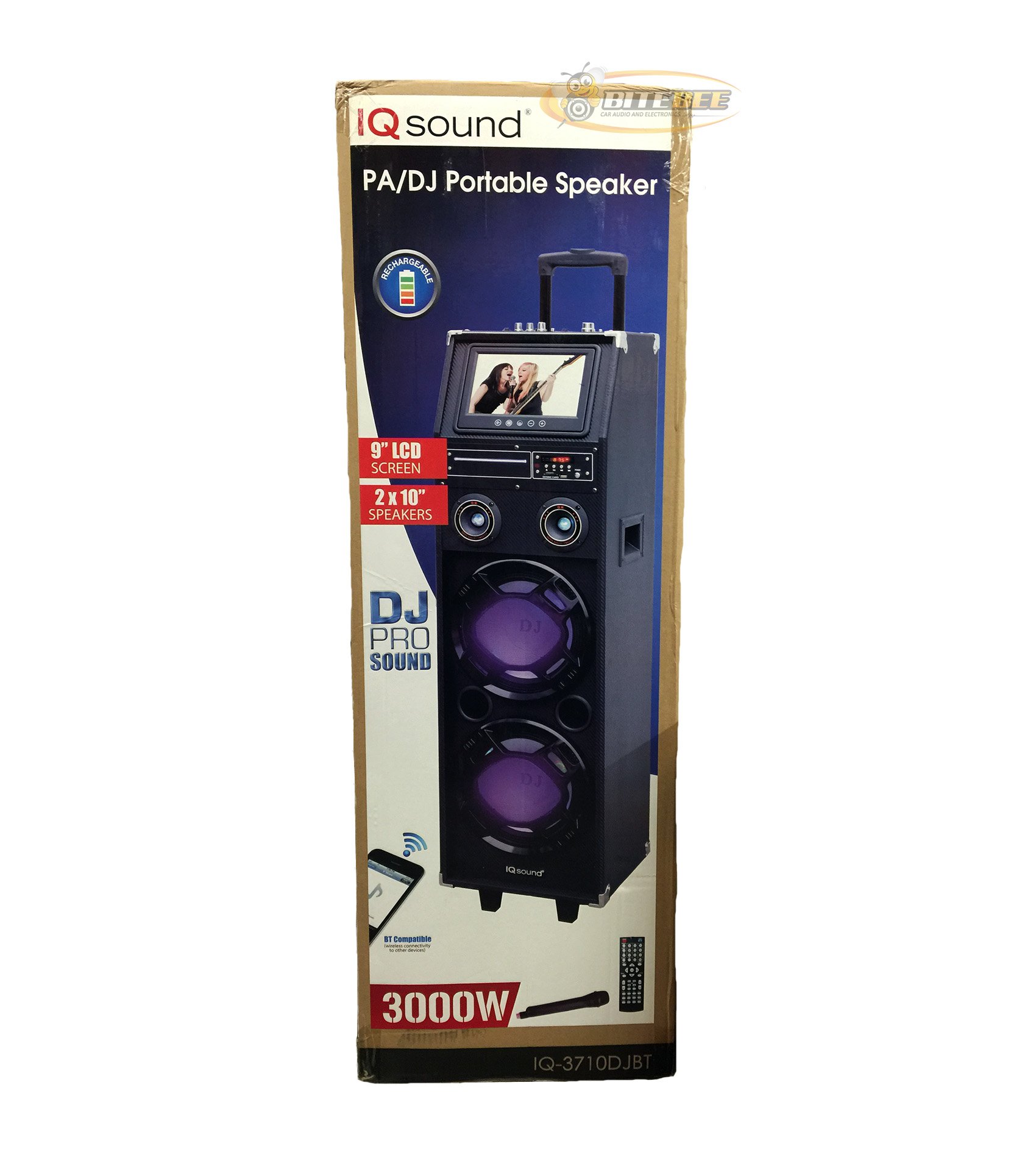
Bild: Vorderseite view of the Supersonic IQ Sound IQ-3710DJBT Portable DJ Speaker, showcasing its dual speakers, 9-inch LCD screen, and control panel.
Merkmale
- Dual 10-inch Full Range Speakers
- Built-in Bluetooth for wireless audio streaming
- FM-Radio-Tuner
- 5-Band Equalizer for audio customization
- 9-inch LCD Display for video and menu navigation
- Eingebauter Akku für den mobilen Einsatz
- Integrated LED Lights for visual effects
- Multimedia Compatible (supports various video and music formats)
- USB Input for external audio devices
- SD Card Slot for media playback
- 1 Gitarreneingang
- 1 Microphone Jack (includes 1 microphone)
- Fernbedienung enthalten
- Built-in Handle and Wheels for easy transport
Packungsinhalt
- IQ-3710DJBT Portable DJ Speaker
- Netzteil
- Mikrofon
- Fernbedienung
- Benutzerhandbuch (dieses Dokument)
Controls and Connections (General)
The main control panel is located on the top or rear of the speaker, featuring buttons for power, mode selection, playback controls (play/pause, skip), volume adjustment, EQ settings, and light controls. Input ports for USB, SD card, microphone, and guitar are also present. The 9-inch LCD display provides visual feedback for media playback, FM radio tuning, and menu navigation.
Aufstellen
1. Laden des Akkus
- Connect the included power adapter to the speaker's DC input port.
- Plug the power adapter into a standard wall outlet (AC 100-240V, 50/60Hz).
- The charging indicator light (if present) will illuminate. Allow approximately 6-8 hours for a full charge before first use.
- Der Lautsprecher kann während des Ladevorgangs verwendet werden.
2. Erstes Einschalten
- Stellen Sie sicher, dass der Lautsprecher vollständig aufgeladen oder an eine Stromquelle angeschlossen ist.
- Locate the Power button (usually on the control panel) and press it to turn on the speaker.
- The LCD display will illuminate, and the speaker will enter the default mode.
3. Peripheriegeräte anschließen
Mikrofon: Insert the included microphone's cable into the Microphone Jack.
Gitarre: Insert your guitar's cable into the Guitar Input.
Bedienungsanleitung
Modusauswahl
Drücken Sie die MODUS button on the control panel or remote control to switch between available modes: Bluetooth, FM Radio, USB, SD, and AUX (if applicable). The current mode will be displayed on the LCD screen.
Bluetooth-Betrieb
- Turn on the speaker and switch to Bluetooth-Modus using the MODE button. The LCD will display "Bluetooth" or a similar indicator.
- Aktivieren Sie Bluetooth auf Ihrem Bluetooth-fähigen Gerät (z. B. Smartphone, Tablet) und suchen Sie nach verfügbaren Geräten.
- Wählen "IQ-3710DJBT" aus der Geräteliste.
- Once paired, the speaker will emit a confirmation sound, and you can now play audio wirelessly from your device.
- Use your device or the speaker's controls for playback (play/pause, skip tracks, volume).
FM-Radiobetrieb
- Wechseln zu UKW-Radiomodus mit der MODE-Taste.
- Drücken Sie die WIEDERGABE/PAUSE button (or a dedicated scan button) to automatically scan and save available FM stations.
- Verwenden Sie die VORHERIGE NÄCHSTE Schaltflächen zur Navigation durch die gespeicherten Sender.
- Adjust the volume using the main volume knob or remote control.
USB/SD-Kartenwiedergabe
- Stecken Sie einen USB-Speicherstick in das USB-Anschluss oder eine SD-Karte in den SD-Kartensteckplatz.
- The speaker should automatically switch to USB or SD mode and begin playing media. If not, press the MODUS Schaltfläche zur Auswahl des richtigen Eingangs.
- Use the playback controls (play/pause, previous/next) on the speaker or remote to manage your media.
- The 9-inch LCD display will show file information and video playback (if applicable).
Equalizer (EQ)-Einstellung
The 5-band EQ allows you to fine-tune the audio output. Locate the EQ controls on the speaker's panel. Adjust the sliders or knobs for different frequency bands (e.g., bass, mid-range, treble) to achieve your desired sound profile.
Microphone and Guitar Use
Once connected, adjust the individual volume controls for the microphone and guitar (if available) on the speaker's control panel. The main volume knob controls the overall output.
LED-Lichtsteuerung
Drücken Sie die LICHTER button (or similar) on the control panel or remote to cycle through different light modes or to turn the lights on/off.
LCD Anzeige
The 9-inch LCD display shows current mode, track information, FM frequency, and can play video files from USB or SD card. Navigate menus using the dedicated navigation buttons or remote control.
Wartung
- Reinigung: Use a soft, dry cloth to clean the exterior of the speaker. Do not use abrasive cleaners or solvents. For the LCD screen, use a screen-specific cleaning solution and a microfiber cloth.
- Batteriepflege: To prolong battery life, fully charge the speaker before first use and recharge it regularly, even if not in frequent use. Avoid completely draining the battery. Store in a cool, dry place.
- Lagerung: Bei längerer Nichtbenutzung sollte der Lautsprecher an einem kühlen, trockenen Ort, fern von direkter Sonneneinstrahlung und extremen Temperaturen aufbewahrt werden.
- Transport: Utilize the built-in handle and wheels for easy and safe transport of the speaker.
Fehlerbehebung
| Problem | Mögliche Ursache | Lösung |
|---|---|---|
| Der Lautsprecher lässt sich nicht einschalten. | Battery is drained or power adapter is not connected. | Connect the power adapter and charge the speaker. Ensure the power outlet is functional. |
| Keine Tonausgabe. | Volume is too low, incorrect mode selected, or device not properly connected. | Increase volume. Verify correct mode (Bluetooth, USB, FM). Reconnect Bluetooth device or reinsert USB/SD card. Check microphone/guitar connections. |
| Die Bluetooth-Kopplung schlägt fehl. | Speaker not in Bluetooth mode, device too far, or interference. | Ensure speaker is in Bluetooth mode. Move device closer to speaker. Turn off and on Bluetooth on your device. Try pairing again. |
| Der FM-Radioempfang ist schlecht. | Schwaches Signal oder Störungen. | Relocate the speaker to an area with better reception. Perform an auto-scan again. |
| USB/SD media not playing. | Nicht unterstützt file format, corrupted media, or improper insertion. | Ensure media is inserted correctly. Check file formats (refer to specifications for supported types). Try a different USB drive or SD card. |
Technische Daten
- Modell: IQ-3710DJBT
- Marke: Überschall
- Lautsprechertyp: Tragbarer DJ-Lautsprecher
- Referenten: 2 x 10-inch Full Range
- Anzeige: 9-Zoll-LCD
- Konnektivität: Bluetooth, USB
- Eingänge: USB, SD Card, Microphone (1), Guitar (1)
- Radio: FM-Tuner
- Equalizer: 5-Band-EQ
- Energiequelle: Built-in Rechargeable Battery, AC Power Adapter
- Abmessungen (L x B x H): 15 x 14 x 45 Zoll (ca.)
- Gewicht: 54 Pfund (ca.)
- Mitgeliefertes Zubehör: Microphone, Remote Control, Power Adapter
Garantie und Support
This product comes with a standard manufacturer's warranty. For specific warranty terms and conditions, please refer to the warranty card included in your package or visit the official Supersonic webWebsite.
For technical support, service inquiries, or to purchase replacement parts, please contact Supersonic customer service. Contact information can typically be found on the product packaging or the official brand webWebsite.
Online-Hilfe: www.superonicinc.com (This is a placeholder link, please verify the actual support URL.)
Ask a question about this manual
Ask about setup, troubleshooting, compatibility, parts, safety, or missing instructions. Manuals+ will review the question and use this page’s manual context to help answer it.