
1. Einleitung
Vielen Dank für Ihren Einkauf.asing the Marvo G904 6D Optical Wired Gaming Mouse. This manual provides essential information for the proper setup, operation, and maintenance of your new gaming mouse. Please read this manual thoroughly before use to ensure optimal performance and longevity of the product.
2. Produktüberschreitungview
The Marvo G904 is a high-performance 6D optical wired gaming mouse designed for precision and comfort. It features an AVago3050 sensor, adjustable DPI settings, and programmable buttons to enhance your gaming experience.

Figure 1: Marvo G904 Gaming Mouse with blue LED lighting, showcasing sein ergonomisches Design und die beleuchteten Akzente.

Figure 2: Marvo G904 Gaming Mouse displaying green LED lighting, indicating different lighting modes or DPI settings.
3. Einrichtung
Follow these steps to set up your Marvo G904 gaming mouse:
- Maus auspacken: Carefully remove the mouse and any accessories from its packaging.
- Mit Computer verbinden: Plug the USB connector of the mouse into an available USB port on your computer. The mouse is plug-and-play for basic functionality.
- Install Driver (Optional for Advanced Features): For full functionality, including macro programming and advanced DPI settings, insert the provided CD driver into your computer's optical drive and follow the on-screen instructions to install the software. If your computer does not have an optical drive, please visit the official Marvo webWebsite für Treiber-Downloads.

Figure 3: Marvo G904 Gaming Mouse packaging, which includes the driver CD.
4. Bedienungsanleitung
The Marvo G904 mouse features 6 buttons and adjustable DPI settings for versatile control.
4.1 Tastenfunktionen
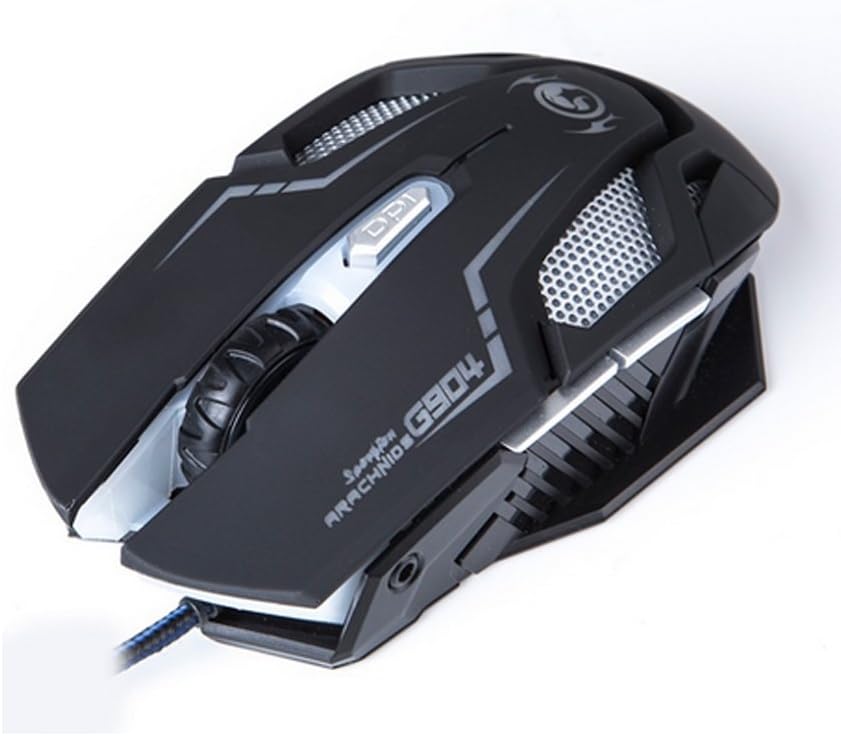
Abbildung 4: Oben view of the Marvo G904 Gaming Mouse, highlighting the placement of its 6 buttons.
- Linksklick-Taste: Standardmäßige primäre Klickfunktion.
- Rechtsklick-Schaltfläche: Standardmäßige Sekundärklickfunktion.
- Scrollrad: Scrolls up/down. Can also be pressed for a middle click function.
- DPI Shift Button: Cycles through DPI settings (1000, 2000, 3000, 4000).
- Seitliche Tasten (2): Typically function as 'Forward' and 'Back' in web Browser und file explorers. These can be programmed using the driver software.
4.2 DPI-Anpassung
Drücken Sie die DPI Shift Button (located behind the scroll wheel) to cycle through the available DPI settings: 1000, 2000, 3000, and 4000 DPI. Each DPI level may be indicated by a change in the mouse's LED lighting color or pattern, depending on the current light mode.
4.3 Macro Programming (with Light Mode)
Utilize the included CD driver software to customize button functions and create macros. The software also allows you to configure the mouse's LED lighting modes. Refer to the software's help section for detailed instructions on macro creation and light mode customization.
5. Wartung
Durch sachgemäße Wartung wird die Langlebigkeit und optimale Leistung Ihrer Gaming-Maus sichergestellt.
- Reinigung: Verwenden Sie ein weiches, trockenes Tuch, um die Oberfläche der Maus abzuwischen. Bei hartnäckigem Schmutz leicht andrücken.ampBefeuchten Sie das Tuch mit Wasser oder einer milden Reinigungslösung. Vermeiden Sie die Verwendung von scharfen Chemikalien oder Scheuermitteln.
- Sensorpflege: Halten Sie den optischen Sensor an der Unterseite der Maus sauber und frei von Staub und Schmutz. Verwenden Sie gegebenenfalls ein Wattestäbchen oder Druckluft.
- Kabelmanagement: Um Beschädigungen zu vermeiden, sollten Sie das USB-Kabel nicht scharf biegen oder übermäßig daran ziehen.
- Lagerung: Bewahren Sie die Maus bei Nichtgebrauch an einem sauberen, trockenen Ort fern von extremen Temperaturen auf.
6. Fehlerbehebung
If you encounter issues with your Marvo G904 mouse, refer to the following common problems and solutions:
| Problem | Lösung |
|---|---|
| Maus reagiert nicht. |
|
| DPI settings not changing. |
|
| Buttons not functioning correctly. |
|
| Mouse cursor movement is erratic or jumpy. |
|
7. Spezifikationen
Detailed technical specifications for the Marvo G904 Gaming Mouse:

Abbildung 5: Unten view of the Marvo G904 Gaming Mouse, displaying model number, DPI range, and certification marks.
| Besonderheit | Detail |
|---|---|
| Modell | G904 |
| Sensortyp | Optical (AVago3050) |
| DPI-Einstellungen | 1000 / 2000 / 3000 / 4000 DPI |
| Schaltflächen | 6D (6 Buttons) |
| Berichtsrate | 1000 Hz |
| Haltbarkeit der Tasten | 10 Millionen Klicks |
| Kabellänge | 1.5 Meter |
| Abmessungen (L*B*H) | 143 * 76 * 42 mm |
| Nennvolumentage | 5V |
| Nennstrom | 10 mA |
| Kompatibilität | PC |
| Farbe | Schwarz |
8. Garantie und Support
For warranty information and technical support, please refer to the documentation provided with your purchase or contact your retailer. You may also visit the official MARVO website for further assistance and updated driver software.