
1. Einleitung
This manual provides essential information for the safe and efficient operation of your Philips 40PFL4609/F8 40-inch Full HD LED Smart TV. Please read these instructions carefully before using your television and retain them for future reference.
2. Sicherheitshinweise
Beachten Sie beim Gebrauch dieses Fernsehers stets die grundlegenden Sicherheitsvorkehrungen, um das Risiko von Bränden, Stromschlägen und Verletzungen zu verringern.
- Das Fernsehgerät darf weder Regen noch Feuchtigkeit ausgesetzt werden.
- Öffnen Sie das Gehäuse nicht; alle Wartungsarbeiten dürfen nur von qualifiziertem Fachpersonal durchgeführt werden.
- Sorgen Sie für ausreichende Belüftung rund um den Fernseher.
- Schützen Sie das Netzkabel vor Beschädigungen durch Treten oder Einklemmen.
- Ziehen Sie bei Gewittern oder längerer Nichtbenutzung den Netzstecker des Fernsehers.
3. Packungsinhalt
Prüfen Sie, ob alle Artikel in der Box vorhanden sind:
- Philips 40PFL4609/F8 40-inch Full HD LED Smart TV
- Fernbedienung (benötigt 2 AAA-Batterien, im Lieferumfang enthalten)
- Netzkabel
- Tabletop Stand and Screws
- Kurzanleitung (nicht in diesem digitalen Handbuch enthalten)
- Benutzerhandbuch (dieses Dokument)
4. Einrichtung
4.1 Auspacken und Aufstellen
Carefully remove the television from its packaging. Inspect the TV for any physical damage. Place the television on a stable, flat surface or mount it on a wall using a compatible VESA 200x200mm wall mount (sold separately).
4.2 Montage des Ständers
If using the tabletop stand:
- Legen Sie den Fernseher mit dem Bildschirm nach unten auf eine weiche, saubere Unterlage, um Beschädigungen am Bildschirm zu vermeiden.
- Richten Sie den Standfuß an den Befestigungslöchern an der Unterseite des Fernsehers aus.
- Befestigen Sie den Ständer mit den mitgelieferten Schrauben.
4.3 Stromversorgung anschließen
Connect the power cord to the TV's power input, then plug the other end into a 110 VAC, 60 Hz electrical outlet.
4.4 Externe Geräte anschließen
Your Philips TV offers various connection options for external devices.
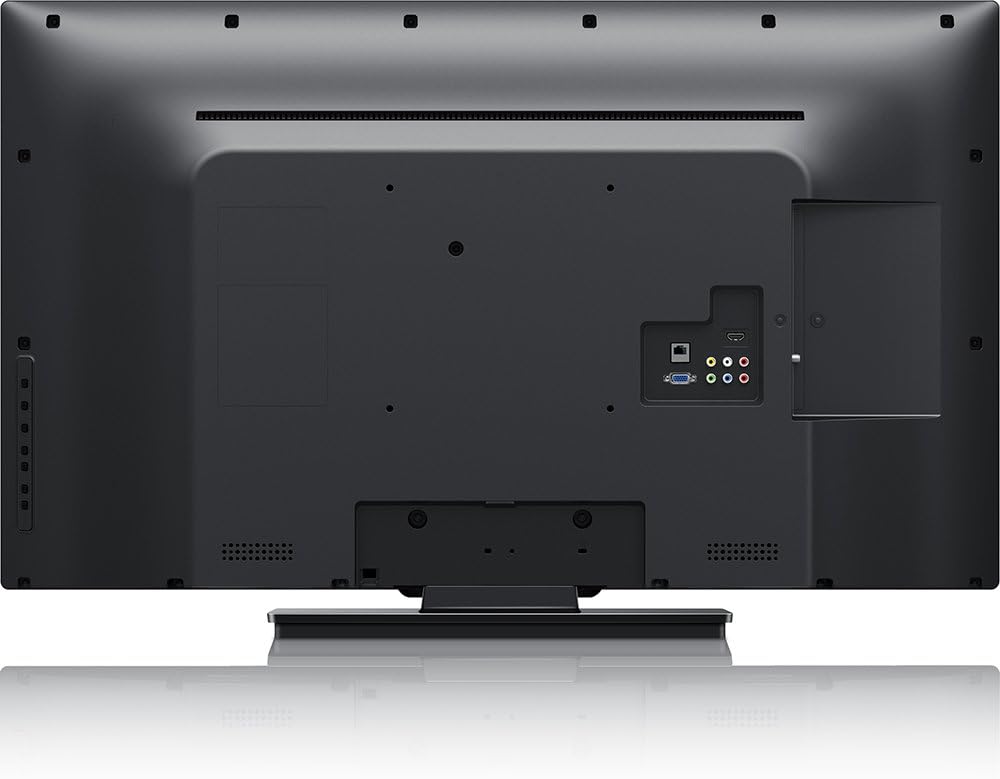
Bild: Hinteren view of the Philips 40PFL4609/F8 television, highlighting the input ports including HDMI, DVI, and other audio/video connections.
- HDMI: Connect Blu-Ray players, game consoles, or other HDMI-enabled devices. This model has 1 HDMI port.
- DVI: Connect computers or other DVI-enabled devices.
- USB: Connect USB storage devices for media playback. This model has 1 USB 2.0 port.
- Antenne/Kabel: Schließen Sie eine Antenne oder ein Kabelfernsehsignal für den Empfang von Fernsehkanälen an.
4.5 Ersteinrichtungsassistent
Beim ersten Einschalten führt Sie der Fernseher durch einen ersten Einrichtungsprozess:
- Sprachauswahl: Wählen Sie Ihre bevorzugte Sprache.
- Netzwerkverbindung: Connect to your home Wi-Fi network. The TV supports Wi-Fi connectivity.
- Kanalsuchlauf: Scan for available broadcast channels (if an antenna or cable is connected).
5. Bedienung des Fernsehers
5.1 Fernsteuerung überview
The included remote control allows you to navigate menus, adjust settings, and control playback. Insert two AAA batteries into the remote control, ensuring correct polarity.
5.2 Grundfunktionen
- Leistung: Drücken Sie den Netzschalter, um den Fernseher ein- oder auszuschalten.
- Volumen: Verwenden Sie die Lautstärketasten, um die Lautstärke anzupassen.
- Kanal: Verwenden Sie die Kanaltasten, um die Fernsehkanäle zu wechseln.
- Eingang: Press the input button to select connected devices (HDMI, DVI, etc.).
5.3 Smart TV Features (Net TV)
Your Philips TV features Net TV, providing access to online content and applications.
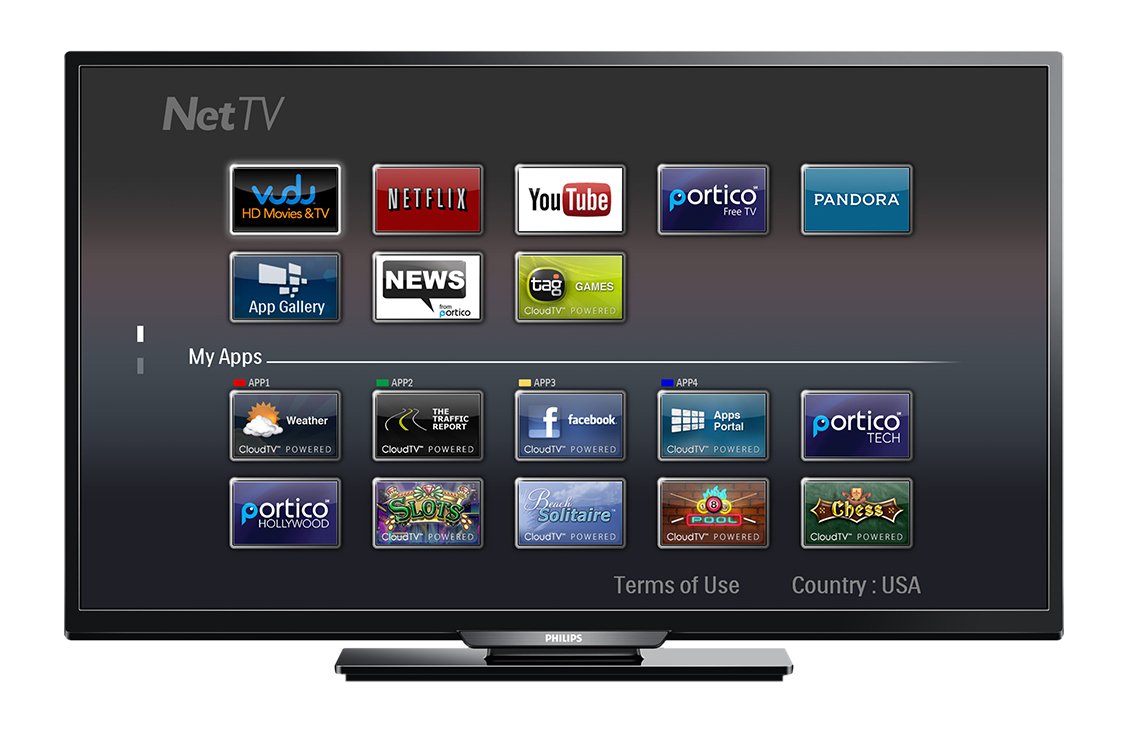
Bild: Front view of the Philips 40PFL4609/F8 television, showing the Net TV interface with various application icons such as Netflix, YouTube, and other streaming services.
- Auf Apps zugreifen: Use the remote control to navigate to the Net TV menu and select applications like Netflix and YouTube.
- Wi-Fi-Konnektivität: Ensure your TV is connected to a stable Wi-Fi network for optimal Smart TV performance.
5.4 Bildeinstellungen
Adjust picture settings to enhance your viewErfahrung:
- Pixel Plus HD: This video engine enhances detail, depth, and clarity.
- 120Hz PMR (Perfect Motion Rate): Provides sharp images in fast-moving scenes.
- Access the picture menu to adjust brightness, contrast, color, and sharpness.
5.5 Toneinstellungen
Audioausgabe optimieren:
- SRS TruSurround: Enjoy immersive sound with this integrated surround sound format.
- Access the audio menu to adjust bass, treble, and sound modes.
5.6 Medienwiedergabe über USB
Connect a USB storage device to the TV's USB 2.0 port to view Fotos machen, Musik abspielen oder Videos ansehen.
6. Wartung
6.1 Reinigung des Bildschirms
Wischen Sie den Bildschirm vorsichtig mit einem weichen, fusselfreien Tuch ab. Bei hartnäckigen Flecken dampBefeuchten Sie das Tuch mit etwas Wasser oder einem speziellen Bildschirmreiniger. Sprühen Sie keine Flüssigkeit direkt auf den Bildschirm.
6.2 Reinigung des Casing
Wischen Sie den Fernseher ab.asinMit einem weichen, trockenen Tuch abwischen. Vermeiden Sie die Verwendung von Scheuermitteln oder Lösungsmitteln.
6.3 Softwareaktualisierungen
This model may not support automatic software updates via the internet. Check the Philips support website for information on manual firmware updates, if available, to ensure optimal performance and access to the latest features.
7. Fehlerbehebung
Sollten Sie Probleme mit Ihrem Fernseher haben, beachten Sie bitte die folgenden gängigen Lösungsansätze:
- Kein Strom: Ensure the power cord is securely plugged into both the TV and the electrical outlet. Check the power outlet with another device.
- Kein Bild/Ton: Verify the correct input source is selected. Check all cable connections (HDMI, DVI, antenna).
- Keine Netzwerkverbindung: Ensure your Wi-Fi router is working correctly. Re-enter your Wi-Fi password if necessary.
- Net TV Limitations: Some users have reported that the Net TV functionality on this model can be basic or limited in terms of additional app installation or software updates. If you find the built-in Smart TV features insufficient, consider connecting an external streaming device.
- Physischer Schaden: Upon unboxing, carefully inspect the screen and casing for any damage, especially along the edges, which could affect display quality. Contact your retailer immediately if damage is found.
- Fernbedienung funktioniert nicht: Tauschen Sie die AAA-Batterien aus. Stellen Sie sicher, dass sich keine Hindernisse zwischen der Fernbedienung und dem Infrarotsensor des Fernsehers befinden.
8. Spezifikationen

Bild: Seite view of the Philips 40PFL4609/F8 television, illustrating its slim profile and side-mounted connectivity options.
| Besonderheit | Beschreibung |
|---|---|
| Modellname | PHILIPS 40PFL4609/F8 |
| Bildschirmgröße | 40 Zoll (100.3 Zentimeter) |
| Display-Technologie | LED, LCD |
| Auflösung | 1080p Full HD |
| Bildwiederholrate | 120 Hz (120Hz PMR) |
| Seitenverhältnis | 16:9 |
| Konnektivitätstechnologie | W-lan |
| Kompatible Internetdienste | Netflix, YouTube |
| Besondere Merkmale | Blu-Ray compatible, DVI Input, HDMI Input, Full HD, HD Compatible, Internet, Surround Sound |
| HDMI-Anschlüsse | 1 |
| USB 2.0-Anschlüsse | 1 |
| Audioausgabemodus | Stereo, Surround-Sound |
| Integrated Surround Sound Format | SRS TruSurround |
| Beschreibung des Sprechers | SRS TruSurround |
| Energieaufnahme | 89 Watt |
| Bandtage | 110 VAC 60 Hz |
| Artikelgewicht | 8200 Gramm |
| VESA-Montagestandard | 200 x 200 mm |
| Farbe | Schwarz |
| Kompatible Geräte | Laptop, Tablet, Game Console, Headphones |
| Modelljahr | 2016 |
9. Garantieinformationen
This Philips television comes with a 12 Monate eingeschränkte Garantie provided by the manufacturer. Please retain your proof of purchase for warranty claims. The warranty covers manufacturing defects under normal use conditions.
10. Kundendienst
For further assistance, technical support, or warranty inquiries, please contact Philips customer service. Refer to the official Philips webDie Kontaktdaten für Ihre Region finden Sie auf unserer Website oder auf Ihrer Produktverpackung.