
Einführung
This manual provides detailed instructions for the Inateck Bluetooth 4.1 Sport Headset, Model P20 (BH1001). Please read this guide thoroughly before using the product to ensure proper operation and to maximize your listening experience. This headset is designed for active lifestyles, offering wireless audio with a secure fit and integrated microphone.
1. Einrichtung
1.1 Packungsinhalt
Überprüfen Sie, ob alle Artikel im Paket vorhanden sind:
- Inateck Bluetooth Sport Headset (P20 / BH1001)
- USB-Ladekabel
- Multiple pairs of silicone ear tips (various sizes)
- Tragetasche
- Benutzerhandbuch (dieses Dokument)
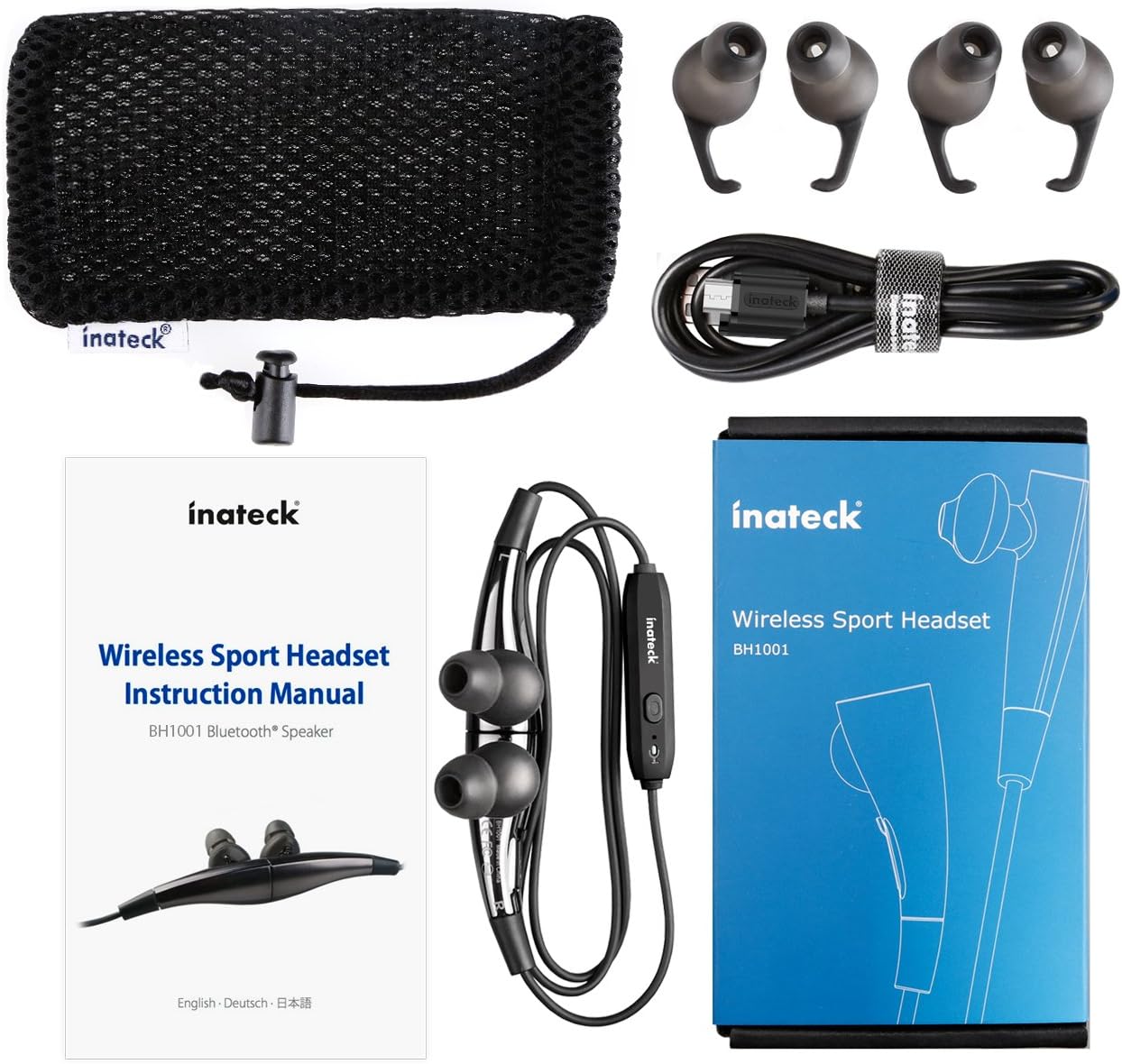
Abbildung 1.1: Contents of the Inateck Bluetooth Sport Headset package.
1.2 Aufladen des Headsets
Before first use, fully charge the headset. A full charge takes approximately 3 hours and provides at least 8 hours of music playback.
- Suchen Sie den Micro-USB-Ladeanschluss am Headset.
- Connect the small end of the provided USB charging cable to the headset's Micro USB port.
- Verbinden Sie das größere Ende des USB-Kabels mit einer USB-Stromquelle (z. B. einem USB-Anschluss am Computer oder einem USB-Netzteil).
- The status indicator light will illuminate during charging. It will change color or turn off once charging is complete.

Abbildung 1.2: Charging the Inateck Bluetooth Sport Headset via Micro USB.
1.3 Koppeln mit einem Bluetooth-Gerät
So verbinden Sie Ihr Headset mit einem Smartphone oder einem anderen Bluetooth-fähigen Gerät:
- Stellen Sie sicher, dass das Headset ausgeschaltet ist.
- Press and hold the Multifunction Key (MFB) on the inline control unit for approximately 5-7 seconds until the status indicator light flashes red and blue alternately. This indicates pairing mode.
- On your Bluetooth device, enable Bluetooth and search for new devices.
- Select "Inateck BH1001" or "Inateck P20" from the list of available devices.
- Once paired, the status indicator light on the headset will flash blue slowly, and you may hear an audible confirmation.
- The headset will automatically attempt to reconnect to the last paired device when turned on.

Abbildung 1.3: Inateck Headset paired with a mobile device for music playback.
2. Bedienungsanleitung
2.1 Headset-Bedienelemente
The inline control unit provides easy access to various functions:

Abbildung 2.1: Überview of the Inateck Headset control unit.
- Multifunction Key (MFB):
- Gedrückt halten (5-7 Sekunden): Ein-/Ausschalten, Kopplungsmodus aktivieren
- Kurzes Drücken: Musik abspielen/pausieren, Anruf annehmen/beenden
- Long press (during incoming call): Reject call
- Lautstärke erhöhen (+) / Nächster Titel:
- Kurz drücken: Lautstärke erhöhen
- Lang drücken: Zum nächsten Titel springen
- Lautstärke verringern (-) / Vorheriger Titel:
- Kurz drücken: Lautstärke verringern
- Long press: Go to previous track
- Micro-USB-Anschluss: Zum Aufladen des Headsets.
- Statusanzeige: Zeigt den Strom-, Kopplungs- und Ladestatus an.
- Mikrofon: Für freihändige Anrufe.
2.2 Tragen des Headsets
Select the ear tips that provide the most comfortable and secure fit for your ears. The headset is designed to be worn with the cable behind your neck, ensuring stability during physical activity.

Abbildung 2.2: Proper wearing of the Inateck Sport Headset for active use.
2.3 Magnetic Earbuds Feature
The earbuds feature integrated magnets. When not in use, you can connect the two earbuds together, forming a necklace around your neck. This action automatically pauses music playback and prevents the headset from falling off.

Abbildung 2.3: Magnetic earbuds feature for secure wearing around the neck.

Abbildung 2.4: Headset worn as a necklace using the magnetic feature.
3. Wartung
- Reinigung: Reinigen Sie das Headset mit einem weichen, trockenen Tuch. Verwenden Sie keine Scheuermittel oder Lösungsmittel.
- Ohrtipps: Reinigen Sie die Silikon-Ohrstöpsel regelmäßig mit milder Seife und Wasser. Stellen Sie sicher, dass sie vollständig trocken sind, bevor Sie sie wieder anbringen.
- Lagerung: When not in use, store the headset in the provided carrying pouch to protect it from dust and damage. Avoid extreme temperatures.
- Wasserbeständigkeit: The headset is designed to be water-resistant for sports and exercise (e.g., sweat, light rain). Do not submerge it in water or expose it to heavy rain.
4. Fehlerbehebung
4.1 Einschalten nicht möglich
Ensure the headset is fully charged. Connect it to a power source using the USB cable and allow it to charge for at least 30 minutes before attempting to power on again.
4.2 Kopplung mit dem Gerät nicht möglich
- Ensure the headset is in pairing mode (status indicator flashing red and blue alternately).
- Make sure Bluetooth is enabled on your device and it is within range (typically 10 meters or 33 feet).
- Schalten Sie die Bluetooth-Funktion an Ihrem Gerät aus und wieder ein.
- If previously paired, try "forgetting" or "unpairing" the headset from your device's Bluetooth settings and then re-pair.
- Stellen Sie sicher, dass keine anderen Bluetooth-Geräte die Verbindung stören.
4.3 Kein Ton oder schlechte Tonqualität
- Überprüfen Sie die Lautstärke sowohl am Headset als auch an Ihrem angeschlossenen Gerät.
- Ensure the headset is properly paired and connected to your device.
- Move closer to your device to reduce potential interference or range issues.
- Ensure the ear tips are correctly seated in your ears for optimal sound delivery.
- Starten Sie sowohl das Headset als auch Ihr angeschlossenes Gerät neu.
4.4 Zeitweise unterbrochene Verbindung
- Ensure there are no physical obstructions between the headset and your device.
- Avoid placing your device in areas where the signal might be blocked (e.g., deep pockets, behind thick walls).
- Minimieren Sie Störungen durch andere drahtlose Geräte (Wi-Fi-Router, andere Bluetooth-Geräte).
- Keep the headset and your device within the recommended Bluetooth range.
5. Spezifikationen
| Marke | Inateck |
| Modellname | P20 |
| Modellnummer | BH1001 |
| Konnektivitätstechnologie | Bluetooth 4.1 |
| Formfaktor | In-Ear |
| Platzierung des Ohrs | Intraaural |
| Kopfhöreranschluss | USB (zum Aufladen) |
| Wasserbeständigkeit | Waterproof (suitable for sweat/light rain) |
| Besondere Merkmale | Sports and exercise, integrated microphone, magnetic earbuds |
| Artikelgewicht | 78 Gramm |
| Steuerungstyp | Volume Control, Multifunction Button |
| Material | Plastik |
6. Garantieinformationen
Inateck products typically come with a limited warranty. For specific warranty terms and conditions applicable to your Inateck Bluetooth Sport Headset, please refer to the warranty card included in your product packaging or visit the official Inateck webBewahren Sie Ihren Kaufbeleg für Garantieansprüche auf.
7. Kundendienst
If you encounter any issues not covered in this manual or require further assistance, please contact Inateck customer support. You can usually find contact information, FAQs, and additional resources on the official Inateck webWebsite:
WebWebsite: www.inateck.com
Please have your product model (P20 / BH1001) and purchase details ready when contacting support.