
1. Einleitung
The Perixx PERIDUO-712B is a compact wireless keyboard and mouse combo designed for efficiency and convenience. This set includes a space-saving mini keyboard and a 3-button optical mouse, ideal for various environments such as home, office, or travel. It features a stable 2.4 GHz wireless connection and plug-and-play setup for immediate use.

Image 1.1: The Perixx PERIDUO-712B Wireless Mini Keyboard and Mouse Set, showcasing its compact design and included nano receiver.
Packungsinhalt:
- 1 x drahtlose Tastatur
- 1 x Kabellose Maus
- 1 x USB-Nano-Empfänger
- 1 x Benutzerhandbuch (dieses Dokument)
2. Erste Schritte (Einrichtung)
Follow these steps to set up your Perixx PERIDUO-712B wireless keyboard and mouse set.
2.1 Einlegen der Batterie
- Tastatur: Locate the battery compartment on the underside of the keyboard. Insert two (2) AA alkaline batteries (not included), ensuring correct polarity.
- Maus: Locate the battery compartment on the underside of the mouse. Insert one (1) AA alkaline battery (not included), ensuring correct polarity.
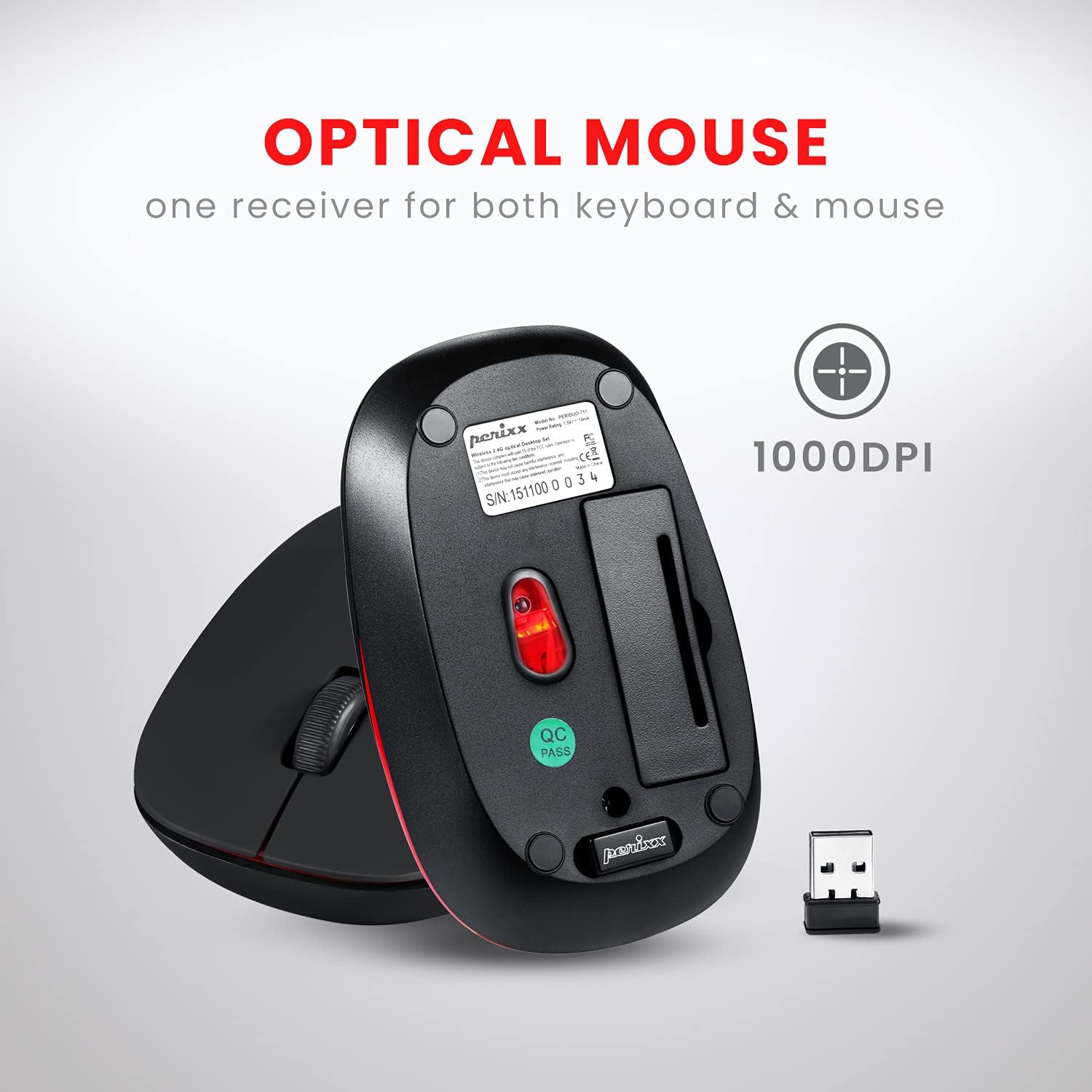
Image 2.1: Underside of the mouse, indicating the battery compartment and the storage slot for the USB nano receiver.
2.2 Anschließen des Empfängers
The USB nano receiver connects both the keyboard and mouse to your computer.
- Nehmen Sie den USB-Nano-Empfänger aus seinem Aufbewahrungsfach an der Unterseite der Maus.
- Stecken Sie den USB-Nano-Empfänger in einen freien USB-Anschluss Ihres Computers.
- Your computer will automatically detect and install the necessary drivers. No additional software is required.
- Tastatur und Maus sind nun einsatzbereit.
3. Bedienungsanleitung
3.1 Verwenden der Tastatur
The keyboard features a low-profile design with membrane switches for comfortable and quiet typing. It has a standard US English QWERTY layout.

Image 3.1: Detailed diagram illustrating the keyboard layout, including standard keys and function key assignments.
Multimedia Function Keys (Fn + F1-F12):
The keyboard includes 12 integrated multimedia hotkeys for quick access to various functions. To activate these functions, press and hold the Fn Drücken Sie anschließend die entsprechende Taste. F-Taste (F1-F12).
- Fn + Esc: Media Player
- Fn+F1: Vorheriger Titel
- Fn+F2: Abspielen/Pause
- Fn+F3: Nächster Titel
- Fn+F4: Stumm
- Fn+F5: Lautstärke verringern
- Fn+F6: Lautstärke erhöhen
- Fn+F7: Heim
- Fn+F8: Suche
- Fn+F9: E-Mail
- Fn+F10: Kalkulator
- Fn+F11: Favoriten
- Fn+F12: Mein Computer

Image 3.2: Visual guide to the multimedia function keys and their corresponding actions.
3.2 Verwenden der Maus
The 3-button optical mouse provides precise tracking and a comfortable grip with its soft rubber coating. It operates at 1000 DPI.
- Links Klick: Standardauswahl und -aktivierung.
- Rechtsklick: Context menu access.
- Scrollrad: Scroll documents and web Seiten. Kann auch für die Funktion eines Mittelklicks gedrückt werden.

Image 3.3: The Perixx mouse, highlighting its ergonomic design, nano receiver, 3-button functionality, 30 ft operating range, and 75g weight.
4. Pflege und Wartung
- Reinigung: Reinigen Sie Tastatur und Maus mit einem weichen, trockenen Tuch. Bei hartnäckigem Schmutz leicht andrücken.ampBefeuchten Sie das Tuch mit Wasser oder einer milden Reinigungslösung. Vermeiden Sie scharfe Chemikalien oder scheuernde Materialien.
- Batteriewechsel: Replace batteries when performance degrades. Always use fresh alkaline batteries of the specified type (AA).
- Lagerung: When not in use for extended periods, remove batteries to prevent leakage. Store the USB nano receiver in its dedicated slot on the mouse to prevent loss.
- Umfeld: Vermeiden Sie es, die Geräte extremen Temperaturen, direkter Sonneneinstrahlung oder übermäßiger Feuchtigkeit auszusetzen.
5. Fehlerbehebung
If you encounter issues with your PERIDUO-712B set, refer to the following common solutions:
| Problem | Lösung |
|---|---|
| Tastatur oder Maus reagiert nicht |
|
| Zeitweise Verbindungsabbrüche oder Verzögerung |
|
| Probleme mit der Mausverfolgung |
|
| Caps Lock indicator light behaves erratically |
|
6. Technische Daten

Image 6.1: Technical drawing showing precise dimensions of the keyboard and mouse.
| Besonderheit | Detail |
|---|---|
| Modell | PERIDUO-712B |
| Konnektivität | 2.4-GHz-WLAN |
| Betriebsbereich | Bis zu 30 m |
| Tastaturabmessungen | 11.46 × 5.43 × 0.77 Zoll (291 x 138 x 19.5 mm) |
| Gewicht der Tastatur | 0.78 Pfund (ca. 354 g) |
| Tastaturlayout | US English QWERTY, 84 keys |
| Abmessungen der Maus | 4.09 × 2.44 × 1.33 Zoll (104 x 62 x 34 mm) |
| Mausgewicht | Ca. 75g |
| Maus-DPI | 1000 DPI |
| Stromquelle | Keyboard: 2 x AA batteries; Mouse: 1 x AA battery (not included) |
| Kompatibles Betriebssystem | Windows 7, 8, 10, 11 (and older versions like XP, Vista) |
7. Garantie und Support
7.1 Garantieinformationen
The Perixx PERIDUO-712B Wireless Mini Keyboard and Mouse Set is backed by a 12 Monate eingeschränkte Garantie. This warranty covers manufacturing defects from the date of purchase. Please retain your proof of purchase for warranty claims.
7.2 Kundendienst
For technical assistance, warranty claims, or general inquiries, please visit the official Perixx website or contact their customer support directly. Information regarding spare USB receivers can also be found on the Perixx website or Amazon.
Hersteller: Perixx Computer GmbH
Weitere Informationen finden Sie unter: Perixx Store on Amazon