
Naztech N750
Naztech N750 Emerge Kabelloses Bluetooth-Headset – Benutzerhandbuch
Modell: N750
Einführung
Thank you for choosing the Naztech N750 Emerge Wireless Bluetooth Headset. This manual provides detailed instructions on how to set up, operate, and maintain your headset to ensure optimal performance and longevity. The N750 Emerge is designed for clear communication and media playback, featuring advanced noise cancellation and versatile connectivity.
Packungsinhalt

Image: Contents of the Naztech N750 Emerge package.
- Naztech N750 Emerge Wireless Headset
- Autoladegerät
- Ear Gels (S/M/L)
- Bedienungsanleitung
- Flat Micro USB Cable
Produkt überview
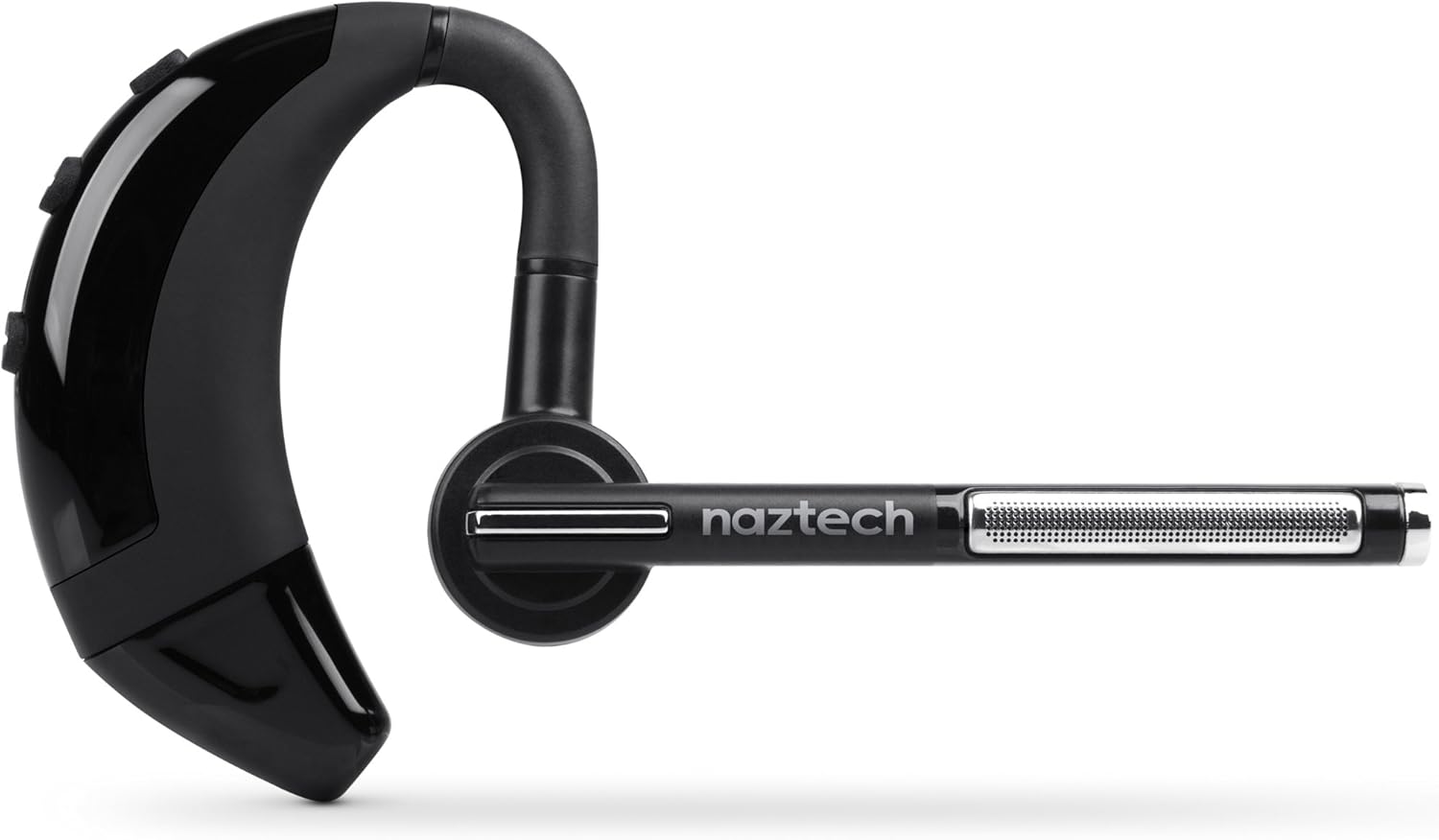
Image: The Naztech N750 Emerge Wireless Bluetooth Headset.
The Naztech N750 Emerge features an ergonomic design for comfortable wear and intuitive controls for easy operation. Key components include the ear hook, main body with control buttons, microphone boom, and ear tip.
Aufstellen
1. Laden des Headsets
Before first use, fully charge the N750 Emerge headset. Connect the provided Micro USB cable to the charging port on the headset and the other end to a USB power source (e.g., the included car charger, a computer USB port, or a wall adapter). The LED indicator will show charging status and turn off or change color when fully charged.
2. Kopplung mit einem Bluetooth-Gerät
- Stellen Sie sicher, dass das Headset ausgeschaltet ist.
- Press and hold the Multi-function Button (MFB) on the headset until the LED indicator flashes blue and red alternately, indicating pairing mode.
- Gehen Sie auf Ihrem Smartphone oder Bluetooth-fähigen Gerät zu den Bluetooth-Einstellungen und aktivieren Sie Bluetooth.
- Suchen nach available devices. Select "Naztech N750" from the list.
- Wenn Sie zur Eingabe eines Passcodes aufgefordert werden, geben Sie "0000" (vier Nullen) ein.
- Once successfully paired, the LED indicator will flash blue slowly, and you may hear a confirmation tone.
3. Tragen des Headsets

Image: The Naztech N750 Emerge headset demonstrating its 180-degree swivel for left or right ear use.
The N750 Emerge is designed for comfortable wear on either the left or right ear. The ear hook swivels 180 degrees to accommodate your preference. Adjust the ear hook and select the appropriate ear gel size (S/M/L) for a secure and comfortable fit. The microphone boom should be positioned towards your mouth for optimal voice pickup.
Bedienungsanleitung
Ein-/Ausschalten
- Einschalten: Press and hold the MFB for approximately 3 seconds until the LED flashes blue.
- Ausschalten: Press and hold the MFB for approximately 5 seconds until the LED flashes red and then turns off.
Anruf-Management

Image: The headset's advanced call technology automatically pauses music and routes incoming calls.
- Anruf annehmen: Press the MFB once when a call comes in.
- Anruf beenden: Drücken Sie während eines Anrufs einmal die Multifunktionstaste.
- Anruf ablehnen: Press and hold the MFB for approximately 2 seconds when a call comes in.
- Wahlwiederholung letzte Nummer: Double-press the MFB when the headset is idle.
- Sprachwahl: Press the MFB once when the headset is idle to activate your phone's voice assistant (if supported).
Lautstärkeregelung
Use the Volume Up (+) and Volume Down (-) buttons on the headset to adjust the call or media volume.
GPS & Voice Prompt / Caller ID Announcement

Image: The headset provides GPS voice prompts and announces caller ID for incoming calls.
The N750 Emerge supports voice prompts for GPS navigation and announces the caller ID for incoming calls, allowing for hands-free information and call management.
Musikwiedergabe
When connected to a device, the headset can play audio. Use your device's controls for play/pause, skip track, etc. Incoming calls will automatically pause music playback.
Multipoint-Technologie

Image: The headset supports Multipoint Technology for connecting to two devices simultaneously.
The N750 Emerge supports multipoint technology, allowing it to be connected to two Bluetooth devices simultaneously. This enables seamless switching between calls or audio from two different paired devices.
Geräuschunterdrückung

Image: The headset utilizes Noisehush Technology for crystal clear conversations with noise cancellation.
The integrated Noisehush® Technology provides ultimate HD clarity and noise cancellation, ensuring crystal clear conversations for both you and your callers by reducing distracting ambient sound.
Wartung
- Clean the headset regularly with a soft, dry cloth. Do not use harsh chemicals or abrasive cleaners.
- Avoid exposing the headset to extreme temperatures, moisture, or direct sunlight.
- Bewahren Sie das Headset bei Nichtgebrauch an einem kühlen, trockenen Ort auf.
- Versuchen Sie nicht, das Headset zu zerlegen oder zu verändern, da dies zum Erlöschen der Garantie führt und Schäden verursachen kann.
Fehlerbehebung
| Problem | Mögliche Ursache | Lösung |
|---|---|---|
| Das Headset lässt sich nicht einschalten. | Der Akku ist schwach oder leer. | Laden Sie das Headset vollständig auf. |
| Kopplung mit dem Gerät nicht möglich. | Headset nicht im Kopplungsmodus; Bluetooth am Gerät deaktiviert; Gerät zu weit entfernt. | Stellen Sie sicher, dass sich das Headset im Kopplungsmodus befindet (blinkt blau/rot). Aktivieren Sie Bluetooth auf Ihrem Gerät. Bringen Sie das Headset näher an Ihr Gerät heran (innerhalb von 10 Metern). |
| Kein Ton oder geringe Lautstärke. | Lautstärke zu niedrig; Headset nicht angeschlossen; falscher Audioausgang ausgewählt. | Increase volume on headset and device. Reconnect headset. Ensure audio is routed to the headset on your device. |
| Poor call quality / Noise. | Weak signal; environmental interference; microphone not positioned correctly. | Move closer to the paired device. Avoid strong electromagnetic interference. Adjust microphone boom towards your mouth. |
Technische Daten
- Modell: N750 Emerge
- Bluetooth-Version: Version 4.1
- Drahtlose Kommunikationstechnologien: Bluetooth
- Konnektivitätstechnologie: Kabellos
- Geräuschunterdrückung: Noisehush® Technology
- Multipoint-Technologie: Ja
- iOS Battery Tracker: Ja
- Gesprächszeit: Bis zu 8 Stunden
- Standby-Zeit: Bis zu 140 Stunden
- Batterie: 1 Lithium-Ionen-Akku erforderlich
- Produktabmessungen: 10.16 x 10.16 x 2.54 cm
- Artikelgewicht: 22.7 g
- Farbe: Schwarz
Garantie und Support
Naztech products are designed and manufactured to the highest quality standards. For warranty information and technical support, please refer to the warranty card included with your product or visit the official Naztech webBewahren Sie Ihren Kaufbeleg als Kaufnachweis für Garantieansprüche auf.
Ask a question about this manual
Ask about setup, troubleshooting, compatibility, parts, safety, or missing instructions. Manuals+ will review the question and use this page’s manual context to help answer it.