
Einführung
Vielen Dank für Ihren Einkauf.asing the Mitzu Kaiser PAK-8915 Dual Audio System. This system includes an amplified speaker and a passive speaker, designed to deliver powerful and clear sound. This manual provides essential information for the safe and efficient operation of your new audio system. Please read it thoroughly before use and retain it for future reference.
Sicherheitshinweise
- Energiequelle: Stellen Sie sicher, dass das Netzteil mit der Lautstärke übereinstimmttage auf dem Gerät angegeben.
- Belüftung: Die Lüftungsöffnungen dürfen nicht blockiert werden. Um eine ordnungsgemäße Luftzirkulation zu gewährleisten, muss um das Gerät herum ausreichend Platz vorhanden sein.
- Wasser und Feuchtigkeit: Das Gerät darf weder Regen noch Feuchtigkeit oder anderen Flüssigkeiten ausgesetzt werden. Von Wasserquellen fernhalten.
- Hitze: Stellen Sie das Gerät nicht in der Nähe von Wärmequellen wie Heizkörpern, Heizlüftern, Öfen oder anderen wärmeerzeugenden Geräten auf.
- Reinigung: Unplug the unit before cleaning. Use a dry cloth. Do not use liquid cleaners or aerosol cleaners.
- Wartung: Versuchen Sie nicht, dieses Produkt selbst zu warten. Überlassen Sie alle Wartungsarbeiten qualifiziertem Servicepersonal.
- Platzierung: Place the speakers on a stable, level surface. The amplified speaker features a rear knob for stand mounting.
- Kabel: Use only the provided cables and ensure they are not damaged or pinched.
Packungsinhalt
Bitte überprüfen Sie, ob alle folgenden Artikel in Ihrem Paket enthalten sind:
- 1 x Amplified Speaker (with 15-inch woofer)
- 1 x Passive Speaker (with 15-inch woofer)
- 1 x Fernbedienung
- Connection Cables (10 meters in length for speaker connection)
- Stromkabel
Produkt überview
Amplified Speaker Rear Panel
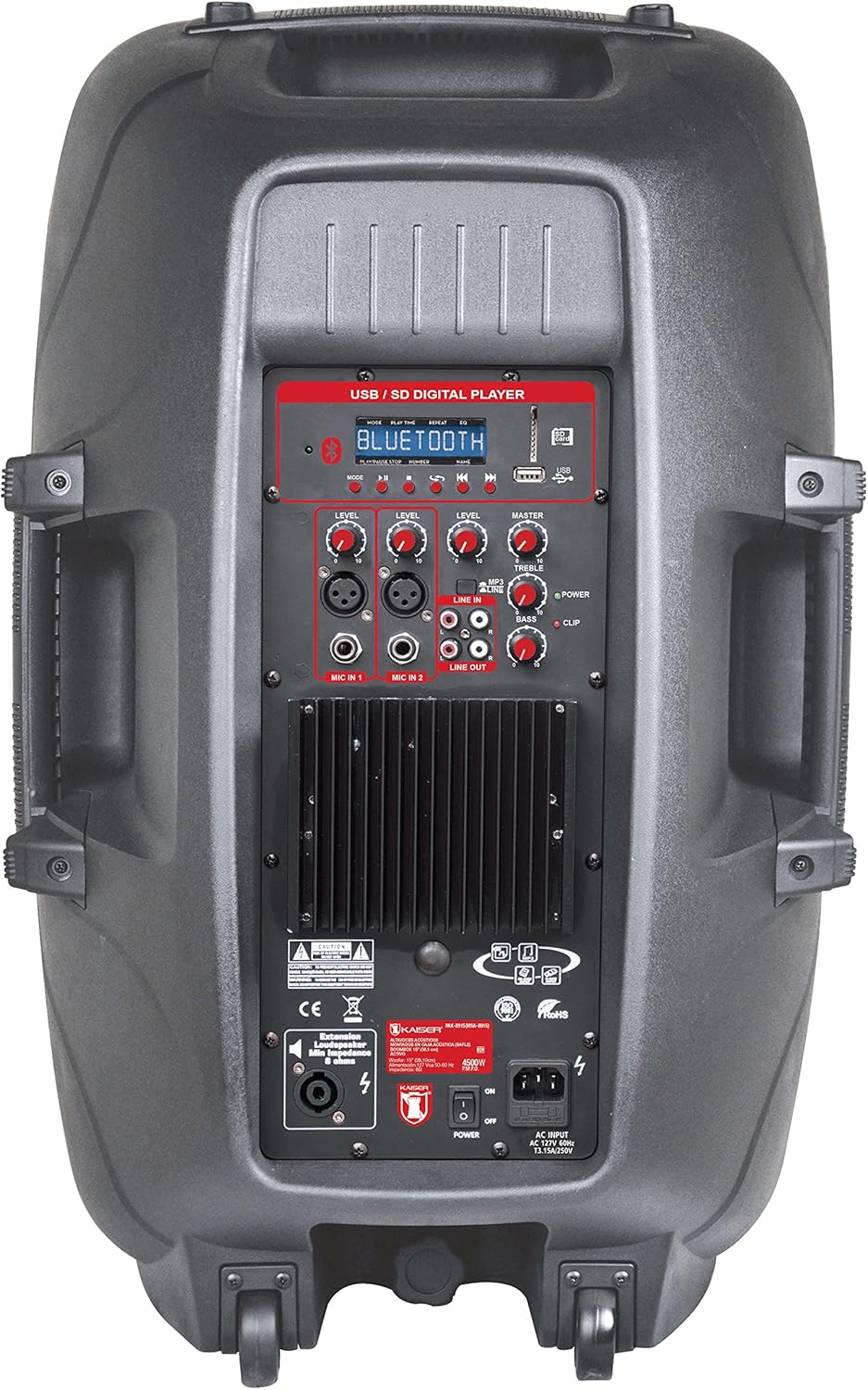
Abbildung 1: Amplified Speaker Rear Control Panel
Der amplified speaker's rear panel houses all primary controls and connection ports:
- USB / SD Digital Player: Ports for USB drives and SD cards, along with a display and playback controls.
- Bluetooth-Modul: Für drahtloses Audio-Streaming.
- Pegelregler: Adjust input levels for MIC 1, MIC 2, LINE IN, and MASTER volume.
- Klangregler: Knobs for TREBLE and BASS adjustment.
- Mikrofoneingänge: Two inputs (Cannon and 6.3mm) for connecting microphones.
- Line-In (RCA): Stereo RCA inputs for connecting external audio devices.
- Line Out: RCA output to connect to another amplified speaker or audio system.
- Lautsprecherausgang: Speakon connector for connecting the passive speaker.
- Stromschalter: Ein-/Ausschalter für das Gerät.
- AC-Eingang: Zum Anschluss des Netzkabels.
- Clip-Anzeige: Leuchtet auf, wenn das Audiosignal übersteuert (verzerrt) wird.
Passive Speaker Rear Panel

Abbildung 2: Passive Speaker Rear Panel
The passive speaker features simple input and output connections:
- Eingang: Speakon input for connection from the ampLed Lautsprecher.
- Ausgabe: Speakon output for daisy-chaining to another passive speaker (if applicable).
Fernbedienung
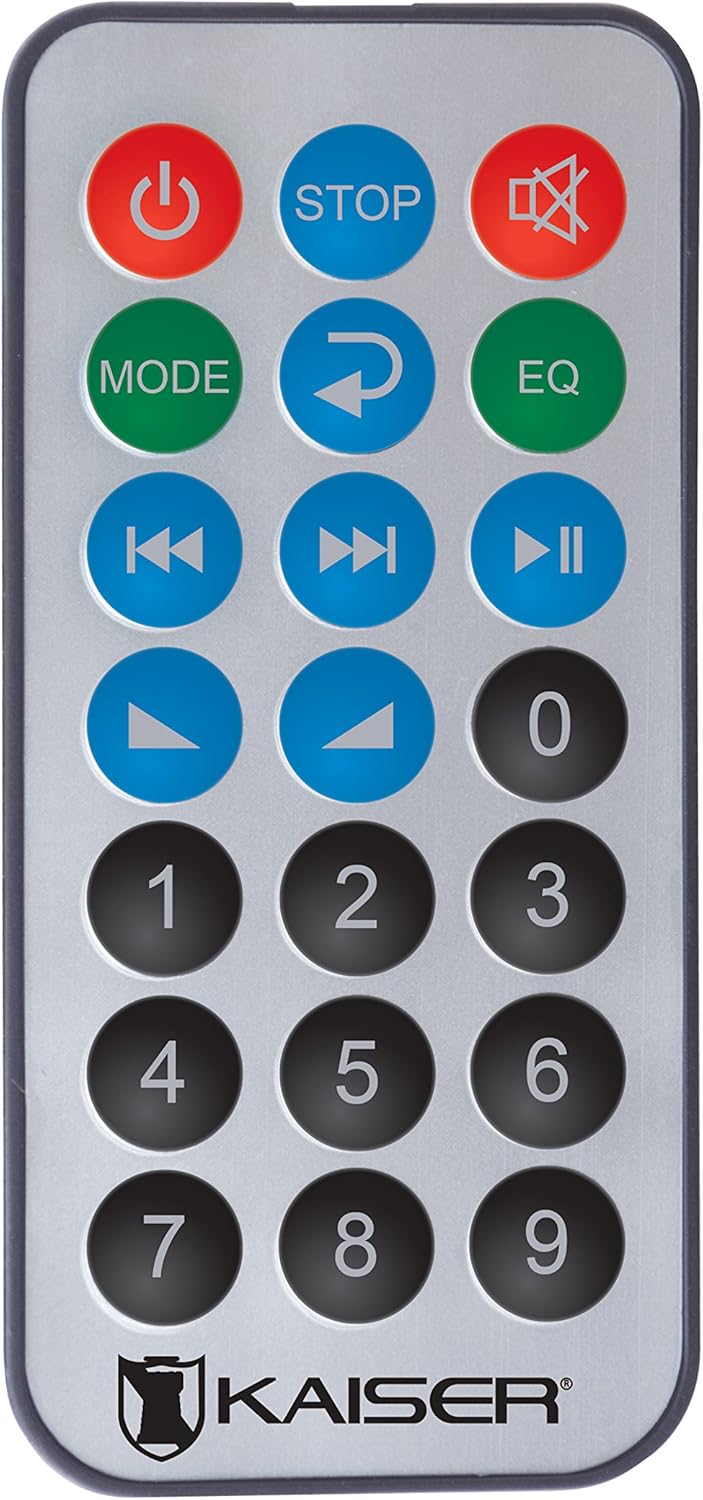
Abbildung 3: Fernbedienung
Die Fernbedienung ermöglicht einen bequemen Zugriff auf verschiedene Funktionen:
- Netzschalter: Schaltet das Gerät ein/aus.
- STOPPEN: Stoppt die Wiedergabe.
- Stumm: Schaltet den Ton stumm bzw. hebt die Stummschaltung auf.
- MODUS: Switches between input modes (Bluetooth, USB, SD, FM, RCA).
- Wiederholen: Wiederholt den aktuellen Titel oder die aktuelle Playlist.
- EQ: Wählt Equalizer-Voreinstellungen aus.
- Vorheriger/Nächster Titel: Springt zum vorherigen oder nächsten Titel.
- Abspielen/Pause: Startet oder pausiert die Wiedergabe.
- Lautstärke erhöhen/verringern: Stellt die Master-Lautstärke ein.
- Numerische Tastatur: For direct track selection or FM station tuning.
Aufstellen
- Platzierung: Positionieren Sie den amplified and passive speakers in your desired location. The amplified speaker has handles and wheels for transport. Both speakers can be mounted on a stand using the rear knob on the ampLed Lautsprecher.
- Passiven Lautsprecher anschließen: Use the provided speaker cable to connect the "Speaker Output" on the amplified speaker's rear panel to the "Input" on the passive speaker's rear panel. Ensure a secure connection.
- Stromanschluss: Connect the power cable to the AC input on the amplified speaker and then plug it into a suitable power outlet.
- Erstes Einschalten: Ensure all volume knobs are set to minimum before turning on the power switch.
Bedienungsanleitung
Ein-/Ausschalten
Flip the "POWER" switch on the rear panel of the amplified speaker to turn the system on or off. You can also use the power button on the remote control.
Auswahl des Eingabemodus
Press the "MODE" button on the control panel or remote control to cycle through available input sources: Bluetooth, USB, SD, FM Radio, and RCA Line In.
Bluetooth-Verbindung
- Switch the speaker system to Bluetooth mode using the "MODE" button. The display will show "Bluetooth" or a similar indicator.
- Aktivieren Sie auf Ihrem Mobilgerät (Smartphone, Tablet usw.) Bluetooth und suchen Sie nach verfügbaren Geräten.
- Select "Kaiser PAK-8915" or a similar name from the list of devices.
- Once paired, you will hear a confirmation sound, and your device will show a connected status. You can now stream audio wirelessly from up to 30 meters away.
USB/SD-Wiedergabe
- Insert a USB flash drive or SD card containing audio files into the respective port on the amplified speaker's rear panel.
- The system should automatically switch to USB or SD mode and begin playback. If not, press the "MODE" button to select the correct source.
- Use the playback controls (Play/Pause, Previous/Next, Stop) on the speaker panel or remote control to manage your music.
RCA-Line-In-Anschluss
Connect an external audio device (e.g., DVD player, TV, computer) to the "LINE IN" RCA ports on the amplified speaker using an RCA cable. Select "LINE IN" mode using the "MODE" button.
Mikrofonnutzung
Plug your microphone(s) into the "MIC IN 1" (Cannon) or "MIC IN 2" (6.3mm) ports. Adjust the individual "MIC LEVEL" knobs to control the microphone volume. Ensure the MASTER volume is also adjusted appropriately.
UKW-Radio
Switch to FM Radio mode using the "MODE" button. The system will automatically scan and store available stations. Use the Previous/Next track buttons to navigate between stations or the numeric keypad on the remote for direct tuning.
Volume and Tone Adjustment
Use the "MASTER" volume knob to control the overall output volume. Adjust the "BASS" and "TREBLE" knobs to fine-tune the audio's low and high frequencies. Individual input levels (MIC 1, MIC 2, LINE IN) can also be adjusted.
Wartung
- Reinigung: Vor der Reinigung die Stromzufuhr unterbrechen. Die Außenflächen mit einem weichen, trockenen Tuch abwischen. Keine Scheuermittel, Wachse oder Lösungsmittel verwenden.
- Lagerung: If not in use for an extended period, store the speakers in a cool, dry place, away from direct sunlight and extreme temperatures.
- Belüftung: Regularly check that the ventilation grilles are free from dust and debris to prevent overheating.
Fehlerbehebung
| Problem | Mögliche Ursache | Lösung |
|---|---|---|
| Kein Strom | Netzkabel nicht angeschlossen; Netzschalter ausgeschaltet; Steckdose defekt. | Stellen Sie sicher, dass das Netzkabel fest angeschlossen ist. Schalten Sie den Netzschalter ein. Testen Sie die Steckdose mit einem anderen Gerät. |
| Keine Tonausgabe | Volume too low; Incorrect input mode selected; Audio source not playing; Passive speaker not connected. | Increase MASTER volume. Select the correct input mode. Ensure the audio source is playing. Verify the passive speaker is correctly connected to the ampLed Lautsprecher. |
| Bluetooth stellt keine Verbindung her | Lautsprecher nicht im Bluetooth-Modus; Gerät zu weit entfernt; Gerät bereits mit einem anderen Lautsprecher verbunden. | Ensure the speaker is in Bluetooth mode. Move your device closer to the speaker (within 30m). Disconnect from other Bluetooth devices. |
| USB/SD-Wiedergabe funktioniert nicht | Falsch file format; USB/SD card corrupted; Speaker not in USB/SD mode. | Sicherstellen der Audioqualität files are in a compatible format. Try another USB/SD card. Select USB/SD mode. |
| Klangverzerrung | Volume too high (clipping); Input level too high. | Reduce MASTER volume. Adjust individual input levels (MIC, LINE IN) to prevent the CLIP indicator from lighting up. |
Technische Daten
| Marke | Mitzu |
| Modell | PAK-8915 |
| Amplified Speaker Power | 3500 W PMPO |
| Passive Speaker Power | 3000 W PMPO |
| Tieftönergröße | 15 Zoll (38.1 cm) |
| Impedanz | 8 Ω |
| Konnektivitätstechnologie | Bluetooth, RCA, USB |
| Wireless-Technologie | Bluetooth |
| Bluetooth-Reichweite | Bis zu 30 Meter |
| Audioausgabemodus | Stereo |
| Frequenzgang | 4 KHz |
| Kontrollmethode | Tasten, Fernbedienung |
| Stromquelle | Stromkabel |
| Artikelgewicht | 34 Kilogramm |
| Empfohlene Verwendung | Smartphones, Tablets, Computers, DVD Players, TVs, Surround Sound Systems, Microphones |
Garantie und Support
Specific warranty information for the Mitzu Kaiser PAK-8915 is not provided in this manual. Please refer to the warranty card included with your purchase or contact your retailer for details regarding warranty coverage and terms.
For technical support or service inquiries, please contact the Mitzu customer service department or your authorized dealer. Keep your purchase receipt as proof of purchase.