
1. Einleitung
This manual provides detailed instructions for the operation and maintenance of your Supersonic SC-1495BT Bluetooth AM/FM Boombox. Please read this manual thoroughly before using the device to ensure proper function and to maximize your listening experience.
2. Sicherheitshinweise
- Um Brände oder Stromschläge zu vermeiden, setzen Sie das Gerät weder Regen noch Feuchtigkeit aus.
- Blockieren Sie keine Lüftungsöffnungen. Sorgen Sie für ausreichend Platz um das Gerät herum, um eine ordnungsgemäße Luftzirkulation zu gewährleisten.
- Vermeiden Sie es, das Gerät in der Nähe von Wärmequellen wie Heizkörpern, Heizlüftern, Öfen oder anderen Geräten (einschließlich) aufzustellen. ampKonverter (Lüfter), die Wärme erzeugen.
- Verwenden Sie nur vom Hersteller angegebene Anbaugeräte/Zubehör.
- Bei Gewitter oder längerer Nichtbenutzung des Geräts den Stecker ziehen.
- Überlassen Sie alle Wartungsarbeiten qualifiziertem Servicepersonal. Eine Wartung ist erforderlich, wenn das Gerät in irgendeiner Weise beschädigt wurde.
3. Packungsinhalt
Bitte prüfen Sie beim Auspacken, ob alle unten aufgeführten Artikel vorhanden sind:
- Supersonic SC-1495BT Bluetooth AM/FM Boombox
- Netzkabel
4. Produktmerkmale
The Supersonic SC-1495BT Boombox offers a variety of features for versatile audio playback:
- Bluetooth Version 3.0 for wireless music streaming
- Built-in USB input for media playback
- Built-in SD card and Micro SD card slot for media playback
- 3.5 mm Line-in (AUX) jack for external audio devices
- Four-band radio: AM, FM, SW1, SW2
- Integrated rechargeable battery for portable use
- Übersichtliches LCD-Display
- Fast forward and rewind functions for media playback
- 360-degree rod antenna for enhanced radio reception
- Drehbarer Lautstärkeregler
- Kopfhöreranschluss für ungestörtes Hören
- AC/DC operation for flexible power options
5. Bedienelemente und Anschlüsse
Familiarize yourself with the various controls and connection ports on your boombox.
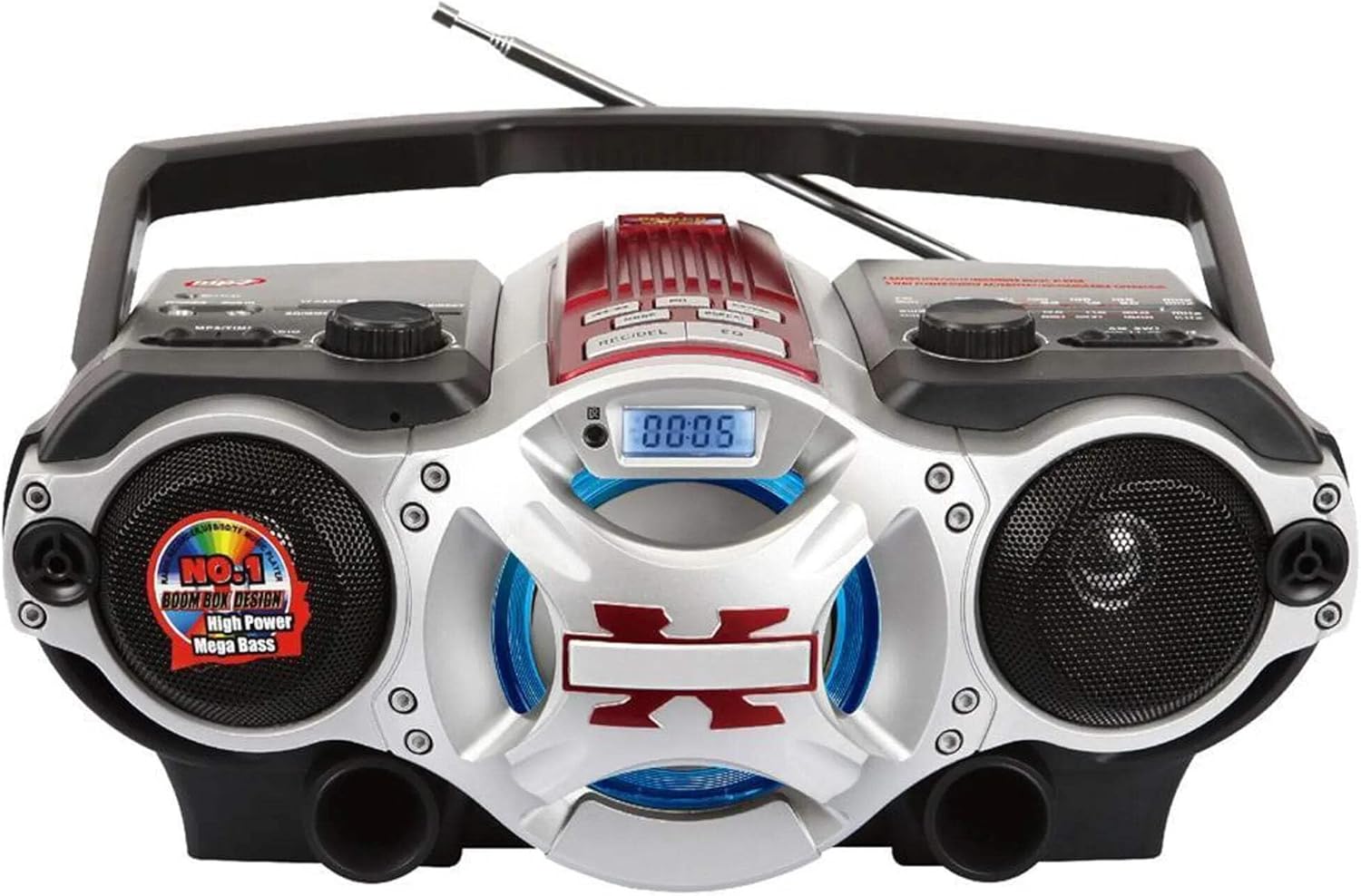
Abbildung 1: Front view of the Supersonic SC-1495BT Boombox, showing the speakers, central display, and main control area.

Abbildung 2: Left side controls, including USB input, SD/Micro SD card slot, AUX IN, PHONES jack, BT/MP3/RADIO mode switch, and Rotary Volume control.

Abbildung 3: Right side controls, featuring the AM/FM/SW1/SW2 band selector, TUNING knob, and playback control buttons (Play/Pause, Skip, Mode, Clock, EQ).
6. Einrichtung
6.1 Stromanschluss
- Wechselstromversorgung: Connect the included AC power cord to the AC input on the back of the boombox and then plug it into a standard wall outlet. The internal rechargeable battery will begin charging.
- DC Power (Battery): The boombox has a built-in rechargeable battery. Ensure it is charged before portable use. The unit can also operate on DC power from the internal battery when not connected to AC.
6.2 Antenneneinstellung
Extend the 360-degree rod antenna for optimal radio reception, especially for FM and SW bands. Adjust its position for the clearest signal.
7. Bedienungsanleitung
7.1 Ein-/Ausschalten und Modusauswahl
- To power on the unit, slide the BT/MP3/RADIO switch to the desired mode (BT, MP3, or RADIO).
- To power off, slide the switch to the OFF position.
7.2 Bluetooth-Betrieb
- Schieben Sie den Modusschalter auf BT (Bluetooth). The LCD display will indicate Bluetooth mode, and the unit will enter pairing mode.
- Aktivieren Sie Bluetooth auf Ihrem Bluetooth-fähigen Gerät (Smartphone, Tablet usw.) und suchen Sie nach verfügbaren Geräten.
- Select "SC-1495BT" from the list of devices. Once paired, the unit will emit a confirmation sound.
- You can now play audio from your device through the boombox. Use your device or the boombox's playback controls (Play/Pause, Skip) to manage music.
7.3 Radio Operation (AM/FM/SW1/SW2)
- Schieben Sie den Modusschalter auf RADIO.
- Wählen Sie mit dem Bandwahlschalter das gewünschte Frequenzband (AM, FM, SW1 oder SW2) aus.
- Extend and adjust the rod antenna for optimal reception.
- Drehen Sie den TUNING knob to scan for radio stations. The frequency will be displayed on the LCD.
7.4 USB/SD-Karten-Wiedergabe
- Schieben Sie den Modusschalter auf MP3.
- Insert a USB flash drive into the USB input or an SD/Micro SD card into the corresponding slot. Ensure the card is inserted correctly.
- The unit will automatically detect and begin playing MP3 audio files vom eingelegten Medium.
- Use the playback control buttons (Play/Pause, Skip, Fast Forward, Rewind) to navigate tracks.
7.5 Hilfseingang (AUX)
- Schieben Sie den Modusschalter auf MP3.
- Schließen Sie ein externes Audiogerät (z. B. MP3-Player, Smartphone) an den/die/das an. AUX IN Anschluss über ein 3.5-mm-Audiokabel (nicht im Lieferumfang enthalten).
- Play audio from your external device. The sound will be routed through the boombox speakers. Control playback from your external device.
7.6 Lautstärkeregelung
Drehen Sie den VOLUMEN Drehen Sie den Knopf im Uhrzeigersinn, um die Lautstärke zu erhöhen, und gegen den Uhrzeigersinn, um sie zu verringern.
7.7 Kopfhöreranschluss
For private listening, plug standard 3.5mm earphones (not included) into the TELEFONE jack. The main speakers will be muted.
8. Wartung
- Reinigung: Reinigen Sie die Außenseite des Geräts mit einem weichen, trockenen Tuch. Verwenden Sie keine Scheuermittel oder Lösungsmittel.
- Lagerung: Bei längerer Nichtbenutzung sollte die Boombox an einem kühlen, trockenen Ort, geschützt vor direkter Sonneneinstrahlung und extremen Temperaturen, aufbewahrt werden.
- Batteriepflege: To prolong the life of the built-in rechargeable battery, avoid fully discharging it frequently. Charge the unit regularly, even if not in use.
9. Fehlerbehebung
If you encounter issues with your boombox, refer to the following common problems and solutions:
| Problem | Mögliche Ursache | Lösung |
|---|---|---|
| Kein Strom | AC cord not connected; Battery discharged; Power switch off | Ensure AC cord is securely plugged in; Charge the battery; Slide power switch to ON/BT/MP3/RADIO. |
| Kein Ton | Volume too low; Mute activated (if applicable); Incorrect mode selected; Earphones connected | Increase volume; Ensure correct mode (BT, MP3, RADIO) is selected; Disconnect earphones. |
| Bluetooth nicht gekoppelt | Boombox not in pairing mode; Device Bluetooth off; Too far from boombox | Ensure boombox is in BT mode; Enable Bluetooth on your device; Move device closer (within 30 feet/10 meters); Try re-pairing. |
| Schlechter Radioempfang | Antenna not extended/adjusted; Weak signal area | Fully extend and adjust the rod antenna; Try moving the unit to a different location. |
| USB-/SD-Karte wird nicht abgespielt | Falsch file Formatierung; Karte/Laufwerk nicht korrekt eingelegt; Beschädigt files | Sicherstellen files are MP3 format; Re-insert card/drive; Try a different USB drive or SD card. |
10. Spezifikationen
- Modell: SC-1495BT
- Marke: Überschall
- Konnektivität: Bluetooth (Ver. 3.0), USB, SD/Micro SD, 3.5mm AUX
- Radiobänder: AM, FM, SW1, SW2
- Unterstützte Audioformate: MP3
- Energiequelle: AC 110-220V, Built-in Rechargeable Battery
- Referenten: 2 (Stereo)
- Abmessungen (L x B x H): 15 x 10 x 12 Zoll
- Gewicht: 4.3 Pfund
- Hersteller: Capitol Sales Company
- UPC: 639131814950
11. Gewährleistung
This product comes with a 1-year limited warranty. Please retain your proof of purchase for warranty claims. For specific warranty terms and conditions, refer to the documentation included with your purchase or contact Supersonic customer support.
12. Unterstützung
For further assistance, technical support, or inquiries regarding your Supersonic SC-1495BT Boombox, please visit the official Supersonic webSie können die Website besuchen oder sich an den Kundendienst wenden. Die Kontaktdaten finden Sie in der Regel auf der Website des Herstellers. webStandort oder Produktverpackung.