
Cornelius CN161862005
CORNELIUS 161862005 Temperatursensor – Benutzerhandbuch
Model: CN161862005 | Brand: Cornelius
1. Produktüberschreitungview
The Cornelius 161862005 Temperature Sensor is a high-quality component designed for precise temperature measurement in various industrial and scientific applications. This sensor is an essential part for maintaining optimal operational conditions in compatible systems.
Zu den Hauptmerkmalen gehören:
- High Quality construction ensuring reliability.
- Designed for accurate temperature sensing.
- Lightweight with a weight of 0.35 Lbs.
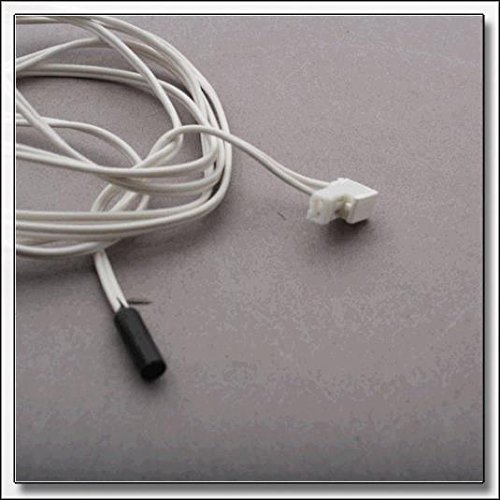
Figure 1: Cornelius 161862005 Temperature Sensor. This image shows the white insulated wire leading to a small black cylindrical sensor tip on one end and a white plastic connector on the other end. The wire is coiled loosely.
2. Sicherheitshinweise
Always observe the following safety precautions when handling, installing, or maintaining the temperature sensor:
- Ensure power is disconnected from the system before installation or removal of the sensor.
- Handle the sensor carefully to avoid damage to the wiring or sensing element.
- Do not expose the sensor to temperatures or environments outside its specified operating range.
- Consult a qualified technician for installation if you are unsure of the procedure.
- This product is not classified as a hazardous material.
3. Packungsinhalt
The package for the Cornelius 161862005 Temperature Sensor typically includes:
- 1 x Cornelius 161862005 Temperature Sensor (Model CN161862005)
Note: Additional components or tools required for installation are sold separately.
4. Einrichtung und Installation
The Cornelius 161862005 Temperature Sensor is designed for straightforward integration into compatible systems. Installation typically involves connecting the sensor to the appropriate control unit or circuit board.
4.1 Checkliste vor der Installation
- Verify the sensor's compatibility with your equipment models (e.g., IACS227E50, IAC530, IACS227, IAC330, IACS227E60, IAC522, IWCS224, AC322, IACS224, IAC322).
- Ensure the power to the system is completely off and locked out.
- Gather necessary tools (e.g., screwdrivers, wire strippers if needed).
4.2 Installationsschritte
- Locate the existing temperature sensor or the designated sensor port on your equipment.
- Carefully disconnect and remove the old sensor, if applicable.
- Connect the white plastic connector of the new Cornelius 161862005 sensor to the corresponding receptacle on your equipment. Ensure a secure fit.
- Position the black cylindrical sensor tip in the area where temperature measurement is required. The flange mount design facilitates secure placement.
- Route the sensor wire to prevent interference with moving parts or exposure to excessive heat/cold.
- Once installed, restore power to the system and verify proper operation.
5. Bedienungsanleitung
The Cornelius 161862005 Temperature Sensor operates passively by providing temperature data to the connected system. Its operation is integrated with the equipment it is installed in.
- Once properly installed, the sensor will automatically begin transmitting temperature readings to the control unit.
- Monitor your equipment's display or control interface to confirm that temperature readings are accurate and within expected parameters.
- Refer to your equipment's specific user manual for details on how it utilizes the temperature data from this sensor.
6. Wartung
The Cornelius 161862005 Temperature Sensor requires minimal maintenance. Regular inspection can help ensure its longevity and accurate performance.
- Reinigung: If necessary, gently wipe the sensor tip and wire with a soft, dry cloth. Do not use abrasive cleaners or immerse the sensor in liquids.
- Inspektion: Periodically check the sensor wire for any signs of wear, fraying, or damage. Ensure the connection remains secure.
- Kalibrierung: This sensor typically does not require user calibration. If temperature readings appear inaccurate, consult the equipment's manual or a qualified technician.
7. Fehlerbehebung
If you encounter issues with your Cornelius 161862005 Temperature Sensor, consider the following troubleshooting steps:
| Problem | Mögliche Ursache | Lösung |
|---|---|---|
| No temperature reading / Incorrect reading | Loose connection, damaged wire, sensor malfunction, incorrect installation. |
|
| Sensor not recognized by system | Incompatibility, incorrect wiring, system fault. |
|
For complex issues or if troubleshooting steps do not resolve the problem, contact Cornelius customer support or a certified service technician.
8. Spezifikationen
Detailed technical specifications for the Cornelius 161862005 Temperature Sensor:
| Attribut | Wert |
|---|---|
| Marke | Cornelius |
| Modellnummer | CN161862005 |
| Hersteller | CORNELIUS |
| Produktabmessungen (L x B x H) | 7 x 7 x 7 Zoll |
| Artikelgewicht | 16 ounces (0.35 Lbs as per description) |
| Length (as per description) | 52.0 Zoll |
| Montagetyp | Flanschmontage |
| Kompatible Modelle | IACS227E50, IAC530, IACS227, IAC330, IACS227E60, IAC522, IWCS224, AC322, IACS224, IAC322 |
9. Garantie und Support
For information regarding warranty coverage, technical support, or replacement parts for your Cornelius 161862005 Temperature Sensor, please contact Cornelius directly or refer to their official webWebsite.
This product is returnable as per the seller's policy.
Ask a question about this manual
Ask about setup, troubleshooting, compatibility, parts, safety, or missing instructions. Manuals+ will review the question and use this page’s manual context to help answer it.