
1. Einleitung
This manual provides detailed instructions for the assembly, installation, operation, and maintenance of your BONTEC Table Top Desk Pedestal TV Stand Mount. Please read this manual thoroughly before installation to ensure correct setup and safe operation. Keep this manual for future reference.
2. Sicherheitshinweise
- Gewichtskapazität: Do not exceed the maximum weight capacity of 50kg (110 lbs). This stand is designed for TVs between 32 and 60 inches.
- VESA-Kompatibilität: Ensure your TV's VESA mounting pattern is compatible with this stand (refer to specifications).
- Sichere Installation: Always ensure all screws and bolts are securely tightened before placing the TV on the stand.
- Oberflächenstabilität: Place the stand on a stable, level, and sturdy surface that can support the combined weight of the stand and your television.
- Kinder und Haustiere: Halten Sie Kinder und Haustiere vom Montagebereich fern. Kleinteile können verschluckt werden und eine Erstickungsgefahr darstellen.
- Professionelle Hilfe: Wenn Sie sich bei irgendeinem Teil des Installationsprozesses unsicher sind, konsultieren Sie einen qualifizierten Fachmann.
3. Packungsinhalt
Please verify that all components are present and undamaged before assembly. If any parts are missing or damaged, contact BONTEC customer support.
- Base Plate
- Upright Support Column
- TV-Wandhalterungen (2 Stück)
- Hardware Kit (various screws, washers, spacers, Allen wrench, spanner)
- Anti-Rutsch-Pads
4. Aufbau und Montage
Befolgen Sie diese Schritte sorgfältig, um Ihren Fernsehständer zusammenzubauen.
Step 4.1: Attach Anti-slip Pads to the Base
Peel and stick the provided anti-slip pads to the bottom of the base plate. This prevents scratching your furniture and provides stability.
Step 4.2: Assemble the Upright Support Column to the Base
Secure the upright support column to the base plate using the designated screws and tools from the hardware kit. Ensure it is firmly attached and stable.
Schritt 4.3: Befestigen Sie die TV-Halterungen an Ihrem Fernseher
Identify the VESA mounting holes on the back of your television. Select the appropriate screws, washers, and spacers from the hardware kit that fit your TV's specific VESA pattern. Attach the two TV mounting brackets to the back of your TV. Ensure they are level and securely fastened.

Abbildung 4.3.1: This image illustrates the VESA compatibility (50x50mm to 800x400mm) and screen size range (22-65 inches) supported by the stand, with a maximum capacity of 50kg. It helps in selecting the correct mounting hardware for your TV.

Abbildung 4.3.2: This image displays two installation options for the TV mounting brackets: one for larger TVs (Max VESA: 800x400mm) and another for smaller TVs (Max VESA: 400x200mm). It also provides detailed dimensions of the stand, including height and width, to aid in proper setup.
Schritt 4.4: Montieren Sie den Fernseher auf dem Ständer
Carefully lift your TV with the attached brackets and hook them onto the upright support column. Ensure the brackets are properly seated and secured. The stand offers multiple height adjustment levels.

Abbildung 4.4.1: This image demonstrates the three adjustable height levels of the TV stand: Maximum (700mm), Mid (640mm), and Minimum (580mm). This allows users to customize the TV's viewHöhe.
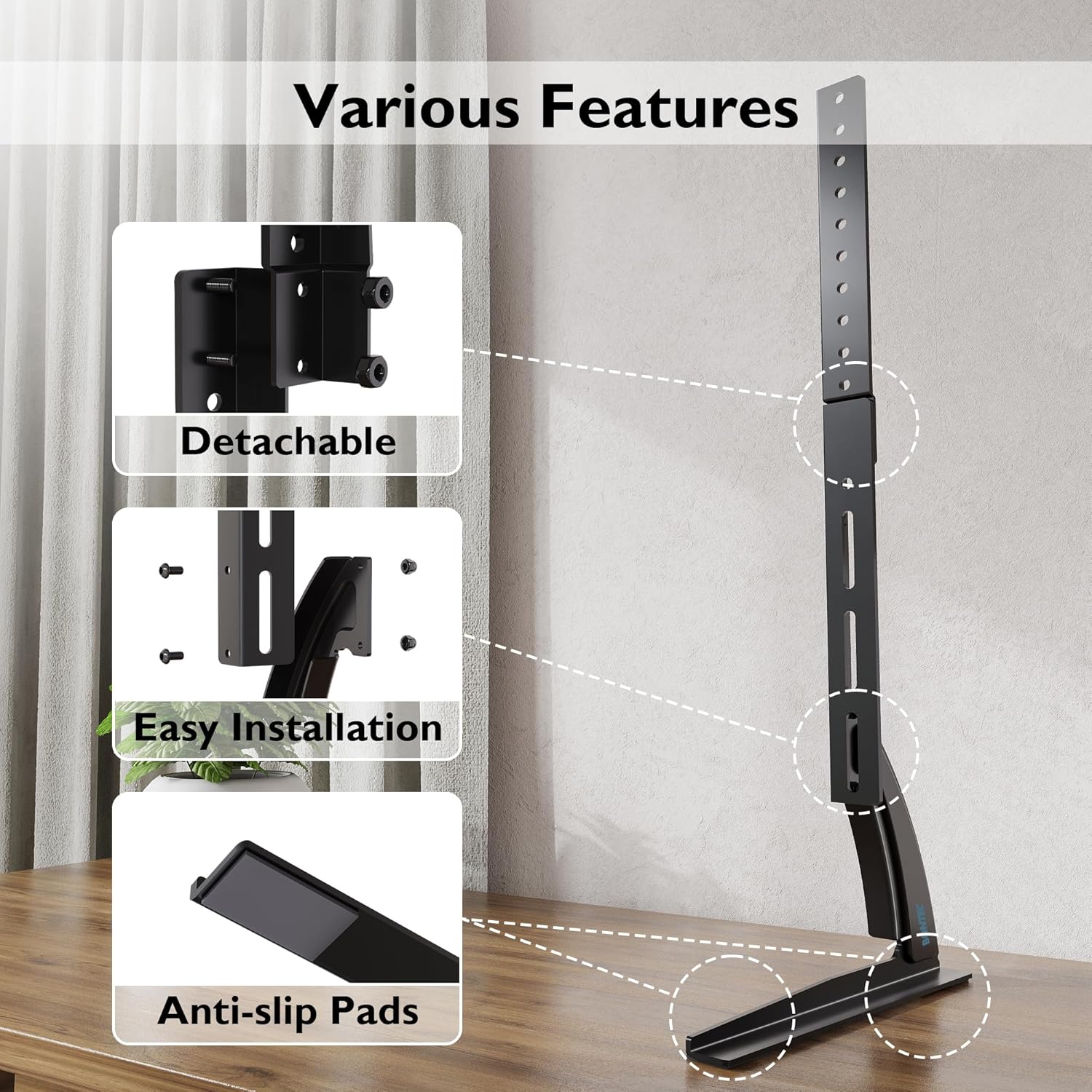
Abbildung 4.4.2: This image compares the stability of the BONTEC stand, showing a TV securely upright, against another stand that appears unstable. It highlights the design's focus on keeping your TV safely in position.

Abbildung 4.4.3: This image details key features of the stand, including its detachable components for easier assembly, the straightforward installation process, and the inclusion of anti-slip pads on the base for enhanced stability and surface protection.
5. Bedienungsanleitung
Once assembled, the BONTEC TV stand is designed for fixed placement. The primary operation involves adjusting the TV's height during initial setup.
5.1 Höhenverstellung
The stand offers three distinct height levels. To adjust the height:
- Carefully remove the TV from the mounting brackets.
- Adjust the position of the mounting brackets on the upright support column to your desired height level (Max, Mid, or Min).
- Re-mount the TV onto the adjusted brackets, ensuring it is securely locked in place.
Always ensure the TV is balanced and stable after any height adjustment.
6. Wartung
Regular maintenance ensures the longevity and safety of your TV stand.
- Reinigung: Wischen Sie den Ständer mit einem weichen, trockenen Tuch ab. Vermeiden Sie scheuernde Reiniger oder Lösungsmittel, die die Oberfläche beschädigen könnten.
- Verbindungen prüfen: Überprüfen Sie regelmäßig alle Schrauben und Bolzen, um sicherzustellen, dass sie fest sitzen. Ziehen Sie sie gegebenenfalls nach.
- Auf Schäden prüfen: Regularly inspect the stand for any signs of wear, damage, or instability. If damage is found, discontinue use and contact customer support.
7. Fehlerbehebung
Sollten Sie Probleme mit Ihrem TV-Ständer haben, beachten Sie bitte die folgenden häufigen Probleme und Lösungen:
| Problem | Mögliche Ursache | Lösung |
|---|---|---|
| Der Fernseher ist instabil oder wackelt. | Loose screws; uneven surface; TV too heavy; incorrect assembly | Ensure all screws are tightened. Place stand on a level surface. Verify TV weight is within limits. Review Montageschritte. |
| TV does not fit the stand | Incorrect VESA pattern; TV size outside range | Check your TV's VESA pattern against the stand's specifications. Confirm TV size is between 32-60 inches. |
| Fehlende Teile | Verpackungsfehler | Contact BONTEC customer support with your purchase details. |
8. Spezifikationen
- Marke: BONTEC
- Modell: B01ESPNXJW
- Montageart: Tischhalterung
- Bewegungsart: Fixed (Height adjustable during assembly)
- Kompatible Geräte: Fernsehen
- Minimum Supported Screen Size: 32 Zoll
- Maximum Supported Screen Size: 60 Inches (Note: Some users report compatibility with up to 65 inches, but official specification is 60 inches)
- Maximale Gewichtskapazität: 50 kg
- Artikelgewicht: 1.9 Kilogramm
- VESA-Kompatibilität: 50x50mm, 75x75mm, 100x100mm, 200x100mm, 200x200mm, 300x200mm, 300x300mm, 400x200mm, 400x300mm, 400x400mm, 600x400mm, 800x400mm
- Einstellbare Höhenstufen: 3 levels (Max 700mm, Mid 640mm, Min 580mm from base to top of bracket)
9. Garantie und Support
BONTEC products are manufactured to high-quality standards. For warranty information, technical support, or to report missing/damaged parts, please contact BONTEC customer service through the retailer where the product was purchased or visit the official BONTEC website. Please have your model number (B01ESPNXJW) and purchase date ready.