
Fluance RT80
Fluance RT80 Classic High Fidelity Vinyl Turntable
Bedienungsanleitung
Einführung
Welcome to the user manual for your new Fluance RT80 Classic High Fidelity Vinyl Turntable. This manual provides detailed instructions for setting up, operating, maintaining, and troubleshooting your turntable to ensure optimal performance and longevity. Please read this manual thoroughly before using your turntable.
Im Leistungsumfang enthalten
Your Fluance RT80 turntable package includes the following components:
- RT80 Turntable Plinth
- Staubschutzhülle
- 2x Staubschutzscharniere
- Headshell with Audio Technica AT91 Cartridge
- Gegengewicht
- Aluminiumplatte
- Gummiriemen
- 45 Adapter
- Felt Slip Mat
- 3ft RCA Cable With Ground Wire
- 5ft 100V - 240V (50/60Hz) AC Power Adapter
- Kurzanleitung
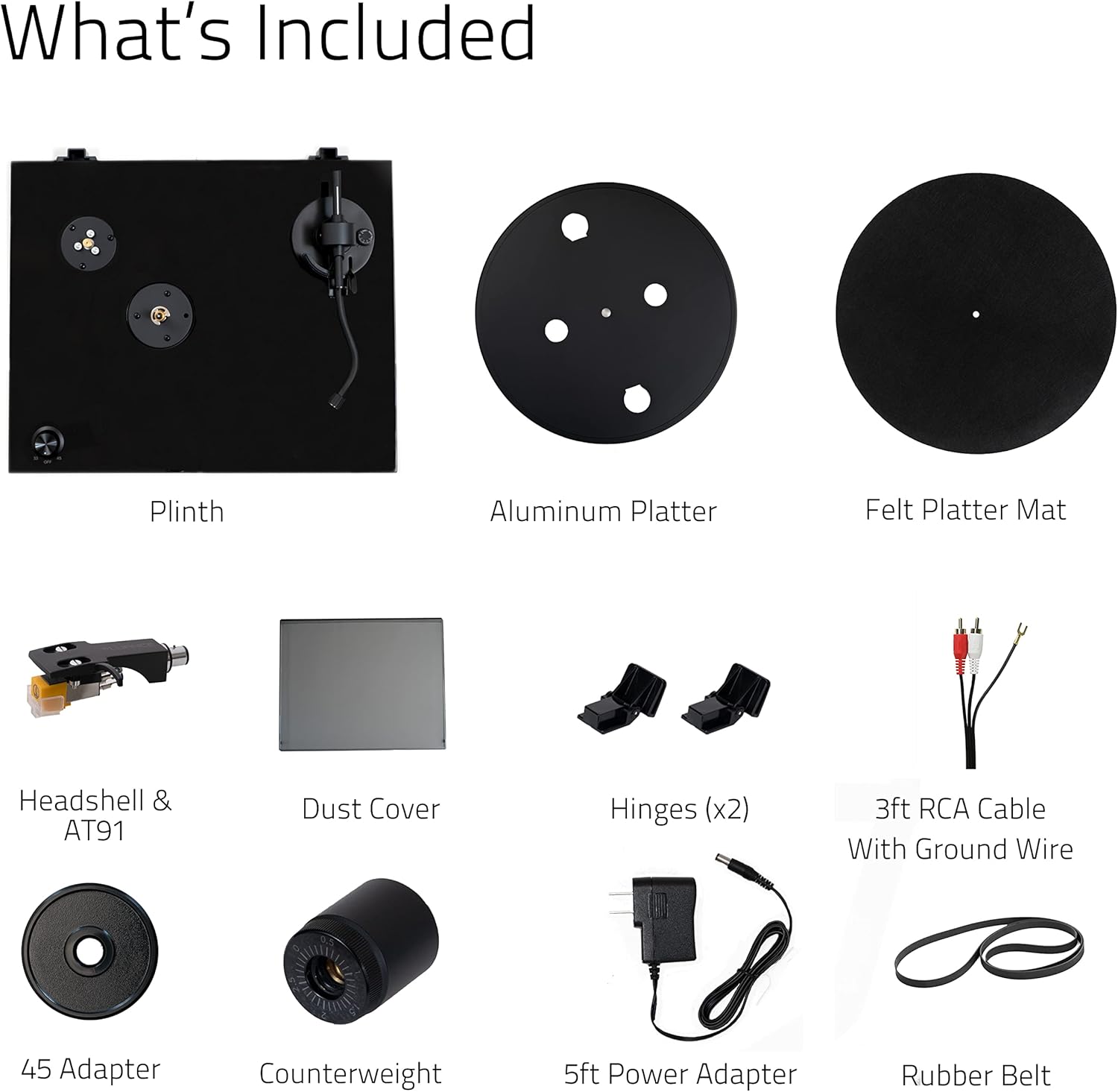
Image: All components included in the Fluance RT80 turntable package, laid out for easy identification.
Wichtige Sicherheitsinformationen
Please read and follow all safety instructions carefully to prevent damage to the unit and ensure your safety.
- Setzen Sie das Gerät weder Regen noch Feuchtigkeit aus.
- Stellen Sie keine mit Flüssigkeit gefüllten Gegenstände, wie zum Beispiel Vasen, auf das Gerät.
- Blockieren Sie keine Belüftungsöffnungen.
- Installieren Sie das Gerät nicht in der Nähe von Wärmequellen wie Heizkörpern, Heizregistern, Öfen oder anderen Geräten (einschließlich ampKonverter (Lüfter), die Wärme erzeugen.
- Schützen Sie das Netzkabel vor Beschädigungen durch Treten oder Einklemmen.
- Verwenden Sie nur vom Hersteller angegebene Zusatzgeräte/Zubehör.
- Trennen Sie das Gerät bei Gewitter oder längerer Nichtbenutzung vom Stromnetz.
- Überlassen Sie sämtliche Wartungsarbeiten qualifiziertem Servicepersonal.
Installationshandbuch
Follow these steps to properly set up your Fluance RT80 turntable.
1. Auspacken und Aufstellen
Carefully remove all components from the packaging. Place the turntable on a stable, level surface away from direct sunlight, heat sources, and excessive vibration.
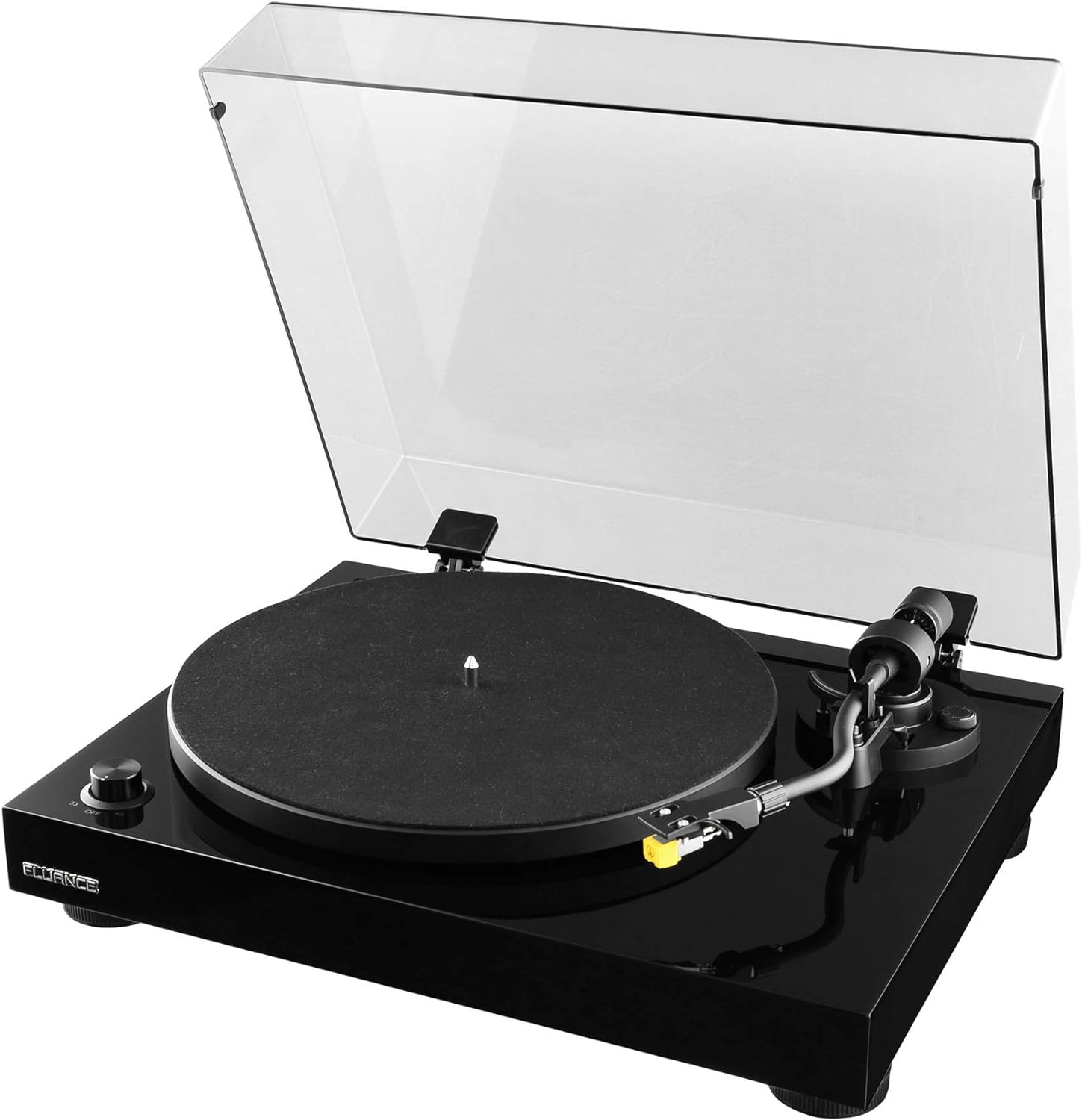
Image: The Fluance RT80 turntable in its assembled state, ready for use.
2. Plattenteller- und Riemenmontage
- Place the aluminum platter onto the center spindle.
- Locate the rubber drive belt. Carefully stretch the belt around the inner rim of the platter and hook it onto the motor pulley. Ensure the belt is not twisted.
- Legen Sie die Filzunterlage auf die Platte.
3. Counterweight and Tonearm Balance
The Audio Technica AT91 cartridge is pre-installed on the headshell. You will need to balance the tonearm.
- Gently slide the counterweight onto the rear of the tonearm with the numbers facing forward.
- Entfernen Sie den Nadelschutz vom Tonabnehmer.
- While holding the tonearm lift, carefully release the tonearm clamp.
- Adjust the counterweight by rotating it until the tonearm is perfectly balanced and floats horizontally.
- Once balanced, hold the counterweight steady and rotate the numbered ring to '0' (zero).
- Rotate the entire counterweight counter-clockwise to the recommended tracking force of 2.0 grams (2 on the scale).

Bild: Eine detaillierte view of the Audio Technica AT91 cartridge, highlighting its position on the tonearm.
4. Antiskating-Einstellung
Set the anti-skate dial to the same value as your tracking force, which is 2.0 for the AT91 cartridge.
5. Montage der Staubschutzhaube
Insert the two dust cover hinges into the slots at the rear of the turntable plinth, then attach the dust cover to the hinges.

Image: The Fluance RT80 turntable with its protective dust cover in the open position.
6. Verbindungen
Connect the RCA cables from the turntable to your amplifier or powered speakers. Ensure the ground wire is connected to the ground terminal on your ampVerstärker, falls verfügbar.
Connect the power adapter to the DC 12V input on the turntable and then plug it into a wall outlet.

Image: The rear connection panel of the turntable, illustrating the RCA outputs, ground terminal, and power input.

Image: The back of the turntable, displaying the various connection ports and switches.
7. Vorheramp Schalten
The RT80 has a built-in Texas Instruments preamp. Use the switch on the rear panel to select between PHONO (BYPASS) if connecting to an amplifier with a dedicated phono input, or LINE if connecting to a standard auxiliary input on an ampVerstärker oder Aktivlautsprecher.
Bedienungsanleitung
Eine Schallplatte abspielen
- Place a record on the felt slip mat.
- Select the appropriate speed (33 1/3 RPM or 45 RPM) using the speed selector knob. Use the 45 adapter for 7-inch singles if needed.
- Heben Sie den Tonarm mithilfe des Tonarmlifts an.
- Positionieren Sie den Tonarm über der gewünschten Startrille der Schallplatte.
- Senken Sie den Cueing-Hebel vorsichtig ab, damit die Nadel auf die Schallplatte absinken kann.
- At the end of the record, the auto-stop feature will engage, and the platter will stop spinning.
- Lift the tonearm using the cueing lever and return it to the tonearm rest. Secure it with the tonearm clamp.
Auto-Stop-Funktion
The RT80 features an auto-stop function that automatically stops the platter rotation when the tonearm reaches the end of a record. This helps prevent unnecessary wear on the stylus and record. The auto-stop function can be toggled ON/OFF via a switch on the rear panel.
Plattenpflege
- Always handle records by their edges to avoid transferring oils from your skin.
- Um ein Verziehen der Schallplatten zu verhindern, sollten diese senkrecht in ihren Hüllen aufbewahrt werden.
- Clean records regularly with a carbon fiber brush or a record cleaning solution to remove dust and static.
Wartung
Reinigen des Plattenspielers
- Wipe the dust cover and plinth with a soft, dry, lint-free cloth.
- Verwenden Sie keine aggressiven Chemikalien oder Scheuermittel.
- Für den Plattenteller und den Tonarm verwenden Sie einen leicht damp Bei Bedarf mit einem Tuch abwischen und anschließend sofort trocknen lassen.
Stiftpflege
- Clean the stylus regularly using a soft brush designed for stylus cleaning, brushing from back to front.
- A dirty stylus can damage your records and degrade sound quality.
- Replace the stylus after approximately 300-500 hours of playback, or if you notice a decrease in sound quality or increased distortion.
Riemenwechsel
The rubber drive belt may stretch or degrade over time. If you notice inconsistent speed or a decrease in playback quality, the belt may need to be replaced. Contact Fluance support for replacement belts.
Fehlerbehebung
| Problem | Mögliche Ursache | Lösung |
|---|---|---|
| Kein Ton oder nur sehr leiser Ton. |
|
|
| Distorted sound or skipping. |
|
|
| Platter not spinning or spinning too slowly/quickly. |
|
|
| Summendes Geräusch. |
|
|
Technische Daten
| Besonderheit | Detail |
|---|---|
| Modellname | RT80 |
| Marke | Fluance |
| Technische Daten | 13.75 x 16.5 x 5.5 Zoll |
| Artikelgewicht | 9.9 Pfund |
| Material | MDF Holz |
| Farbe | Klavier schwarz |
| Patrone | Audio Technica AT91 |
| Laufwerkstyp | Riemenantrieb |
| Eingebauter Preamp | Yes (Texas Instruments) |
| Geschwindigkeiten | 33 1/3, 45 U/min |
| Konnektivitätstechnologie | Kabelgebunden (RCA) |
| Ursprungsland | Taiwan |
Garantie und Support
Your Fluance RT80 turntable comes with a 2 Jahre Herstellergarantie, ensuring peace of mind regarding your purchase. Fluance also offers Lebenslanger Kundensupport.
For technical assistance, warranty claims, or general inquiries, please visit the official Fluance website or contact their customer support directly. You can also refer to the Benutzerhandbuch (PDF) or Installationshandbuch (PDF) provided by Fluance for additional information.
Ask a question about this manual
Ask about setup, troubleshooting, compatibility, parts, safety, or missing instructions. Manuals+ will review the question and use this page’s manual context to help answer it.