
1. Einleitung
The Protmex MS6208A is a compact, portable handheld digital tachometer designed for precise contact measurement of rotational and linear speeds. It is equipped with a high-speed integrated chip for stable and reliable performance. This device is ideal for a wide range of applications, including measuring the speed of motors, fans, conveyor belts, and various industrial and automotive equipment.
This manual provides detailed instructions on the proper setup, operation, maintenance, and troubleshooting of your MS6208A tachometer to ensure accurate measurements and extend the product's lifespan.
2. Sicherheitshinweise
Bitte lesen und verstehen Sie alle Sicherheitshinweise, bevor Sie das Gerät in Betrieb nehmen. Die Nichtbeachtung dieser Hinweise kann zu Verletzungen oder Schäden am Gerät führen.
- Always wear appropriate personal protective equipment (PPE) when taking measurements, especially when working with moving machinery.
- Do not attempt to measure rotating objects that are unstable or could pose a hazard.
- Ensure the device is clean and dry before use. Do not operate in wet or explosive environments.
- Halten Sie das Gerät von starken elektromagnetischen Feldern fern.
- Do not disassemble or modify the instrument. Refer all servicing to qualified personnel.
- Tauschen Sie die Batterien umgehend aus, sobald die Anzeige für niedrigen Batteriestand erscheint, um genaue Messwerte zu gewährleisten.
3. Packungsinhalt
Prüfen Sie beim Auspacken, ob alle Artikel vorhanden und in gutem Zustand sind.
- 1 x Protmex MS6208A Digital Tachometer
- 1 x 6-inch Idler Wheel
- 1 x 0.1m Idler Wheel
- 2 x Touch Tips (Protruding and Concave)
- 1 x Erweiterungsleiste
- 4 x 1.5 V AAA-Batterien
- 1 x Benutzerhandbuch (dieses Dokument)
- 1 x Meterbeutel
4. Produktüberschreitungview
The MS6208A tachometer is designed for versatility and ease of use, featuring a robust build and intuitive controls.

Figure 4.1: Labeled diagram of the Protmex MS6208A Digital Tachometer, showing the LCD screen, transmission shaft, power button, mode switch, data storage (MEM), data storage read (READ), and plus/minus buttons.
Hauptmerkmale:
- Highly Reliable Digital Tachometer: Features a 16-bit high-speed integrated chip for stable and reliable performance. The double-layer ABS casing, produced by secondary injection molding, offers an ergonomic design for easy operation and maintenance.
- Kontaktmessung: Measures rotational speeds from 50 RPM to 19999 RPM and surface speeds. Includes 5 different contact accessories (idler wheels, touch tips) to suit various measurement needs.
- Mehrere Funktionen: Offers 5 unit selections (m/min, m/sec, ft/min, ft/sec, in/min). Features include 100 groups of data recording, data hold, and average value functions.
- LCD-Hintergrundbeleuchtung: Equipped with an LCD backlight display for easy data reading in dark environments.
- Energiesparen: Includes a low battery indicator and automatically powers off after 30 seconds of inactivity to conserve energy.
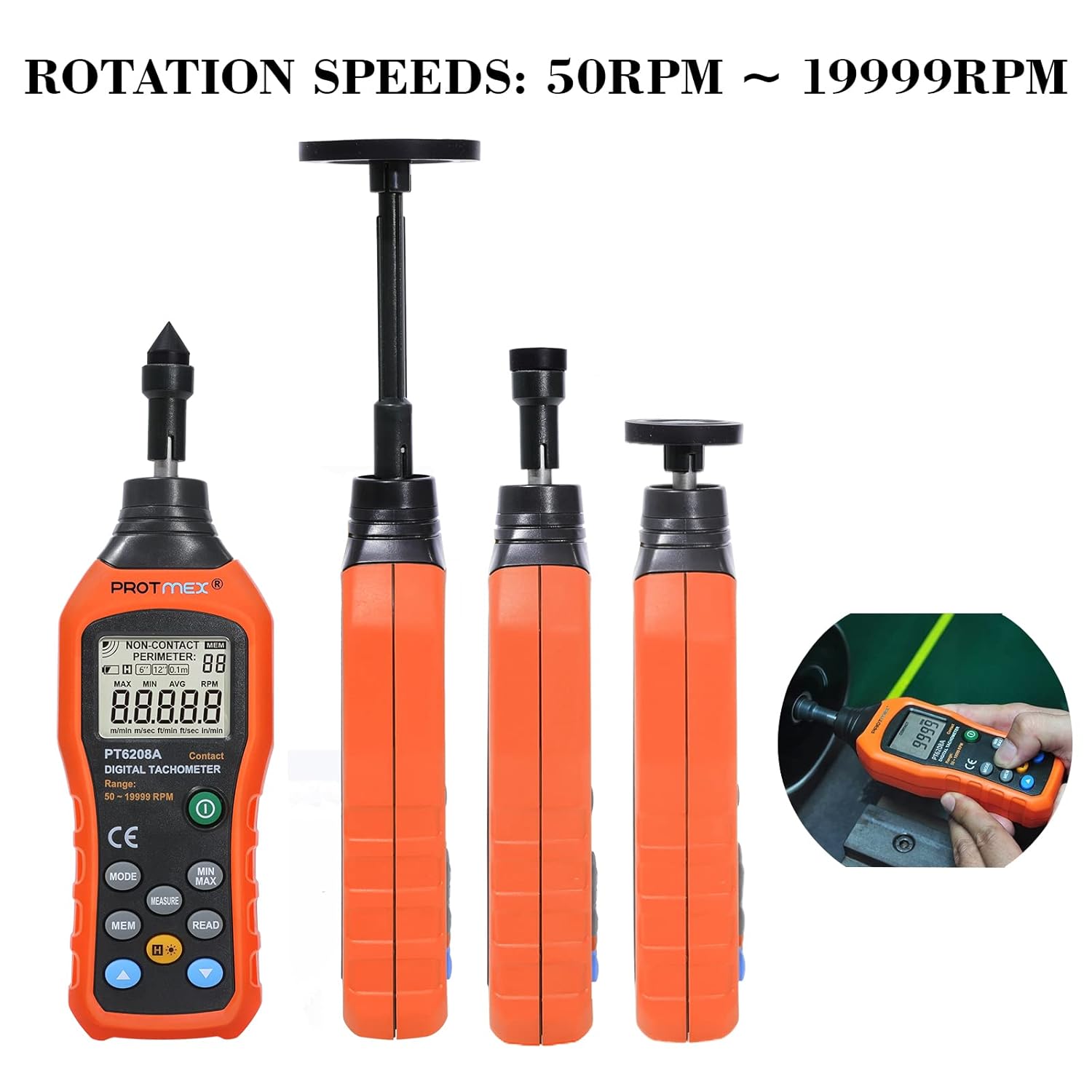
Figure 4.2: The Protmex MS6208A tachometer shown with different contact attachments, illustrating its capability to measure rotation speeds from 50 RPM to 19999 RPM.
5. Einrichtung
5.1 Einlegen der Batterie
- Locate the battery compartment on the back of the tachometer.
- Open the battery cover by sliding it off or unscrewing it, depending on the model.
- Insert four (4) 1.5V AAA batteries, ensuring correct polarity (+ and -).
- Verschließen Sie das Batteriefach fest.

Abbildung 5.1: View of the Protmex MS6208A's battery compartment, showing the placement for four AAA batteries and the internal 16-bit low-power MCU chip.
5.2 Anbringen von Messzubehör
The tachometer comes with various accessories for different measurement scenarios.
- Select the appropriate contact accessory (idler wheel or touch tip) for your measurement task.
- Attach the chosen accessory firmly to the transmission shaft at the top of the tachometer. For extended reach, use the extension bar between the shaft and the accessory.

Figure 5.2: The Protmex MS6208A tachometer demonstrating its adaptability with a 0.1m/6in. idler wheel, protruding touch tip, and concave touch tip, along with an extension bar.
6. Bedienungsanleitung
6.1 Ein-/Ausschalten
- Drücken Sie die Leistung Taste () um das Gerät einzuschalten.
- The device will automatically power off after 30 seconds of inactivity. To manually turn off, press and hold the Leistung Taste.
6.2 Measurement Modes and Unit Selection
- After powering on, the device defaults to RPM measurement.
- Drücken Sie die MODUS button to cycle through different measurement units: RPM, m/min, m/sec, ft/min, ft/sec, in/min.
- Ensure the selected unit matches your measurement requirement.
6.3 Messung durchführen
- Attach the appropriate contact accessory to the tachometer.
- Gently press the contact accessory against the center of the rotating object or surface you wish to measure.
- Ensure stable contact. The LCD will display the real-time measurement.
- For surface speed measurements, use an idler wheel and press it against the moving surface.
6.4 Data Hold, MAX/MIN/AVG Functions
- Drücken Sie die MESSEN button to hold the current reading on the display. Press again to release.
- Drücken Sie die MINIMAL MAXIMAL button to cycle through Maximum, Minimum, and Average readings during a measurement session.
6.5 Data Storage (MEM) and Recall (READ)
The device can store up to 100 groups of data.

Figure 6.1: The Protmex MS6208A tachometer in use, demonstrating its ability to store up to 100 sets of measurement data.
- To store a reading, press the MEM button while a measurement is displayed. The display will show the storage location number.
- Um gespeicherte Daten abzurufen, drücken Sie die Taste LESEN Klicken Sie auf die Schaltfläche Plus (+) Und Minus (-) buttons to navigate through the stored data groups.
6.6 Hintergrundbeleuchtung
- Drücken Sie die Hintergrundbeleuchtung Taste () to turn the LCD backlight on or off for improved visibility in low-light conditions.

Abbildung 6.2: Nahaufnahme view of the Protmex MS6208A's backlit LCD display, showing clear readability of contact RPM measurements.
7. Wartung
7.1 Reinigung
- Wischen Sie das Gerät mit einem weichen, trockenen Tuch ab. Bei hartnäckigem Schmutz verwenden Sie ein leicht dämpfendes Tuch.amp cloth with mild detergent, then dry thoroughly.
- Verwenden Sie keine scheuernden Reiniger oder Lösungsmittel, da diese das Material beschädigen können.asing oder Anzeige.
- Keep the transmission shaft and contact accessories free from dust and debris to ensure smooth operation and accurate readings.
7.2 Speicherung
- When not in use for an extended period, remove the batteries to prevent leakage and damage to the device.
- Store the tachometer and its accessories in the provided meter bag in a cool, dry place, away from direct sunlight and extreme temperatures.
7.3 Batteriewechsel
- When the low battery indicator appears on the display, replace all four AAA batteries promptly.
- Befolgen Sie die in Abschnitt 5.1 beschriebenen Schritte zur Installation der Batterie.
8. Fehlerbehebung
If you encounter issues with your Protmex MS6208A, refer to the following common problems and solutions:
| Problem | Mögliche Ursache | Lösung |
|---|---|---|
| Gerät lässt sich nicht einschalten. | Defekte oder falsch eingesetzte Batterien. | Batteriepolung prüfen. Durch neue AAA-Batterien ersetzen. |
| Ungenaue Messwerte. | Poor contact with the rotating object; incorrect accessory used; low battery. | Ensure firm and stable contact. Use the correct accessory for the surface. Replace batteries. |
| Das Display ist dunkel oder flackert. | Schwache Batterie. | Ersetzen Sie sie durch neue AAA-Batterien. |
| Daten können nicht gespeichert werden. | Speicher voll; fehlerhafte Operation. | Ensure you are pressing MEM during a live measurement. If memory is full, consider clearing data (refer to advanced functions in full manual if available). |
| Auto-off too quickly. | Normalbetrieb (30 Sekunden Inaktivität). | Dies ist eine Energiesparfunktion. Drücken Sie eine beliebige Taste, um das Gerät aktiv zu halten. |
9. Spezifikationen
| Parameter | Wert |
|---|---|
| Modell | MS6208A (PT6208A Contact Tachometer) |
| Messtyp | Kontakt |
| Drehzahlmessbereich | 50 ~ 19999 U / min |
| Genauigkeit | ± (0.03 % + 2 Ziffern) |
| Messabstand | N/A (Contact Measurement) |
| Einheitenauswahl | m/min, m/sec, ft/min, ft/sec, in/min |
| Datensatz | 100 Gruppen |
| Funktionen | MAX/MIN/AVG, Data Hold, Display Backlight, Low Battery Indication |
| Automatisches Herunterfahren | 30 Sekunden Inaktivität |
| Stromversorgung | 4 x 1.5 V AAA-Batterien |
| Produktabmessungen (L x B x H) | 19.3 x 6 x 2.9 cm (7.6 x 2.4 x 1.1 Zoll) |
| Produktgewicht | 120 g (0.26 Pfund) |
| Material | ABS-Kunststoff |
| Zertifizierungen | CE (LVE, EMC, RoHS) |
10. Garantie und Support
Protmex is committed to providing quality products and customer satisfaction. This product is CE (LVE, EMC, RoHS) certified.
For any questions, technical assistance, or support needs, please contact Protmex customer service. We provide friendly 24/7 online support to assist you with any inquiries regarding your MS6208A Digital Tachometer.
Please refer to your purchase documentation or the official Protmex webDie genauen Garantiebedingungen und Kontaktinformationen finden Sie auf der Webseite.