
Timex TW2P99000
Timex Metropolitan+ Aktivitätstracker Smartwatch – Benutzerhandbuch
Model: TW2P99000
Einführung
The Timex Metropolitan+ Activity Tracker Smart Watch is designed to seamlessly blend classic analog watch aesthetics with modern activity tracking capabilities. This timepiece allows you to monitor your steps, distance, and sleep patterns, providing valuable insights into your daily activity without compromising on style. Its robust design, including 50-meter water resistance and INDIGLO night-light, makes it suitable for various environments, from urban settings to outdoor adventures.
Erste Schritte: Einrichtung
1. Ersteinrichtung und App-Download
To begin using your Timex Metropolitan+ watch, you will need to download the official Timex Connected app on your smartphone. This app is essential for syncing your watch, viewing activity data, and configuring settings.
- Suchen nach "Timex Connected" in your device's app store (Apple App Store for iOS or Google Play Store for Android).
- Laden Sie die Anwendung herunter und installieren Sie sie.
- Stellen Sie sicher, dass Bluetooth auf Ihrem Smartphone aktiviert ist.
2. Koppeln Ihrer Uhr
Follow these steps to pair your Timex Metropolitan+ with the Timex Connected app:
- Öffnen Sie die Timex Connected-App auf Ihrem Smartphone.
- Erstellen Sie ein Konto oder melden Sie sich an, wenn Sie bereits eines haben.
- Follow the on-screen prompts within the app to add a new device. The app will guide you through the pairing process.
- The watch will indicate successful pairing, typically by a movement of the hands or a specific light pattern.
- Nach der Kopplung synchronisiert die Uhr automatisch Zeit und Datum mit Ihrem Telefon.

Abbildung 1: Vorderseite view of the Timex Metropolitan+ Smart Watch. This image displays the watch's analog face, including the main hour and minute hands, a sub-dial for activity tracking percentage, and the INDIGLO night-light indicator. The watch features a silver-tone case and bracelet.
Bedienung Ihrer Uhr
Aktivitätsverfolgung
The Timex Metropolitan+ tracks your daily steps, distance, and calories burned. This data is displayed on the watch's sub-dial and can be viewed in detail within the Timex Connected app.
- Viewing Progress: The sub-dial on the watch face shows your progress towards your daily step goal as a percentage.
- Detaillierte Daten: For comprehensive activity logs, including historical data and trends, open the Timex Connected app. The watch automatically syncs data to the app when connected via Bluetooth.
Sleep Metrics
Wear your watch while sleeping to track your sleep patterns. The watch monitors your sleep duration and quality, which can be reviewed in the Timex Connected app.
- Ensure the watch is worn comfortably on your wrist throughout the night.
- Synchronize the watch with the app in the morning to view Ihre Schlafdaten.
INDIGLO Night-Light
The watch features Timex's signature INDIGLO night-light for easy readability in low-light conditions.
- Press the crown (the button on the side of the watch) to activate the INDIGLO night-light.
- The light will illuminate the entire watch face for a few seconds.

Abbildung 2: Seite view of the Timex Metropolitan+ Smart Watch. This image highlights the watch's crown, used for setting time and activating the INDIGLO night-light, and an additional push-button for other functions.
Wartung
Reinigung Ihrer Uhr
Um das Aussehen und die Funktionalität Ihrer Uhr zu erhalten:
- Reinigen Sie das Uhrengehäuse und das Armband mit einem weichen, fusselfreien Tuch.amp Tuch.
- Vermeiden Sie die Verwendung von aggressiven Chemikalien oder Scheuermitteln, da diese die Oberfläche beschädigen können.
- For water resistance, ensure the crown is pushed in completely after any adjustments.
Batterieinformationen
The Timex Metropolitan+ does not require charging. It operates on a standard watch battery (1 Lithium Metal battery included). The battery life is designed to be long-lasting, typically several months to a year, depending on usage.
- When the battery is low, the watch may exhibit signs such as irregular hand movement or difficulty syncing.
- Der Batteriewechsel sollte idealerweise von einem qualifizierten Uhrmacher durchgeführt werden, um die Wasserdichtigkeit zu gewährleisten.
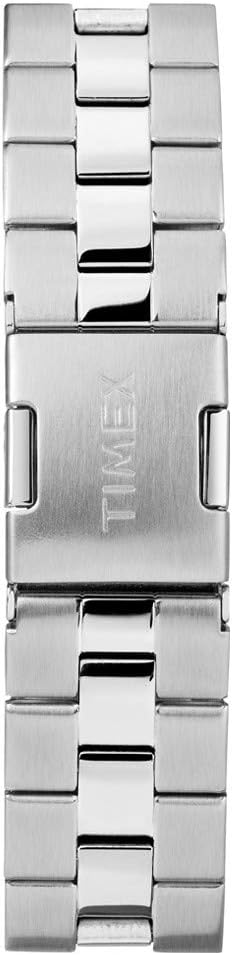
Figure 3: Watch bracelet and clasp detail. This image shows the construction of the silver-tone metal bracelet and the engraved Timex logo on the clasp, indicating the quality and branding of the watch.
Fehlerbehebung
| Problem | Mögliche Ursache | Lösung |
|---|---|---|
| Die Uhr synchronisiert sich nicht mit der App. | Bluetooth is off on phone; App not open; Watch out of range; Low watch battery; App requires update. |
|
| Ungenaue Aktivitätsverfolgung | Watch not worn correctly; Calibration needed; Unusual movement patterns. |
|
| INDIGLO night-light not working | Low watch battery; Malfunction. |
|
Technische Daten
- Modellnummer: TW2P99000
- Marke: Timex
- Abmessungen: 4 x 10 x 6 cm; 127.01 g
- Wasserbeständigkeit: 50 Meter (164 Fuß)
- Batterie: 1 Lithium-Metall-Batterie (im Lieferumfang enthalten)
- Merkmale: Activity Tracking (steps, distance, calories), Sleep Metrics, INDIGLO Night-Light, Sync with smartphone via Bluetooth.
- Material: Brass (case), Silver-tone/Black Bracelet
- Hersteller: Timex Group Canada
- Frühestmöglicher Termin: 19. August 2016
Garantie und Support
Timex products are manufactured to high standards and undergo rigorous testing. For specific warranty details, please refer to the warranty card included with your purchase or visit the official Timex website. Warranty coverage typically includes manufacturing defects.
Kundenservice
If you encounter any issues not covered in this manual or require further assistance, please contact Timex customer support:
- Online-Hilfe: Visit the official Timex webSeite? ˅ (www.timex.com) für FAQs, Support-Artikel und Kontaktinformationen.
- Servicezentren: Information on authorized service centers can be found on the Timex webWebsite.
Ask a question about this manual
Ask about setup, troubleshooting, compatibility, parts, safety, or missing instructions. Manuals+ will review the question and use this page’s manual context to help answer it.