
Amazon Basics BSK30BK
Amazon Basics Portable Wireless, 2.1 Bluetooth Speaker (Model BSK30BK)
Bedienungsanleitung
Einführung
Vielen Dank für Ihren Einkauf.asing the Amazon Basics Portable Wireless, 2.1 Bluetooth Speaker. This manual provides important information regarding the setup, operation, maintenance, and troubleshooting of your new speaker. Please read it thoroughly before use and retain it for future reference.
Produkt überview
The Amazon Basics Portable Wireless, 2.1 Bluetooth Speaker offers high-quality sound with a portable design. It features Bluetooth connectivity for wireless audio streaming, a 3.5mm aux-in jack for wired connections, and a built-in microphone for hands-free calling.
Packungsinhalt
- Amazon Basics Portable Wireless, 2.1 Bluetooth Speaker
- USB-Ladekabel
- Bedienungsanleitung
Lautsprecherkomponenten
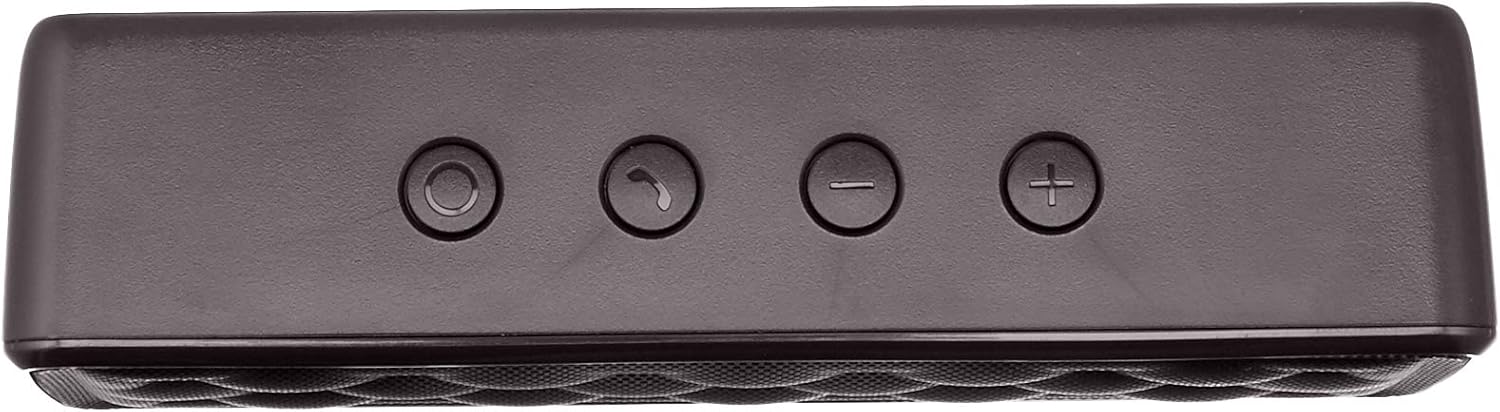


Aufstellen
1. Laden Sie den Lautsprecher auf
Before first use, fully charge the speaker. Connect the supplied USB charging cable to the Micro USB port on the speaker and the other end to a USB power source (e.g., computer USB port, USB wall adapter). The charging indicator light will illuminate during charging and turn off when fully charged. A full charge takes approximately 3 hours.
2. Ein-/Ausschalten
To power on the speaker, slide the ON/OFF switch located on the rear panel to the "ON" position. To power off, slide the switch to the "OFF" position.
Bedienungsanleitung
Bluetooth-Kopplung
- Ensure the speaker is powered on and within 33 feet (10 meters) of your Bluetooth-enabled device.
- The speaker will automatically enter pairing mode, indicated by a flashing blue LED light.
- Gehen Sie auf Ihrem Gerät zu den Bluetooth-Einstellungen und suchen Sie nach verfügbaren Geräten.
- Select "Amazon Basics Speaker" from the list.
- Once paired, the blue LED light will stop flashing and remain solid. You can now stream audio wirelessly.
Note: If pairing fails, turn off the speaker and your device's Bluetooth, then repeat the steps. The speaker will attempt to reconnect to the last paired device automatically when powered on.
Audiowiedergabe
- Lautstärkeregelung: Use the '+' and '-' buttons on the top panel of the speaker to adjust the volume. You can also control the volume from your connected device.
- Abspielen/Pause: Use the controls on your connected device to play or pause audio.
Freisprechen
Bei Verbindung über Bluetooth ermöglicht das im Lautsprecher integrierte Mikrofon freihändiges Telefonieren.
- Anruf annehmen/beenden: Press the Call/Bluetooth button once to answer an incoming call or end an ongoing call.
- Anruf ablehnen: Press and hold the Call/Bluetooth button for 2 seconds to reject an incoming call.
- Wahlwiederholung: Double-press the Call/Bluetooth button to redial the last number.
AUX-Eingangsmodus
To connect non-Bluetooth audio devices, use the 3.5mm AUX input jack on the rear panel. Connect one end of a 3.5mm audio cable (not included) to the speaker's AUX port and the other end to your audio device's headphone jack. The speaker will automatically switch to AUX mode when a cable is inserted.

Wartung
- Reinigen Sie den Lautsprecher mit einem weichen, trockenen Tuch. Verwenden Sie keine Scheuermittel oder Lösungsmittel.
- Vermeiden Sie es, den Lautsprecher extremen Temperaturen, hoher Luftfeuchtigkeit oder direkter Sonneneinstrahlung auszusetzen.
- Tauchen Sie den Lautsprecher nicht in Wasser ein. Er ist nicht wasserdicht.
- Bewahren Sie den Lautsprecher an einem kühlen, trockenen Ort auf, wenn er längere Zeit nicht benutzt wird.
Fehlerbehebung
| Problem | Mögliche Ursache | Lösung |
|---|---|---|
| Der Lautsprecher lässt sich nicht einschalten. | Batterie ist leer. | Laden Sie den Lautsprecher mit dem mitgelieferten USB-Kabel auf. |
| Kopplung via Bluetooth nicht möglich. | Bluetooth is off on your device; speaker is out of range; speaker is already paired to another device. | Ensure Bluetooth is enabled on your device. Move the speaker closer to your device (within 33 feet). Disconnect from other devices or restart the speaker to enter pairing mode. |
| Kein Ton oder geringe Lautstärke. | Volume is too low on speaker or device; incorrect input mode. | Increase volume on both the speaker and your connected device. Ensure the correct input mode (Bluetooth or AUX) is active. |
| Klangverzerrung. | Volume is too high; speaker is too far from the device. | Reduce the volume on the speaker and/or your device. Move the speaker closer to your device. |
Technische Daten
| Modellname | BSK30BK |
| Konnektivitätstechnologie | Bluetooth, Zusatz |
| Drahtlose Reichweite | Bis zu 33 Fuß (10 Meter) |
| Lautsprecherausgangsleistung | 2 x 2.5 Watt (insgesamt 5 Watt) |
| Akkulaufzeit | Bis zu 8 Stunden (bei voller Ladung) |
| Ladezeit | Ungefähr 3 Stunden |
| Abmessungen (L x B x H) | 6.3" x 1.5" x 2.6" (16 cm x 3.8 cm x 6.6 cm) |
| Gewicht | 8.1 Unzen (0.23 kg) |
| Eingebautes Mikrofon | Ja |
| Wasserdicht | NEIN |
Garantieinformationen
This product is covered by a Limited Warranty. For detailed information regarding warranty terms and conditions, please refer to the documentation included with your purchase or visit the Amazon Basics official webWebsite.
Kundenservice
For further assistance, troubleshooting, or product information, please visit the Amazon Basics support page or contact customer service through your Amazon account.
Wichtige Sicherheitsinformationen
- Zerlegen, reparieren oder modifizieren Sie das Produkt nicht.
- Das Produkt sollte von Wasser und hoher Luftfeuchtigkeit ferngehalten werden.
- Vermeiden Sie längere Einwirkung von direkter Sonneneinstrahlung oder extremer Hitze.
- Lassen Sie das Produkt nicht fallen und setzen Sie es keinen starken Stößen aus.
- Das Produkt und seine Batterie sind gemäß den örtlichen Vorschriften verantwortungsvoll zu entsorgen.
Produktvideos
No official instructional videos from the seller are available for this product at this time.