
EMB PKL6000
EMB PKL6000 PA Speaker System User Manual
Model: PKL6000
Einführung
Vielen Dank für Ihren Einkauf.asing the EMB PKL6000 2000W 2x12" PA Rechargeable Trolley Speaker System. This manual provides essential information for the safe and efficient operation of your new speaker system. Please read this manual thoroughly before use and retain it for future reference.
Sicherheitshinweise
Um einen sicheren Betrieb zu gewährleisten und Schäden zu vermeiden, beachten Sie bitte folgende Vorsichtsmaßnahmen:
- Setzen Sie das Gerät weder Regen noch Feuchtigkeit aus, um Brände oder Stromschläge zu vermeiden.
- Do not open the speaker cabinet. There are no user-serviceable parts inside. Refer all servicing to qualified personnel.
- Stellen Sie das Gerät auf eine stabile, ebene Fläche, um ein Umfallen zu verhindern.
- Das Gerät sollte nicht direkter Sonneneinstrahlung, Wärmequellen oder übermäßigem Staub ausgesetzt werden.
- Sorgen Sie für ausreichende Belüftung. Blockieren Sie keine Belüftungsöffnungen.
- Verwenden Sie nur das mit dem Gerät mitgelieferte Netzteil.
- Um Gehörschäden vorzubeugen, vermeiden Sie es, über längere Zeiträume bei übermäßig hoher Lautstärke zu hören.
Packungsinhalt
Carefully unpack your speaker system and ensure all items are present:
- EMB PKL6000 PA Speaker System
- Drahtloses Mikrofon
- Audiokabel
- Netzteil
- Fernbedienung
- Benutzerhandbuch (dieses Dokument)

Image: The EMB PKL6000 speaker system shown with its accompanying wireless microphone and an audio cable, illustrating the typical contents of the package.
Produkt überview
Familiarize yourself with the various components and controls of your PKL6000 speaker system.
Vorderseite und Funktionen
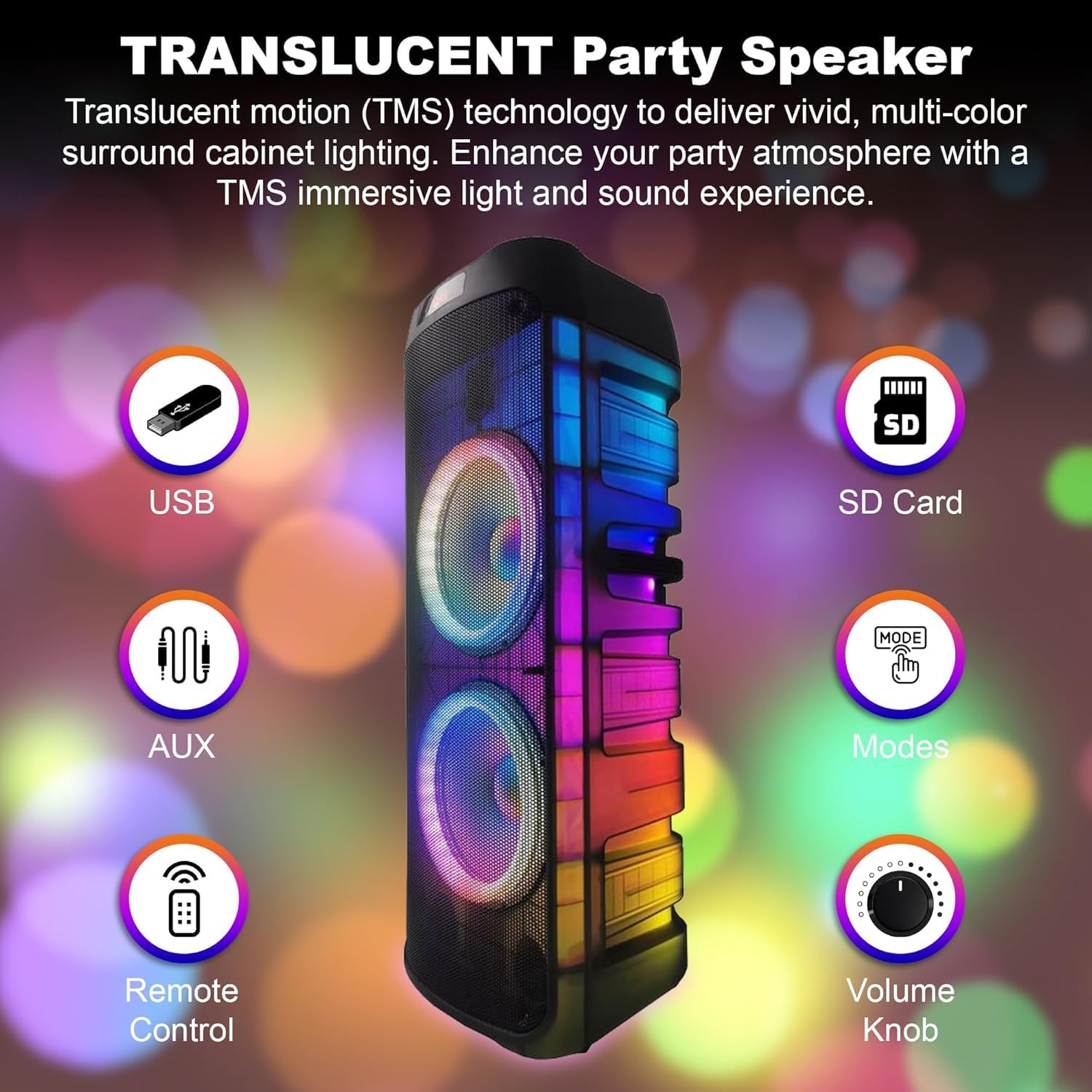
Bild: Vorderseite view of the speaker, indicating key features such as USB port, SD card slot, AUX input, remote control sensor, mode selection, and the main volume knob.
- USB-Anschluss: Zum Abspielen von Audio files von USB-Sticks.
- SD-Kartensteckplatz: Zum Abspielen von Audio files von SD-Speicherkarten.
- AUX-Eingang: Zum Anschluss externer Audiogeräte über ein 3.5-mm-Audiokabel.
- Fernbedienungssensor: Receives signals from the included remote control.
- Modus-Taste: Schaltet die Eingangsmodi durch (Bluetooth, USB, SD, AUX, FM).
- Lautstärkeregler: Regelt die Gesamtlautstärke.
- Translucent Cabinet Lighting: Features multi-color LED lights that enhance the audio experience.
Hinteres Bedienfeld

Image: A close-up of the speaker's rear control panel, showing all input jacks, knobs, and switches clearly labeled for functions like Mic In, Guitar Jack Input, LED Switch, Adaptor, USB Input, LED Mode, Treble, Bass, Echo, Mic Vol, GT Vol, Power ON/OFF, Modes, Previous, Play/Pause, Skip, M.PRI, and Repeat.
- Mikrofoneingang: 6.35mm input for connecting a wired microphone.
- Guitar Jack Input: 6.35mm input for connecting a guitar or other instrument.
- LED-Schalter: Schaltet die LED-Leuchten ein/aus.
- Adaptereingang: Connects the power adapter for charging and continuous power.
- USB Eingang: (Repeated from front panel, likely a secondary or main port).
- LED-Modus: Durchläuft verschiedene LED-Lichtmuster.
- Höhenregler: Passt den Hochfrequenzgang an.
- Bass-Knopf: Passt den Tieftonbereich an.
- Echo-Knopf: Steuert den Echoeffekt für Mikrofoneingangssignale.
- Mikrofon-Lautstärkeregler: Regelt die Lautstärke des Mikrofoneingangs.
- GT Vol Knob: Regelt die Lautstärke des Gitarreneingangs.
- EIN/AUS-Schalter: Schaltet das Lautsprechersystem ein oder aus.
- Modus-Taste: (Repeated from front panel).
- Zurück-Schaltfläche: Springt zum vorherigen Titel.
- Wiedergabe-/Pause-Taste: Spielt den aktuellen Titel ab oder pausiert ihn.
- Skip Button: Springt zum nächsten Titel.
- M.PRI (Microphone Priority) Button: Activates/deactivates microphone priority mode, which lowers music volume when speaking into the microphone.
- Wiederholen-Taste: Wiederholt den aktuellen Titel oder die aktuelle Playlist.
Aufstellen
Laden des Akkus
The PKL6000 features a built-in rechargeable battery (12V 2200mAh). Before first use, it is recommended to fully charge the battery.
- Connect the supplied power adapter to the "Adaptor Input" on the rear panel of the speaker.
- Stecken Sie das andere Ende des Netzteils in eine normale Wechselstromsteckdose.
- The charging indicator light (if present) will illuminate.
- Eine vollständige Aufladung dauert in der Regel etwa 4.5 Stunden.
- Once fully charged, the speaker can provide approximately 5 hours of playback time, depending on volume and usage.

Image: The speaker with an overlay highlighting its charging time of 4.5 hours and a playback time of 5 hours, indicating battery performance.
Ein-/Ausschalten
Locate the "Power ON/OFF" switch on the rear control panel. Flip the switch to the "ON" position to power on the speaker. Flip it to "OFF" to power off.
Bedienungsanleitung
Bluetooth-Kopplung
Connect your Bluetooth-enabled device to the PKL6000 for wireless audio streaming.
- Schalten Sie den Lautsprecher ein.
- Press the "Modes" button until "Bluetooth" mode is selected (a voice prompt or display indicator may confirm).
- Aktivieren Sie Bluetooth auf Ihrem Mobilgerät (Smartphone, Tablet usw.).
- Suchen nach available Bluetooth devices. The speaker will appear as "EMB PKL6000" or similar.
- Select "EMB PKL6000" to pair. Once paired, a confirmation sound will be heard.
- You can now play audio from your device wirelessly. The effective range is up to 30 feet (approximately 9 meters).

Image: A smartphone screen showing the Bluetooth symbol, wirelessly connected to the speaker, illustrating the 30-foot Bluetooth connectivity range.
USB/SD-Kartenwiedergabe
Audio wiedergeben files directly from a USB flash drive or SD card.
- Stecken Sie einen USB-Stick in den USB-Anschluss oder eine SD-Karte in den SD-Kartensteckplatz.
- The speaker will automatically switch to USB/SD mode and begin playing compatible audio files. If not, press the "Modes" button to select the correct input.
- Use the "Previous", "Play/Pause", and "Skip" buttons to control playback.
AUX-Eingang
Connect external audio sources like MP3 players or laptops.
- Connect one end of a 3.5mm audio cable (included) to the AUX input on the speaker.
- Verbinden Sie das andere Ende mit der Kopfhörerbuchse oder dem Audioausgang Ihres externen Geräts.
- Press the "Modes" button to select "AUX" mode.
- Steuern Sie Wiedergabe und Lautstärke über Ihr externes Gerät.
Microphone and Guitar Input (Karaoke Features)
The PKL6000 supports microphone and guitar inputs for live performance or karaoke.
- Connect the wireless microphone receiver (if applicable) or a wired microphone to the "Mic In" jack.
- Connect a guitar or other instrument to the "Guitar Jack Input".
- Adjust the "Mic Vol" and "GT Vol" knobs to control the volume of the respective inputs.
- Use the "Echo" knob to add an echo effect to the microphone.
- Press the "M.PRI" button to activate Microphone Priority, which automatically lowers the background music volume when the microphone is in use. Press again to deactivate.
LED-Lichtsteuerung
Enhance your audio experience with dynamic LED lighting.
- Use the "LED Switch" to turn the lights on or off.
- Press the "LED Mode" button to cycle through various light patterns and effects, including 360-degree motion lights.

Image: The speaker emitting vibrant, circular light patterns, demonstrating its 360-degree motion lighting feature.
True Wireless Stereo (TWS)-Funktion
Connect two PKL6000 speakers wirelessly for a true stereo sound experience.
- Ensure both PKL6000 speakers are powered on and in Bluetooth mode, but not yet paired with any device.
- On one of the speakers (this will be the primary unit), press and hold the "TWS" button (or a similar button, if not explicitly labeled, it might be the Play/Pause button or Mode button pressed for longer). Refer to the specific button on your unit if "TWS" is not marked.
- The primary speaker will search for the secondary speaker. Once connected, a confirmation sound will be heard.
- Now, pair your Bluetooth device to the primary speaker as described in the "Bluetooth Pairing" section. Audio will play in stereo through both speakers.
- The wireless connection between the two speakers can extend up to 30 feet.

Image: Two speakers positioned apart, illustrating their ability to connect wirelessly for stereo sound, with a visual representation of the 30-foot maximum connection range.
Wartung
- Reinigung: Reinigen Sie die Außenseite des Lautsprechers mit einem weichen, trockenen Tuch. Verwenden Sie keine Scheuermittel, Wachse oder Lösungsmittel.
- Lagerung: Bei längerer Nichtbenutzung sollte der Lautsprecher an einem kühlen, trockenen Ort, fern von direkter Sonneneinstrahlung und extremen Temperaturen aufbewahrt werden.
- Batteriepflege: To prolong battery life, fully charge the speaker before storing it for long periods. If stored for more than a few months, recharge the battery every 3-6 months to prevent deep discharge.
- Belüftung: Um eine Überhitzung zu vermeiden, stellen Sie sicher, dass die Lüftungsöffnungen frei von Staub und Schmutz sind.
Fehlerbehebung
| Problem | Mögliche Ursache | Lösung |
|---|---|---|
| Kein Strom | Battery is depleted; Power switch is off; Power adapter not connected properly. | Charge the battery; Ensure the power switch is ON; Check power adapter connection and wall outlet. |
| Kein Ton | Volume is too low; Incorrect input mode selected; Device not paired (Bluetooth); Cables not connected properly (AUX/Mic/Guitar). | Increase master volume and source device volume; Press "Modes" button to select correct input; Re-pair Bluetooth device; Check all cable connections. |
| Bluetooth-Verbindung instabil oder bricht ab | Device is out of range; Interference; Speaker already paired to another device. | Move device closer to speaker (within 30ft); Avoid obstacles; Disconnect from other devices and re-pair. |
| Mikrofon funktioniert nicht | Mic volume too low; Microphone not powered on (wireless mic); Incorrect jack used. | Increase "Mic Vol" knob; Ensure wireless microphone has fresh batteries and is powered on; Connect to "Mic In" jack. |
| USB/SD-Wiedergabe funktioniert nicht | Unvereinbar file format; USB/SD card corrupted; Incorrect mode selected. | Sicherstellen files are in compatible format (e.g., MP3); Try another USB/SD card; Select USB/SD mode. |
Technische Daten
| Besonderheit | Detail |
|---|---|
| Modellnummer | PKL6000 |
| Ausgang Wattage | 2000 Watt (Spitzenleistung) |
| Lautsprechergröße | Dual 12" PA Speaker System |
| Stromquelle | Batteriebetrieben (wiederaufladbar) / Netzbetrieb |
| Batterie | 12 V, 2200 mAh |
| Ladezeit | Ca. 4.5 Stunden |
| Spielzeit | Ca. 5 Stunden (bei mäßiger Lautstärke) |
| Konnektivitätstechnologie | Bluetooth, USB, SD Card, AUX (3.5mm), Microphone (6.35mm), Guitar (6.35mm) |
| Bluetooth-Reichweite | Bis zu 30 Fuß (9 Meter) |
| Abmessungen (L x B x H) | 34 x 14 x 12 Zoll (86.36 x 35.56 x 30.48 cm) |
| Artikelgewicht | 36.7 Pfund (16.65 kg) |
| Farbe | Schwarz |
| Hersteller | EMB |
| UPC | 701160333495 |
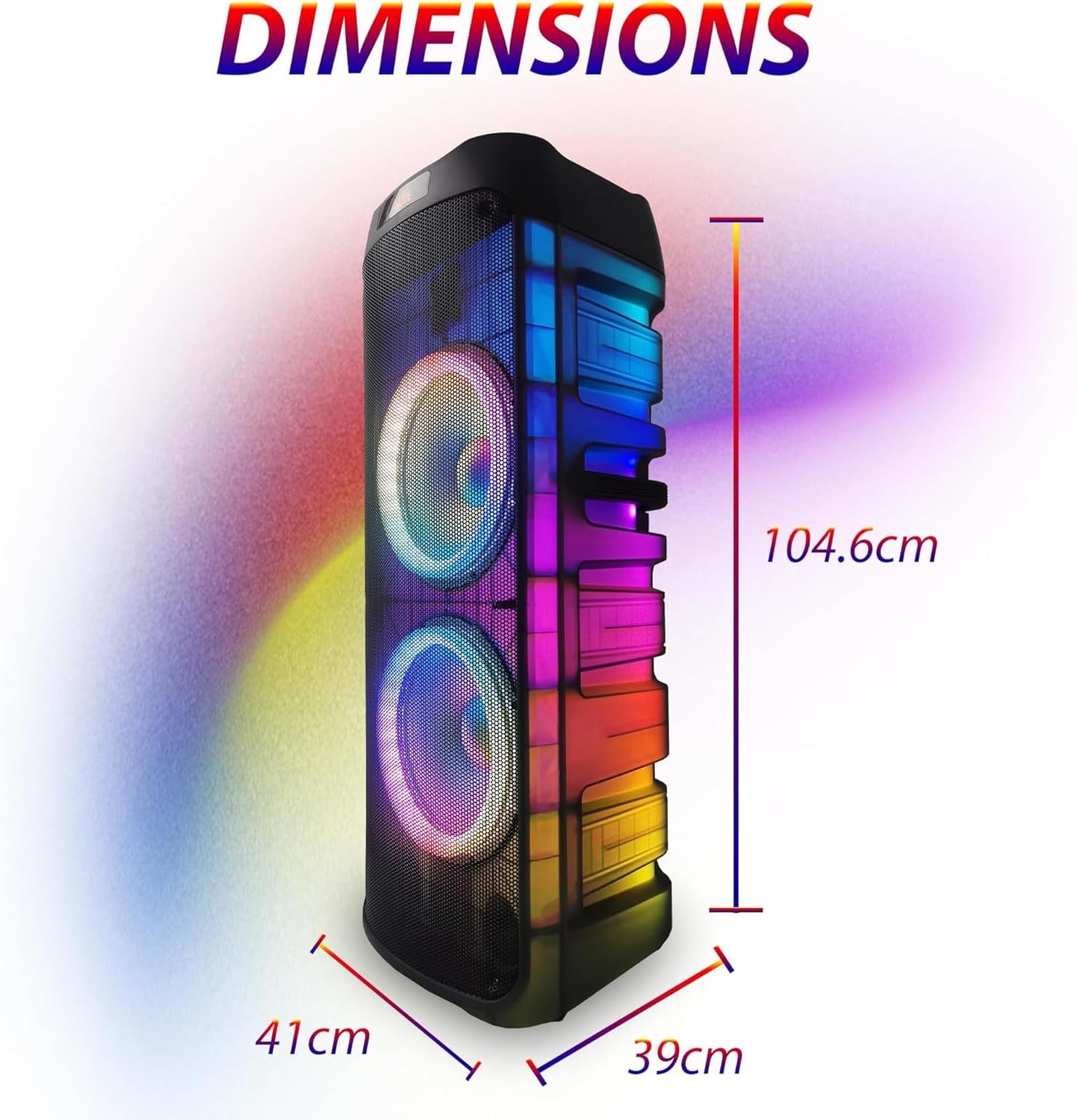
Image: The speaker with its dimensions clearly marked: 104.6 cm (height), 41 cm (width), and 39 cm (depth), providing a visual reference for its size.
Garantie und Support
For warranty information and technical support, please refer to the contact details provided by your retailer or visit the official EMB webBewahren Sie Ihren Kaufbeleg als Kaufnachweis für eventuelle Garantieansprüche auf.
Für dieses Produkt sind möglicherweise erweiterte Schutzpläne verfügbar. Bitte erkundigen Sie sich bei Ihrem Händler nach den verfügbaren Optionen.