
Einführung
Thank you for choosing the Mitzu MC-202 Universal Battery Charger. This manual provides essential information for the safe and efficient operation of your charger. Please read it thoroughly before use and retain it for future reference.
Sicherheitshinweise
- Use this charger only with Ni-MH and Ni-CD rechargeable batteries. Do not attempt to charge alkaline, lithium, or other non-rechargeable battery types, as this may cause explosion, leakage, or personal injury.
- Das Ladegerät darf nicht auseinandergenommen, verändert oder repariert werden.
- Vermeiden Sie es, das Ladegerät Wasser, Feuchtigkeit oder extremen Temperaturen auszusetzen.
- Außerhalb der Reichweite von Kindern aufbewahren.
- Ziehen Sie den Stecker des Ladegeräts aus der Steckdose, wenn es nicht benutzt wird oder bevor Sie es reinigen.
- Ensure proper battery polarity (+/-) when inserting batteries into the charger.
- If the charger or batteries become excessively hot during charging, discontinue use immediately and unplug the device.
Packungsinhalt
- 1 x Mitzu MC-202 Universal Battery Charger
- Note: Some product bundles may include 2 x 1300 mAh AA Ni-MH rechargeable batteries. Please check your specific product packaging.
Produkt überview
The Mitzu MC-202 is a compact and easy-to-use charger designed for Ni-MH and Ni-CD batteries. It features two charging slots for AA/AAA batteries and one slot for a 9V battery, along with a charging indicator.

Bild: Front view of the Mitzu MC-202 universal battery charger with two AA batteries inserted. The charger is white with red indicator lights above each AA slot.

Bild: Zurück view of the Mitzu MC-202 battery charger, featuring a foldable power plug and a label detailing its specifications and model number.
Aufstellen
- Auspacken des Ladegeräts: Carefully remove the Mitzu MC-202 charger from its packaging.
- Auf Schäden prüfen: Prüfen Sie das Ladegerät auf sichtbare Beschädigungen. Verwenden Sie es nicht, wenn es beschädigt ist.
- Batterien vorbereiten: Ensure the batteries you intend to charge are Ni-MH or Ni-CD type.
Bedienungsanleitung
- Batterien einlegen:
- For AA/AAA batteries: Insert up to two AA or AAA Ni-MH/Ni-CD batteries into the designated slots, ensuring correct polarity (+ and -). The positive (+) end of the battery should align with the positive (+) terminal in the charger, and the negative (-) end with the negative (-) terminal.
- For 9V battery: Insert one 9V Ni-MH/Ni-CD battery into the dedicated 9V slot, matching the polarity.
- An die Stromversorgung anschließen: Fold out the charger's power plug and insert it into a standard electrical outlet (100-240V AC, 50-60Hz).
- Aufladen des Monitors: The charging indicator light(s) will illuminate to show that charging is in progress. The charger monitors the charging status for convenience.
- Batterien entfernen: Once charging is complete (the indicator light may change or turn off, depending on the specific model's behavior), unplug the charger from the outlet and carefully remove the charged batteries.

Bild: A hand inserting a Mitzu AA battery into a remote control, illustrating the correct orientation for battery placement. This principle applies to inserting batteries into the charger as well.
Wartung
- Reinigung: Trennen Sie das Ladegerät vor der Reinigung vom Stromnetz. Wischen Sie die Außenseite des Ladegeräts mit einem weichen, trockenen Tuch ab. Verwenden Sie keine flüssigen Reiniger oder Lösungsmittel.
- Lagerung: Bewahren Sie das Ladegerät bei Nichtgebrauch an einem kühlen, trockenen Ort fern von direkter Sonneneinstrahlung und Feuchtigkeit auf.
- Batteriepflege: For optimal battery life, avoid overcharging and completely discharging rechargeable batteries.
Fehlerbehebung
| Problem | Mögliche Ursache | Lösung |
|---|---|---|
| Die Kontrollleuchte des Ladegeräts leuchtet nicht. |
|
|
| Batteries do not charge or charge slowly. |
|
|
| Charger or batteries become very hot. |
|
|
Technische Daten
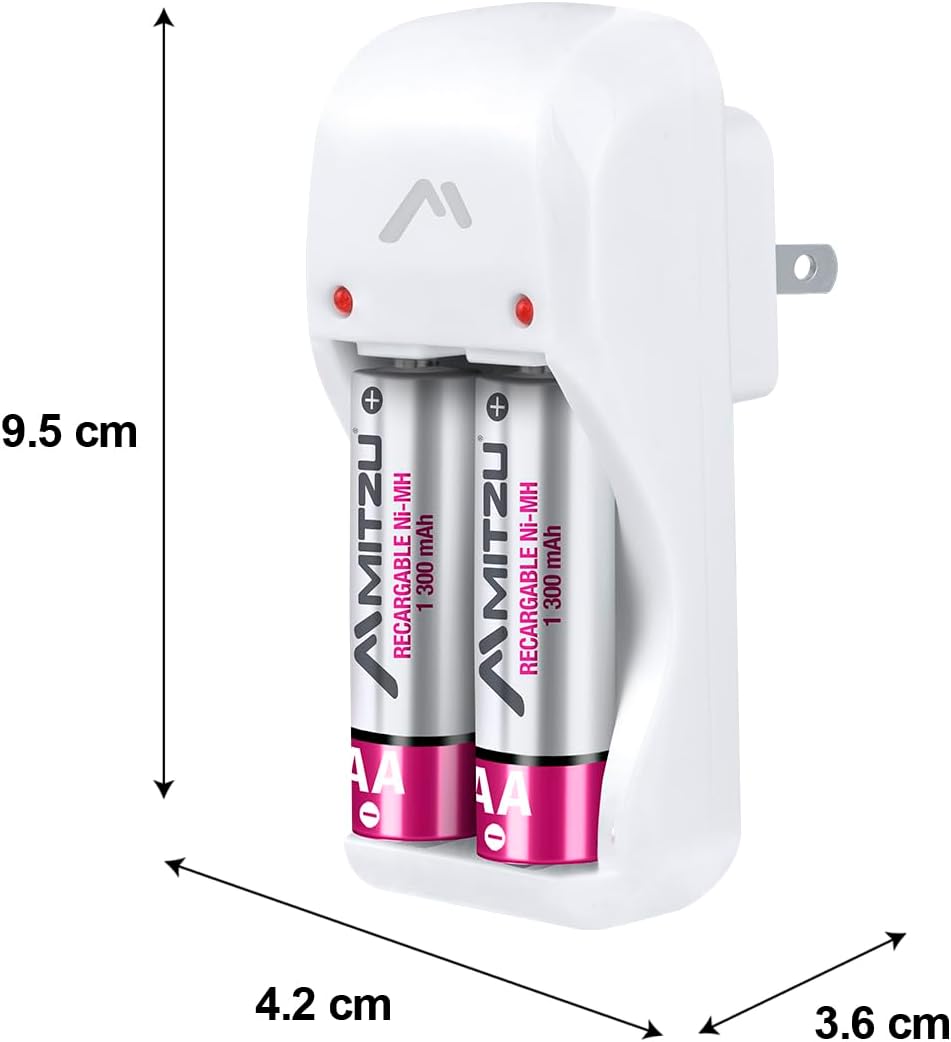
Bild: Mitzu MC-202 charger with dimensions labeled: approximately 9.5 cm height, 4.2 cm width, and 3.6 cm depth.
| Besonderheit | Detail |
|---|---|
| Marke | Mitzu |
| Modell | MC-202 |
| Teilenummer | MC-202 |
| Eingang | 100 – 240 V Wechselstrom, 50 – 60 Hz, 0.5 W |
| Output 1 (AA/AAA) | 1.2V DC, 120mA x 2 |
| Output 2 (9V) | 8.4V DC, 35mA x 1 |
| Kompatible Batterietypen | Ni-MH, Ni-CD |
| Kompatible Batteriegrößen | AA, AAA, 9V |
| Product Dimensions (Charger Unit) | 9.5 cm (Höhe) x 4.2 cm (Breite) x 3.6 cm (Tiefe) |
| Verpackungsabmessungen | 44 x 26 x 22.5 cm |
| Produktgewicht | 450 g |
| Battery Capacity (for included AA batteries, if applicable) | 1300 mAh (NiMH) |
| Batterien im Lieferumfang enthalten | No (for charger unit only; some product bundles may include batteries) |
Garantie und Support
For warranty information or technical support, please refer to the contact details provided on your product packaging or visit the official Mitzu webBewahren Sie Ihren Kaufbeleg als Kaufnachweis auf.
Mitzu Official Store: Visit Mitzu Store on Amazon.com.mx