
1. Einleitung
The Arturia MatrixBrute is a powerful analog matrix synthesizer designed for advanced sound creation and performance. This manual provides essential information for setting up, operating, maintaining, and troubleshooting your instrument. Please read this manual thoroughly to ensure proper use and to maximize your experience with the MatrixBrute.
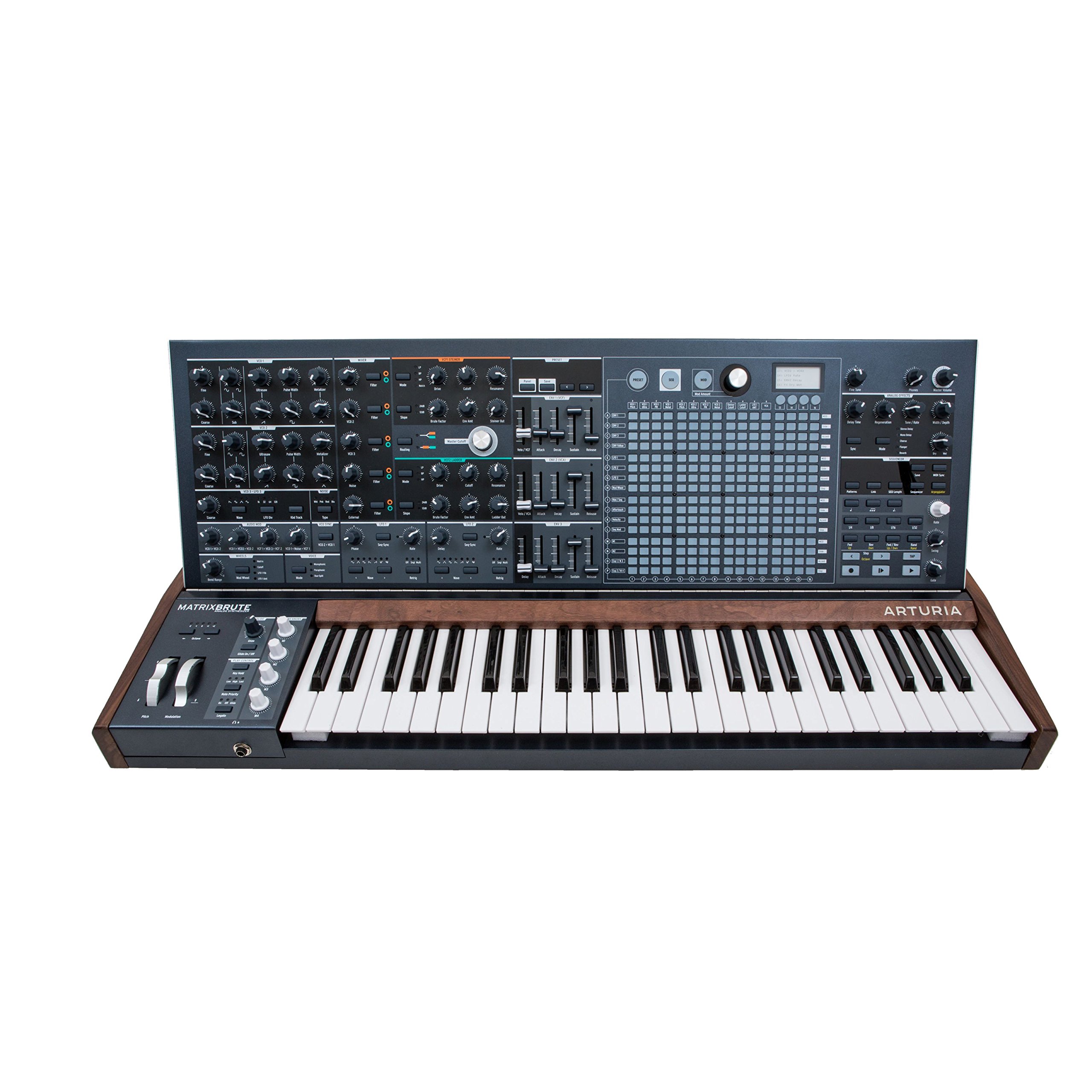
Abbildung 1: Vorderseite view of the Arturia MatrixBrute Analog Matrix Synthesizer.
2. Einrichtung
2.1 Auspacken
Carefully remove the MatrixBrute from its packaging. Retain all packaging materials for future transport or storage. Verify that all included components are present:
- Arturia MatrixBrute Synthesizer
- Stromkabel
- Benutzerhandbuch (dieses Dokument)
- Registrierungskarte
2.2 Anschlüsse
Before connecting the MatrixBrute, ensure all audio equipment is powered off. Connect cables firmly to prevent signal loss or damage.

Abbildung 2: Rückseite mit verschiedenen Eingangs- und Ausgangsanschlüssen.
- Stromanschluss: Connect the supplied power cable to the AC IN socket on the rear panel and then to a suitable power outlet.
- Audioausgang: Connect the main audio outputs (LEFT/MONO, RIGHT) to your mixer, audio interface, or amplifier using 1/4-inch TS cables.
- MIDI-Anschlüsse: Use standard 5-pin DIN MIDI cables to connect the MIDI IN, OUT, and THRU ports to other MIDI devices.
- USB-Verbindung: Connect a USB Type B cable from the MatrixBrute's USB port to your computer for MIDI communication and firmware updates.
- CV/Gate Connections: Utilize the various CV/Gate inputs and outputs for integration with modular synthesizers and other compatible equipment.
- Kopfhörer: Connect headphones to the 1/4-inch stereo headphone jack for private monitoring.
2.3 Erstes Einschalten
After all connections are made, power on your audio system first, then the MatrixBrute using the power switch on the rear panel. The display will illuminate, indicating the unit is ready for use.
3. Operating the MatrixBrute
The MatrixBrute offers extensive control over its analog synthesis engine. This section covers the primary operational aspects.

Abbildung 3: Ausführlich view of the control panel, showing knobs, faders, and the matrix interface.
3.1 Grundlegende Bedienelemente
- Tastatur: The 49-key velocity-sensitive keyboard with aftertouch is your primary interface for playing notes.
- Oszillatoren: The MatrixBrute features three voltage-controlled oscillators (VCOs) with various waveforms (Saw, Square, Triangle) and sub-oscillators. Adjust the Welle, Impulsbreite, Und Melodie controls to shape the initial sound.
- Filter: Two filters (Steiner-Parker and Ladder) provide distinct tonal characteristics. Use the Abgeschnitten, Resonanz, Und Fahren controls to sculpt the sound.
- Umschläge: Three ADSR (Attack, Decay, Sustain, Release) envelopes control the amplitude, filter cutoff, and other parameters over time.
- LFOs: Three Low-Frequency Oscillators (LFOs) can modulate various parameters, adding movement and complexity to your sounds.
3.2 Using the Matrix
The central matrix is a versatile tool for sequencing, arpeggiation, and modulation routing.
- Sequenzer: The 64-step sequencer allows for complex melodic and rhythmic patterns. Use the dedicated sequencer controls to record, edit, and playback sequences.
- Arpeggiator: Create dynamic arpeggios from held notes.
- Modulationsmatrix: The matrix serves as a powerful modulation router, allowing you to assign sources (e.g., LFOs, envelopes) to destinations (e.g., filter cutoff, oscillator pitch) with adjustable intensity.
3.3 Onboard Effects
The MatrixBrute includes analog effects such as Delay, Chorus, and Flanger. Adjust the dedicated controls in the effects section to integrate them into your sound design.
3.4 CV/MIDI Integration
The MatrixBrute offers extensive connectivity for integrating with other gear:
- MIDI: Control the MatrixBrute from an external MIDI controller or sequence it from a DAW via MIDI IN. Send MIDI data from the MatrixBrute via MIDI OUT/THRU.
- CV/Gate: Connect to modular synthesizers using the dedicated CV/Gate inputs and outputs for pitch, gate, and modulation control.
4. Wartung
4.1 Reinigung
To maintain the appearance and functionality of your MatrixBrute, follow these guidelines:
- Wischen Sie die Oberfläche mit einem weichen, trockenen Tuch ab.
- Bei hartnäckigem Schmutz verwenden Sie ein leichtamp Mit einem milden Seifentuch befeuchten und anschließend sofort trocken wischen.
- Avoid abrasive cleaners, solvents, or waxes, as these can damage the finish.
- Do not spray liquids directly onto the instrument.
4.2 Softwareaktualisierungen
Arturia periodically releases firmware updates to improve performance, add features, or fix bugs. Visit the official Arturia webSeite? ˅ (www.arturia.com) for the latest firmware and instructions on how to update your MatrixBrute.
4.3 Speicherung
When not in use for extended periods, store the MatrixBrute in a dry, dust-free environment. If possible, use the original packaging or a dedicated flight case for protection during transport or storage.
5. Fehlerbehebung
This section addresses common issues you might encounter. If you experience problems not covered here, please contact Arturia support.
| Problem | Mögliche Ursache | Lösung |
|---|---|---|
| Keine Tonausgabe |
|
|
| MIDI reagiert nicht |
|
|
| Unexpected behavior / Glitches |
|
|
6. Spezifikationen
| Besonderheit | Detail |
|---|---|
| Marke | Arturia |
| Modellname | Arturia MatrixBrute |
| Modellnummer | 550101 |
| Artikelabmessungen (L x B x H) | 40.5 x 22.5 x 7.5 Zoll |
| Artikelgewicht | 19 Kilogramm |
| Gehäusematerial | Metall |
| Im Lieferumfang enthaltene Komponenten | Cymbal (Note: This may be a listing error, typically includes power cable and documentation.) |
| UPC | 779177280095, 713803231419 |
| Steckertyp | USB Type C (Note: Product images show USB Type B, please verify.) |
Note: Specifications are subject to change without notice. Please refer to the official Arturia webWebsite für die aktuellsten Informationen.
7. Garantie und Support
7.1 Produktgarantie
Arturia products are covered by a limited warranty against defects in materials and workmanship. The specific terms and duration of the warranty may vary by region. Please register your product on the Arturia website to activate your warranty and for detailed information regarding warranty coverage.
7.2 Kundendienst
For technical assistance, troubleshooting, or any questions regarding your Arturia MatrixBrute, please visit the official Arturia support page:
You can find FAQs, knowledge base articles, and contact information for direct support.