
1. Produktüberschreitungview
The ADATA HM900 (model AHM900-6TU3-CEUBK) is a 6TB external hard disk drive designed for high-capacity data storage and transfer. This mechanical hard disk drive offers ample space for extensive data needs and supports simultaneous operations without compromising performance. It connects via USB, making it compatible with various devices, including personal computers and televisions.

Abbildung 1: Vorderseite view of the ADATA HM900 External Hard Drive.
2. Einrichtungsanweisungen
2.1 Packungsinhalt
Bevor Sie fortfahren, vergewissern Sie sich, dass alle Artikel im Paket vorhanden sind:
- ADATA HM900 External Hard Disk Drive
- USB-Datenkabel
- Netzteil
- Kurzanleitung (falls enthalten)
2.2 Anschließen der Festplatte
- Schließen Sie das Netzteil an: Plug the power adapter into the DC IN port on the back of the ADATA HM900. Connect the other end of the power adapter to a wall outlet. The device requires 12 Watts of power.
- Schließen Sie das USB-Kabel an: Insert one end of the provided USB data cable into the USB port (marked 'SS' for SuperSpeed USB) on the back of the hard drive.
- Verbinden Sie sich mit Ihrem Gerät: Plug the other end of the USB cable into an available USB port on your computer, television, or other compatible device.
- Einschalten: The drive should power on automatically. A status indicator light will typically illuminate to show it is active.
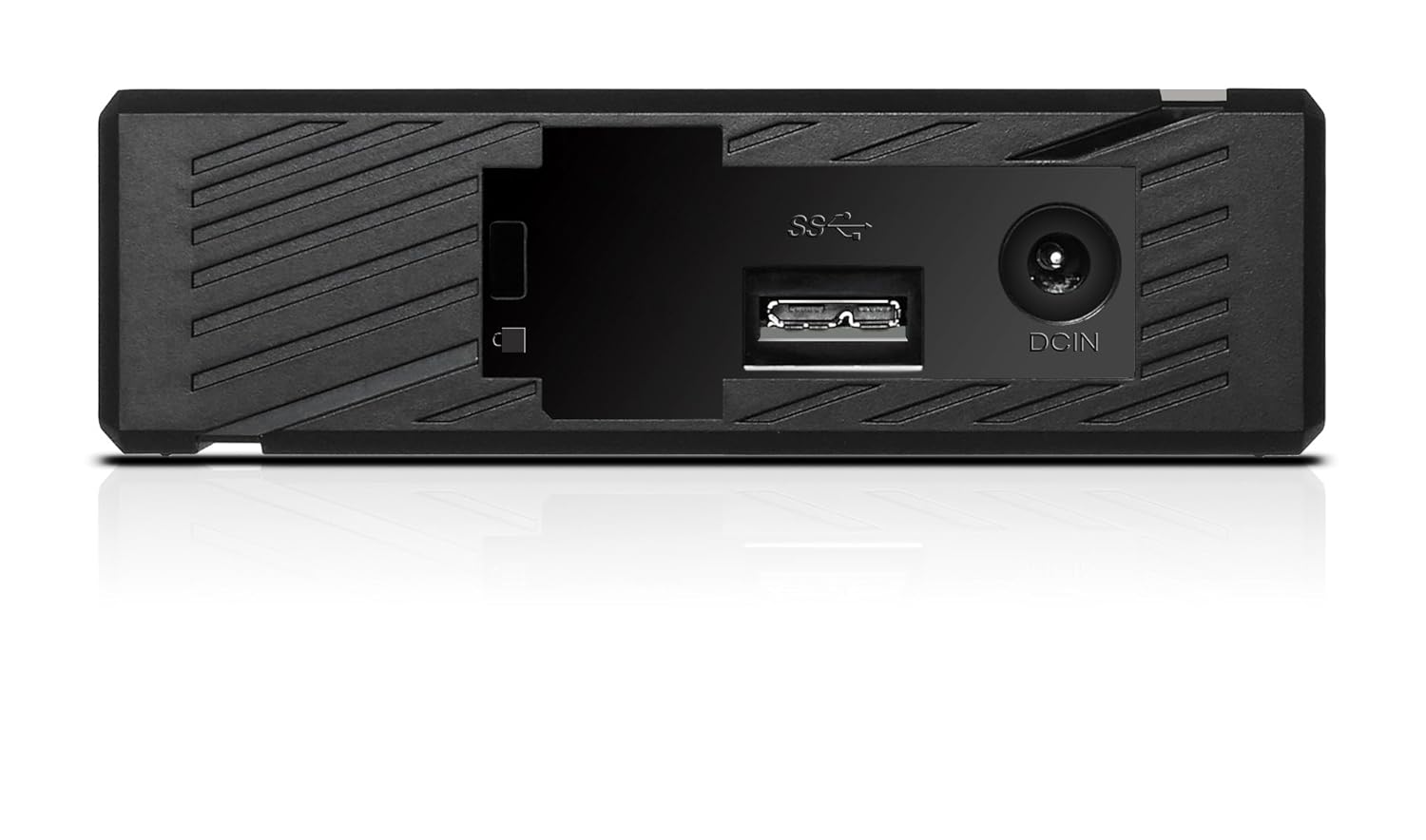
Abbildung 2: Rückseite view of the ADATA HM900, highlighting the USB and DC IN ports for connection.
3. Bedienung der Festplatte
3.1 Erste Erkennung
Upon first connection, your operating system (Windows, macOS, Linux) or compatible device (e.g., smart TV) should automatically detect the ADATA HM900. For computers, it may appear as a new drive letter or volume in 'My Computer'/'This PC' or 'Finder'.
3.2 Datenübertragung
Übertragen files, simply drag and drop them to and from the HM900 drive icon. For larger transfers, it is recommended to use your operating system's copy/paste functions or dedicated backup software.
3.3 Using with a Television
The ADATA HM900 is compatible with televisions that support external storage devices. Connect the drive as described in Section 2.2. Refer to your television's user manual for specific instructions on how to access and play media files from an external USB drive.
4. Wartung und Pflege
Proper care ensures the longevity and reliability of your ADATA HM900 external hard drive:
- Sichere Trennung: Always safely eject or unmount the hard drive from your operating system before physically disconnecting the USB cable or power. This prevents data corruption.
- Physischer Schutz: Avoid dropping or subjecting the drive to strong impacts, as it contains a mechanical hard disk that can be damaged.
- Umgebungsbedingungen: Store and operate the drive in a cool, dry environment, away from direct sunlight, extreme temperatures, and high humidity.
- Reinigung: Reinigen Sie die Außenseite des Laufwerks mit einem weichen, trockenen Tuch. Verwenden Sie keine flüssigen Reiniger oder Lösungsmittel.
5. Fehlerbehebung
5.1 Laufwerk nicht erkannt
- Verbindungen prüfen: Ensure both the power adapter and USB cable are securely connected to the drive and your device.
- Versuchen Sie es mit einem anderen USB-Anschluss: Connect the drive to a different USB port on your computer or device.
- Leistung überprüfen: Confirm the power adapter is plugged into a working electrical outlet and the drive's indicator light is on.
- Gerät neu starten: Restart your computer or television and try connecting the drive again.
- Datenträgerverwaltung prüfen (Windows) / Festplattendienstprogramm (macOS): For computers, check if the drive appears in disk management tools, even if it doesn't have a drive letter assigned.
5.2 Langsame Datenübertragungsgeschwindigkeiten
- Verwenden Sie den USB 3.0-Anschluss: Ensure the drive is connected to a USB 3.0 (or higher) port on your device for optimal speeds. USB 2.0 ports will result in slower transfers.
- Vermeiden Sie andere USB-Geräte: Trennen Sie während großer Datenübertragungen andere USB-Geräte mit hoher Bandbreite.
- Laufwerkszustand prüfen: Run a disk check utility on your computer to ensure the drive is healthy.
6. Spezifikationen
| Besonderheit | Spezifikation |
|---|---|
| Marke | ADATA |
| Modellnummer | AHM900-6TU3-CEUBK |
| Digitale Speicherkapazität | 6 TB |
| Festplattenbeschreibung | Mechanische Festplatte |
| Formfaktor der Festplatte | 2.5 Zoll |
| Konnektivitätstechnologie | USB |
| Artikelabmessungen (LxBxH) | 19 x 12.1 x 3.65 Zentimeter |
| Artikelgewicht | 998 g |
| Wastage | 12 Watt |
| Kompatible Geräte | Television, Personal Computers |
| Erstes verfügbares Datum | 11. November 2016 |
7. Garantie und Support
Detaillierte Garantieinformationen finden Sie auf der Ihrem Produkt beiliegenden Garantiekarte oder auf der offiziellen ADATA-Website. website. Support resources, including drivers and firmware updates, may also be available on the ADATA support portal.