
1. Einleitung
Thank you for choosing the Kaidi KD-766 Gaming Headset. This manual provides essential information for the proper setup, operation, and maintenance of your new headset. Please read it thoroughly before use to ensure optimal performance and longevity of the product.
2. Sicherheitshinweise
- Um Gehörschäden vorzubeugen, vermeiden Sie längeres Hören bei hoher Lautstärke.
- Setzen Sie das Headset keinen extremen Temperaturen, hoher Luftfeuchtigkeit oder korrosiven Substanzen aus.
- Halten Sie das Gerät von Wasser und anderen Flüssigkeiten fern.
- Versuchen Sie nicht, das Headset zu zerlegen oder zu verändern. Dadurch erlischt die Garantie.
- Reinigen Sie das Headset ausschließlich mit einem weichen, trockenen Tuch.
3. Packungsinhalt
Stellen Sie sicher, dass alle Artikel im Paket vorhanden sind:
- Kaidi KD-766 Gaming Headset
- Benutzerhandbuch (dieses Dokument)

Image: Retail box of the Kaidi KD-766 Gaming Headset, showing the headset with RGB lighting and the model number KD-766.
4. Produktüberschreitungview
Familiarize yourself with the components of your KD-766 Gaming Headset.
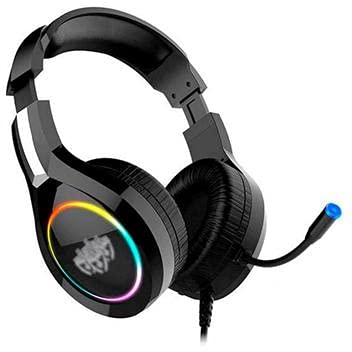
Image: The Kaidi KD-766 Gaming Headset, featuring over-ear cups, an adjustable headband, and a flexible boom microphone.
- Verstellbares Kopfband: Für eine bequeme Passform.
- Gepolsterte Ohrmuscheln: Over-ear design for sound isolation and comfort.
- Flexibles Bügelmikrofon: Adjustable for clear voice communication.
- Inline-Fernbedienung: Zur Lautstärkeregelung und Mikrofonstummschaltung.
- 3.5mm Audio Jack (P2): Für Audio-Ein-/Ausgabe.
- USB-Anschluss: For powering LED lighting.
5. Einrichtungsanweisungen
5.1 Connecting to a PC/Console
- Audioverbindung: Locate the 3.5mm audio jack (P2) on your computer or gaming console. Plug the 3.5mm connector from the headset into this port. Ensure it is fully inserted.
- USB Power (for LED): If your headset features LED lighting, plug the USB connector into an available USB port on your computer or console. This provides power for the lighting effects.
- Mikrofon-Setup: If your device has separate audio and microphone jacks, you may need a Y-splitter adapter (not included) to use both the headset audio and microphone simultaneously with a single 3.5mm combo jack. For devices with separate ports, plug the 3.5mm audio jack into the headphone port and the microphone jack (if separate) into the microphone port. The KD-766 typically uses a single 3.5mm jack for audio and mic, plus a USB for LED.
- Einstellungen anpassen: After connecting, go to your device's sound settings to ensure the headset is selected as the default audio output and input device. Adjust volume levels as needed.
6. Bedienungsanleitung
6.1 Lautstärkeregelung
Use the in-line remote control on the headset cable to adjust the volume. Rotate the volume wheel up to increase volume and down to decrease it.
6.2 Mikrofonnutzung
Position the flexible boom microphone approximately 2-3 cm (1 inch) from your mouth for optimal voice clarity. Use the microphone mute switch on the in-line remote to quickly turn the microphone on or off.
6.3 LED-Beleuchtung
The LED lighting on the earcups will illuminate automatically when the USB connector is plugged into a powered USB port. There are no user-adjustable controls for the LED lighting.
7. Wartung
- Reinigung: Wipe the headset with a soft, dry, lint-free cloth. Do not use liquid cleaners or aerosols.
- Lagerung: Store the headset in a cool, dry place when not in use. Avoid direct sunlight and extreme temperatures.
- Kabelpflege: Um Beschädigungen zu vermeiden, sollten Sie die Kabel nicht scharf biegen oder übermäßig daran ziehen.
8. Fehlerbehebung
| Problem | Mögliche Ursache | Lösung |
|---|---|---|
| Kein Ton vom Headset. | Headset not properly connected. Volume too low. Incorrect audio output selected. | Ensure the 3.5mm jack is fully inserted. Increase volume using the in-line control and your device's settings. Check your device's sound settings and select the headset as the default output. |
| Mikrofon funktioniert nicht. | Microphone muted. Incorrect audio input selected. | Check the microphone mute switch on the in-line remote. Ensure the headset microphone is selected as the default input device in your device's sound settings. |
| Die LED-Leuchten funktionieren nicht. | Der USB-Anschluss ist nicht eingesteckt oder erhält keinen Strom. | Ensure the USB connector is securely plugged into a powered USB port. Try a different USB port. |
| Die Klangqualität ist schlecht. | Loose connection. Audio source issue. | Check all connections. Test the headset with another device to rule out an issue with the audio source. |
9. Spezifikationen
| Marke: | Kaidi |
| Modell: | KD-766 |
| Ohrplatzierung: | Circum-aural (Over-ear) |
| Geräuschpegelkontrolle: | Schallisolierung |
| Empfindlichkeit: | 108 dB |
| Frequenzbereich: | 20 Hz – 20 kHz |
| Konnektivitätstechnologie: | Verdrahtet |
| Kopfhörereingang: | 3.5-mm-Buchse |
| Kompatible Geräte: | Desktops, Notebooks, Gaming Consoles |
| Kontrollmethode: | Fernbedienung (Inline) |
10. Garantie und Support
For warranty information and technical support, please refer to the warranty card included with your product or contact your local Kaidi distributor or retailer. Keep your proof of purchase for warranty claims.