
1. Einleitung
Thank you for choosing the Comelit Classic Monitor, Model 6101N. This manual provides essential information for the correct installation, operation, and maintenance of your video intercom monitor. Please read these instructions carefully before using the device to ensure safe and efficient operation.
The Comelit Classic Monitor is designed to provide reliable video and audio communication for door entry systems, enhancing security and convenience for your home or office.
2. Sicherheitshinweise
- Elektrische Sicherheit: Installation and maintenance should only be performed by qualified personnel. Disconnect power before performing any wiring or service.
- Umfeld: Do not expose the monitor to extreme temperatures, humidity, direct sunlight, or corrosive substances.
- Reinigung: Verwenden Sie zur Reinigung ein weiches, trockenes Tuch. Verwenden Sie keine Scheuer- oder Lösungsmittel.
- Änderungen: Do not attempt to modify or repair the device yourself. Unauthorized modifications may void the warranty and pose safety risks.
3. Packungsinhalt
Bitte prüfen Sie, ob alle Komponenten im Paket vorhanden sind:
- Comelit Classic Monitor (Model 6101N)
- Wandhalterung
- Befestigungsschrauben und Dübel
- Bedienungsanleitung (dieses Dokument)
4. Produktüberschreitungview
The Comelit Classic Monitor features a sleek design and intuitive controls for managing your door entry system. Below is an image of the monitor, highlighting its key features.
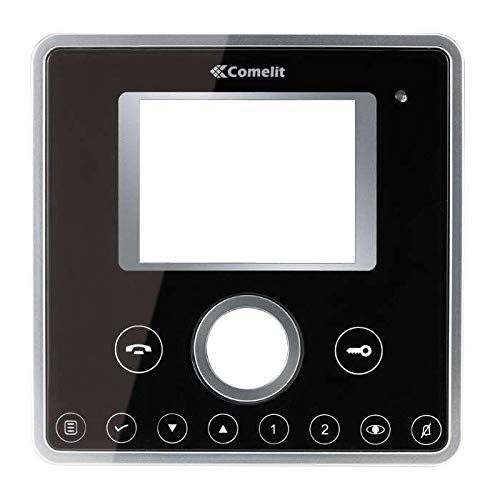
Abbildung 1: Vorderseite view of the Comelit Classic Monitor (Model 6101N). This image shows the monitor's display screen, handset, and control buttons. The monitor is black with a minimalist design.
Zu den wichtigsten Komponenten gehören typischerweise:
- Bildschirm: Zeigt das Videobild der Außeneinheit.
- Mobilteil: Für die Audiokommunikation.
- Türöffnertaste: Activates the electric lock to open the door.
- Zusatztaste: May control additional functions (e.g., secondary door, stair light).
- Lautstärkeregelung: Adjusts ringtone and communication volume.
5. Einrichtung und Installation
Installation of the Comelit Classic Monitor requires electrical wiring and should ideally be performed by a qualified technician. Incorrect installation can lead to device malfunction or safety hazards.
5.1 Montage des Monitors
- Choose a suitable location on an interior wall, away from direct heat sources or moisture.
- Befestigen Sie die Montagehalterung mit den mitgelieferten Schrauben und Dübeln an der Wand. Achten Sie darauf, dass die Halterung waagerecht angebracht ist.
- Refer to the system wiring diagram (provided with your outdoor unit or system documentation) for correct cable connections.
- Connect the system cables to the monitor's terminals as indicated in the wiring diagram. Ensure all connections are secure.
- Carefully attach the monitor to the mounting bracket, ensuring it clicks securely into place.
5.2 Erstes Einschalten
Once installed, restore power to the system. The monitor should power on and display a standby screen or indicator light. Perform a test call from the outdoor unit to verify proper operation.
6. Bedienungsanleitung
6.1 Einen Anruf annehmen
- When someone calls from the outdoor unit, the monitor will ring and display the video feed.
- Lift the handset to answer the call and begin two-way audio communication.
- To end the call, replace the handset.
6.2 Tür öffnen
During a call, or when the monitor is active, press the Türöffnertaste (often marked with a key symbol) to activate the electric lock and open the door.
6.3 Einstellungen anpassen
- Volumen: Use the volume control (usually a rotary dial or buttons on the side/bottom) to adjust the ringtone and communication volume.
- Helligkeit Kontrast: Some models may have controls for adjusting screen brightness or contrast. Refer to specific model features if available.
7. Wartung
- Reinigung: Regularly wipe the monitor's surface and screen with a soft, dry, anti-static cloth. Do not use liquid cleaners directly on the screen or device.
- Inspektion: Überprüfen Sie regelmäßig auf lose Verbindungen oder sichtbare Beschädigungen. Sollten Sie Probleme feststellen, wenden Sie sich an einen qualifizierten Techniker.
- Software-Updates: If your system supports firmware updates, follow the manufacturer's instructions for applying them to ensure optimal performance and security.
8. Fehlerbehebung
| Problem | Mögliche Ursache | Lösung |
|---|---|---|
| Kein Video/Audio vom Außengerät. | Loose wiring, power issue, outdoor unit malfunction. | Check all connections. Ensure system has power. Contact technician if problem persists. |
| Der Monitor lässt sich nicht einschalten. | No power supply, faulty wiring, monitor malfunction. | Verify power supply to the system. Check wiring. Contact technician. |
| Türöffner funktioniert nicht. | Wiring issue to electric lock, faulty lock, monitor button malfunction. | Check wiring to the lock. Test the lock independently if possible. Contact technician. |
| Schlechte Videoqualität. | Dirty camera lens (outdoor unit), poor wiring, interference. | Clean outdoor camera lens. Check wiring for damage or interference. |
9. Spezifikationen
Below are the technical specifications for the Comelit Classic Monitor, Model 6101N:
- Modellnummer: 6101N
- Hersteller: Comelit
- Produktart: Video-Gegensprechanlage-Monitor
- ASIN: B01MSE76EO
- Anzahl der Produkte: 1
- Frühestmöglicher Termin: 2. Februar 2017
- Note: Specific electrical and display specifications may vary by system configuration. Refer to your system's main documentation for full details.
10. Garantie und Support
Comelit products are covered by a manufacturer's warranty. For specific warranty terms and conditions, please refer to the warranty card included with your product or visit the official Comelit webBewahren Sie Ihren Kaufbeleg für Garantieansprüche auf.
For technical support, service, or further assistance, please contact your authorized Comelit dealer or visit the official Comelit support page:
Official Comelit WebWebsite: www.comelitgroup.com
Please have your model number (6101N) and purchase details ready when contacting support.