
Einführung
Thank you for choosing the Aqualin Dual Outlet Irrigation Timer Controller. This device is designed to automate your garden watering, providing convenience and efficient water management. With two independently programmable outlets, you can customize watering schedules for different areas of your garden or lawn. Please read this manual carefully to ensure proper installation, operation, and maintenance of your irrigation timer.
Produkt überview
The Aqualin YL21060 features a clear LCD display, intuitive controls, and robust construction for outdoor use. It offers flexible programming options, including a rain delay function to conserve water.

The Aqualin Dual Outlet Irrigation Timer Controller, shown attached to a faucet, featuring a digital display and two independent water outlets.
Hauptmerkmale:
- Dual Independent Outlets: Program two separate watering zones with unique schedules.
- Flexible Programmierung: Set desired frequency and duration for each zone.
- Regenverzögerungsfunktion: Skip watering sessions during and after rainy days (1-7 days).
- Manuelle Bewässerung: Initiate immediate watering without interrupting programmed cycles.
- IPX5 Wasserdicht: Für den dauerhaften Einsatz im Außenbereich konzipiert.
- Einfache Installation: Features a swivel joint for quick connection to standard faucets (3/4" or 1").
- LCD Anzeige: Clear digital display for easy programming and monitoring.
- Einlassfilter: Helps prevent debris from entering the system.

Ein Überview of the Aqualin timer's features, including manual watering, IPX5 waterproofing, two independent zones, an inlet filter, an LCD display, and a rain delay function.
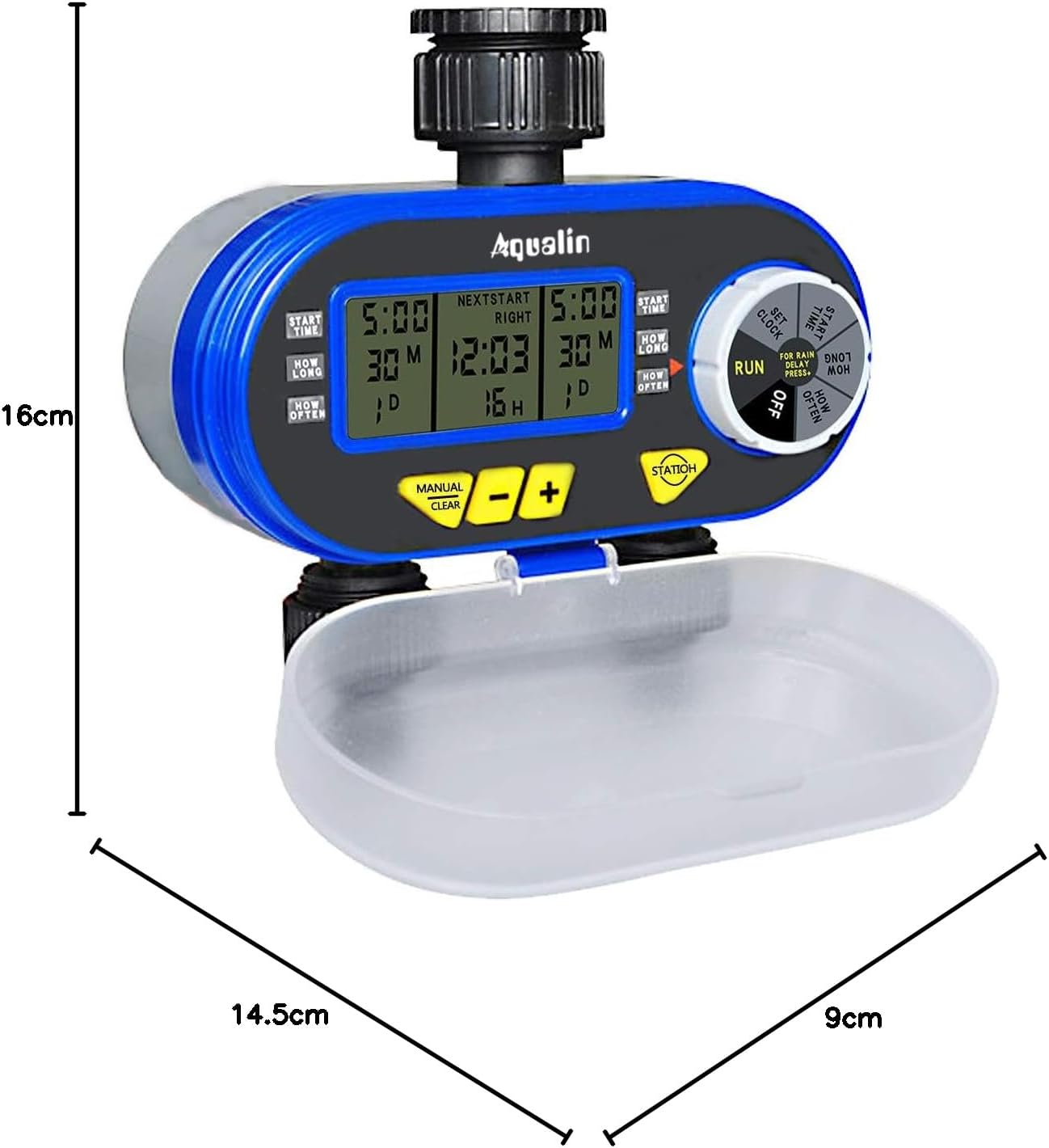
A diagram showing the physical dimensions of the Aqualin timer: 16cm height, 14.5cm length, and 9cm depth.
Aufstellen
- Einlegen der Batterie:
- Open the battery compartment cover located at the back of the unit.
- Insert two (2) AA alkaline batteries, ensuring correct polarity.
- Verschließen Sie das Batteriefach sorgfältig.
- Anschluss an den Wasserhahn:
- Attach the timer to a standard 3/4" (19mm) or 1" (25mm) outdoor faucet. The swivel joint allows for easy, tool-free connection.
- Ensure the connection is tight to prevent leaks. Do not overtighten.
- Schließen Sie Ihre Gartenschläuche an die beiden unabhängigen Ausgänge an der Unterseite der Zeitschaltuhr an.
- Erste Zeiteinstellung:
- Rotate the main dial to the 'SET CLOCK' position.
- Verwenden Sie die Tasten „+“ und „-“, um die aktuelle Uhrzeit anzupassen.
- Press 'ENTER' to confirm the setting.
- Rain Sensor (Optional):
- If using an external rain sensor, connect it to the designated rain sensor hole.
- Ensure the internal contacts for the rain sensor are not bent if no sensor is connected, as this can prevent watering.

Nahaufnahme view highlighting the 360-degree anti-leak design, the rain sensor input hole, and the battery compartment cover of the Aqualin timer.
Bedienungsanleitung
The Aqualin timer offers both automatic and manual watering modes for maximum flexibility.
Video demonstrating the automatic and manual functions of the Aqualin Dual Outlet Irrigation Timer Controller, showing how to set watering schedules and activate manual irrigation.
1. Automatic Function Programming:
The timer allows independent programming for two zones (Zone 1 and Zone 2).

This image illustrates the independent programming capabilities of the Aqualin timer, with separate settings for start time, duration, and frequency for Zone 1 and Zone 2.
- Startzeit einstellen:
- Rotate the dial to 'START TIME'.
- Use '+' and '-' to set the desired start time for Zone 1. Press 'ENTER'.
- Für Zone 2 wiederholen.
- Einstellen der Dauer:
- Rotate the dial to 'HOW LONG'.
- Use '+' and '-' to set the watering duration for Zone 1 (1 minute to 240 minutes). Press 'ENTER'.
- Für Zone 2 wiederholen.
- Einstellen der Häufigkeit (Frequenz):
- Rotate the dial to 'HOW OFTEN'.
- Use '+' and '-' to set the watering frequency for Zone 1 (e.g., every 12 hours, every 3 days). Press 'ENTER'.
- Für Zone 2 wiederholen.
- Programm ausführen:
- Once all settings are configured, rotate the dial to 'RUN'. The timer will now operate according to your programmed schedule.
2. Rain Delay Function:
To prevent overwatering and save water, use the rain delay feature.

The timer's display showing the Rain Delay feature, which allows skipping irrigation for 1 to 7 days to conserve water.
- While in 'RUN' mode, press the 'RAIN DELAY' button.
- Use '+' or '-' to select the desired delay period (e.g., 24, 48, 72 hours, or up to 7 days).
- Press 'ENTER' to activate the rain delay. Watering will resume automatically after the selected period.
3. Manuelle Bewässerung:
Sofort bewässern, ohne Ihren programmierten Zeitplan zu beeinträchtigen:

The Aqualin timer in manual watering mode, allowing for immediate irrigation without altering programmed schedules.
- While in 'RUN' mode, press the 'MANUAL/CLEAR' button.
- Use '+' or '-' to set the desired manual watering duration (1 to 360 minutes).
- Press 'ENTER' to start manual watering.
- To stop manual watering, press 'MANUAL/CLEAR' again.
Wartung
- Batteriewechsel: Replace AA batteries every 1.5 to 3 months, or when the low battery indicator appears on the display, to ensure continuous operation.
- Reinigung des Einlassfilters: Periodically check and clean the inlet filter to prevent clogging and maintain optimal water flow. Remove the timer from the faucet, unscrew the inlet connection, and rinse the filter under running water.
- Überwinterung: Before the first frost, disconnect the timer from the faucet and hoses. Drain any remaining water from the unit and store it indoors in a dry, frost-free location.
- Allgemeine Reinigung: Löschen Sie den Timer mit Anzeigeamp Mit einem Tuch Schmutz und Ablagerungen entfernen. Keine Scheuermittel oder Lösungsmittel verwenden.
Fehlerbehebung
| Problem | Mögliche Ursache | Lösung |
|---|---|---|
| Kein Wasserfluss |
|
|
| Lecks aus Verbindungen |
|
|
| Timer not programming correctly |
|
|
| Batteriefach klemmt | Battery compartment inserted incorrectly. | Ensure the battery compartment is inserted in the correct orientation. Forcing it can cause damage. |
Technische Daten
| Besonderheit | Detail |
|---|---|
| Marke | Aqualin |
| Modellnummer | YL21060 |
| Material | ABS |
| Abmessungen (L x B x H) | 14.5 cm x 9 cm x 16 cm |
| Anzahl der Einstellungen | 2 (Unabhängige Zonen) |
| Wasserhahnanschluss | 3/4" (19mm) or 1" (25mm) |
| Bewässerungsdauer | 1 Minute zu 240 Minuten |
| Stromquelle | 2 x AA-Batterien |
| GTIN | 613869410455 |
Garantie und Support
The Aqualin Dual Outlet Irrigation Timer Controller comes with a standard manufacturer's warranty. For specific warranty details, technical assistance, or to download a detailed PDF instruction manual, please visit the official Aqualin webBesuchen Sie die Website oder kontaktieren Sie den Kundendienst. Bewahren Sie Ihren Kaufbeleg als Kaufnachweis für Garantieansprüche auf.
Anwendungsszenarien

This image illustrates the versatility of the Aqualin timer, suitable for various watering applications such as gardens, lawns, farms, and potted plants.