
Einführung
This manual provides instructions for the USARMT replacement remote control, designed for use with various Seiki Blu-ray players. This remote is pre-programmed and requires no additional setup beyond battery installation.
Aufstellen
Einlegen der Batterien
The remote control operates on two AAA alkaline batteries (not included).
- Suchen Sie das Batteriefach auf der Rückseite der Fernbedienung.
- Schieben Sie den Deckel des Batteriefachs nach unten, um ihn zu öffnen.
- Legen Sie zwei AAA-Batterien ein und achten Sie darauf, dass die Plus- (+) und Minus- (-) Anschlüsse mit den Markierungen im Inneren des Batteriefachs übereinstimmen.
- Schieben Sie den Batteriefachdeckel wieder an seinen Platz, bis er sicher einrastet.
The remote is now ready for use.
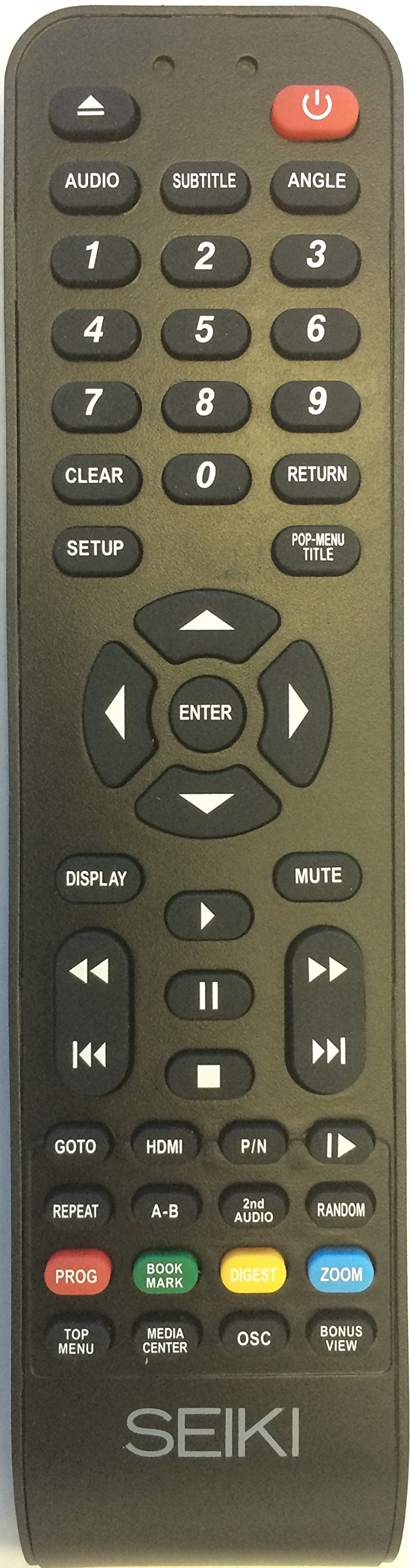
Abbildung 1: USARMT Replacement Remote Control for Seiki Blu-ray Players. This image displays the full layout of the remote control, showing all buttons and their labels, including the power button, number pad, navigation controls, and function buttons.
Bedienungsanleitung
Tastenfunktionen
This section details the function of each button on your USARMT replacement remote control.
- Netzschalter (⑂): Turns the Blu-ray player on or off.
- AUDIO: Wählt Audiospuren oder Modi aus.
- SUBTITLE: Toggles subtitles on or off, or cycles through available subtitle languages.
- WINKEL: Changes the viewing angle on compatible discs.
- Nummernblock (0-9): Used for direct track selection, chapter selection, or inputting numerical values.
- KLAR: Clears the current input or selection.
- ZURÜCKKEHRENKehrt zum vorherigen Menü oder Bildschirm zurück.
- AUFSTELLEN: Accesses the system setup menu of the Blu-ray player.
- POP-MENU/TITLE: Displays the disc's pop-up menu or title menu.
- Navigationstasten (nach oben, unten, links, rechts): Navigiert durch Menüs und Optionen.
- EINGEBEN: Bestätigt eine Auswahl oder Aktion.
- ANZEIGE: Shows on-screen display information, such as playback time or disc status.
- MUTE: Schaltet die Audioausgabe stumm oder hebt die Stummschaltung auf.
- Wiedergabesteuerung:
- Zurückspulen (⏪): Rewinds playback.
- Schnellvorlauf (⏩): Fast forwards playback.
- Vorheriger Titel (⏮): Skips to the beginning of the previous track or chapter.
- Nächster Titel (⏭): Skips to the beginning of the next track or chapter.
- Abspielen (▶): Starts or resumes playback.
- Pause (⏸): Pausiert die Wiedergabe.
- Stopp (⏹): Stoppt die Wiedergabe.
- GEHE ZU: Jumps to a specific time, track, or chapter.
- HDMI: Selects the HDMI input (if applicable to the player).
- Teile-Nr.: Switches between PAL and NTSC video formats (if applicable).
- WIEDERHOLEN: Repeats a track, chapter, or entire disc.
- AB: Repeats a specific section between two marked points (A and B).
- 2nd AUDIO: Selects a secondary audio track.
- ZUFÄLLIG: Plays tracks in a random order.
- PROG (Programm): Enters program mode to create a custom playback sequence.
- BOOK MARK: Sets or recalls a bookmark during playback.
- VERDAUEN: Displays a digest or thumbnail view of the disc content.
- ZOOM: Zooms in on the video image.
- TOP MENU: Accesses the main menu of the disc.
- MEDIA CENTER: Opens the media center function (if available on the player).
- OSC: On-Screen Control (functionality may vary).
- BONUS VIEW: Activates BonusView/Picture-in-Picture features on compatible discs.
Wartung
Pflege und Handhabung
- Keep the remote control dry. Liquids can damage the internal circuitry.
- Setzen Sie die Fernbedienung keinen extremen Temperaturen aus.
- Die Fernbedienung darf nicht fallen gelassen oder starken Stößen ausgesetzt werden.
- Reinigen Sie die Fernbedienung mit einem weichen, trockenen Tuch. Verwenden Sie keine Scheuermittel oder Lösungsmittel.
- Wenn die Fernbedienung längere Zeit nicht verwendet wird, entfernen Sie die Batterien, um ein Auslaufen zu verhindern.
Fehlerbehebung
Häufige Probleme und Lösungen
| Problem | Mögliche Ursache | Lösung |
|---|---|---|
| Die Fernbedienung funktioniert nicht. | Tote oder falsch eingelegte Batterien. | Ersetzen Sie die Batterien durch neue AAA-Alkalibatterien und achten Sie dabei auf die richtige Polarität. |
| Remote signal is not reaching the player. | Obstruction between remote and player; remote is too far away; infrared sensor on player is blocked. | Ensure a clear line of sight between the remote and the Blu-ray player. Move closer to the player. Check if anything is blocking the player's IR sensor. |
| Bestimmte Tasten reagieren nicht. | Button may be stuck or damaged; remote may not be fully compatible with all player functions. | Gently press the button multiple times. If the issue persists, the remote may not support that specific function for your player model. |
Technische Daten
Technische Details
- Marke: USARMT
- Modellnummer: 4330255057
- Konnektivitätstechnologie: Infrarot
- Kompatible Geräte: Seiki Blu-ray, DVD/Blu-ray Players
- Akku-Typ: 2 x AAA-Alkaline-Batterien (nicht im Lieferumfang enthalten)
- Maximale Reichweite: 10 Meter (ungefähr 33 Fuß)
- Besonderheit: Ergonomic design, Pre-programmed
Garantie und Support
Produktinformationen
This USARMT replacement remote control comes with a 30-day hassle-free return policy. For further assistance or inquiries, please refer to the seller's contact information on the purchase platform.
For specific operational details of your Seiki Blu-ray player, please consult the original manual provided with your player.