
ILIFE V5s Pro
ILIFE V5s Pro Robot Vacuum and Mop Combo User Manual
Modell: V5s Pro
Einführung
This manual provides essential information for the safe and efficient operation, maintenance, and troubleshooting of your ILIFE V5s Pro Robot Vacuum and Mop Combo. Please read it thoroughly before using the appliance and retain it for future reference.

The ILIFE V5s Pro Robot Vacuum and Mop Combo.
Aufstellen
1. Auspacken und Komponentencheck
Nehmen Sie alle Komponenten vorsichtig aus der Verpackung. Stellen Sie sicher, dass alle unten aufgeführten Teile vorhanden sind:
- 1 ILIFE V5s Pro Robot Vacuum (Vacuum & Mop)
- 1 Wassertank
- 1 Wischmopp
- 1 Mülleimer
- 1-Fernbedienung
- 2 AAA-Batterien (für die Fernbedienung)
- 2 Filter
- 1 AC Adapter (approx. 1.5m length)
- 1 Ladestation
- 1 Reinigungsbürste
- 2 Seitenbürsten
- 1 User's Quick Guide
- 1 Benutzerhandbuch
2. Platzierung der Ladestation
Place the charging base against a wall in an open area, ensuring there are no obstacles within 1 meter (3 feet) to the sides and 2 meters (6 feet) in front. Connect the AC adapter to the charging base and plug it into a power outlet. Ensure the power indicator on the charging base is illuminated.
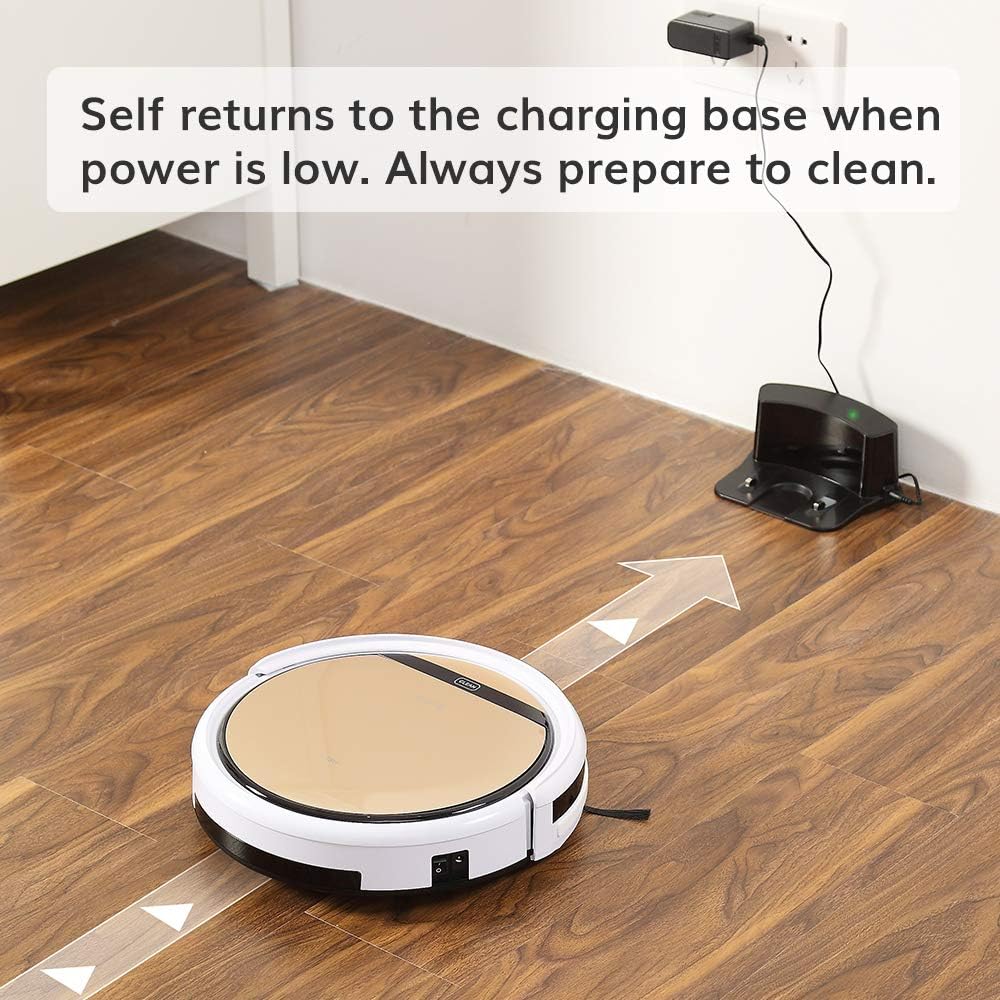
The robot vacuum returning to its charging base.
3. Erstes Aufladen
Before first use, fully charge the robot. You can either place the robot manually onto the charging base, ensuring the charging contacts align, or connect the AC adapter directly to the robot's charging port. The 'CLEAN' button will flash during charging and turn solid when fully charged. A full charge takes approximately 4-5 hours.
4. Montage der Seitenbürsten
Attach the two side brushes to the posts on the underside of the robot. Press firmly until they click into place.

Underside of the robot showing side brush attachment points.
5. Aufstellen eines Mülleimers oder Wassertanks
The ILIFE V5s Pro supports both vacuuming and mopping. For vacuuming, ensure the dustbin is installed. For mopping, replace the dustbin with the water tank and attach the mop cloth.

Removing the dustbin.

Inserting the water tank.
Betrieb
1. Ein-/Ausschalten
To power on, press the 'CLEAN' button on the robot or the power button on the remote control. To power off, press and hold the 'CLEAN' button for a few seconds or use the remote.
2. Reinigungsmodi
The ILIFE V5s Pro offers multiple cleaning modes:
- Automatikmodus: The robot automatically cleans the area, maximizing coverage.
- Spot-Modus: Der Roboter konzentriert sich auf einen bestimmten kleinen Bereich zur intensiven Reinigung.
- Max-Modus: Provides intensive cleaning with increased suction power.
- Edge-Modus: The robot cleans along walls and corners.
Wählen Sie den gewünschten Modus mit der Fernbedienung aus.

The robot vacuum cleaning a low-pile carpet.
3. Terminplanung
You can set a daily cleaning schedule using the remote control. Refer to the remote control section in the User's Quick Guide for detailed instructions on setting the time and schedule.
4. Saug- und Wischfunktionen
The robot automatically detects whether the dustbin (for vacuuming) or water tank (for mopping) is installed and operates accordingly. Ensure the correct tank is in place for the desired cleaning function.

The robot vacuum operating quietly near a sleeping dog, demonstrating its quiet operation.
5. Automatic Docking
When the battery is low, the robot will automatically return to its charging base to recharge. Ensure the charging base is accessible and plugged in.

The robot vacuum intelligently navigating around furniture, showcasing its anti-collision sensors.
Wartung
Regelmäßige Wartung gewährleistet optimale Leistung und verlängert die Lebensdauer Ihres Saugroboters.
1. Entleeren des Mülleimers
Empty the dustbin after each use. Press the 'PUSH' button on the top cover to open, remove the dustbin, and discard collected debris. Clean the dustbin with the provided cleaning brush or rinse with water (ensure it is completely dry before re-inserting).
2. Filter reinigen
The robot uses two filters. Clean the primary filter and the high-performance filter regularly. Tap them to remove dust or use the cleaning brush. Replace filters every 3-6 months, depending on usage.
3. Seitenbürsten reinigen
Periodically remove and clean the side brushes. If they are worn or damaged, replace them with new ones.
4. Cleaning the Suction Inlet
The V5s Pro features a unique suction inlet designed to prevent hair tangles. Regularly check and clean the inlet to ensure efficient debris collection, especially for pet owners.
5. Wartung des Wassertanks und des Wischmopps
After mopping, empty any remaining water from the tank and allow it to air dry. Remove and wash the mop cloth. Ensure the water tank is completely dry before storage.
6. Reinigung der Sensoren und Ladekontakte
Wipe the anti-drop sensors, anti-collision sensors, and charging contacts on both the robot and the charging base with a soft, dry cloth to ensure proper function.
Fehlerbehebung
If your ILIFE V5s Pro encounters an issue, refer to the following common solutions:
- Roboter startet nicht: Ensure the robot is fully charged and the main power switch (usually on the side) is turned on.
- Roboter lädt nicht: Vergewissern Sie sich, dass die Ladestation angeschlossen ist und die Betriebsanzeige leuchtet. Reinigen Sie die Ladekontakte sowohl am Roboter als auch an der Ladestation.
- Roboter bleibt häufig stecken: Clear obstacles like loose cables, small rugs, or furniture that are too low for the robot to pass under.
- Schlechte Reinigungsleistung: Empty the dustbin, clean or replace filters, and clean the side brushes and suction inlet.
- Wischfunktion funktioniert nicht: Ensure the water tank is filled and correctly installed, and the mop cloth is attached.
Bei anhaltenden Problemen konsultieren Sie bitte das vollständige Benutzerhandbuch oder wenden Sie sich an den Kundendienst.
Technische Daten
| Besonderheit | Spezifikation |
|---|---|
| Marke | Ich lebe |
| Modellname | ILFV5SPRO2RB |
| Oberflächenempfehlung | Hartboden, Teppich |
| Besonderheit | Roboter Staubsauger und Wischmopp Combo |
| Farbe | V5s Pro |
| Controllertyp | Fernbedienung |
| Filtertyp | Patrone |
| Akkulaufzeit | 110 Мinuten |
| Akku-Typ | Lithium-Ionen |
| Bandtage | 14.4 Volt |
| Kapazität (Mülleimer) | 300 Milliliter |
| Stromquelle | Batteriebetrieben |
| Artikelabmessungen L x B x H | 11.8 Zoll L x 11.8 Zoll B x 3 Zoll H |
| Artikelgewicht | 4.9 Pfund |
| Geräuschpegel | 58 Dezibel |
| Innen- und Außennutzung | Innenbereich |
| Modellnummer | ILIFEV5SP01 |
| UPC | 768571855510 |
Garantie und Support
Garantieinformationen
A new ILIFE V5s Pro Robot Vacuum is provided with a 12 Monate Garantie. Refurbished or used robots are provided with a 3 Monate GarantieBitte bewahren Sie Ihren Kaufbeleg für Garantieansprüche auf.
Kundenservice
For technical assistance, warranty inquiries, or replacement parts, please contact ILIFE customer support through their official webWebsite oder die Kontaktinformationen, die auf Ihrer Produktverpackung angegeben sind.
Ask a question about this manual
Ask about setup, troubleshooting, compatibility, parts, safety, or missing instructions. Manuals+ will review the question and use this page’s manual context to help answer it.