
Einführung
Thank you for choosing the Symphonized NXT 2.0 Portable Bluetooth Speaker. This manual provides essential information for setting up, operating, and maintaining your speaker to ensure optimal performance and longevity. Please read this manual thoroughly before using the product.
Lieferumfang
- Symphonized NXT 2.0 Portable Bluetooth Speaker
- USB-Ladekabel
- Bedienungsanleitung
Produkt überview
The Symphonized NXT 2.0 speaker features a durable ABS plastic construction with elegant wood accents, providing both robust protection and a natural aesthetic. It is designed for portability and delivers a well-balanced, powerful sound experience.

Front view of the Symphonized NXT 2.0 Portable Bluetooth Speaker, showcasing its dual speaker grilles and wood-grain finish.
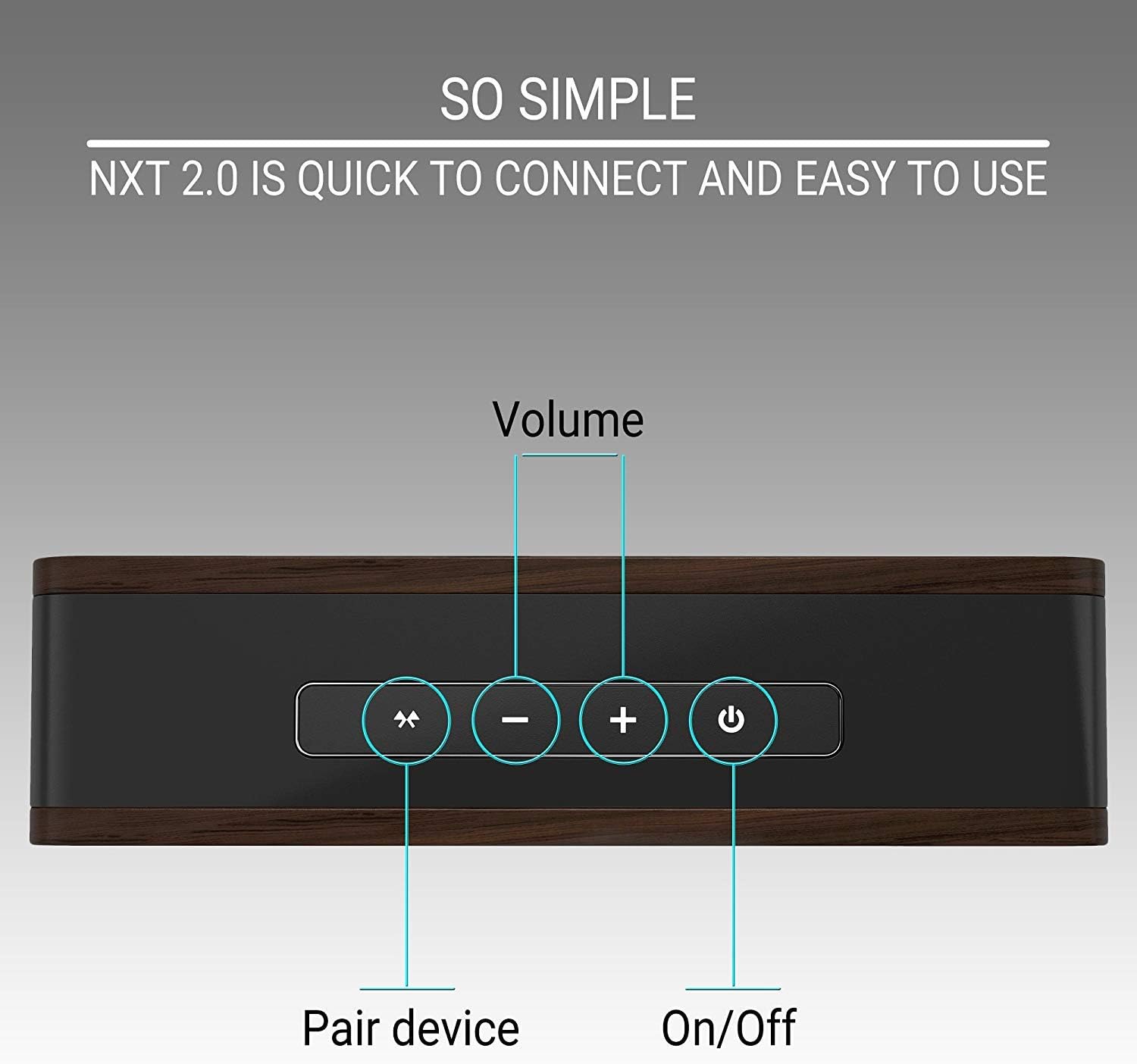
Top panel of the speaker showing the control buttons: Pair Device, Volume Down, Volume Up, and Power On/Off.
Aufstellen
Aufladen des Lautsprechers
- Connect the micro USB end of the charging cable to the charging port on the speaker.
- Verbinden Sie das USB-A-Ende des Ladekabels mit einem kompatiblen USB-Netzteil (nicht im Lieferumfang enthalten) oder einem USB-Anschluss Ihres Computers.
- Die Ladeanzeige leuchtet auf. Eine vollständige Ladung dauert in der Regel etwa 6 Stunden.
- Sobald der Akku vollständig geladen ist, kann die Kontrollleuchte je nach Modell die Farbe wechseln oder erlöschen. Trennen Sie das Ladekabel.
A fully charged speaker provides up to 6 hours of playtime.
Bluetooth-Kopplung
- Stellen Sie sicher, dass der Lautsprecher vollständig aufgeladen ist.
- Press and hold the Power On/Off button on the speaker until you hear an audible prompt or see an indicator light flashing, indicating it's in pairing mode.
- Aktivieren Sie auf Ihrem Gerät (Smartphone, Tablet, Laptop) Bluetooth und suchen Sie nach verfügbaren Geräten.
- Select "Symphonized NXT 2.0" from the list of available devices.
- Once connected, you will hear a confirmation sound, and the indicator light will typically stop flashing and remain solid.
The speaker has a Bluetooth working distance of approximately 10 meters (32 feet).
Wired Connection (AUX Input)
For devices without Bluetooth capability, or if you prefer a wired connection:
- Connect one end of a 3.5mm auxiliary cable (not included) to the AUX input port on the speaker.
- Connect the other end of the 3.5mm auxiliary cable to the audio output jack of your device.
- The speaker will automatically switch to AUX mode, or you may need to select it manually if there is a mode button.
Bedienungsanleitung
Ein-/Ausschalten
- To power on: Press and hold the Power On/Off button until the indicator light illuminates.
- To power off: Press and hold the Power On/Off button until the indicator light turns off.
Lautstärkeregelung
- To increase volume: Press the '+' button.
- To decrease volume: Press the '-' button.
Bluetooth Device Pairing Button
- To initiate pairing mode or reconnect to a previously paired device, press the 'Pair Device' button.
Wartung
Reinigung
- Wischen Sie den Lautsprecher mit einem weichen, trockenen Tuch ab.
- Verwenden Sie keine Scheuermittel, Lösungsmittel oder starke Chemikalien, da diese die Oberfläche oder die internen Bauteile beschädigen können.
Lagerung
- Bewahren Sie den Lautsprecher an einem kühlen, trockenen Ort fern von direkter Sonneneinstrahlung und extremen Temperaturen auf.
- Bei längerer Lagerung sollte darauf geachtet werden, dass der Akku nur teilweise geladen ist (etwa 50 %), um seine Lebensdauer zu verlängern.
Fehlerbehebung
| Problem | Mögliche Ursache | Lösung |
|---|---|---|
| Lautsprecher schaltet sich nicht ein | Schwache Batterie | Laden Sie den Lautsprecher vollständig auf. |
| Bluetooth-Kopplung nicht möglich | Speaker not in pairing mode; Device Bluetooth off; Out of range | Ensure speaker is in pairing mode. Turn on Bluetooth on your device. Move device closer to speaker (within 10m/32ft). |
| Kein Ton oder geringe Lautstärke | Volume too low on speaker or device; Incorrect input mode | Increase volume on both speaker and connected device. Ensure correct input mode (Bluetooth/AUX) is selected. |
| Klangverzerrung bei hoher Lautstärke | Volumen zu hoch | Reduce the volume on the speaker or your connected device. |
Technische Daten
| Besonderheit | Detail |
|---|---|
| Marke | Symphonisiert |
| Modellname | NXT 2.0 |
| Maximale Lautsprecherausgangsleistung | 25 Watt |
| Frequenzgang | 80 Hz - 20 kHz |
| Konnektivitätstechnologie | Aux-Anschluss, Bluetooth, USB |
| Audioausgabemodus | Stereo |
| Gehäusematerial | ABS-Kunststoff |
| Lautsprechertyp | Im Freien |
| Zusätzliche Merkmale | Tragbar |
| Farbe | Schwarz |
| Ist wasserdicht | FALSCH |
| Kontrollmethode | Taste |
| Durchschnittliche Batterielebensdauer | 6 Stunden |
| Anzahl der Audiokanäle | 2.0 |
| Wireless-Technologie | Bluetooth |
| Konnektivitätsprotokoll | Bluetooth |
| Akkuladezeit | 6 Stunden |
| Artikelgewicht | 0.68 Kilogramm |
| Kompatible Geräte | Smartphone, Tablet, Laptop, Fernseher |
| Stromquelle | Batteriebetrieben |
Garantieinformationen
The Symphonized NXT 2.0 Portable Bluetooth Speaker comes with a Limited Warranty. For specific details regarding warranty coverage, duration, and claims process, please refer to the warranty card included with your product or contact Symphonized customer support.
Unterstützung
If you encounter any issues not covered in the troubleshooting section or require further assistance, please contact Symphonized customer support. Contact information can typically be found on the product packaging, the official Symphonized webWebsite oder Ihre Kaufdokumentation.