
Einführung
This manual provides detailed instructions for the setup, operation, and maintenance of your Intex Wi-Fi HD Camera, model IT-101. Please read this manual thoroughly before using the device to ensure proper functionality and safety.
Produkt überview
The Intex Wi-Fi HD Camera IT-101 is a compact security camera designed for monitoring. It features HD video resolution, night vision capabilities, and Wi-Fi connectivity for remote access.
Hauptmerkmale:
- HD-Videoauflösung: Captures video at 1280x720 pixels (720p) with a frame rate of 25 frames per second.
- Weitwinkelobjektiv View: Features a 77-degree lens view angle for broader coverage.
- Nachtsicht: Equipped with Infrared LED illumination for clear night vision up to 10 meters.
- SD-Kartenunterstützung: Unterstützt SD-Karten bis zu 64 GB für die lokale Speicherung.
- Kabellose Verbindung: Connects via Wi-Fi for remote monitoring through mobile or computer applications.
- Kompatibilität: Supports Android and iOS operating systems.
Packungsinhalt:
- Intex Wi-Fi HD Camera IT-101
- Netzteil (DC 5V/1A)
- Benutzerhandbuch (dieses Dokument)
- Montagezubehör (sofern enthalten)
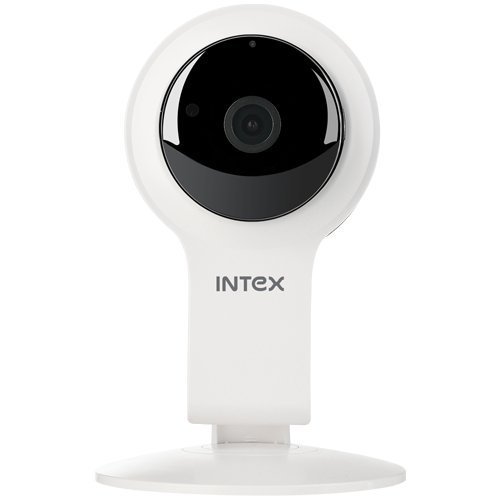
Abbildung 1: Vorderseite view of the Intex Wi-Fi HD Camera IT-101. This image shows the camera lens and the main body of the device.
Aufstellen
1. Einschalten der Kamera:
- Connect the provided DC 5V/1A power adapter to the camera's power input port.
- Stecken Sie das Netzteil in eine normale Steckdose.
- The camera will power on, and an indicator light will illuminate (refer to the camera's physical indicators for specific light behavior).
2. Installing an SD Card (Optional):
To enable local video recording, an SD card (up to 64GB) can be installed.
- Locate the SD card slot on the camera (consult the camera's physical design for exact location).
- Gently insert the SD card into the slot with the contacts facing the correct direction until it clicks into place.
- To remove, press the SD card inward until it springs out.
3. Connecting to Wi-Fi and Mobile App:
The camera requires a mobile application for initial setup and remote viewing. The specific app name is not provided in the product details, please refer to the packaging or a quick start guide for the correct app to download from your device's app store (Android/iOS).
- Download and install the designated mobile application on your smartphone or tablet.
- Open the application and create an account or log in if you already have one.
- Follow the in-app instructions to add a new device. This typically involves scanning a QR code on the camera or manually entering its device ID.
- Connect the camera to your home Wi-Fi network through the app. Ensure your Wi-Fi network is 2.4GHz, as 5GHz networks may not be supported.
- Once connected, the camera's indicator light will change (e.g., solid blue), and you should see the live feed in the app.
Bedienungsanleitung
Live View:
Access the live video feed from your camera through the mobile application. This allows real-time monitoring of the camera's view.
Aufnahme:
- Manuelle Aufnahme: Most applications offer a manual record button to start and stop video recording directly to your phone or the installed SD card.
- Geplante Aufnahme: Configure recording schedules within the app to automatically record at specific times.
- Aufnahme mit Bewegungserkennung: Enable motion detection in the app settings. The camera will automatically record when motion is detected within its field of view.
Wiedergabe:
Aufgenommen footage stored on the SD card can be accessed and played back through the mobile application. Navigate to the "Playback" or "History" section within the app.
Nachtsicht:
The camera automatically switches to night vision mode in low-light conditions. The Infrared LED illuminates the area, allowing for clear black and white video capture up to 10 meters.
Einstellungen:
The mobile application provides various settings to customize your camera's operation, including:
- Video quality adjustment
- Empfindlichkeit der Bewegungserkennung
- Benachrichtigungseinstellungen
- Synchronisierung von Uhrzeit und Datum
- SD card management (formatting, viewing storage)
Wartung
- Reinigung: Reinigen Sie Objektiv und Gehäuse der Kamera mit einem weichen, trockenen Tuch. Vermeiden Sie die Verwendung von scharfen Chemikalien oder Scheuermitteln.
- Firmware-Updates: Periodically check the mobile application for available firmware updates for your camera. Keeping the firmware updated ensures optimal performance and security.
- SD-Kartenverwaltung: Regularly back up important recordings from your SD card. Consider formatting the SD card periodically through the app to maintain performance.
- Umgebungsbedingungen: Ensure the camera is operated within its specified temperature and humidity ranges. The camera is not water-resistant, so avoid exposure to moisture.
Fehlerbehebung
Kamera lässt sich nicht einschalten:
- Stellen Sie sicher, dass das Netzteil sowohl mit der Kamera als auch mit einer funktionierenden Steckdose fest verbunden ist.
- Verify that the power adapter is the correct DC 5V/1A model.
Keine Verbindung zum WLAN möglich:
- Confirm your Wi-Fi network is 2.4GHz. The camera may not support 5GHz networks.
- Stellen Sie sicher, dass sich die Kamera in Reichweite Ihres WLAN-Routers befindet.
- Prüfen Sie, ob das in der App eingegebene WLAN-Passwort korrekt ist.
- Starten Sie Ihren WLAN-Router und die Kamera neu und versuchen Sie dann, die Verbindung wiederherzustellen.
- If issues persist, try resetting the camera to factory defaults (refer to the camera's physical buttons or app for reset option).
Kein Video-Feed in der App:
- Vergewissern Sie sich, dass die Kamera eingeschaltet und mit dem WLAN verbunden ist.
- Überprüfen Sie Ihre Internetverbindung auf Ihrem Mobilgerät.
- Close and reopen the mobile application.
- Ensure the camera's privacy mode (if available) is not activated.
SD Card Not Recording or Recognized:
- Stellen Sie sicher, dass die SD-Karte korrekt eingesetzt ist.
- Verify the SD card is not full. Format it through the app if necessary (this will erase all data).
- Check if the SD card is damaged. Try a different compatible SD card.
- Confirm that recording settings (manual, scheduled, motion detection) are properly configured in the app.
Technische Daten
| Besonderheit | Detail |
|---|---|
| Modellname | IT-101 |
| Bildsensor | H42 1/4 CMOS Sensor |
| Auflösung der Videoaufnahme | 1280x720 Pixels (720p HD) |
| Bildfrequenz | 25 fps |
| Linse View Winkel | 77 Grad |
| Objektivtyp | 3.6 mm, Zoom |
| Fokustyp | Autofokus |
| Nachtsichtentfernung | 10 meters (Infrared LED Illumination) |
| Tag-/Nachtmodus | Yes (Automatic switching) |
| Konnektivitätstechnologie | Kabellos (Wi-Fi) |
| SD-Kartenunterstützung | Bis zu 64 GB |
| Video Supported Format | H.264, MP4 |
| Unterstütztes Bildformat | JPEG |
| Betriebssystemkompatibilität | Android, iOS |
| Stromversorgung | Gleichstrom 5 V/1 A |
| Bruttogewicht | 260g |
| Farbe | Weiß |
| Wasserbeständigkeit | Nicht wasserfest |
| Bildstabilisierung | NEIN |
Garantie und Support
For warranty information and technical support, please refer to the documentation included with your purchase or visit the official Intex webBewahren Sie Ihren Kaufbeleg für Garantieansprüche auf.
Hersteller: Intex
Marke: Intex