
1. Produktüberschreitungview
The PRUNUS L-218AM is a compact and versatile portable radio featuring AM/FM reception and MP3 playback capabilities via Micro TF card or USB. Its small size and lightweight design make it ideal for both indoor and outdoor use. This manual provides detailed instructions for operating and maintaining your device.
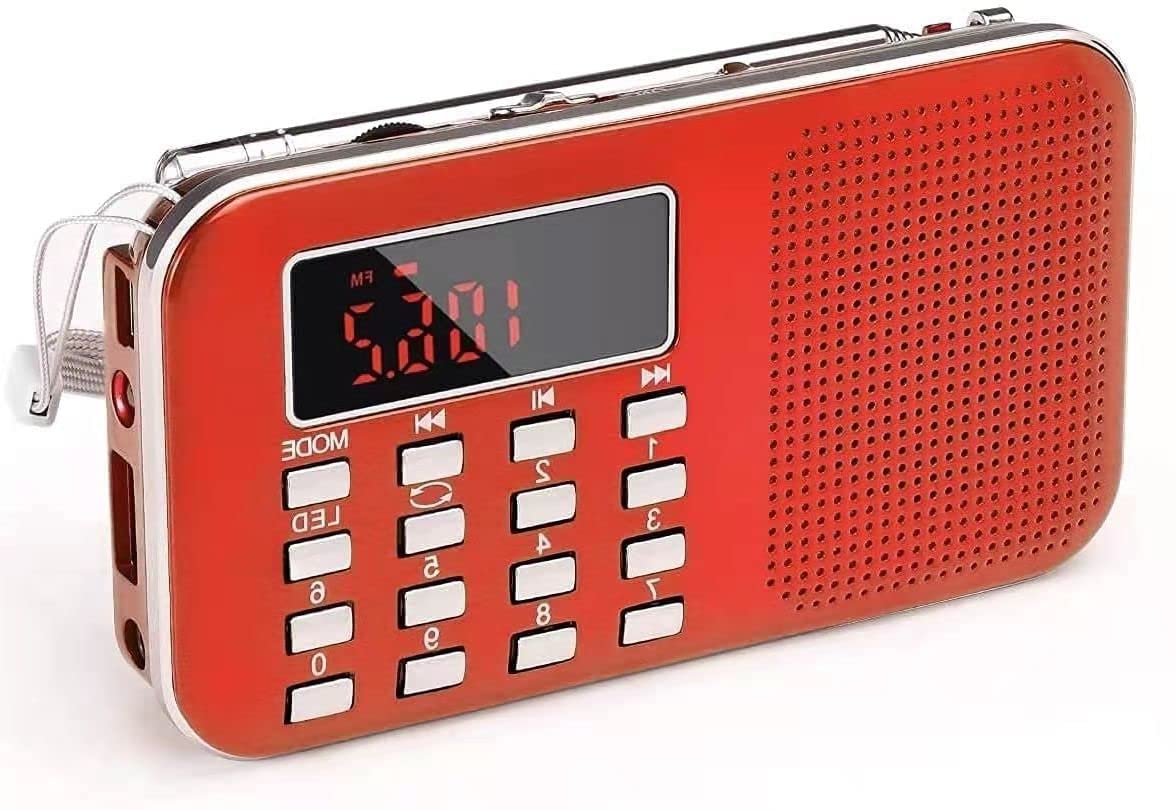
Abbildung 1.1: PRUNUS L-218AM Portable Radio (Red model shown).
Hauptmerkmale:
- Kompakt und tragbar: Measures 11.7 x 2 x 6.4 cm and weighs 126g, making it easy to carry. Includes a carrying strap.
- Hochwertiger Klang: Equipped with a 3W internal magnetic speaker for clear sound with deep bass and smooth treble. Supports headphone output via a 3.5mm jack.
- Hervorragender Radioempfang: Supports AM (522-1710MHz) and FM (70-108MHz) bands with a long 38.5cm antenna for improved signal reception.
- Versatile MP3 Playback: Spielt MP3 ab files from Memory Sticks, TF cards, or via AUX input. Features single, folder, and global loop modes.
- Wiederaufladbarer Akku: Includes an 800mAh rechargeable and replaceable BL5C Li-ion battery, offering 6-8 hours of playback. Can be charged via USB.
- Notfall-Taschenlampe: Integrierte Taschenlampe für mehr Komfort bei schlechten Lichtverhältnissen.
2. Einrichtung
2.1 Einlegen und Laden der Batterie
The PRUNUS L-218AM radio comes with a rechargeable BL5C Li-ion battery. Before first use, it is recommended to fully charge the battery.
- Batterie einlegen: Open the battery compartment cover on the back of the radio and insert the BL5C battery, ensuring correct polarity. Close the cover securely.
- Akku aufladen: Connect the radio to a USB power source (e.g., adapter, computer, power bank) using the provided USB charging cable. The charging time is approximately 3-5 hours. The indicator light will illuminate during charging. Note that the light may not turn off even when fully charged.
2.2 Erstes Einschalten
To power on the radio, locate the power switch, typically on the side or top of the device, and slide it to the 'ON' position. The digital display will light up.
3. Bedienungsanleitung
3.1 Radio Function (AM/FM)
The radio supports both AM (522-1710MHz) and FM (70-108MHz) bands.

Abbildung 3.1: Front view of the PRUNUS L-218AM radio, showing the display, speaker, and control buttons.
- Band auswählen: Press the 'MODE' button to switch between AM and FM radio bands.
- Antenne ausfahren: Für optimalen Empfang die Teleskopantenne vollständig ausziehen.
- Automatische Suche: To automatically search and store available stations, press and hold the 'Pause/Play' button for 3 seconds. The radio will scan and save stations sequentially. Note that the order of stored stations cannot be changed manually.
- Manuelle Abstimmung: In radio mode, you can directly enter a station frequency using the numeric keypad. For example, to tune to 89.8 MHz, press 8-9-8.
- Browse Stored Stations: Use the 'Previous' and 'Next' track buttons to cycle through the automatically stored stations.
3.2 MP3-Wiedergabe
Das Radio kann MP3-Audiodateien abspielen. files from a Memory Stick (USB drive) or a TF (Micro SD) card. It also supports AUX input.
Abbildung 3.2: Universal compatibility of the radio with Micro SD/TF cards, USB flash drives, and AUX input.
- Medien einfügen: Insert a Memory Stick into the USB port or a TF card into the TF card slot.
- Auswahlmodus: Press the 'MODE' button until 'MP3' or the corresponding media source is displayed.
- Wiedergabesteuerung: Verwenden Sie die Tasten „Wiedergabe/Pause“, „Vorheriger Titel“ und „Nächster Titel“, um die Wiedergabe zu steuern.
- Schleifenmodi: The device supports single track loop, folder loop, and global loop modes. Refer to the on-screen indicators or specific button functions for cycling through these modes.
- AUX-Eingang: Connect an external audio device (e.g., computer, mobile phone) to the AUX port using a 3.5mm audio cable. The radio will then act as an external speaker.
3.3 Taschenlampenfunktion
The radio includes a built-in emergency flashlight.
- Taschenlampe aktivieren: Press the 'LED' button to turn the flashlight on or off.
3.4 Kopfhörernutzung
For private listening, connect 3.5mm headphones to the headphone jack on the device.
4. Wartung
To ensure the longevity and optimal performance of your PRUNUS L-218AM radio, follow these maintenance guidelines:
- Reinigung: Reinigen Sie das Äußere des Radios mit einem weichen, trockenen Tuch. Vermeiden Sie die Verwendung von Scheuermitteln oder Lösungsmitteln.
- Wasserbeständigkeit: Dieses Gerät ist nicht wasserbeständig. Keep it away from water, moisture, and high humidity to prevent damage.
- Lagerung: Bei längerer Nichtbenutzung sollte das Radio an einem kühlen, trockenen Ort aufbewahrt werden.
- Batteriepflege: If the radio will not be used for a long time, consider removing the battery to prevent leakage. Recharge the battery periodically if stored for extended periods to maintain its health.
5. Fehlerbehebung
If you encounter issues with your PRUNUS L-218AM radio, refer to the following common problems and solutions:
| Problem | Mögliche Ursache | Lösung |
|---|---|---|
| Das Radio lässt sich nicht einschalten. | Die Batterie ist leer oder falsch eingesetzt. | Ensure the battery is correctly installed and fully charged. Connect to a USB power source. |
| Schlechter Radioempfang. | Antenne nicht ausgefahren, schwaches Signal. | Fully extend the telescopic antenna. Try moving to a location with better signal strength. |
| Cannot change the order of stored radio stations. | Dies ist eine konstruktionsbedingte Einschränkung. | The radio automatically numbers stations after storage, and their order cannot be manually changed. |
| MP3 files spielt nicht. | Nicht unterstützt file format, media not inserted correctly, or corrupted files. | Sicherstellen files are in MP3 format. Check if the Memory Stick or TF card is inserted correctly. Try with different media or files. |
| Kein Ton aus den Kopfhörern. | Headphones not fully plugged in, faulty headphones. | Ensure headphones are securely plugged into the 3.5mm jack. Test with another pair of headphones. |
| Taschenlampe funktioniert nicht. | Battery low, or LED button not pressed correctly. | Charge the battery. Press the 'LED' button firmly. |
6. Spezifikationen
| Besonderheit | Detail |
|---|---|
| Modellnummer | L-218AM |
| Abmessungen (L x B x H) | 11.7 x 2 x 6.4 cm |
| Gewicht | 200 g |
| Radiobänder | AM (522-1710MHz), FM (70-108MHz) |
| Lautsprecherleistungsausgang | 3W |
| Unterstütztes Audioformat | MP3 only |
| Playback Methods | Memory Stick, TF Card, AUX |
| Akku-Typ | BL5C Li-ion (Rechargeable, Replaceable) |
| Batteriekapazität | 800 mAh |
| Ladevolumentage | DC 5V/500MAH |
| Ladezeit | 3-5 Stunden |
| Wiedergabezeit | 6-8 Stunden |
| Konnektivitätstechnologie | USB |
| Besonderheit | Portable, Flashlight |
| Anzeigetyp | LCD (shows station number, no clock function) |
| Wasserbeständigkeit | Nicht wasserbeständig |
7. Garantie und Support
7.1 Garantieinformationen
PRUNUS offers a 30-day no-questions-asked return policy for this product. Please retain your proof of purchase for any warranty claims.
7.2 Kundendienst
For any inquiries or technical assistance, please contact PRUNUS customer support. We aim to respond to all queries within 24 hours.
Weitere Hilfe finden Sie unter PRUNUS Brand Store.