
Motorola C4201
Motorola C4201 Schnurgebundenes/Schnurloses Kombitelefon – Benutzerhandbuch
Einführung
This manual provides comprehensive instructions for the setup, operation, and maintenance of your Motorola C4201 Corded/Cordless Combo Phone. Please read this manual thoroughly before using your new phone to ensure proper functionality and to take full advantage seiner Funktionen.
The Motorola C4201 combines the reliability of a corded phone with the flexibility of a cordless handset, offering convenience for both home and office environments. Key features include a hands-free speakerphone, a 50-name and number phonebook, call transfer capabilities, and an emergency mode.
Sicherheitshinweise
- Verwenden Sie nur die mitgelieferten Netzteile und Batterien.
- Das Telefon darf weder Wasser noch Feuchtigkeit ausgesetzt werden.
- Vermeiden Sie es, das Telefon in der Nähe von Wärmequellen oder direkter Sonneneinstrahlung zu platzieren.
- Außerhalb der Reichweite von Kindern aufbewahren.
- Versuchen Sie nicht, das Gerät selbst zu öffnen oder zu reparieren. Überlassen Sie alle Wartungsarbeiten qualifiziertem Fachpersonal.
Packungsinhalt
Bitte stellen Sie sicher, dass alle unten aufgeführten Artikel in Ihrem Paket enthalten sind:
- 1 x Corded Phone Base Unit
- 1 x Cordless Handset
- 1 x Cordless Handset Charger Base
- 2 x Power Adapters (one for corded base, one for cordless charger)
- 1 x Telefonkabel
- Wiederaufladbare Batterien für schnurlose Mobilteile
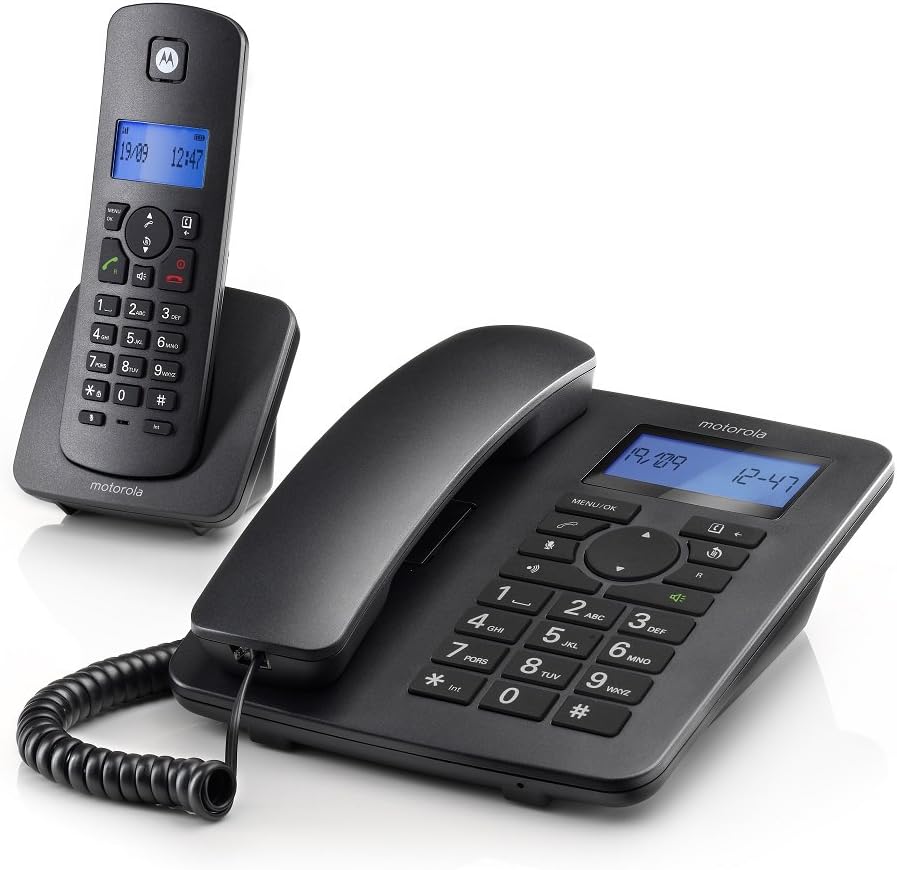
Abbildung 1: Motorola C4201 Corded and Cordless Phone Combo. This image displays the main corded base unit with its handset and the separate cordless handset on its charging cradle.
Aufstellen
1. Connecting the Corded Base Unit
- Connect one end of the telephone line cord to the LINE socket on the back of the corded base unit.
- Verbinden Sie das andere Ende des Telefonkabels mit Ihrer Telefonwandbuchse.
- Connect one power adapter to the POWER socket on the back of the corded base unit.
- Stecken Sie den Netzadapter in eine Steckdose.

Abbildung 2: Motorola C4201 Corded Phone Base Unit. This image shows a top-down view of the corded base unit, highlighting the keypad and display, which is where the line and power connections are typically made on the rear.
2. Einlegen der Batterien in das schnurlose Mobilteil
- Öffnen Sie die Batteriefachabdeckung auf der Rückseite des schnurlosen Mobilteils.
- Legen Sie die mitgelieferten Akkus unter Beachtung der richtigen Polarität (+ und -) ein.
- Schließen Sie den Batteriefachdeckel.
3. Aufladen des schnurlosen Mobilteils
- Connect the second power adapter to the cordless handset charger base.
- Stecken Sie den Netzadapter in eine Steckdose.
- Place the cordless handset on its charger cradle. The display will indicate charging.
- Um eine volle Akkukapazität zu gewährleisten, sollte das Mobiltelefon vor der ersten Benutzung mindestens 16 Stunden lang aufgeladen werden.

Abbildung 3: Motorola C4201 Cordless Handset on Charger. This image shows the cordless handset resting in its charging cradle, ready for use or charging.
4. Ersteinrichtung (Datum und Uhrzeit)
After the phone is powered on, you may be prompted to set the date and time. Follow the on-screen instructions using the navigation keys and the MENU/OK button.
Bedienungsanleitung
Anrufe tätigen und empfangen
Anrufen:
- Corded Handset: Lift the corded handset, dial the number, and press the Anruf Schaltfläche (normalerweise ein grünes Telefonsymbol).
- Schnurloses Mobilteil: Drücken Sie die Anruf button (green phone icon), then dial the number.
So erhalten Sie einen Anruf:
- Corded Handset: Nehmen Sie den kabelgebundenen Hörer ab.
- Schnurloses Mobilteil: Drücken Sie die Anruf Schaltfläche (grünes Telefonsymbol).
Freisprechfunktion
Um die Freisprechfunktion während eines Anrufs zu aktivieren, drücken Sie die Taste Lautsprecher button (speaker icon) on either the corded base or the cordless handset. Press it again to switch back to the handset.
Phonebook (50 Name and Number)
The phonebook allows you to store frequently called numbers. Access the phonebook via the MENÜ/OK button and navigate to the 'Phonebook' option. Follow the on-screen prompts to add, edit, or delete entries.
Call Transfer Between Handsets
During an active call on one handset, you can transfer the call to the other handset. Press the INT (Intercom) button, select the desired handset (if applicable), and then press the Überweisen or Anruf Schaltfläche, um die Übertragung abzuschließen.
Notfallmodus
The phone features an emergency mode for making calls from both the corded base and cordless handsets. Consult the on-screen menu for specific instructions on setting up and activating emergency numbers.
Bright Blue Backlit Display
Both the corded base and cordless handset feature a bright blue backlit display for improved visibility in various lighting conditions. The display shows caller ID, date, time, and menu options.
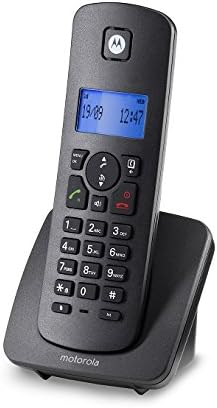
Abbildung 4: Motorola C4201 Cordless Handset Display. This image provides a close-up view of the cordless handset's backlit display and keypad, showing the date and time.
Wartung
- Reinigung: Wischen Sie die Oberflächen des Telefons mit einem weichen, fusselfreien Tuch ab.amp Tuch. Keine Scheuer- oder Lösungsmittel verwenden.
- Batteriepflege: For optimal battery life, fully charge the cordless handset batteries for 16 hours before first use. If the handset will not be used for an extended period, remove the batteries.
- Lagerung: Bewahren Sie das Telefon an einem kühlen, trockenen Ort fern von direkter Sonneneinstrahlung und extremen Temperaturen auf.
Fehlerbehebung
| Problem | Mögliche Ursache | Lösung |
|---|---|---|
| Kein Wählton | Das Telefonkabel ist nicht angeschlossen oder defekt. | Vergewissern Sie sich, dass das Telefonkabel fest mit der Basisstation und der Wandsteckdose verbunden ist. Testen Sie es gegebenenfalls mit einem anderen Telefon. |
| Das schnurlose Mobilteil lädt nicht. | Handset not correctly placed on charger; charger not powered; faulty batteries. | Ensure the handset is correctly seated. Check the charger's power connection. Replace batteries if old. |
| Schlechte Gesprächsqualität / Rauschen | Störungen durch andere elektronische Geräte; Mobilteil zu weit von der Basisstation entfernt. | Move the phone away from other electronics. Ensure the cordless handset is within range of the base unit. |
| Anzeige leer | No power to base unit; cordless handset batteries depleted. | Check power adapter connections. Charge cordless handset. |
| Anrufe können nicht getätigt/empfangen werden. | Line not active; phone line issue; incorrect dialing. | Verify your telephone line service. Ensure correct numbers are dialed. |
| Cordless handset battery life is short | Die Batterien sind alt oder nicht vollständig geladen. | Consider replacing the rechargeable batteries. Ensure full charge cycles are completed, especially the initial 16-hour charge. |
| Caller's voice is unclear | Poor line connection or phone settings. | Ensure all line connections are secure. Adjust volume settings on the handset. |
Technische Daten
- Modell: Motorola C4201
- Farbe: Schwarz
- Telefontyp: Corded/Cordless Combo (DECT)
- Energiequelle: Corded Electric (2 x AC Adapters)
- Wählgerätetyp: Tastenfeld
- Anrufbeantworter: Digitales
- Telefonbuchkapazität: 50 Namen und Zahlen
- Anzeige: Bright Blue Backlit LCD on both handsets
- Freisprecheinrichtung: Speakerphone on both handsets
- Besondere Merkmale: Emergency Mode, Call Transfer, Multi-Line Operation
- Artikelabmessungen (L x B x H): 21 x 12.7 x 17 cm (approximate for base unit)
- Artikelgewicht: 1.09 Kilogramm
- ASIN: B0719DP9KZ
- Als Erstes verfügbar: 1 2019. März
Garantie und Support
The Motorola C4201 comes with a 1 Year Local (Singapore) Warranty as stated in the product features. Please retain your proof of purchase for any warranty claims. While product specifications may indicate a 3-year guarantee, the local warranty period for this specific product in Singapore is 1 year.
For technical support or warranty service, please contact your local Motorola service center or the retailer from whom you purchased the product.
Ask a question about this manual
Ask about setup, troubleshooting, compatibility, parts, safety, or missing instructions. Manuals+ will review the question and use this page’s manual context to help answer it.