
TENVIS WH-TH661
TENVIS Heimtierkamera – Benutzerhandbuch
Model: WH-TH661 | Brand: TENVIS
Einführung
The TENVIS Home Pet Camera is an advanced FHD 1080P indoor video surveillance system designed to provide comprehensive monitoring for your home, pets, and family. Featuring 355° horizontal and 120° vertical rotation, two-way audio communication, automatic night vision, and sensitive motion detection, this camera offers a complete 360° coverage solution. This manual provides detailed instructions for setting up, operating, maintaining, and troubleshooting your device.
Installationshandbuch
1. Lieferumfang
- TENVIS Home Pet Camera
- Kits montieren
- Bedienungsanleitung (dieses Dokument)
2. Physische Installation
The TENVIS camera is designed for indoor use and can be placed on a flat surface or mounted on a wall. Ensure the camera is positioned to provide the desired viewing angle, considering its 355° pan and 120° tilt capabilities.
For wall mounting, use the provided mount kits. Secure the mounting bracket to the desired location using screws, then attach the camera to the bracket. Ensure the power cable can reach the camera comfortably without strain.

Image: The TENVIS Home Pet Camera, showing its compact design and integrated antenna.
3. Stromanschluss
Connect the provided DC power adapter to the camera's power input port and then plug the adapter into a standard electrical outlet. The camera will power on automatically.
4. Network Connection (Wi-Fi Setup)
The camera supports 802.11b/g/n 2.4GHz Wi-Fi bands (5GHz Wi-Fi is not supported) and Ethernet connectivity. For wireless setup, follow these steps:
- Laden Sie die App herunter: Suchen nach the official TENVIS app on your smartphone's app store (available for iOS and Android).
- Kontoregistrierung: Öffne die App und registriere dich für ein neues Konto oder melde dich an, falls du bereits eines hast.
- Gerät hinzufügen: Follow the in-app instructions to add a new device. The camera utilizes 'Sound Wave Smart Connection' for easy Wi-Fi configuration.
- Listen for Beep: During the setup process, the camera will emit a series of beeps. Wait for a distinct, longer beep that signals the camera is ready for Wi-Fi connection. Attempting to connect before this specific beep may result in an error.
- Komplette Einrichtung: Once the camera is connected, you can name it and begin monitoring.
For advanced users or PC setup, you can find the camera's IP address on your router's connected devices list (look for 'IPCAM'). Access the camera's web Schnittstelle durch Eingabe der IP-Adresse in ein web browser. The default login credentials are 'admin' for both username and password. It is highly recommended to change these default credentials immediately after initial setup for security purposes.
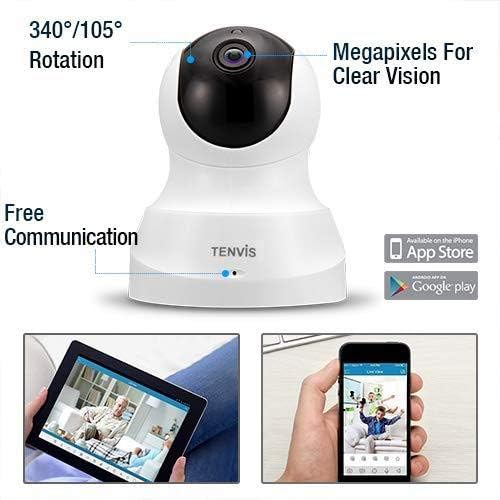
Image: Diagram illustrating the camera's rotation capabilities and showing icons for app availability on Apple App Store and Google Play.
Bedienungsanleitung
1. Camera Control (Pan/Tilt)
From the mobile app, you can remotely control the camera's movement. Swipe on the live view screen to pan the camera horizontally up to 355° and tilt it vertically up to 120°, providing a full 360° coverage of your space.
2. Leben View und Aufzeichnung
Access the live video feed through the TENVIS app. You can initiate manual video recording directly from your smartphone at any time, saving footage to your device or the camera's storage.
3. Zwei-Wege-Audiokommunikation
The camera features a built-in microphone and speaker, enabling two-way audio. Tap the microphone icon in the app to speak through the camera, and listen to audio from the camera's environment. This feature is ideal for communicating with pets, family members, or deterring intruders.

Image: A user interacting with family members remotely through the camera's two-way audio feature via the smartphone app.
4. Automatische Nachtsicht
Equipped with 11 infrared LED lights, the camera automatically switches to night vision mode in low-light conditions. It provides clear vision up to 32 feet (10 meters) without disturbing occupants or pets, ensuring continuous monitoring around the clock.
5. Bewegungserkennung und Benachrichtigungen
The camera's sensitive motion detection system can identify potential dangers and send instant alerts to your phone and email. When triggered, it records a 15-second video, and you will receive the alarm notification in less than 3 seconds. This allows you to quickly review events and take appropriate action.

Image: The TENVIS camera positioned to monitor a child, demonstrating its use for childcare and home surveillance.
6. Voreingestellte Positionen
You can set up to 8 specific preset positions for the camera. This allows you to quickly navigate to frequently monitored areas with a single tap in the app, saving time and ensuring critical areas are easily viewfähig.
7. Speicheroptionen
The camera supports multiple storage methods for recorded video footage, including cloud storage (subscription may be required) and local storage via a Micro SD card (not included, up to 128GB recommended for extended recording).
Wartung
- Reinigung: Use a soft, dry cloth to clean the camera lens and body. Avoid using liquid cleaners or abrasive materials that could damage the surface or lens.
- Firmware-Updates: Periodically check the TENVIS app for available firmware updates. Keeping your camera's firmware up-to-date ensures optimal performance, security, and access to new features.
- Platzierung: Stellen Sie sicher, dass die Kamera an einem stabilen Ort aufgestellt ist, fern von direkter Sonneneinstrahlung, extremen Temperaturen und hoher Luftfeuchtigkeit.
Fehlerbehebung
Häufige Probleme und Lösungen:
| Problem | Mögliche Ursache/Lösung |
|---|---|
| Kamera stellt keine Verbindung zum WLAN her |
|
| No image or offline status |
|
| Schlechte Bildqualität |
|
| Bewegungserkennung funktioniert nicht |
|
Technische Daten
| Besonderheit | Detail |
|---|---|
| Modellnummer | WH-TH661 |
| Auflösung der Videoaufnahme | 1080p (1280*720 Mega Pixels) |
| Pan / Tilt Rotation | 355 ° Horizontal, 120 ° Vertikal |
| Nachtsichtbereich | Bis zu 32 Fuß (10 Meter) |
| Konnektivitätstechnologie | Wireless (Wi-Fi 802.11b/g/n 2.4GHz), Ethernet |
| Zwei-Wege-Audio | Ja (Eingebautes Mikrofon und Lautsprecher) |
| Bewegungserkennung | Yes (Instant alerts, 15-second video recording) |
| Speicheroptionen | Cloud-Speicher, Micro-SD-Karte (bis zu 128 GB, nicht im Lieferumfang enthalten) |
| Stromquelle | DC (5 watts) |
| Abmessungen (L x B x H) | 4.1 x 4.1 x 5.1 Zoll |
| Artikelgewicht | 8.8 Unzen (0.55 Pfund) |
| Verwendung im Innen- und Außenbereich | Innenbereich |
| Kompatible Geräte | Smartphone |
| Bildfrequenz | 25 Bilder pro Sekunde |
| Videoaufnahmeformat | H.264 |
Garantie und Support
TENVIS products are manufactured to high-quality standards. For specific warranty information regarding your Home Pet Camera, please refer to the warranty card included in your product packaging or visit the official TENVIS webWebsite.
For technical support, troubleshooting assistance, or any inquiries not covered in this manual, please contact TENVIS customer support through the contact information provided on their official website or within the mobile application. Please have your model number (WH-TH661) and purchase details ready when contacting support.
Ask a question about this manual
Ask about setup, troubleshooting, compatibility, parts, safety, or missing instructions. Manuals+ will review the question and use this page’s manual context to help answer it.