Einführung
The Perixx PERIBOARD-313 is a wired, full-sized keyboard featuring an integrated touchpad and a 3-level LED backlight. Designed for convenience and efficiency, this keyboard combines typing and pointing functionalities into a single device, making it suitable for various computing environments. Its dimensions are approximately 456mm x 160mm x 30mm, with a touchpad measuring 57mm x 40mm.
This manual provides comprehensive instructions for the proper setup, operation, and maintenance of your PERIBOARD-313 keyboard to ensure optimal performance and longevity.
Packungsinhalt
- 1 x Perixx PERIBOARD-313 Wired USB Backlit Keyboard with Touchpad
- Benutzerhandbuch (dieses Dokument)

Image: The Perixx PERIBOARD-313 keyboard, its USB cable, and the user manual shown next to the product packaging.
Systemanforderungen
- Betriebssystem: Windows 7, 8 oder 10
- Connectivity: Available USB port
Aufstellen
- Auspacken der Tastatur: Carefully remove the PERIBOARD-313 from its packaging.
- Mit Computer verbinden: Stecken Sie den USB-Stecker der Tastatur in einen freien USB-Port Ihres Computers.
- Treiberinstallation: Die Tastatur ist sofort einsatzbereit (Plug-and-Play). Ihr Betriebssystem erkennt und installiert die benötigten Treiber automatisch. Es ist keine zusätzliche Softwareinstallation erforderlich.
- Funktionalität überprüfen: Once connected, the keyboard and touchpad should be immediately functional. Test by typing and moving the cursor.
Bedienungsanleitung
Tastaturlayout
The PERIBOARD-313 features a standard full-size US English QWERTY layout with 104 keys, including a dedicated numeric keypad and function keys.

Image: Detailed diagram illustrating the full QWERTY keyboard layout, including the numeric keypad and integrated touchpad.
Touchpad-Funktionen
The integrated touchpad provides precise cursor control and includes two buttons that function as left and right mouse clicks.
- Cursorbewegung: Slide your finger across the touchpad surface to move the cursor on the screen.
- Links Klick: Press the left button below the touchpad or tap once on the touchpad surface.
- Rechtsklick: Press the right button below the touchpad or tap with two fingers on the touchpad surface (if supported by OS settings).
- Scrollen: Use two fingers to scroll vertically on the touchpad (if supported by OS settings).
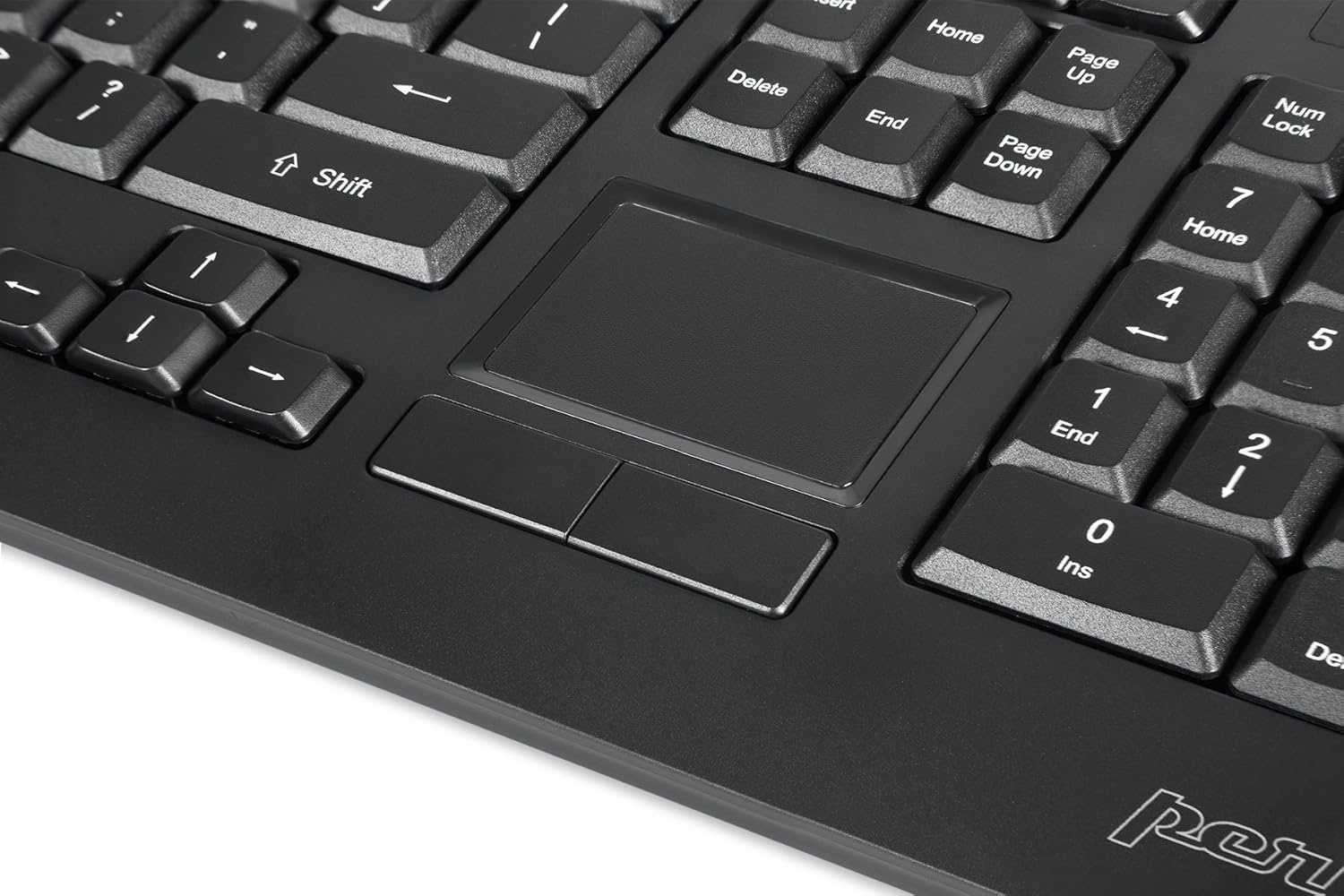
Image: A close-up of the integrated touchpad, highlighting its surface and the two dedicated click buttons.

Image: A user's hand interacting with the touchpad for cursor control.
Steuerung der Hintergrundbeleuchtung
The keyboard features a white LED backlight with three adjustable brightness levels. Use the dedicated backlight control keys to adjust the illumination.
- Hintergrundbeleuchtung ein-/ausschalten: Drücken Sie die Fn + F12 Tastenkombination.
- Helligkeit anpassen: Drücken Fn + F11 um durch die drei Helligkeitsstufen zu blättern.
Multimedia-Schlüssel
The PERIBOARD-313 includes 10 multimedia function keys for quick access to media controls and internet features. These functions are activated by holding the Fn durch Drücken der entsprechenden Funktionstaste (F1-F10).
- Fn+F1: Öffnen Sie den Mediaplayer
- Fn+F2: Lautstärke verringern
- Fn+F3: Lautstärke erhöhen
- Fn+F4: Stumm
- Fn+F5: Vorheriger Titel
- Fn+F6: Nächster Titel
- Fn+F7: Abspielen/Pause
- Fn+F8: Stoppen
- Fn+F9: Offen Web Browser
- Fn+F10: E-Mail-Client öffnen
Integrierte USB-Hubs
The keyboard features two integrated USB 2.0 hubs, allowing you to connect additional USB devices directly to the keyboard for convenience.

Image: The side of the keyboard displaying the two built-in USB 2.0 ports for connecting peripherals.
Wartung
- Reinigung: Trennen Sie die Tastatur vor der Reinigung vom Computer. Verwenden Sie ein weiches, fusselfreies Tuch.amp cloth to wipe the surface. For deeper cleaning between keys, use compressed air to remove dust and debris. Avoid using harsh chemicals or abrasive cleaners.
- Lagerung: Bewahren Sie die Tastatur in einer trockenen Umgebung, fern von extremen Temperaturen und direkter Sonneneinstrahlung auf.
- Flüssigkeitsexposition: This keyboard is not water-resistant. Avoid spilling liquids on it. If liquid exposure occurs, immediately disconnect the keyboard and allow it to dry completely before reconnecting.
Fehlerbehebung
| Problem | Mögliche Ursache | Lösung |
|---|---|---|
| Tastatur reagiert nicht | Wackelkontakt am USB-Anschluss, defekter USB-Anschluss, Treiberproblem. |
|
| Touchpad funktioniert nicht | Driver issue, touchpad disabled (unlikely for wired), physical damage. |
|
| Backlight not turning on/off or adjusting | Falsche Tastenkombination, Softwarekonflikt. |
|
| Multimediatasten funktionieren nicht | Falsche Tastenkombination, Softwarekonflikt. |
|
Technische Daten
| Marke | Perixx |
| Modellname | PERIBOARD-313 US |
| Modellnummer | 11445 |
| Konnektivitätstechnologie | USB-A (kabelgebunden) |
| Tastaturbeschreibung | QWERTY, Full-sized, Backlit |
| Besonderheit | Backlit, Integrated Touchpad, USB Hubs |
| Farbe | Schwarz |
| Farbe der Tastatur-Hintergrundbeleuchtung | Einfarbig (weiße LED) |
| Material | ABS-Kunststoff |
| Anzahl der Schlüssel | 104 |
| Schaltertyp | Membran |
| Touchpad-Abmessungen | 57 mm x 40 mm (2.24" x 1.57") |
| Tastaturabmessungen | 456mm x 160mm x 30mm (17.95 "x 6.30" x 1.18 ") |
| Artikelgewicht | 1.85 Pfund |
| Total USB 2.0 Ports | 2 (Integrated Hubs) |
Image: Technical drawing with key dimensions of the PERIBOARD-313 keyboard.
Garantie
The Perixx PERIBOARD-313 comes with a 1 Jahr eingeschränkte Garantie from the date of purchase. This warranty covers manufacturing defects and workmanship under normal use. It does not cover damage caused by misuse, accident, modification, or unauthorized repair. Please retain your proof of purchase for warranty claims.
Unterstützung
For further assistance, technical support, or warranty inquiries, please visit the official Perixx webSie können die Website besuchen oder sich an den Kundenservice wenden. Weitere Informationen und Kontaktdaten finden Sie auf der Website. Perixx Brand Store on Amazon.