
1. Einleitung
The Symcode MJ-R30-2D is a compact, ring-type barcode scanner designed for efficient data collection in various environments such as warehouses, retail stores, and logistics centers. It offers versatile connectivity options including Bluetooth, 2.4GHz wireless, and USB wired connection, supporting both 1D and 2D barcode types. This manual provides essential information for setting up, operating, and maintaining your device.
2. Produktüberschreitungview und Komponenten
The MJ-R30-2D scanner features a unique ring design for comfortable, hands-free operation. It is equipped with advanced decoding capabilities to read various barcode types efficiently.

Packungsinhalt:
- Symcode MJ-R30-2D Barcode Scanner
- USB-Lade- / Datenkabel
- 2.4-GHz-Funk-USB-Dongle
- User Manual (Brochure)
3. Einrichtung und Erstkonfiguration
The MJ-R30-2D scanner is designed for plug-and-play operation, requiring no application downloads or driver installations for basic functionality. For detailed configuration, refer to the provided Japanese instruction manual and scan the appropriate setup codes.
Systemkompatibilität:
- Windows
- Mac OS
- iOS (iPhone, iPad)
- Android-Geräte
Notiz: For PCs without built-in Bluetooth, a separate Bluetooth receiver adapter is required to use the Bluetooth connection mode.
4. Betriebsarten
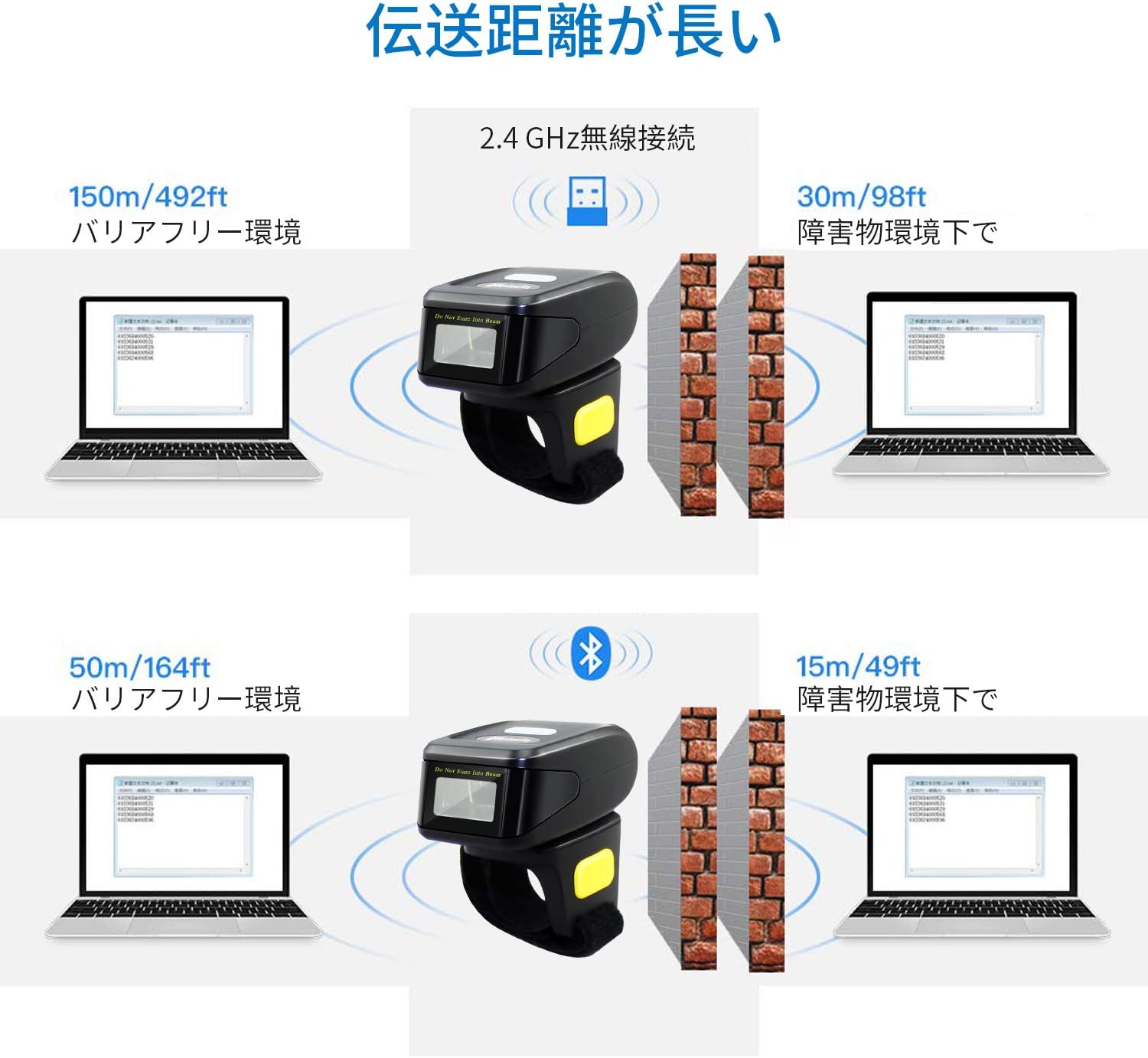
The scanner supports three primary connection modes: USB Wired, 2.4GHz Wireless, and Bluetooth.

4.1. Kabelgebundener USB-Modus
Connect the scanner directly to your computer using the provided USB cable. This mode allows for both data transmission and charging. The cable ensures a stable connection and supports mobile flash charging.
4.2. 2.4-GHz-Funkmodus
Insert the 2.4GHz USB dongle into your computer's USB port. The scanner will automatically connect to the dongle. This mode provides a robust wireless connection suitable for environments where Bluetooth might be less ideal.
4.3. Bluetooth-Modus
Enable Bluetooth on your smartphone, tablet, or computer. Put the scanner into Bluetooth pairing mode (refer to the manual for specific instructions, usually by scanning a pairing barcode). Select the scanner from your device's Bluetooth settings to establish a connection. No dongle is required for Bluetooth-enabled devices.
5. Data Transmission Modes
The scanner offers flexibility in how scanned data is handled, allowing for immediate transfer or temporary storage.
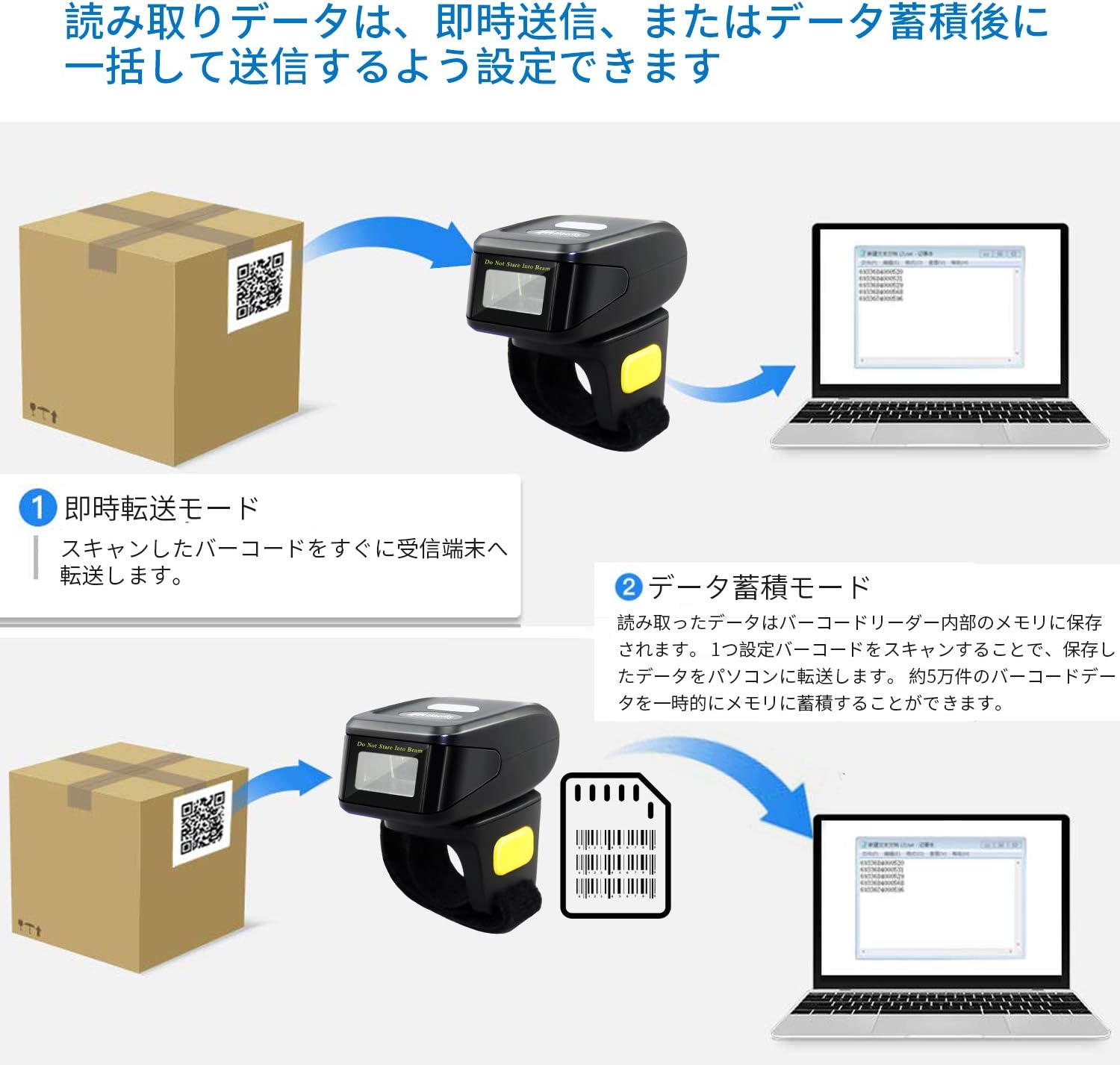
5.1. Instant Transmission Mode
In this mode, scanned barcodes are immediately transmitted to the connected receiving device (e.g., computer, smartphone). This is ideal for real-time inventory updates or point-of-sale operations.
5.2. Data Storage Mode
The scanner can store approximately 50,000 barcode entries in its internal memory. Scanned data is saved internally and can be uploaded in a batch to a connected PC or device later. This mode is useful for offline scanning or when connectivity is intermittent.
6. Barcode Decoding Capabilities
The MJ-R30-2D scanner features excellent decoding capabilities, recognizing both 1D and 2D barcodes even if they are blurred, damaged, or scanned under challenging lighting conditions (weak or strong light).

Unterstützte 1D-Barcode-Typen:
- JAN/EAN-13, JAN/EAN-8, UPC-A, UPC-E
- Code11, Code32, Code39, Code 39 Full ASCII, Code93, Code128
- Codabar (NW-7)
- Interleaved 2 of 5, Matrix 2 of 5, Industrial 2 of 5, Standard 2 of 5
- PLESSEY, MSI, ITF14
- ISBN, ISSN
- GS1 Databar, GS1-128 (UCC/EAN128), ISBT-128
Unterstützte 2D-Barcode-Typen:
- QR-Code
- Datenmatrix
- PDF417
- Aztekischer Code
- Maxicode
7. Akku und Aufladen
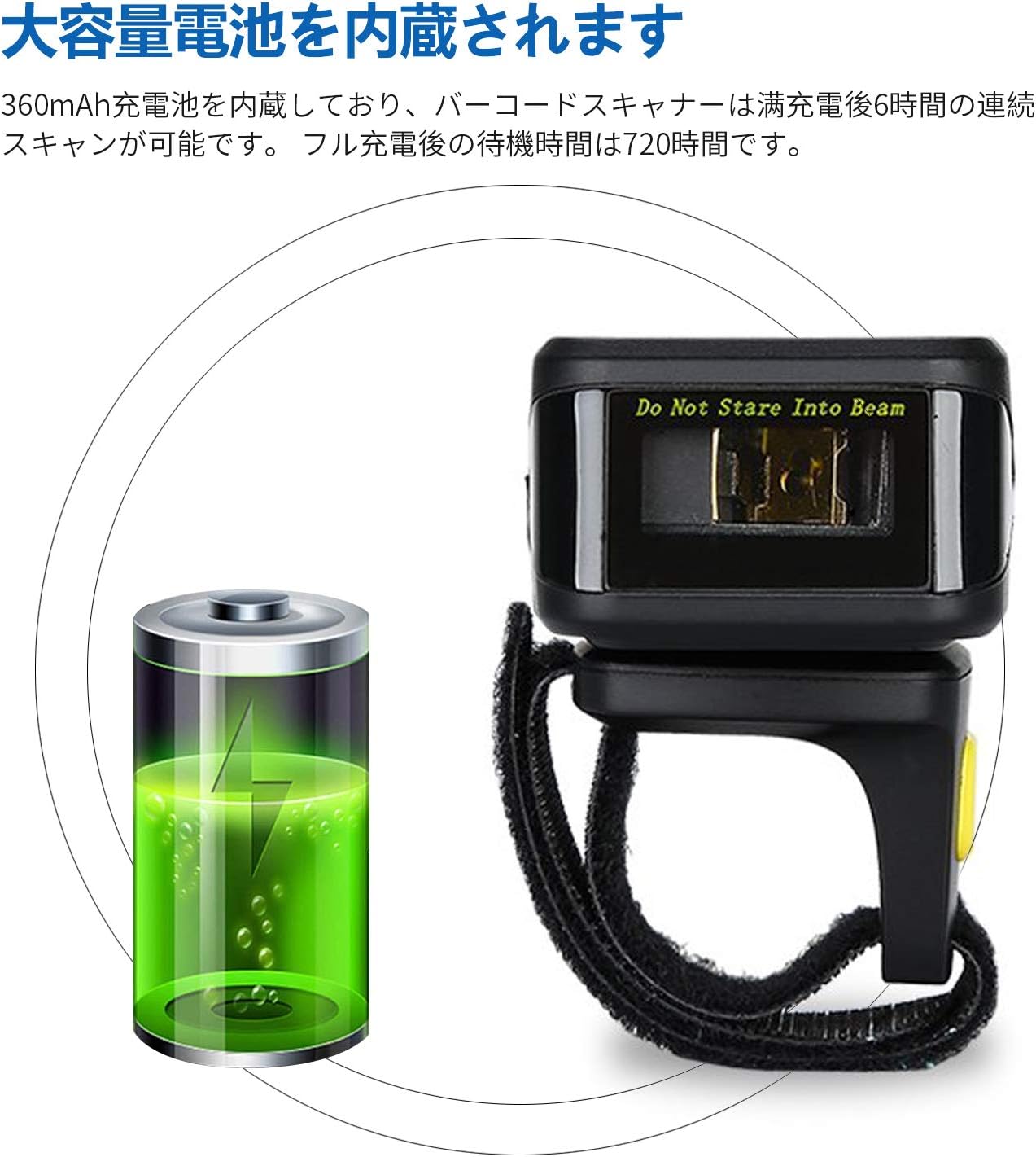
The MJ-R30-2D is equipped with a built-in 360mAh rechargeable battery, providing reliable power for extended use.
Batterieleistung:
- Kontinuierliches Scannen: Bis zu 6 Stunden bei voller Ladung.
- Standby-Zeit: Up to 720 hours (30 days) on a full charge.
Laden:
Connect the scanner to a power source using the provided USB cable. The device will indicate when it is charging and when it is fully charged. Ensure the scanner is fully charged before initial use for optimal performance.
8. Anpassung und Einstellungen
The scanner's operation can be customized to fit specific user needs by scanning configuration barcodes found in the detailed product manual.
Scan Reading Modes:
- Auslösemodus: Scan a barcode by pressing the trigger button.
- Kontinuierlicher Scanmodus: The scanner continuously scans for barcodes without requiring a trigger press.
- Automatischer Erkennungsmodus: The scanner automatically detects and scans barcodes when they enter its field of view.
Feedback Settings:
The scanner's sound and vibration feedback can be toggled on or off as desired, typically by scanning specific configuration barcodes.
9. Fehlerbehebung
This section addresses common issues you might encounter with your Symcode MJ-R30-2D scanner.
9.1. Scanner Not Connecting
- Überprüfen Sie die Leistung: Stellen Sie sicher, dass der Scanner aufgeladen ist.
- Kabelverbindung: Verify the USB cable is securely connected to both the scanner and the computer.
- 2.4 GHz Wireless: Ensure the USB dongle is properly inserted into the computer and the scanner is in 2.4GHz mode.
- Bluetooth Verbindung: Make sure Bluetooth is enabled on your host device and the scanner is in pairing mode. If connecting to a PC without built-in Bluetooth, ensure a Bluetooth adapter is installed.
9.2. Barcodes werden nicht gescannt
- Barcode-Typ: Confirm the barcode type is supported by the scanner (refer to Section 6).
- Barcode-Qualität: Ensure the barcode is not excessively damaged, blurred, or poorly printed.
- Beleuchtung: Adjust the scanning angle or environment if glare or insufficient light is an issue.
- Distanz: Maintain an appropriate distance between the scanner and the barcode.
9.3. On-Screen Keyboard Disappears on iOS Devices
When the scanner is connected via Bluetooth to an iOS device (e.g., iPhone, iPad), the on-screen keyboard may not appear automatically. To resolve this, you may need to disconnect the scanner temporarily or use a specific function key combination on the scanner (if available) to toggle the keyboard. Refer to the detailed manual for specific iOS compatibility settings.
10. Spezifikationen
| Marke | Symcode |
| Modellnummer | MJ-R30-2D |
| Konnektivitätstechnologie | Bluetooth, 2.4GHz Wireless, USB Cable |
| Stromquelle | Batteriebetrieben |
| Batteriekapazität | 360 mAh |
| Kontinuierliche Scanzeit | Ca. 6 Stunden |
| Standby-Zeit | Ca. 720 Stunden |
| Technische Daten | 12.45 x 4.06 x 10.41 cm |
| Produktgewicht | 127.57 g |
| Unterstützte Barcodes | 1D (JAN/EAN, UPC, Code series, Codabar, etc.), 2D (QR Code, Data Matrix, PDF417, Aztec, Maxicode) |
| Speicherkapazität | Approx. 50,000 barcode entries (in storage mode) |
11. Wartung
Durch sachgemäße Wartung wird die Langlebigkeit und optimale Leistung Ihres Barcode-Scanners sichergestellt.
- Reinigung: Reinigen Sie die Außenseite des Scanners mit einem weichen, trockenen Tuch. Für das Scanfenster verwenden Sie ein fusselfreies Tuch und tupfen Sie es vorsichtig ab.ampened with a mild cleaning solution (e.g., isopropyl alcohol) if necessary. Avoid abrasive cleaners or direct spraying of liquids.
- Lagerung: Bewahren Sie den Scanner an einem kühlen, trockenen Ort fern von direkter Sonneneinstrahlung und extremen Temperaturen auf.
- Batteriepflege: For long-term storage, ensure the battery is partially charged (around 50%) to prevent deep discharge. Recharge the battery periodically if not in use for extended periods.
- Physischer Schutz: While durable, avoid dropping the scanner or subjecting it to strong impacts to prevent internal damage.
12. Garantie und Support
Symcode Technology, established in 2009, is committed to providing high-quality barcode scanning products and comprehensive customer support.
For any product-related inquiries, technical assistance, or support needs, please contact Symcode customer service through the platform where you purchased the product (e.g., Amazon). This ensures you receive prompt and accurate support directly from the manufacturer or authorized reseller.