
1. Einleitung
The Mackie MRS10 is a 10-inch powered studio subwoofer designed to provide dynamic and accurate low-end frequency reproduction for your studio monitoring system. It enhances the listening experience by delivering deep, punchy bass without artificial coloration, crucial for mixing electronic music, hip-hop, and other genres requiring precise low-frequency monitoring. This manual provides essential information for setting up, operating, and maintaining your MRS10 subwoofer.
2. Lieferumfang
Carefully unpack your Mackie MRS10 subwoofer and ensure all items are present:
- Mackie MRS10 10-inch Studio Subwoofer
- Netzkabel
- Kurzanleitung
- Pro Tools® | First Software (Download Card/Code)
3. Produktüberschreitungview
Front View

The front panel features the 10-inch glass aramid composite woofer with a protective grille and the Mackie logo. A small LED indicator shows the power status.
Abgewinkelt View

Das view highlights the robust construction and sleek design of the MRS10, suitable for any studio environment.
Anschlüsse und Bedienelemente auf der Rückseite
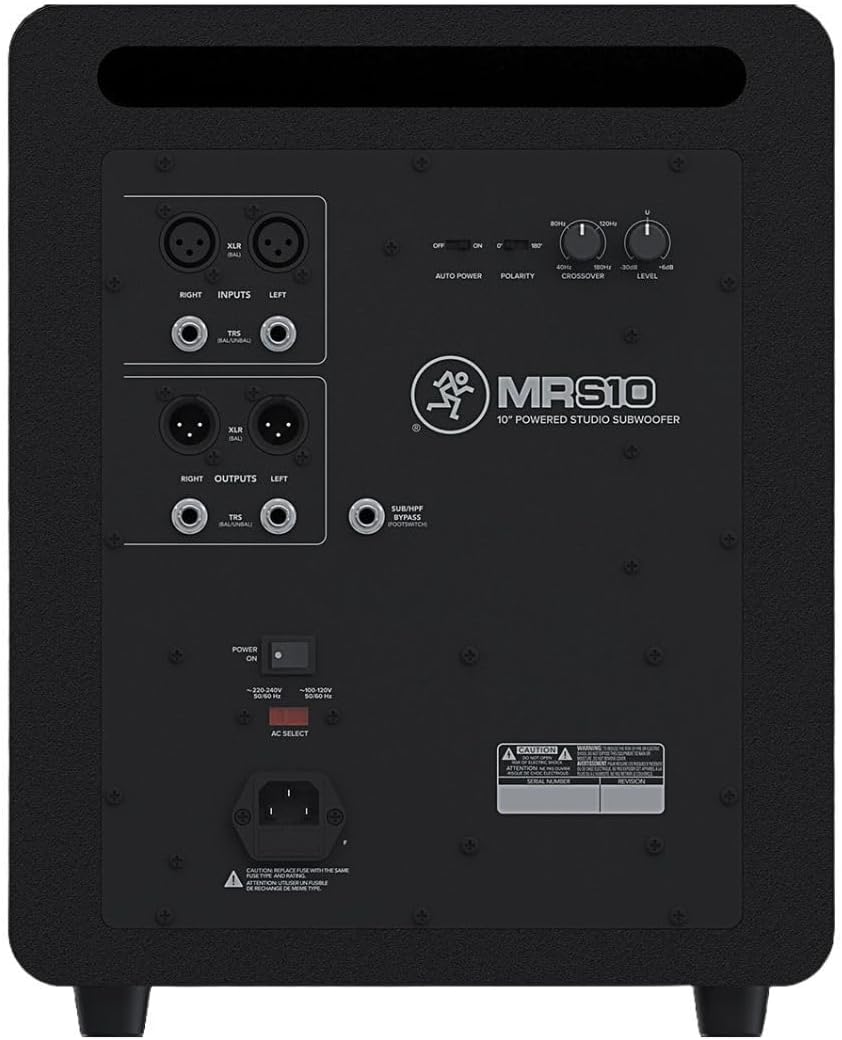
The rear panel provides all necessary input and output connections, along with controls for fine-tuning the subwoofer's performance to your specific setup.
Technische Daten

The image displays the physical dimensions of the MRS10, measuring approximately 21 inches deep, 19 inches wide, and 16 inches high, with a weight of 33.1 pounds.
4. Einrichtung
Platzierung
Optimal placement of the MRS10 is crucial for accurate low-frequency response. Position the subwoofer on a stable surface, ideally on the floor, and experiment with its location relative to your main studio monitors and listening position. Consider the room's acoustics; placing it in a corner or against a wall can increase bass response, which may require adjustment of the subwoofer's controls.
Anschlüsse
The MRS10 offers flexible connectivity options:
- Eingänge: Connect your audio source (e.g., audio interface, mixer) to the MRS10's stereo XLR or TRS inputs.
- Ausgaben: Connect the MRS10's stereo XLR or TRS outputs to your main studio monitors. The subwoofer will pass through the higher frequencies to your monitors while handling the low-end.
- Foot-switch: An optional foot-switch can be connected to the SUB/HPF FOOTSWITCH input for convenient bypass functionality.
- Leistung: Connect the supplied power cord to the AC input and then to a grounded AC outlet.
Erstes Einschalten
Before powering on, ensure all connections are secure and the level control is set to minimum. Turn on your audio source and main monitors first, then power on the MRS10. When powering down, turn off the MRS10 first, then your main monitors and audio source.
5. Bedienungsanleitung
The MRS10 features several controls on its rear panel to optimize its performance within your studio setup:
- Frequenzweiche: This control allows you to set the frequency point where the subwoofer handles the low frequencies and your main monitors handle the higher frequencies. Adjust this to seamlessly integrate the MRS10 with your main monitors.
- Polarität: The polarity switch (0°/180°) helps ensure that the subwoofer's output is in phase with your main monitors. Experiment with both settings to find the one that provides the most coherent and impactful bass response.
- Ebene: This knob adjusts the overall output volume of the subwoofer. Start with a low setting and gradually increase it to achieve a balanced sound with your main monitors.
- Auto-Power: The Auto Power switch enables or disables the automatic standby feature. When enabled, the subwoofer will enter a low-power standby mode after a period of no audio signal and wake up when a signal is detected.
- Foot-switchable Bypass: If an optional foot-switch is connected, you can instantly bypass the subwoofer and return your main monitors to full-range operation, allowing for quick A/B comparisons of your mix with and without the subwoofer.
Acoustic Space Applications (General Guidance)
While the MRS10 itself does not feature specific 'Acoustic Space Controls' like some Mackie monitors, understanding room acoustics is vital. The placement of your subwoofer and main monitors significantly impacts sound. Corners and walls can exaggerate bass. Use the MRS10's crossover and level controls to compensate for room effects and achieve a flat, accurate frequency response at your listening position. Refer to the video below for a general overview of Mackie's MR Series and the importance of acoustic optimization.
6. Wartung
To ensure the longevity and optimal performance of your MRS10 subwoofer, follow these maintenance guidelines:
- Reinigung: Use a soft, dry cloth to clean the exterior of the subwoofer. Avoid abrasive cleaners, solvents, or waxes.
- Belüftung: Ensure adequate airflow around the subwoofer to prevent overheating. Do not block the rear panel vents.
- Umfeld: Operate the subwoofer in a dry environment, away from direct sunlight, heat sources, and excessive dust or moisture.
- Netzkabel: Regularly inspect the power cord for any damage. Replace if necessary.
7. Fehlerbehebung
If you encounter issues with your MRS10 subwoofer, refer to the following common troubleshooting steps:
- Kein Strom: Check if the power cord is securely connected to both the subwoofer and the AC outlet. Verify the power switch is in the 'ON' position. Ensure the AC outlet is functional.
- Kein Ton: Confirm that your audio source is sending a signal and that your main monitors are receiving sound. Check all audio cables (XLR/TRS) for secure connections and proper functionality. Adjust the MRS10's level control.
- Verzerrter Klang: Reduce the input level from your audio source and the MRS10's level control. Check for damaged cables. Ensure the subwoofer is not placed too close to walls or corners, which can cause excessive bass buildup.
- Summen oder Brummen: Ensure all audio cables are balanced (XLR or TRS) if possible. Try connecting the subwoofer to a different AC outlet or using a power conditioner.
If problems persist, contact Mackie customer support for further assistance.
8. Spezifikationen
| Besonderheit | Detail |
|---|---|
| Marke | Mackie |
| Modellnummer | MRS10 |
| Maximale Lautsprecherausgangsleistung | 120 Watt |
| Subwoofer-Durchmesser | 10 Zoll |
| Frequenzgang | 180 Hz (Adjustable Crossover) |
| Konnektivitätstechnologie | XLR, Klinke |
| Audioausgabemodus | Stereo |
| Montagetyp | Tischhalterung |
| Gehäusematerial | Edelstahl |
| Stromquelle | Kabelgebundene Elektrik |
| Artikelabmessungen (T x B x H) | 21"T x 19"B x 16"H |
| Artikelgewicht | 33.1 Pfund |
| Kompatible Geräte | Audio Interface, Desktop, Laptop, Mixer, Studio Monitor |
9. Garantie und Support
The Mackie MRS10 Studio Subwoofer comes with a One-year, all-inclusive, non-transferable warranty. For detailed warranty information, service, or technical support, please visit the official Mackie webBesuchen Sie die Website oder kontaktieren Sie den Kundendienst. Bewahren Sie Ihren Kaufbeleg für Garantieansprüche auf.