
1. Einleitung
The VILTROX JY-710-S2 is a versatile multi-functional wireless shutter remote control designed for various Sony camera models. It enables precise control over camera shutter functions, including single shot, continuous shooting, Bulb mode, delayed shooting, and advanced timer schedule shooting. This device is ideal for capturing time-lapse sequences, astrophotography, and other scenarios requiring stable, remote shutter activation to prevent camera shake.
2. Produktüberschreitungview und Packungsinhalt
The JY-710-S2 system consists of a transmitter, a receiver, and necessary connection cables. Please verify that all components are present upon unboxing.

Bild 1: VILTROX JY-710-S2 package contents. This image displays the main components: the remote control transmitter, the receiver, various connection cables, and the user manual.
Packungsinhalt:
- JY-710 Transmitter (Remote Control Unit)
- JY-710RX Receiver Unit
- Shutter Release Connection Cable (S2 type for Sony cameras)
- Bedienungsanleitung
- Batteries (typically AAA for transmitter, CR2 for receiver, may vary)
3. Hauptmerkmale
- Multifunktionale Aufnahmemodi: Supports single shot, 1-second continuous shooting, Bulb mode, delay shooting, and advanced timer schedule shooting.
- Kabellose Kontrolle: Built-in FSK 2.4GHz wireless remote control system with 4 channels, offering a remote distance of approximately 50-80 meters.
- Wired Control Option: Can also be used as a wired remote control, directly connected to the camera.
- Schwingungsreduktion: Eliminates camera vibration caused by manually pressing the shutter button, preserving image integrity and quality.
- Bulb Function Support: Activates the Bulb function on compatible cameras for long exposures up to 100 hours.
- Exposure Count Setting: Allows setting the number of exposures up to 399 times, ideal for time-lapse photography.
- Geringer Stromverbrauch: Designed for extended use with clear indication of battery status.
- Austauschbare Kabel: The transmitter, receiver, and shutter cord are separated, allowing compatibility with different camera brands by simply changing the connection cable.
4. Einrichtung
4.1 Einlegen der Batterie
- Sender: Open the battery compartment on the back of the transmitter. Insert two AAA batteries, ensuring correct polarity. Close the compartment.
- Empfänger: Open the battery compartment on the receiver. Insert one CR2 battery, ensuring correct polarity. Close the compartment.
4.2 Connecting to Camera (Wired Mode)
For wired operation, connect the shutter release cable directly from the transmitter to your camera's remote control port.
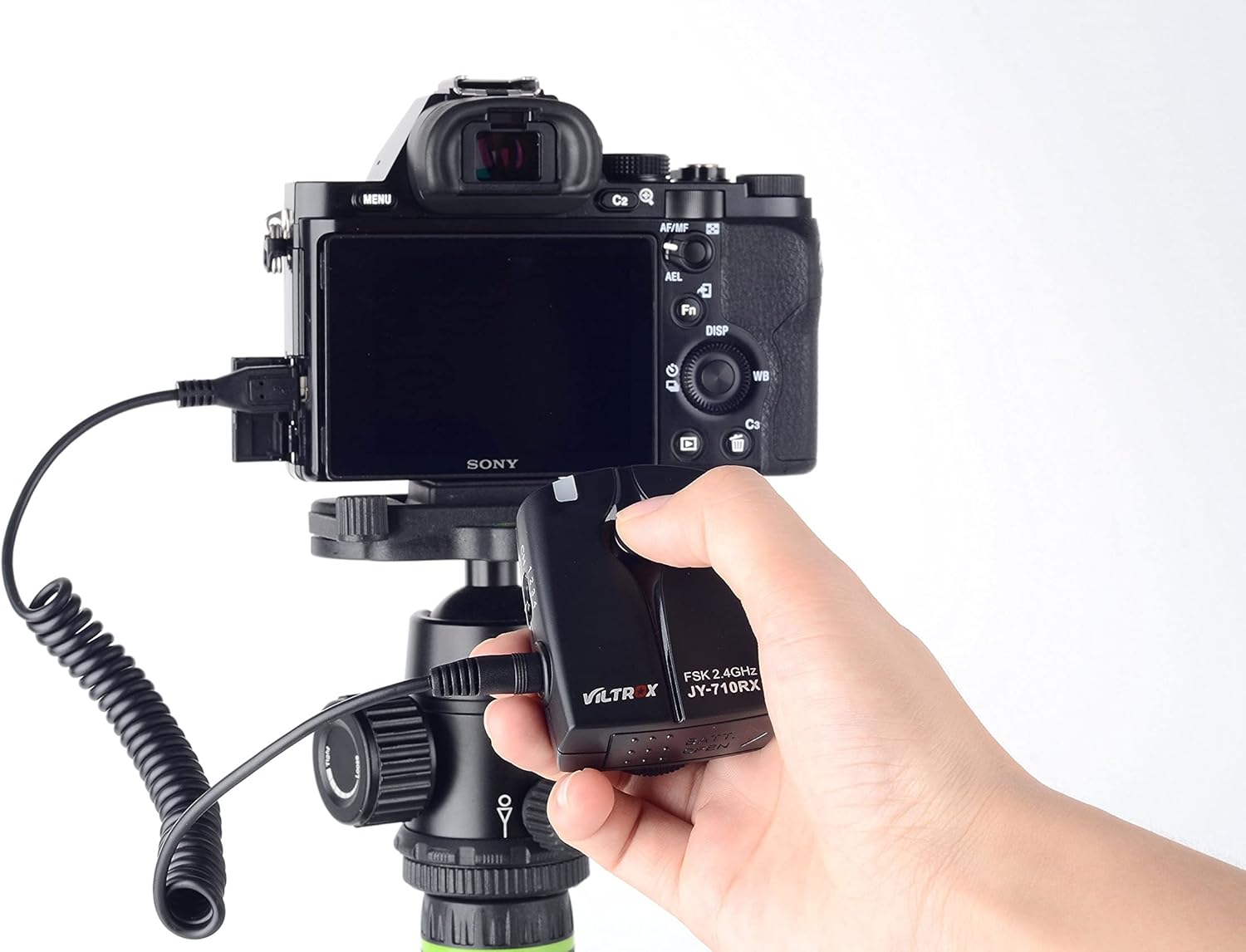
Bild 2: Transmitter connected directly to a Sony camera for wired operation.
4.3 Connecting to Camera (Wireless Mode)
For wireless operation, the receiver unit must be connected to your camera. The transmitter will then communicate wirelessly with the receiver.
- Attach the receiver to your camera's hot shoe or a suitable mounting point.
- Connect the shutter release cable from the receiver to your camera's remote control port.
- Ensure both the transmitter and receiver are powered on and set to the same channel (1-4).

Bild 3: Receiver connected to a Sony camera for wireless operation.
5. Bedienungsanleitung
The JY-710-S2 offers various shooting modes and customizable settings. Familiarize yourself with the display and buttons on the transmitter.

Bild 4: VILTROX JY-710-S2 Transmitter and Receiver.
5.1 Basic Shutter Functions
- Einzelner Schuss: Press the 'TIMER START/STOP' button halfway to focus, then fully press to take a single photo.
- Dauerfeuer: Refer to your camera's settings for continuous shooting mode. The remote will trigger shots based on camera settings when the 'TIMER START/STOP' button is fully pressed and held.
- Lampenmodus: Set your camera to Bulb mode. On the remote, activate the 'LONG' (long exposure) function. Press 'TIMER START/STOP' to open the shutter, press again to close.
5.2 Timerfunktionen
The transmitter's LCD screen displays various parameters for timer control. Use the 'SET' button to cycle through settings and the arrow buttons to adjust values.
- DELAY (Delay Timer): Sets a delay before the first shot is taken. Adjustable from 1 second up to 99 hours, 99 minutes, and 99 seconds.
- LONG (Long Exposure/Bulb): Sets the duration of the shutter open time for long exposures. Adjustable from 1 second up to 99 hours, 99 minutes, and 99 seconds.
- INTVL (Intervalltimer): Sets the time interval between consecutive shots. Adjustable from 1 second up to 99 hours, 99 minutes, and 99 seconds.
- N (Exposure Count): Sets the total number of exposures to be taken. Adjustable from 1 to 399 shots.
To start a timer plan, configure the desired DELAY, LONG, INTVL, and N settings, then press the 'TIMER START/STOP' button. The display will show the countdown or progress.
5.3 Sperren der Bedienelemente
Use the 'LOCK' switch on the side of the transmitter to prevent accidental button presses during a timer sequence or when carrying the device.
6. Wartung
- Halten Sie das Gerät trocken. Setzen Sie es weder Regen noch Feuchtigkeit aus.
- Reinigen Sie das Gerät mit einem weichen, trockenen Tuch. Verwenden Sie keine scharfen Chemikalien oder Scheuermittel.
- Vermeiden Sie es, das Gerät fallen zu lassen oder starken Stößen auszusetzen.
- Wenn das Gerät längere Zeit nicht verwendet wird, entfernen Sie die Batterien, um ein Auslaufen zu verhindern.
- An einem kühlen, trockenen Ort aufbewahren und direkte Sonneneinstrahlung vermeiden.
7. Fehlerbehebung
- Gerät lässt sich nicht einschalten: Überprüfen Sie den Batterieeinbau und stellen Sie sicher, dass die Batterien neu sind.
- Kamera reagiert nicht:
- Ensure the connection cable is securely attached to both the remote/receiver and the camera.
- Verify that the camera's remote control settings are enabled (refer to your camera's manual).
- In wireless mode, ensure both transmitter and receiver are on the same channel and within range.
- Inconsistent wireless connection: Ensure there are no major obstructions between the transmitter and receiver. Check for sources of 2.4GHz interference.
- Timer functions not working as expected: Double-check all DELAY, LONG, INTVL, and N settings. Ensure the 'TIMER START/STOP' button was pressed to initiate the sequence.
8. Spezifikationen
| Besonderheit | Spezifikation |
|---|---|
| Marke | VILTROX |
| Modellnummer | JY-710-S2 |
| Konnektivitätstechnologie | FSK 2.4GHz Wireless |
| wireless-Kanal | 4 |
| Maximale Reichweite | 80 Meters (approx.) |
| Delay Timer (DELAY) | 0s bis 99h 59m 59s (in 1-Sekunden-Schritten) |
| Long Exposure (LONG) | 0s bis 99h 59m 59s (in 1-Sekunden-Schritten) |
| Interval Timer (INTVL) | 0s bis 99h 59m 59s (in 1-Sekunden-Schritten) |
| Exposure Count (N) | 1 bis 399 Aufnahmen |
| Sendeleistung | 2 x AAA-Batterien |
| Empfängerleistung | 1 x CR2 Batterie |
| Kompatible Geräte | Sony a58, A-77M2, A-7RM2, A5000, A6000, A7, A-7M2, A7R, A7S (and other compatible Sony models with S2 port) |
| Artikelgewicht | 0.2 Kilogramm (ca.) |
9. Garantie und Support
For warranty information, technical support, or further inquiries, please visit the official VILTROX webWebsite oder wenden Sie sich an den Kundendienst.
Offiziell WebWebsite: http://www.viltrox.com/