
Einführung
The ZAGG Folio Case with Backlit Keyboard is designed to enhance your Verizon Ellipsis 8" HD Tablet experience by providing both protection and increased productivity. This folio features a built-in Bluetooth keyboard with island-style keys and backlighting, a unique hinge design for multiple viewing angles, and a long-lasting battery. This manual provides instructions for setup, operation, maintenance, and troubleshooting to ensure optimal use of your device.
Packungsinhalt
Überprüfen Sie, ob alle Artikel in Ihrem Paket vorhanden sind:
- ZAGG Folio Case with Backlit Keyboard
- USB-Ladekabel
- Benutzerhandbuch (dieses Dokument)
Aufstellen
1. Einlegen Ihres Tablets
Carefully align your Verizon Ellipsis 8" HD Tablet with the case. Gently press the tablet into the protective shell until it is securely seated. Ensure all ports and buttons are accessible.

Image: The ZAGG Folio Case open with a tablet inserted, showing the backlit keyboard and the tablet screen at an angle.
2. Aufladen der Tastatur
Before initial use, fully charge your ZAGG Folio keyboard. Connect the included USB charging cable to the charging port on the keyboard and plug the other end into a USB power source (e.g., wall adapter, computer USB port). The charging indicator light will illuminate during charging and turn off when fully charged. A full charge can provide up to three months of regular use.
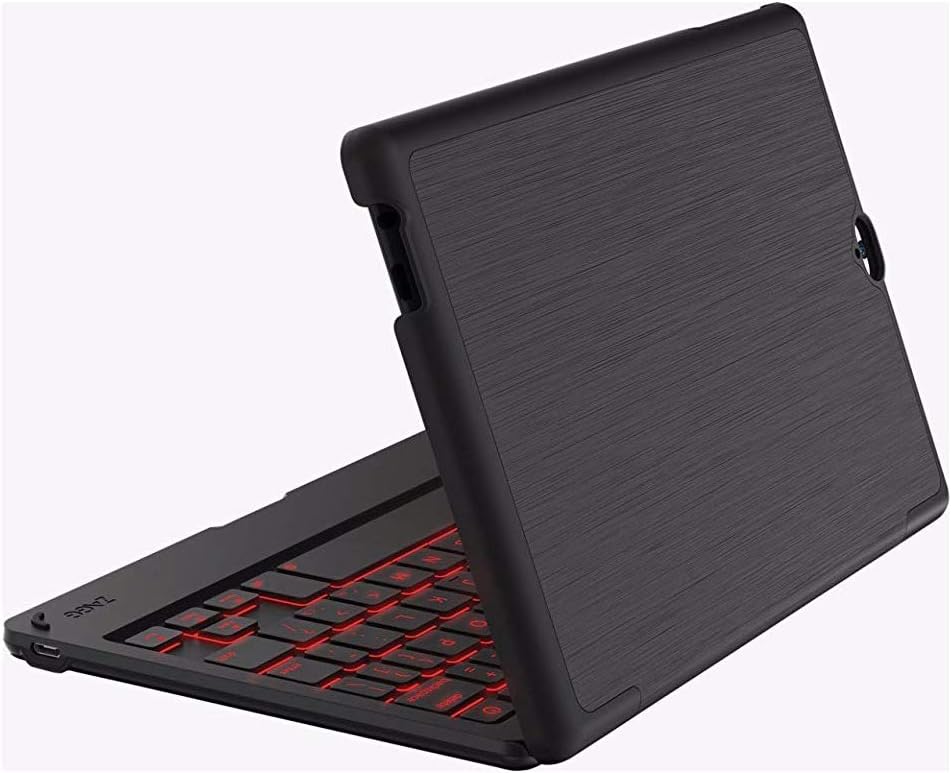
Image: The ZAGG Folio Case in a closed position, showcasing the textured exterior of the case.
3. Bluetooth-Kopplung
- Ensure your tablet's Bluetooth is enabled.
- On the ZAGG Folio keyboard, locate and press the Bluetooth pairing button (refer to the keyboard layout for exact location, usually near the power button). The Bluetooth indicator light will begin to flash, indicating it is in pairing mode.
- On your tablet, go to Bluetooth settings and search for available devices.
- Select "ZAGG Folio" from the list of available devices.
- Folgen Sie den Anweisungen auf dem Bildschirm, um den Kopplungsvorgang abzuschließen. Sobald die Kopplung erfolgreich war, hört die Bluetooth-Anzeigeleuchte an der Tastatur auf zu blinken.
Bedienungsanleitung
Verwenden der Tastatur
The ZAGG Folio features a full-size, island-style keyboard designed for comfortable and efficient typing. Simply open the case and position your tablet to begin typing.
Hintergrundbeleuchtete Tasten
The keyboard includes a backlight feature for typing in low-light conditions. To activate or adjust the backlight, locate the backlight key (often represented by a sun icon or similar) on the keyboard. Pressing this key repeatedly will cycle through brightness levels or turn the backlight off. This model supports single-color backlighting.
Einstellbar ViewWinkel
The unique hinge design allows you to position your tablet at various viewing angles, up to 135 degrees. Adjust the tablet to your preferred angle for typing, viewing, or interacting with the touchscreen.
Sleep/Wake Function
The ZAGG Folio utilizes magnets to automatically put your tablet to sleep when the case is closed and wake it up when opened. This feature helps conserve your tablet's battery life.
Wartung
To ensure the longevity and performance of your ZAGG Folio Case:
- Reinigung: Verwenden Sie ein weiches,amp cloth to wipe down the exterior of the case and the keyboard. Avoid harsh chemicals or abrasive cleaners.
- Lagerung: Wenn die Tastatur längere Zeit nicht benutzt wird, sollte sie ausgeschaltet und an einem kühlen, trockenen Ort aufbewahrt werden.
- Batteriepflege: For optimal battery health, avoid completely draining the battery frequently. Charge the keyboard regularly, especially if it will be unused for several weeks.
Fehlerbehebung
If you encounter issues with your ZAGG Folio, try the following solutions:
- Tastatur reagiert nicht:
- Stellen Sie sicher, dass die Tastatur eingeschaltet ist.
- Prüfen Sie den Akkustand und laden Sie ihn bei Bedarf auf.
- Verify that Bluetooth is enabled on your tablet and the keyboard is paired. If not, re-pair the devices.
- Versuchen Sie, die Tastatur aus- und wieder einzuschalten.
- Hintergrundbeleuchtung funktioniert nicht:
- Press the backlight key multiple times to cycle through brightness settings.
- Stellen Sie sicher, dass die Tastatur über ausreichend Akkuladung verfügt.
- Tablet Not Sleeping/Waking:
- Stellen Sie sicher, dass das Tablet korrekt im Gehäuse sitzt.
- Check your tablet's settings to ensure the sleep/wake function is enabled (if applicable).
- Verbindungsprobleme:
- Unpair the keyboard from your tablet and then re-pair it.
- Starten Sie sowohl Ihr Tablet als auch die Tastatur neu.
Technische Daten
| Besonderheit | Detail |
|---|---|
| Modellnummer | E86ZFK-BB0 |
| Kompatible Geräte | Verizon Ellipsis 8" HD Tablet |
| Konnektivitätstechnologie | Bluetooth |
| Tastaturbeschreibung | Wireless, Island-style keys |
| Besonderheit | Hintergrundbeleuchtet (einfarbig) |
| Akku-Typ | 1 Lithium-Polymer (im Lieferumfang enthalten) |
| Akkulaufzeit | Up to 3 months between charges (951 mAh) |
| Artikelgewicht | 13.1 Unzen (ca. 371 Gramm) |
| Produktabmessungen (L x B x H) | 8.35 x 0.71 x 5.39 Zoll |
| Farbe | Schwarz |
| Material | Plastic, possibly polyurethane or leather |
Garantie und Support
For warranty information or technical support, please visit the official ZAGG webBesuchen Sie die Website oder kontaktieren Sie den ZAGG-Kundendienst. Bewahren Sie Ihren Kaufbeleg für Garantieansprüche auf.
ZAGG Official WebWebsite: zag.com