
Einführung
Vielen Dank für Ihren Einkauf.asing the Max Power MPD125L Karaoke DJ Speaker System. This portable 12-inch speaker system is designed to deliver powerful sound and vibrant LED lighting for your entertainment needs. It features a built-in rechargeable battery, multiple connectivity options including USB, SD, AM/FM radio, and Bluetooth, along with a strong amplifier für ein immersives Audioerlebnis.
Please read this manual thoroughly before operating the device to ensure proper use, optimal performance, and to prevent damage.
Sicherheitshinweise
- Um Brände oder Stromschläge zu vermeiden, setzen Sie das Gerät weder Regen noch Feuchtigkeit aus.
- Öffnen Sie nicht das casing. Im Inneren befinden sich keine vom Benutzer wartbaren Teile. Alle Wartungsarbeiten dürfen nur von qualifiziertem Fachpersonal durchgeführt werden.
- Stellen Sie das Gerät auf eine stabile, ebene Fläche, um ein Umfallen zu verhindern.
- Das Gerät sollte nicht direkter Sonneneinstrahlung, Wärmequellen oder übermäßigem Staub ausgesetzt werden.
- Sorgen Sie für ausreichende Belüftung. Blockieren Sie keine Belüftungsöffnungen.
- Verwenden Sie nur das mit dem Gerät mitgelieferte Netzteil.
- Trennen Sie das Gerät während eines Gewitters oder bei längerer Nichtbenutzung vom Stromnetz.
- Vermeiden Sie es, schwere Gegenstände auf das Netzkabel zu stellen.
- Führen Sie keine Gegenstände in die Öffnungen des Geräts ein.
Packungsinhalt
Bitte prüfen Sie, ob alle Artikel vorhanden und in gutem Zustand sind:
- Max Power MPD125L Karaoke DJ Speaker System
- Drahtloses Mikrofon
- Drahtlose Fernbedienung
- Netzteil/Ladekabel
- Benutzerhandbuch (dieses Dokument)
Produkteigenschaften
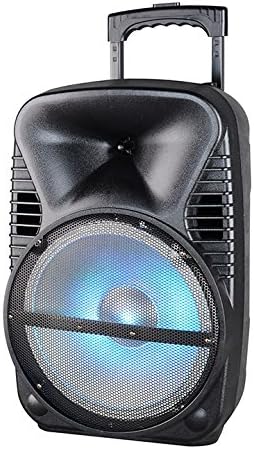
Bild: Vorderseite view of the Max Power MPD125L Karaoke DJ Speaker System. It is a black, portable speaker with a retractable handle on top and wheels at the bottom. The front features a large speaker grille with blue LED lights illuminating the woofer, indicating its active state.
- Tragbares Design: 12-inch speaker with built-in retractable handle and wheels for easy transport.
- Kraftvoller Klang: 4000W peak power output for loud and clear sound with good bass.
- Eingebauter Akku: Provides up to 4 hours of continuous playback. (Battery size: 12V/2.6A)
- LED Dance Lights: Integrated LED lights that flash, transforming any room into a disco club.
- Mehrere Konnektivitätsoptionen:
- Bluetooth: Wireless streaming from compatible devices (laptops, smartphones).
- USB-Steckplatz: Zum Abspielen von Audio files von USB-Laufwerken.
- SD-Slot: Zum Abspielen von Audio files von SD-Karten.
- AM/FM-Radio: Built-in tuner for radio broadcasts.
- Karaoke-Funktionalität: Includes a wireless microphone for karaoke sessions.
- Full-Function Wireless Remote Control: Für die komfortable Bedienung aus der Ferne.
- Impedanz: 4 Ohm.
- Frequenzgang: 40 Hz - 20 kHz.
Aufstellen
1. Laden Sie den Lautsprecher auf
- Locate the DC input port on the speaker (usually on the rear panel).
- Connect the supplied power adapter to the DC input port.
- Stecken Sie das Netzteil in eine normale Steckdose.
- The charging indicator light (if present) will illuminate, typically red, during charging and turn green when fully charged.
- Allow approximately 4-6 hours for a full charge before first use. The speaker can be used while charging.
2. Einrichtung des drahtlosen Mikrofons
- Insert appropriate batteries (not included, usually AA) into the wireless microphone.
- Turn on the microphone. It should automatically pair with the speaker.
- Adjust the microphone volume knob on the speaker's control panel to your desired level.
3. Einrichtung der Fernbedienung
- Insert appropriate batteries (not included, usually AAA) into the wireless remote control.
- Point the remote control towards the speaker's IR receiver (usually on the front panel or near the controls) to operate.
Bedienungsanleitung
1. Ein-/Ausschalten
Locate the Power switch (usually a rocker switch) on the speaker's control panel. Flip it to the "ON" position to power on the speaker. Flip it to "OFF" to power off.
2. Modusauswahl
Press the "MODE" button on the control panel or remote control to cycle through available input modes: Bluetooth, USB, SD, FM Radio, AM Radio, AUX (if available).
3. Bluetooth-Kopplung
- Turn on the speaker and select Bluetooth mode. The speaker will typically announce "Bluetooth Mode" or display "BT" and enter pairing mode (indicated by a flashing Bluetooth indicator).
- On your smartphone, tablet, or laptop, enable Bluetooth and search for new devices.
- Select "MPD125L" (or similar name) from the list of available devices.
- Once paired, the speaker will confirm with an audible tone or a solid Bluetooth indicator light. You can now play audio wirelessly.
4. USB/SD-Wiedergabe
- Insert a USB flash drive or SD card (pre-loaded with MP3 or compatible audio files) in den entsprechenden Schlitz.
- The speaker should automatically switch to USB/SD mode and begin playing the first track. If not, press the "MODE" button to select USB or SD mode.
- Use the Play/Pause, Next Track, and Previous Track buttons on the control panel or remote to navigate.
5. AM/FM-Radiobetrieb
- Select FM or AM radio mode using the "MODE" button.
- Press and hold the Play/Pause button (often labeled "SCAN") to automatically scan and save available radio stations.
- Use the Next Track and Previous Track buttons to switch between saved stations.
- Extend the telescopic antenna (if present) for better reception.
6. Karaoke-Funktion
Ensure the wireless microphone is powered on and paired. Play your desired music through any input mode (Bluetooth, USB, etc.). Speak or sing into the microphone. Adjust the microphone volume and echo effects (if available) using the dedicated knobs on the control panel.
7. LED Dance Lights
The LED lights typically activate automatically when the speaker is powered on. There may be a dedicated button (e.g., "LIGHT" or "LED") on the control panel or remote to toggle them on/off or change patterns.
8. Lautstärkeregelung
Adjust the master volume using the main volume knob on the speaker's control panel or the volume buttons on the remote control.
Wartung
- Reinigung: Use a soft, dry cloth to wipe the exterior of the speaker. Do not use liquid cleaners or abrasive chemicals.
- Lagerung: Bei längerer Nichtbenutzung sollte der Lautsprecher an einem kühlen, trockenen Ort, fern von direkter Sonneneinstrahlung und extremen Temperaturen aufbewahrt werden.
- Batteriepflege: To prolong battery life, avoid fully discharging the battery frequently. Recharge the battery at least once every 3 months if not in regular use.
- Belüftung: Ensure the speaker's ventilation openings are clear of dust and debris to prevent overheating.
Fehlerbehebung
| Problem | Mögliche Ursache | Lösung |
|---|---|---|
| Der Lautsprecher lässt sich nicht einschalten. | Batterie ist leer. Das Stromkabel ist nicht richtig angeschlossen. | Connect the speaker to a power outlet and allow it to charge. Ensure the power cable is securely plugged into both the speaker and the outlet. |
| Aus dem Lautsprecher kommt kein Ton. | Die Lautstärke ist zu niedrig. Falscher Eingabemodus ausgewählt. Device not properly connected (Bluetooth/USB/SD). | Erhöhen Sie die Gesamtlautstärke. Press the "MODE" button to select the correct input. Re-pair Bluetooth device, re-insert USB/SD, or check AUX cable connection. |
| Das Bluetooth-Gerät lässt sich nicht koppeln. | Der Lautsprecher befindet sich nicht im Kopplungsmodus. Gerät zu weit vom Lautsprecher entfernt. Bluetooth am Gerät ist ausgeschaltet. | Ensure speaker is in Bluetooth mode and indicator is flashing. Bringen Sie das Gerät näher an den Lautsprecher heran (innerhalb von 10 Metern). Aktivieren Sie Bluetooth auf Ihrem Gerät. |
| Mikrofon funktioniert nicht. | Microphone is off or batteries are dead. Die Mikrofonlautstärke ist zu niedrig. | Turn on the microphone and replace batteries if necessary. Increase the microphone volume knob on the speaker. |
| Der Radioempfang ist schlecht. | Schwaches Signal. Antenne nicht ausgefahren. | Stellen Sie den Lautsprecher an einem Ort mit besserem Empfang auf. Ziehen Sie die Teleskopantenne vollständig aus. |
Technische Daten
| Modellnummer | MPD125L |
| Marke | MAXIMALE LEISTUNG |
| Spitzenleistung | 4000 Watt |
| Impedanz | 4 Ohm |
| Frequenzgang | 40 Hz - 20 kHz |
| Batteriegröße | 12 V / 2.6 A |
| Akkulaufzeit | Bis zu 4 Stunden |
| Produktabmessungen (L x B x H) | 33.02 x 38.1 x 58.42 cm (13 x 15 x 23 Zoll) |
| Produktgewicht | 15.88 kg |
| Kompatible Geräte | Laptops, Smartphones |
| Steckertyp | USB |
| UPC | 703510623201 |
Garantie und Support
Informationen zur Garantie und zum technischen Support finden Sie in der Ihnen beim Kauf ausgehändigten Dokumentation oder wenden Sie sich an Ihren Händler. Bewahren Sie Ihren Kaufbeleg für eventuelle Garantieansprüche auf.
For further assistance or inquiries, please visit the official MAX POWER webWebsite oder wenden Sie sich an die Kundendienstabteilung.