
1. Einleitung
The JOYING ELM 327 V2.1 Bluetooth OBD2 Diagnostic Scanner is a vehicle interface tool designed to communicate with your car's On-Board Diagnostics (OBD-II) system. It allows users to read and clear diagnostic trouble codes (DTCs), view live sensor data, and monitor various vehicle parameters using a compatible Android device and application. This manual provides instructions for the proper setup, operation, and maintenance of your diagnostic tool.

Abbildung 1: Vorderseite view of the JOYING ELM 327 V2.1 Bluetooth OBD2 Diagnostic Scanner, showing the "ELM327 MINI Interface Supports all OBDII protocols" label.
2. Produktmerkmale
- Reads and clears diagnostic trouble codes (DTCs).
- Displays the meaning of diagnostic trouble codes.
- Turns off the Malfunction Indicator Light (MIL), also known as the "Check Engine" light.
- Shows current sensor data in real-time.
- Bluetooth connectivity for wireless communication with Android devices.
- Supports various OBD-II protocols.
3. Spezifikationen
| Parameter | Wert |
|---|---|
| Prozessor | ELM327 v2.1 |
| Betriebslautstärketage | 12V (with internal protection from short circuits/overvoltages) |
| Nominal Idle Current | 45 mA |
| Bluetooth-Passwort | 1234 |
| Ausgabeschnittstelle | Bluetooth |
| Anwendbarer Geltungsbereich | 5-10 m / 16.4-32.8 Fuß |
| Artikelgewicht | 23 g |
| Technische Daten | 6.3 x 4.72 x 1.97 Zoll (ungefähr) |
| Herstellerteilenummer | 5824090411 |
Supported OBDII Protocols:
- ISO 9141-2 (5 Baud Init, 10.4 kBaud)
- ISO 14230-4 KWP (5 Baud Init, 10.4 kBaud)
- ISO 14230-4 KWP (schneller Start, 10.4 kBaud)
- ISO 15765-4 CAN (11-Bit-ID, 500 kBaud)
- ISO 15765-4 CAN (29-Bit-ID, 500 kBaud)
- ISO 15765-4 CAN (11-Bit-ID, 250 kBaud)
- ISO 15765-4 CAN (29-Bit-ID, 250 kBaud)
Beachten: Dieses Gerät KANN NICHT work for PWM or VPW (SAE J1850) protocols.

Abbildung 2: Seite view of the diagnostic scanner showing approximate dimensions: 1.95 inches length, 1 inch width, 1.25 inches height.
4. Installationsanleitung
4.1. Installation
- Locate your vehicle's OBD-II port. This port is typically found under the dashboard on the driver's side, but its exact location may vary by vehicle model. Refer to your vehicle's owner's manual if you cannot find it.
- Ensure your vehicle's ignition is turned off before plugging in the device.
- Firmly plug the JOYING ELM 327 V2.1 scanner into the OBD-II port. Do not force the connection.
- Once plugged in, turn your vehicle's ignition to the "ON" position (engine does not need to be running). The device should power on, indicated by an LED light.

Abbildung 3: Schräg view of the diagnostic scanner, highlighting the 16-pin OBD-II connector.
4.2. Bluetooth Pairing with Android Device
- On your Android device, go to "Settings" and enable Bluetooth.
- Suchen nach available Bluetooth devices. The scanner should appear as "OBDII" or a similar identifier.
- Select the device to pair. When prompted for a password, enter 1234.
- Once paired, your Android device is ready to connect with a compatible OBD2 application.
4.3. Softwareinstallation
This diagnostic tool requires a third-party OBD2 application to function. Popular applications include "Torque Pro" (often preinstalled on JOYING car radios as "Torque_pro apk") or other compatible apps available on the Google Play Store.
- Download and install your preferred OBD2 application from the Google Play Store.
- Open the application and navigate to its settings.
- In the application settings, select "Bluetooth" as the connection type and choose the paired "OBDII" device.
- Follow the in-app instructions to establish a connection with the scanner.
5. Bedienungsanleitung
Once the JOYING ELM 327 V2.1 scanner is connected to your vehicle and paired with your Android device and OBD2 application, you can begin diagnostics.
- Verbinden: Ensure the app indicates a successful connection to the OBD2 adapter and your vehicle's ECU.
- Fehlercodes auslesen: Navigate to the "Fault Codes" or "DTCs" section within the app to scan for stored diagnostic trouble codes. The app will display the codes and their descriptions.
- Fehlercodes löschen: If applicable, the app will provide an option to clear the fault codes. Clearing codes will also turn off the Malfunction Indicator Light (MIL). Note that if the underlying issue is not resolved, the codes may reappear.
- View Lebensdaten: Access the "Realtime Information" or "Live Data" section to monitor various sensor readings such as engine RPM, vehicle speed, coolant temperature, fuel system status, and more.
- Weitere Funktionen: Depending on your chosen app, additional features like performance monitoring, fuel economy tracking, and graphing of sensor data may be available.
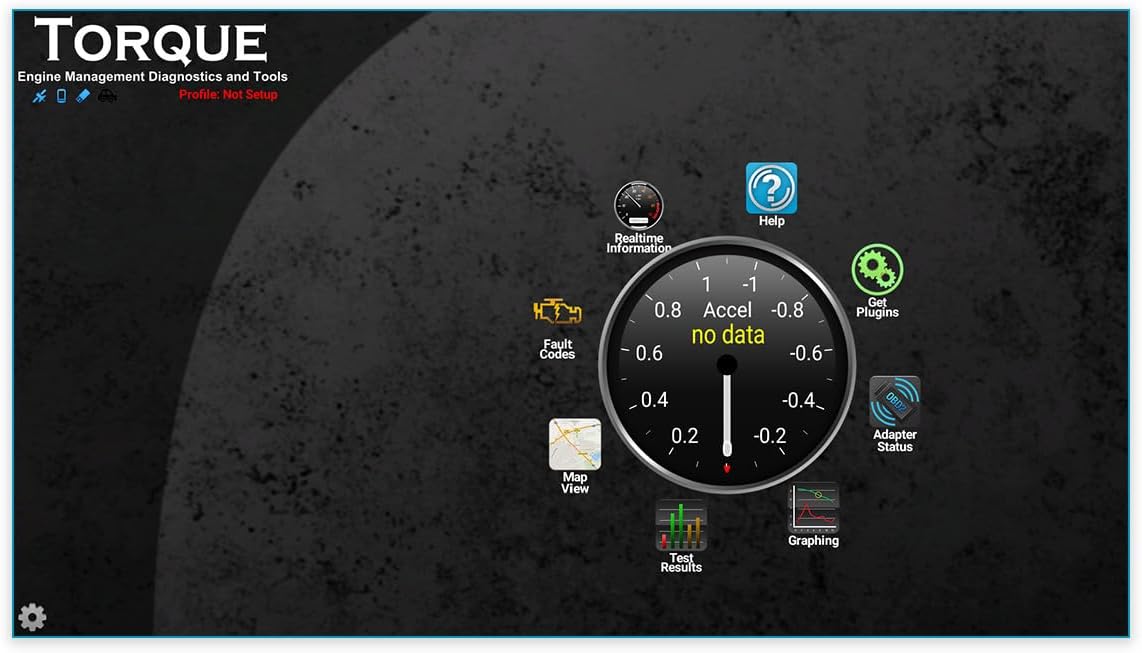
Abbildung 4: Bspample interface of a compatible OBD2 application (Torque Pro), showing options for Realtime Information, Fault Codes, Adapter Status, and Graphing.
For detailed instructions on specific features, please refer to the user manual or help section of your chosen OBD2 application.
6. Wartung
The JOYING ELM 327 V2.1 diagnostic scanner requires minimal maintenance.
- Reinigung: Wischen Sie das Gerät mit einem weichen, trockenen Tuch ab. Verwenden Sie keine flüssigen Reiniger oder Lösungsmittel.
- Lagerung: Bewahren Sie das Gerät bei Nichtgebrauch an einem kühlen, trockenen Ort fern von direkter Sonneneinstrahlung und extremen Temperaturen auf.
- Handhabung: Vermeiden Sie es, das Gerät fallen zu lassen oder starken Stößen auszusetzen.
7. Fehlerbehebung
If you encounter issues with your JOYING ELM 327 V2.1 diagnostic scanner, refer to the following common troubleshooting steps:
- Gerät lässt sich nicht einschalten:
- Stellen Sie sicher, dass das Gerät fest mit dem OBD-II-Anschluss des Fahrzeugs verbunden ist.
- Vergewissern Sie sich, dass die Zündung des Fahrzeugs eingeschaltet ist.
- Check your vehicle's fuse box for any blown fuses related to the OBD-II port (consult your vehicle's manual).
- Probleme mit der Bluetooth-Kopplung:
- Make sure Bluetooth is enabled on your Android device.
- Stellen Sie sicher, dass der Scanner eingeschaltet ist.
- Try unpairing and re-pairing the device. The default Bluetooth password is 1234.
- Stellen Sie sicher, dass keine anderen Geräte aktiv über Bluetooth mit dem Scanner verbunden sind.
- App Not Connecting to Scanner:
- Confirm that the scanner is successfully paired with your Android device via Bluetooth settings.
- In your OBD2 application's settings, verify that "Bluetooth" is selected as the connection type and the correct "OBDII" device is chosen.
- Try restarting both the app and your Android device.
- Some apps may require specific settings or configurations. Consult the app's documentation.
- Ensure the app is compatible with ELM327 v2.1 devices.
- Keine Daten oder falsche Messwerte:
- Verify that your vehicle supports the OBD-II protocols listed in the specifications. This device does not support PWM or VPW (SAE J1850) protocols.
- Stellen Sie sicher, dass die App für das Protokoll Ihres Fahrzeugs korrekt konfiguriert ist (falls zutreffend).
- Check if your vehicle's engine is running or ignition is in the "ON" position.
- Device Not Compatible with iOS:
- This device is designed for use with Android operating systems only and is not compatible with iOS devices.
If problems persist after attempting these steps, please contact JOYING customer support or refer to their official webWebsite für weitere Unterstützung.
8. Garantie und Support
For information regarding warranty coverage, technical support, or service inquiries, please refer to the documentation included with your purchase or visit the official JOYING webWebsite.
Hersteller: FREUDE
WebWebsite: JOYING Official Store on Amazon (or refer to product packaging for direct manufacturer contact information)