
1. Einleitung
Thank you for choosing the GATEMAN WF20 Digital Door Lock. This advanced security system offers convenient and secure access to your property through fingerprint recognition and passcode entry. This manual provides comprehensive instructions for the proper installation, operation, and maintenance of your new digital door lock. Please read this manual thoroughly before installation and use to ensure optimal performance and safety.
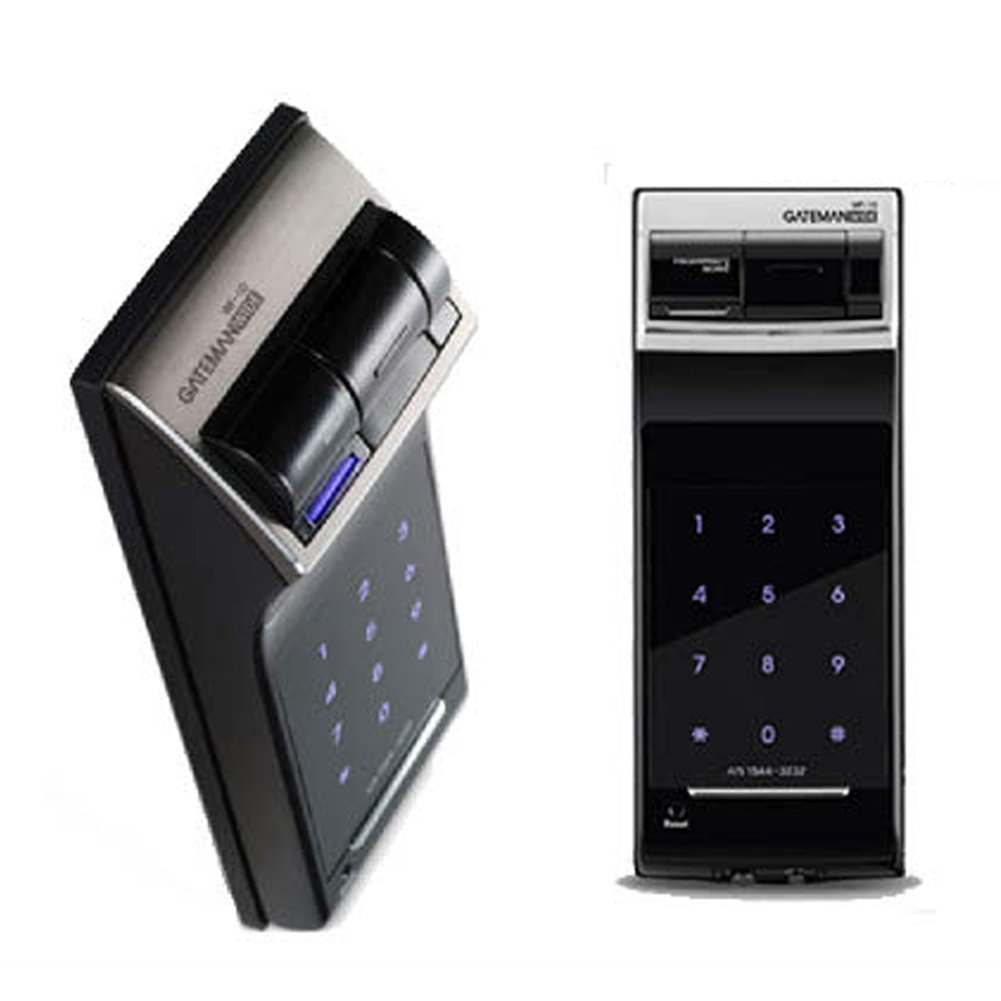
Figure 1: GATEMAN WF20 Digital Door Lock Exterior Unit. This image shows the main exterior unit of the GATEMAN WF20 digital door lock, highlighting its fingerprint recognition scanner, numeric keypad, and sleek design.
Hauptmerkmale:
- One-touch fingerprint recognition (up to 20 registrations)
- Audible voice guidance (Korean)
- Anti-peeping virtual passcode function
- Smart Pad with visual feedback
- Electric shock and high-temperature safety systems
- Durable fiberglass material
- Daily life waterproof function
2. Einrichtung und Installation
Proper installation is crucial for the optimal performance and security of your GATEMAN WF20 Digital Door Lock. While installation can be performed with basic tools like a screwdriver, some steps may require careful attention, especially for specific door types.
Allgemeine Installationshinweise:
- Ensure all components are present before beginning installation.
- For metal doors, you may need to adjust screw positions or use appropriate tools for drilling.
- When connecting wiring, ensure correct orientation. The external unit's claws should align neatly.
- Refer to the included installation template for precise drilling and component placement.
Einlegen der Batterie:
- Öffnen Sie die Batterieabdeckung an der Inneneinheit.
- Legen Sie die angegebene Anzahl AA-Alkalibatterien ein und achten Sie dabei auf die richtige Polarität.
- Schließen Sie die Batterieabdeckung fest.
3. Bedienungsanleitung
3.1 Fingerabdruckerkennung
The GATEMAN WF20 supports one-touch fingerprint recognition for quick and secure access.

Figure 2: Fingerprint Scanning. This image illustrates the fingerprint recognition process for the GATEMAN WF20, showing a finger being placed on the scanner.
Fingerabdruckregistrierung:
- Access the registration mode (refer to the detailed programming guide for specific steps).
- Place the desired finger on the scanner.
- For optimal accuracy, register the same finger three times.
- Ensure your finger is placed correctly from top to bottom during registration and subsequent use.
Bis zu 20 Fingerabdrücke können registriert werden.
3.2 Passcode Entry and Anti-Peeping Function
The lock supports passcode entry and includes a virtual passcode function to enhance security against observation.

Figure 3: Hand Touch Feature. This image demonstrates the 'Hand Touch' feature of the GATEMAN WF20, designed to prevent fingerprint residue from being left on the keypad.
Standard Passcode Entry:
- Berühren Sie das Tastenfeld, um es zu aktivieren.
- Enter your registered passcode.
- Press the '*' or '#' button (or equivalent confirmation button) to unlock.
Virtual Passcode (Anti-Peeping) Function:
To prevent others from observing your passcode, you can enter random numbers before or after your actual passcode.

Figure 4: Virtual Passcode Function. This image explains the virtual passcode function of the GATEMAN WF20, showing how to enter random numbers before or after your real passcode.
Methode 1: Enter random numbers > Enter actual passcode > Enter more random numbers > Touch the pad.
Methode 2: Touch the pad > Enter random numbers > Enter actual passcode > Touch the pad.
3.3 Smart Pad Visual Feedback
The smart pad provides clear visual feedback through individually illuminated number lamps, making it easy to confirm entries and understand the lock's status.

Figure 5: Smart Pad. This image highlights the 'Smart Pad' feature of the GATEMAN WF20, showing how the pad uses individual number lamp illumination to provide clear visual feedback.
3.4 3-Minute Lock Function
As a security measure, if an unregistered passcode is entered 5 times consecutively, all external buttons on the lock will be disabled for 3 minutes.
3.5 2-Way Authentication
The GATEMAN WF20 allows you to open the door using either registered fingerprints or passcodes. Both authentication methods can be easily changed or updated as needed.
3.6 Automatic and Forced Lock Functions
The door lock method can be set to either automatic locking or manual one-touch locking for convenience. Additionally, an internal forced lock function can be activated. When the internal forced lock is set, the door cannot be opened from the outside, even with a valid passcode or registered fingerprint, providing enhanced privacy and security.
3.7 Volume Adjustment and Self-Diagnosis
The operating sound volume can be adjusted with a one-touch button. The lock also features a self-diagnosis function that informs the user of any potential malfunction status in advance, improving user convenience and allowing for timely troubleshooting.
3.8 Notstromversorgung
The lock is equipped with an emergency power supply feature. Before the batteries are completely discharged, an alarm will sound, and a red light will indicate that it's time for battery replacement. If the batteries are fully discharged before replacement, you can temporarily power the lock using an external 9V battery to gain access.
3.9 Breakage and Intrusion Alarm
For enhanced security, the GATEMAN WF20 features an alarm function that activates upon detecting forced entry or breakage attempts. A strong alarm will sound to notify the surroundings, serving as an effective deterrent against crime.
4. Erweiterte Funktionen
4.1 Sprachführung
The GATEMAN WF20 is equipped with a voice guidance function (in Korean) that provides clear instructions for operation, making it easier and more convenient to use compared to simple alarm tones.

Figure 6: Interior Unit with Speaker. This image displays the interior unit of the GATEMAN WF20 digital door lock, pointing out the speaker output area for voice guidance.
4.2 Electric Shock Safety System
The WF20 is designed with a robust electric shock safety system. It can withstand up to 50,000 volts of electric shock (exceeding the KS standard of 30,000 volts) and is equipped with a protective chip that absorbs impact from strong electrical surges, such as lightning. This ensures reliable operation and user safety even in adverse conditions.
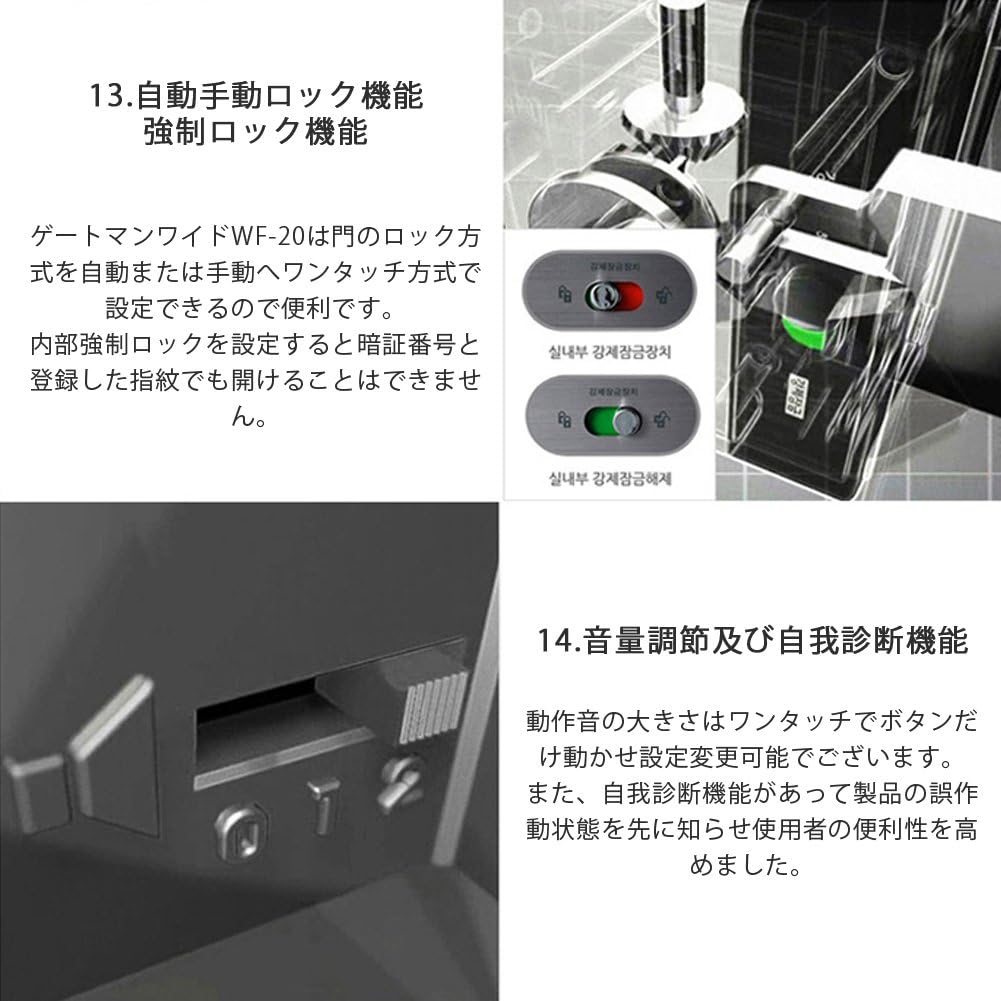
Figure 7: Electric Shock Protection. This image illustrates the electric shock safety system of the GATEMAN WF20, showing the lock with a lightning bolt icon.
4.3 High-Temperature Alarm Safety System
In the event of a fire, the main body's built-in sensor will detect internal or external temperatures reaching 55°C. An 80dB alarm will sound to alert occupants and facilitate evacuation. Additionally, for smooth and safe exit, the door lock function will automatically release.

Figure 8: High-Temperature Alarm. This image depicts the high-temperature alarm safety system of the GATEMAN WF20, showing the lock with a fire alarm icon.
4.4 Fiberglass Material
The WF20 utilizes a special fiberglass material known for its resistance to heat and impact. This material maintains its shape even at high temperatures of 1,000 degrees Celsius and ensures normal operation during impact. It also boasts excellent electrical insulation and strong resistance to static electricity, similar to advanced materials used in military helmets.
4.5 Daily Life Waterproof Function
The GATEMAN WF20 is equipped with a daily life waterproof function, allowing it to operate normally even in environments with some external exposure to moisture. It is suitable for installation in locations such as apartments or mansions that have protective eaves.
5. Wartung
5.1 Batteriewechsel
When the low battery alarm sounds and the red light illuminates, it is time to replace the batteries. Prompt replacement ensures continuous operation and security.
- Öffnen Sie die Batterieabdeckung an der Inneneinheit.
- Entfernen Sie die alten Batterien.
- Insert new AA alkaline batteries, ensuring correct polarity.
- Schließen Sie die Batterieabdeckung fest.
5.2 Reinigung
Wipe the exterior surfaces of the lock with a soft, dry cloth. Avoid using abrasive cleaners, solvents, or excessive moisture, as these can damage the finish or internal components.
6. Fehlerbehebung
If you encounter issues with your GATEMAN WF20 Digital Door Lock, refer to the following common problems and solutions:
| Problem | Mögliche Ursache | Lösung |
|---|---|---|
| Fingerprint not recognized easily | Improper finger placement; insufficient registration data; dry/wet finger. | Ensure finger is placed correctly from top to bottom. Re-register the fingerprint 3 times for better accuracy. Ensure finger is clean and not excessively dry or wet. |
| Keypad unresponsive after multiple incorrect entries | 3-Minute Lock function activated. | Wait for 3 minutes for the lock to reset. Avoid repeated incorrect entries. |
| Lock does not respond (no power) | Batteries are completely discharged. | Use an external 9V battery to supply emergency power. Replace internal batteries immediately. |
| Alarm ertönt unerwartet | High-temperature alarm activated; intrusion attempt detected. | Check for fire hazards. Inspect the door for signs of tampering. If false alarm, consult the full programming guide for alarm sensitivity settings or contact support. |
| Voice guidance is in Korean | Product is designed with Korean voice guidance. | This is the default language. Refer to the manual for visual cues and instructions. |
Sollte das Problem nach Anwendung dieser Lösungsansätze weiterhin bestehen, wenden Sie sich bitte an den Kundendienst.
7. Spezifikationen
| Besonderheit | Detail |
|---|---|
| Marke | GateMan |
| Modellnummer | WF-20 |
| Sperrtyp | Keypad, Biometric (Fingerprint) |
| Authentication Style | Fingerabdruckerkennung |
| Farbe | Schwarz |
| Form | Rechteckig |
| Kontrollmethode | Berühren |
| Fingerabdruckkapazität | Up to 20 registrations |
| Stromversorgung | AA Alkaline Batteries (quantity not specified, typically 4-8) |
| Notstromversorgung | External 9V Battery |
| Hochtemperaturalarm | Activates at 55°C, 80dB alarm |
| Widerstandsfähigkeit gegen Stromschläge | Up to 50,000 volts |
| Material | Fiberglass (heat and impact resistant) |
8. Garantie und Support
Specific warranty information for the GATEMAN WF20 Digital Door Lock may vary by region and retailer. Please retain your proof of purchase for warranty claims.
Kundendienst:
For technical assistance, troubleshooting not covered in this manual, or warranty inquiries, please contact the retailer or the manufacturer's authorized service center. Contact information can typically be found on the product packaging or the seller's webWebsite.