
Einführung
This manual provides detailed instructions for the proper use and maintenance of your SUNITEC Bluetooth Car Speakerphone BC936SA. Please read this manual thoroughly before operating the device to ensure optimal performance and safety.
Sicherheitshinweise
Do not use the hands-free device in a manner that distracts your attention from the road while driving.
Packungsinhalt
Überprüfen Sie, ob alle Artikel im Paket vorhanden sind:
- SUNITEC BC936SA Bluetooth Car Speakerphone
- USB Car Charger
- USB-Ladekabel
- Zurück Clip
- Bedienungsanleitung

Image: Contents of the SUNITEC BC936SA package, including the speakerphone, car charger, USB cable, back clip, and user manual.
Produkt überview
Familiarize yourself with the components and controls of your speakerphone:
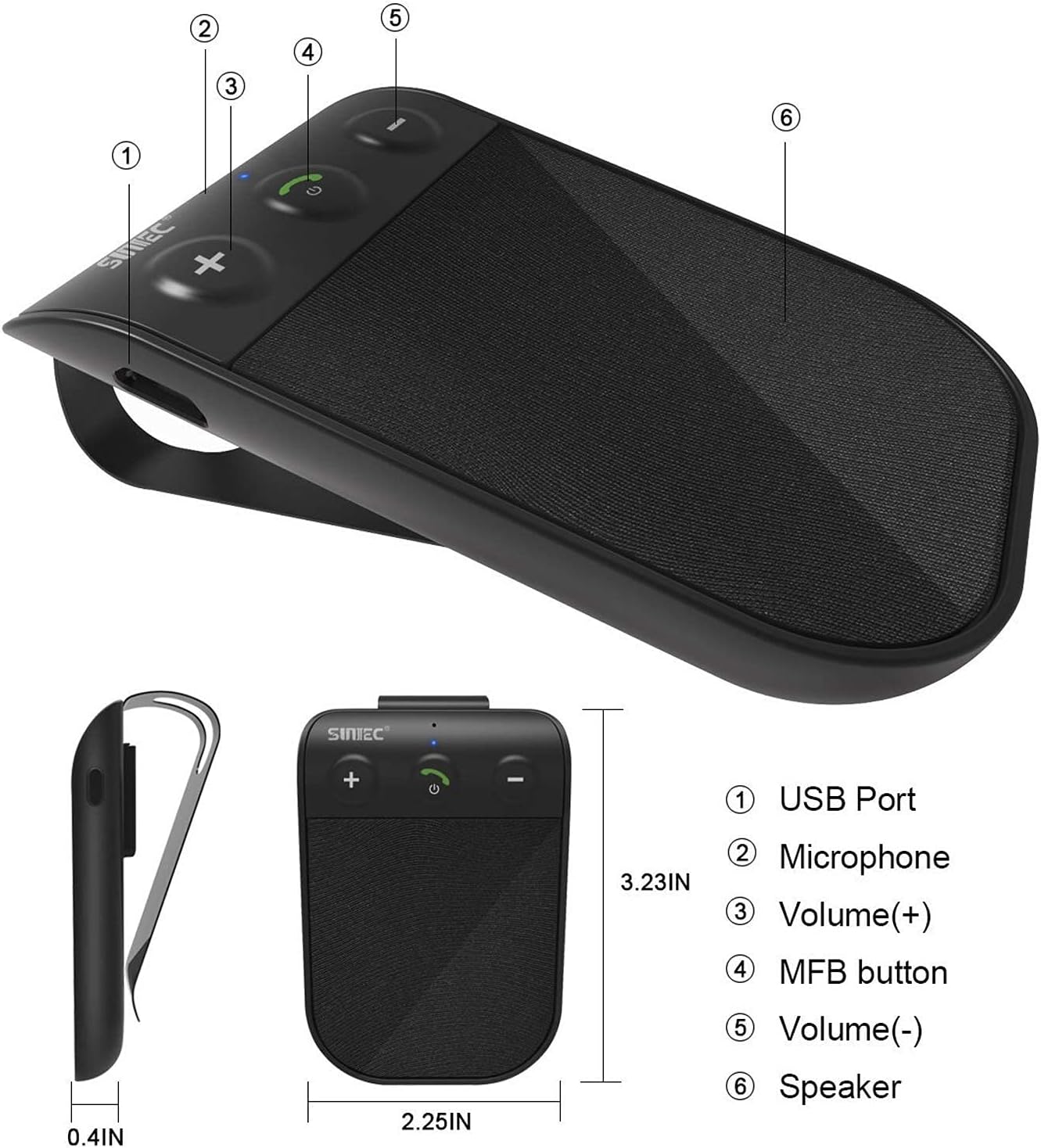
Image: Diagram showing the SUNITEC BC936SA speakerphone with labeled parts: (1) USB Port, (2) Microphone, (3) Volume (+), (4) MFB button, (5) Volume (-), (6) Speaker.
Aufstellen
1. Aufladen des Geräts
Before first use, fully charge the speakerphone. Connect the USB charging cable to the device and the car charger. A red light indicates charging. Charging typically takes less than 2 hours. The device provides up to 12 hours of talk time and 980 hours of standby time on a full charge.
Video: This video demonstrates several features of the SUNITEC BC936SA. It shows the 'Battery Low' voice prompt (0-3s), unboxing the product (3-7s), adjusting volume (7-10s), using GPS directions (10-12s), charging with a red indicator light (12-15s), connecting multiple devices (15-19s), power on/off (19-20s), and a Siri call demonstration (20-38s).

Image: Visual representation of the battery indicator, showing a full charge of 400 mAh and estimated usage hours.
2. Montage des Freisprechsystems
Attach the speakerphone to your car's sun visor using the included clip. Ensure it is securely fastened and does not obstruct your view während der Fahrt.

Image: The SUNITEC BC936SA speakerphone clipped onto a car's sun visor, showing its discreet placement.
3. Koppeln mit Ihrem Telefon
- Turn on the speakerphone. It will enter pairing mode automatically.
- Aktivieren Sie Bluetooth auf Ihrem Mobiltelefon und suchen Sie nach verfügbaren Geräten.
- Select "BC936SA" from the list of devices to connect.
- Nach erfolgreicher Verbindung gibt das Freisprechgerät eine Sprachansage zur Bestätigung der Verbindung.
The device supports connecting two mobile phones simultaneously, allowing for easy switching between calls and music.

Image: The SUNITEC BC936SA speakerphone positioned between two smartphones, illustrating its ability to connect to two devices simultaneously.

Image: A visual showing the speakerphone connecting to two phones, highlighting the dual link feature.
Bedienungsanleitung
1. Power On/Off and Auto Reconnection
The speakerphone features an auto power-on function. Once paired and connected, the BC936SA will automatically power on and reconnect to your phone when the car door is opened. When not in use, it will automatically power off to conserve battery.

Image: A hand opening a car door, with an inset showing the SUNITEC BC936SA on the sun visor, indicating the auto power-on feature upon car door opening.

Image: A visual showing the speakerphone automatically powering on when the car door is opened.
2. Anrufe tätigen und entgegennehmen
The speakerphone provides clear calls thanks to its noise cancellation technology. Use the MFB (Multi-Function Button) to answer, end, or reject calls. Adjust volume using the dedicated volume buttons.
3. Voice Commands (Siri/Google Assistant)
The BC936SA supports Siri and Google Assistant. Activate your phone's voice assistant to make calls, send messages, or get GPS directions, allowing you to remain focused on the road.

Image: The speakerphone next to a phone displaying voice command examples for Siri and Google Assistant, emphasizing safe driving.

Image: A visual showing the speakerphone activating Siri or Google Assistant for voice commands.
4. Musikwiedergabe
You can stream music from your connected phone through the speakerphone. Use the volume buttons to adjust playback levels.

Image: The SUNITEC BC936SA speakerphone with sound waves emanating from it, next to a smartphone displaying a music player, highlighting its ultra-clear sound quality with Bluetooth 5.0.
Wartung
1. Reinigung
Reinigen Sie das Gerät mit einem weichen, trockenen Tuch. Verwenden Sie keine scharfen Chemikalien oder Scheuermittel.
2. Batteriepflege
To prolong battery life, avoid exposing the device to extreme temperatures. Recharge the battery when the "Battery Low" voice prompt is heard.
Fehlerbehebung
| Problem | Mögliche Ursache | Lösung |
|---|---|---|
| Gerät lässt sich nicht einschalten. | Batterie ist leer. | Laden Sie das Gerät vollständig auf. |
| Kopplung mit dem Telefon nicht möglich. | Bluetooth is off on phone or device is not in pairing mode. | Ensure Bluetooth is enabled on your phone. Put the speakerphone into pairing mode (usually by holding the MFB button). Delete previous pairings on your phone and try again. |
| Schlechte Audioqualität bei Anrufen. | Interference or low signal. | Ensure the speakerphone is within range of your phone. Check for other devices causing interference. Adjust volume. |
| Die automatische Ein-/Ausschaltfunktion funktioniert nicht. | Device not properly paired or sensor obstructed. | Re-pair the device. Ensure the device is securely mounted and the sensor is not blocked. |
Weitere Unterstützung erhalten Sie über die Kontaktinformationen im Abschnitt Garantie & Support.
Technische Daten
| Besonderheit | Detail |
|---|---|
| Marke | SUNITEC |
| Modell | BC936SA |
| Technische Daten | 11.68 x 1.78 x 4.57 cm |
| Artikelgewicht | 62.37 Gramm |
| Hardware-Schnittstelle | Bluetooth, USB |
| Kompatible Geräte | Bluetooth-Geräte |
| Zusätzliche Merkmale | Bluetooth |
| Audioausgabemodus | Stereo |
| Bandtage | 3.7 Volt |
| Stromquellentyp | Batteriebetrieben |
| Akku-Typ | Wiederaufladbares Lithium-Polymer |
| Durchschnittliche Akkulaufzeit (Standby) | 980 Stunden |
| Ladezeit | 2 Stunden |
| Kabelloser Typ | Bluetooth |
| Unterstützte Standards | Bluetooth |
| Eingabe der menschlichen Schnittstelle | Schaltflächen |
| Material | Plastik |
| Installationstyp | Phone, Car |
| Bluetooth-Technologieunterstützung | Ja |

Image: Close-up of the Bluetooth 5.0 Qualcomm chipset, indicating advanced connectivity.
Garantie und Support
SUNITEC offers a 365-day free return policy for any product issues. For technical support or inquiries, please contact our customer service. We aim to provide quick responses within 24 hours.
Weitere Informationen finden Sie unter www.sunitec.net.