
Einführung
Thank you for choosing the Perlegear Universal TV Stand. This stand is designed to provide a stable and adjustable mounting solution for your television. Please read this manual carefully before assembly and use to ensure safe and correct installation and operation.
This TV stand is compatible with most LCD/LED/Plasma televisions ranging from 32 to 60 inches, with a maximum weight capacity of 40 kg (88 lbs). It supports VESA mounting patterns from 100x100mm up to 400x400mm.
Sicherheitshinweise
- Maximale Tragfähigkeit: Do not exceed the maximum weight of 40 kg (88 lbs). Exceeding this limit may result in instability and potential injury.
- Kompatibilität der TV-Größe: Dieser Ständer ist für Fernseher mit einer Bildschirmdiagonale von 32 bis 60 Zoll geeignet. Bitte stellen Sie sicher, dass Ihr Fernseher in diesen Bereich fällt.
- VESA-Kompatibilität: Verify your TV's VESA mounting pattern (the distance between the mounting holes on the back of your TV) is between 100x100mm and 400x400mm.
- Stabile Oberfläche: Stellen Sie den Fernsehständer immer auf eine ebene, stabile und waagerechte Fläche.
- Kinder und Haustiere: Keep children and pets away from the TV stand during assembly. Do not allow them to climb on or play with the stand or TV.
- Richtige Installation: Ensure all screws are securely tightened according to the assembly instructions. Do not overtighten.
- Regelmäßige Kontrollen: Überprüfen Sie regelmäßig alle Verbindungen und Befestigungselemente, um sicherzustellen, dass sie fest sitzen.

This diagram illustrates how to verify your television's VESA standard, screen size (32-60 inches), and weight (maximum 40 kg) to ensure compatibility with the stand.
Packungsinhalt
Bitte prüfen Sie vor Beginn der Montage, ob alle Komponenten vorhanden und unbeschädigt sind. Sollten Teile fehlen oder beschädigt sein, wenden Sie sich bitte an unseren Kundendienst.
- 1 x Perlegear Universal TV Stand
- 1 x Montageanleitung
- 1 x Mounting Hardware Kit (various screws, washers, spacers)
Aufbau- und Montageanleitung
Follow these steps carefully for proper assembly. It is recommended to have a second person assist with mounting the television.
- Bereiten Sie die Basis vor: Attach the central support column to the tempered glass base using the provided screws and tools. Ensure the column is firmly secured to the base.
- TV-Halterungen anbringen: Secure the vertical TV brackets to the back of your television using the appropriate VESA screws, washers, and spacers from the hardware kit. Ensure the brackets are centered and level.
- Fernseher am Ständer befestigen: Carefully lift the television with the attached brackets and hook them onto the horizontal mounting plate of the stand. Ensure both brackets are securely seated.
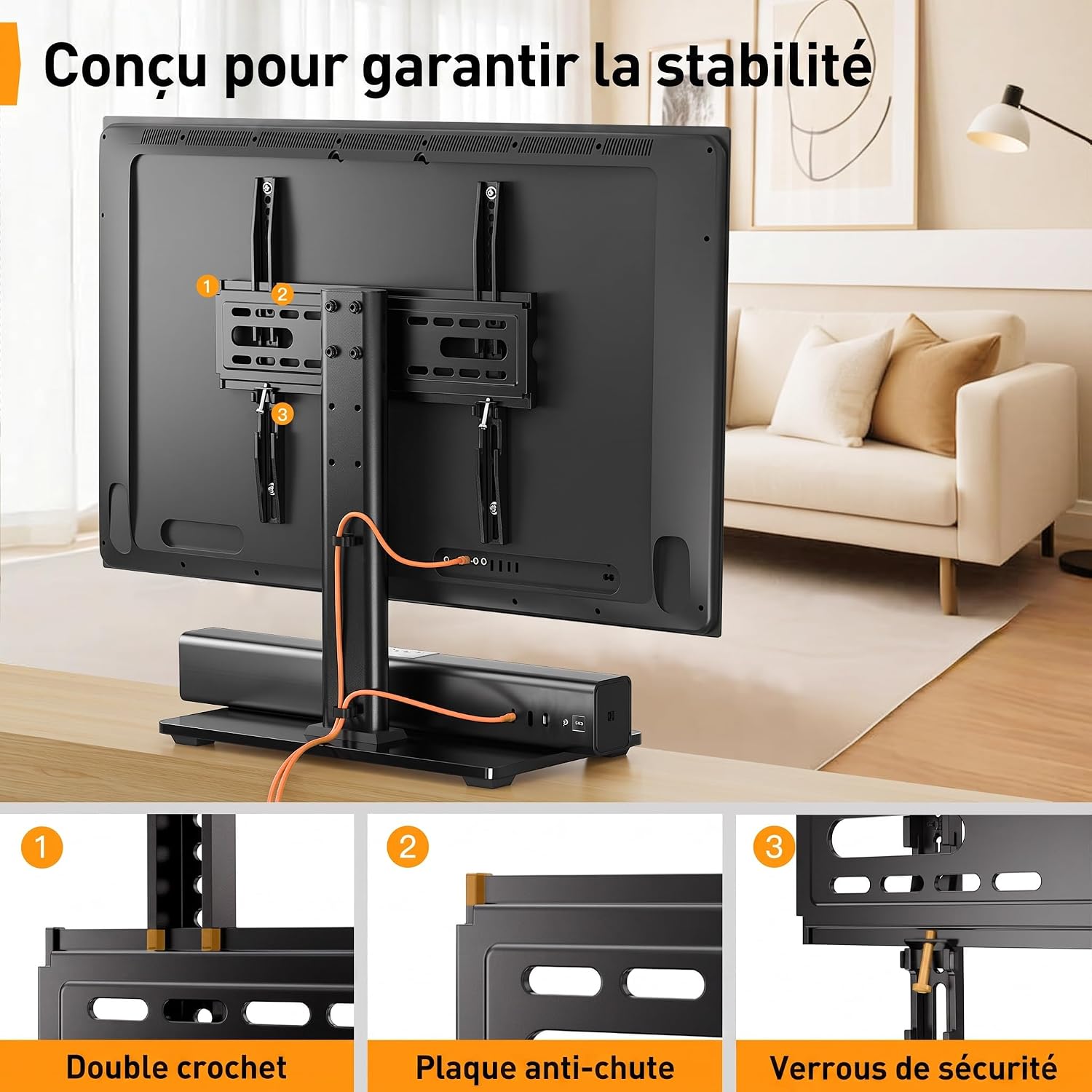
- Sicheres Fernsehen: Once the TV is hooked, use the security locks or screws (as per your specific model's design) to prevent the TV from accidentally lifting off the stand.
- Kabelmanagement: Route your TV cables through the integrated cable management system on the central column for a tidy appearance.
This image demonstrates the straightforward installation process, emphasizing that no wall drilling is necessary for this TV stand.

This image highlights the stand's stability features, including a double hook, anti-fall plate, and security locks, designed to keep your television securely in place.

Eine Front view of the assembled Perlegear Universal TV Stand, showcasing its black tempered glass base and central support column with the VESA mounting bracket.
Bedienungsanleitung
This TV stand offers convenient features for an optimal viewErfahrung.
- Höhenverstellung: The TV stand features 3 levels of height adjustment, with each level allowing for a 50mm change. This enables you to position your television at an optimal viewing height. To adjust, carefully lift the TV slightly, reposition the mounting plate to the desired height setting on the central column, and re-secure.
- Kabelmanagement: Utilize the integrated cable hooks or clips located at the rear of the central column to neatly organize and conceal your TV and accessory cables. This helps maintain a clean and organized entertainment area.

This illustration highlights the ergonomic benefits of the height-adjustable TV stand, showing how it can improve viewing comfort and posture.

This image demonstrates the effective cable management system, allowing for neat routing of cables along the stand's central column to reduce clutter.
Wartung
Um die Langlebigkeit und das Aussehen Ihres TV-Ständers zu gewährleisten, beachten Sie bitte folgende Pflegehinweise:
- Reinigung: Wischen Sie den Ständer mit einem weichen, fusselfreien Tuch ab.amp cloth. Avoid using abrasive cleaners, solvents, or harsh chemicals, as these can damage the finish or glass.
- Überprüfung der Befestigungselemente: Periodically inspect all screws and bolts to ensure they are tight. Loose fasteners can compromise the stability and safety of the stand.
- Glaspflege: The tempered glass base is durable, but avoid placing extremely heavy or sharp objects on it to prevent scratches or damage.
Fehlerbehebung
Sollten Sie während der Montage oder Verwendung auf Probleme stoßen, beachten Sie bitte die folgenden gängigen Lösungsansätze:
- Der Ständer ist instabil:
- Stellen Sie sicher, dass alle Schrauben fest angezogen sind.
- Verify the stand is placed on a flat and level surface.
- Confirm your TV's weight and size are within the specified limits (max 40kg, 32-60 inches).
- TV Does Not Fit Brackets:
- Check your TV's VESA mounting pattern against the stand's compatibility (100x100mm to 400x400mm).
- Ensure you are using the correct screws and spacers from the hardware kit for your TV model.
- Schwierigkeiten bei der Höhenverstellung:
- Ensure the TV is slightly lifted to relieve pressure on the mounting points before attempting to reposition.
- Follow the height adjustment steps carefully, ensuring the mounting plate is correctly seated at the desired level.
Technische Daten
| Besonderheit | Spezifikation |
|---|---|
| Modellnummer | PGTVS04-E |
| Marke | Prozessausrüstung |
| Art der Halterung | Bodenhalterung |
| Bewegungstyp | Höhenverstellbar |
| Material | Gehärtetes Glas, Metall |
| Farbe | Schwarz |
| Kompatible Geräte | Fernsehen |
| Kompatibilität mit Bildschirmgrößen | 32-60 Zoll |
| Maximale Tragfähigkeit | 40 kg |
| VESA-Kompatibilität | 100x100mm, 100x200mm, 200x100mm, 200x200mm, 300x200mm, 300x300mm, 400x200mm, 400x300mm, 400x400mm |
| Höhenverstellungsstufen | 3 levels, 50mm increments |
| Basisabmessungen | 400mm x 240mm (approximate, based on image) |
Garantie und Support
Garantie: This Perlegear TV stand comes with a 5-year warranty from the date of purchase, covering manufacturing defects and material flaws under normal use.
Kundendienst: For technical assistance, missing parts, or warranty claims, please contact Perlegear customer support through the retailer's platform or the official Perlegear website. Please have your model number (PGTVS04-E) and proof of purchase ready.


