
Logilink PDU8P01
Logilink PDU8P01 8-Port IP-Stromverteilungseinheit – Benutzerhandbuch
Model: PDU8P01
1. Einleitung
The Logilink PDU8P01 is an advanced 8-port IP Power Distribution Unit designed for efficient power management in server racks and data centers. This device allows for remote control of individual power outlets, comprehensive power monitoring, and environmental sensing (temperature and humidity). This manual provides essential information for the safe and effective installation, configuration, and operation of your PDU8P01.
2. Sicherheitshinweise
Please read and understand all safety instructions before installing or operating the PDU8P01. Failure to follow these instructions may result in electric shock, fire, or damage to the equipment.
- Ensure the PDU is connected to a properly grounded power source.
- Do not open the PDU casing. Im Inneren befinden sich keine vom Benutzer wartbaren Teile.
- Avoid operating the PDU in excessively humid or hot environments.
- Do not overload the PDU. Refer to the specifications for maximum load capacity.
- Vor Durchführung von Wartungs- oder Installationsarbeiten die Stromzufuhr unterbrechen.
- Verwenden Sie ausschließlich die mitgelieferten oder empfohlenen Stromkabel.
3. Packungsinhalt
Prüfen Sie beim Auspacken, ob alle Artikel vorhanden und in gutem Zustand sind.
- Logilink PDU8P01 8-Port IP Power Distribution Unit
- C19 to C20 Power Cable
- Benutzerhandbuch (dieses Dokument)
- Mounting hardware for 19-inch rack installation (may vary by region/package)

Bild 1: Vorderseite view of the Logilink PDU8P01, showing the C19 input and eight C13 outlets, along with the display and network port.
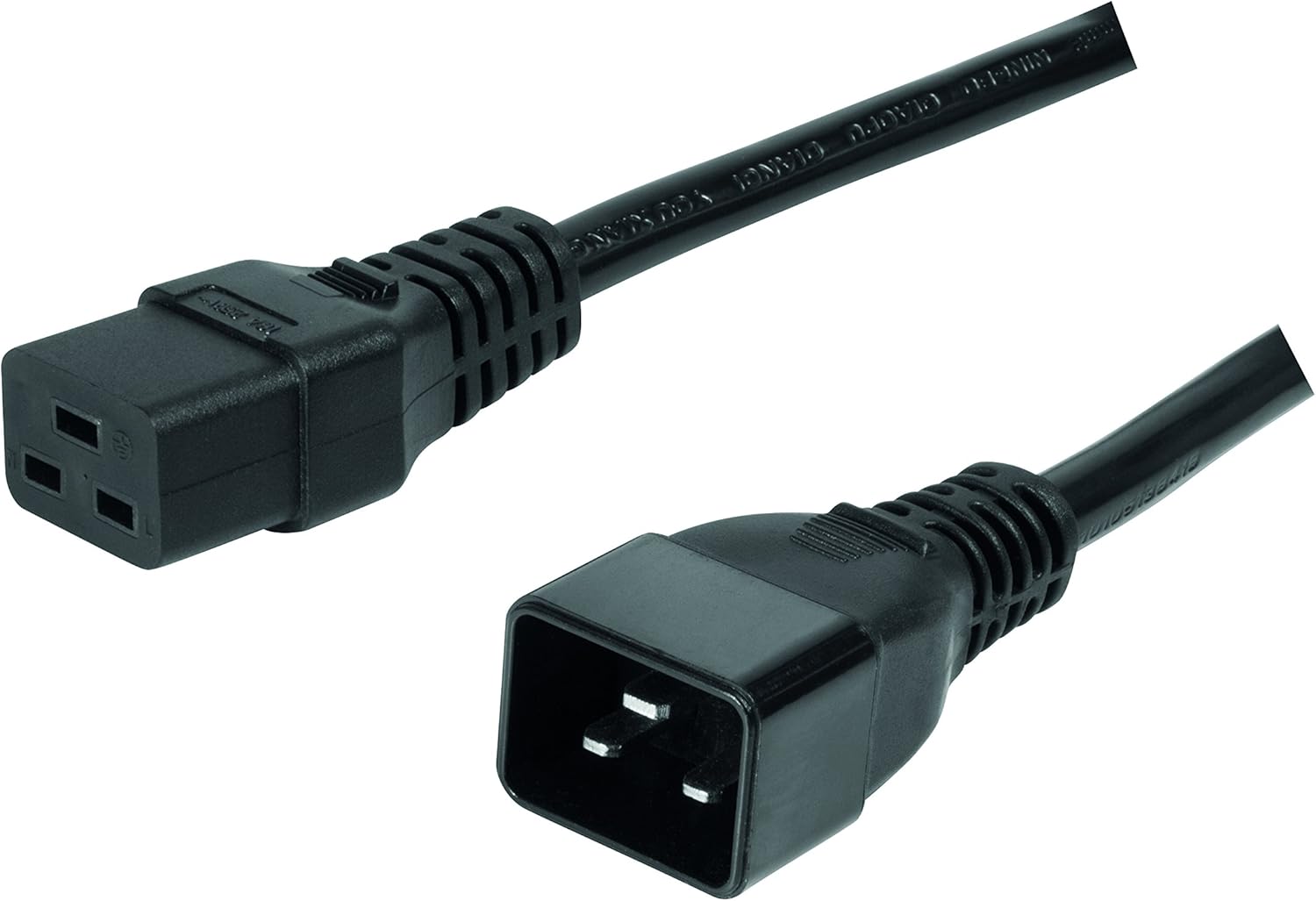
Image 2: Included C19 to C20 power cable for connecting the PDU to a power source.
4. Produktüberschreitungview
4.1 Frontplatte
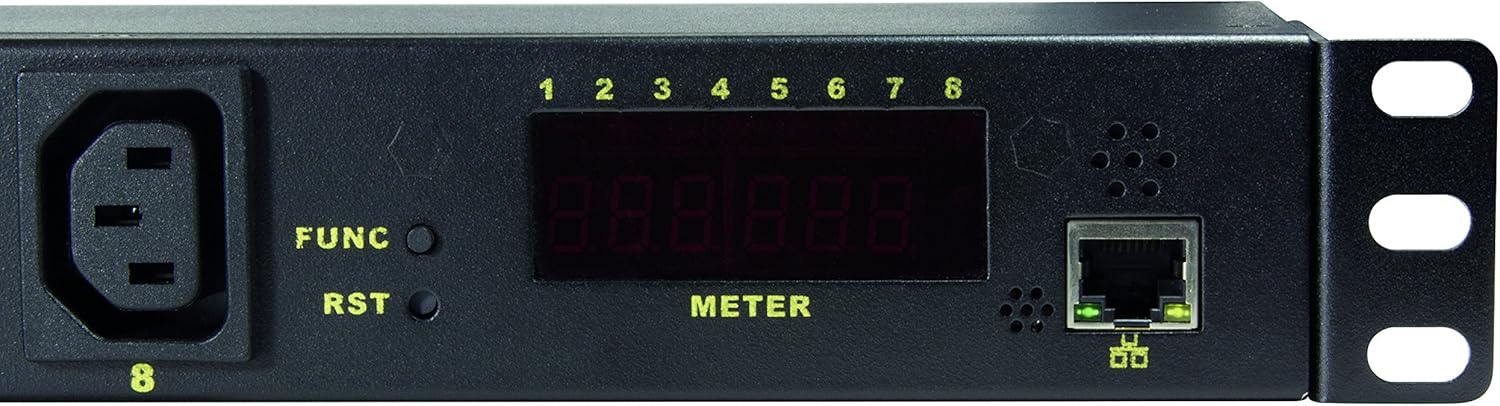
Image 3: Close-up of the PDU's front panel, highlighting the display, function buttons, and network port.
- C19 Input (INPUT 1): Main power input connector.
- C13 Outlets (1-8): Eight individually controllable power outlets.
- FUNC-Taste: Used to cycle through display information (e.g., IP address, voltage, current, temperature, humidity).
- RST-Taste: Reset button for the PDU.
- LED Display (METER): Shows various operational parameters and network information.
- RJ45-Ethernet-Anschluss: For network connection and IP management.
- Outlet Status LEDs (1-8): Indicate the on/off status of each C13 outlet.
5. Einrichtung
5.1 Physische Installation
- Mount the PDU into a standard 19-inch server rack using the provided mounting hardware. Ensure it is securely fastened.
- Connect the C19 end of the included power cable to the PDU's C19 input port.
- Connect the C20 end of the power cable to a suitable power source (e.g., UPS, wall outlet with C20 receptacle).
- Connect an Ethernet cable from the PDU's RJ45 port to your network switch or router.
- Plug your devices into the C13 outlets (1-8) on the PDU.
5.2 Erste Netzwerkkonfiguration
- Power on the PDU. The LED display will illuminate.
- Drücken Sie die FUNK button repeatedly until the IP address is displayed on the meter. The default IP address is typically 192.168.0.100.
- Öffnen Sie ein web browser on a computer connected to the same network segment as the PDU.
- Enter the PDU's IP address (e.g., http://192.168.0.100) into the browser's address bar and press Enter.
- You will be prompted for a username and password. The default credentials are often:
- Benutzername: Administrator
- Passwort: admin or password
- Once logged in, you can configure network settings (e.g., static IP, DHCP), change user credentials, and manage other PDU settings.
6. Bedienungsanleitung
6.1 Web Schnittstelle überview
Der web interface provides comprehensive control and monitoring capabilities. Navigate through the menus to access different functions.
6.2 Outlet Control
- Switching Outlets: From the web interface, you can individually turn each of the 8 C13 outlets ON or OFF.
- Einschaltsequenz: Configure delays for outlets to power on sequentially. This prevents inrush current overloads when multiple devices start simultaneously.
- Scheduled Operations: Set schedules for outlets to turn on or off at specific times.
6.3 Überwachung
The PDU allows real-time monitoring of various parameters:
- Bandtage (V): Eingangsvoltage.
- Strom (A): Total current draw.
- Leistung (W): Total power consumption.
- Temperatur (° C / ° F): Ambient temperature via integrated sensor.
- Feuchtigkeit (%): Ambient humidity via integrated sensor.
These values can be viewed on the PDU's LED display by pressing the FUNK button, or more comprehensively through the web Schnittstelle.
6.4 Alert and Warning Functions
Configure thresholds for voltage, current, power, temperature, and humidity. If these thresholds are exceeded, the PDU can trigger alerts (e.g., email notifications) to inform administrators of potential issues.
7. Wartung
- Reinigung: Periodically clean the exterior of the PDU with a soft, dry cloth. Do not use liquid cleaners or solvents. Ensure the PDU is powered off and disconnected before cleaning.
- Firmware-Aktualisierungen: Check the Logilink support website for any available firmware updates. Follow the instructions provided with the firmware update package carefully.
- Kabelmanagement: Ensure all power and network cables are neatly organized and not obstructing airflow.
8. Fehlerbehebung
| Problem | Mögliche Ursache | Lösung |
|---|---|---|
| PDU does not power on. | No power to the C19 input. | Check the power cable connection and the power source. Ensure the C20 receptacle is live. |
| Kein Zugriff möglich web Schnittstelle. | Incorrect IP address, network connectivity issue, or incorrect credentials. |
|
| Outlets not switching. | Software issue, PDU overload, or internal fault. |
|
| Ungenaue Sensormesswerte. | Environmental interference or sensor malfunction. | Ensure the PDU is not in direct sunlight or near heat sources. If issues persist, contact support. |
9. Spezifikationen
| Besonderheit | Detail |
|---|---|
| Modell | PDU8P01 |
| Marke | Logilink |
| Eingangs-Buchsen | 1 x C19 |
| Ausgangsanschlüsse | 8 x C13 |
| Formfaktor | 1HE Rackmontage |
| Netzwerkschnittstelle | RJ45 Ethernet (10Mbit) |
| Überwachung | Bandtage, Current, Power, Temperature, Humidity |
| Besondere Merkmale | Surge Protection, Remote Outlet Control, Power-On Sequencing, Alert Functions |
| Technische Daten | 18.96 x 1.77 x 1.77 Zoll (48.16 x 4.5 x 4.5 cm) |
| Artikelgewicht | 5.21 Pfund (2.36 kg) |
10. Garantie und Support
Informationen zur Garantie und zum technischen Support finden Sie auf der offiziellen Logilink-Website. webBesuchen Sie unsere Website oder kontaktieren Sie Ihren Händler vor Ort. Bewahren Sie Ihren Kaufbeleg als Kaufnachweis auf.
Logilink WebWebsite: www.logilink.com (This is a placeholder, actual link may vary)
Ask a question about this manual
Ask about setup, troubleshooting, compatibility, parts, safety, or missing instructions. Manuals+ will review the question and use this page’s manual context to help answer it.