
1. Einleitung
Vielen Dank für Ihren Einkauf.asing the Capello Play it All Bluetooth Wireless Home Stereo Speaker CI302. This device offers versatile audio playback options including Bluetooth wireless streaming, CD player functionality, and FM digital radio. This manual provides detailed instructions for setup, operation, maintenance, and troubleshooting to ensure optimal performance and longevity of your speaker system.
2. Wichtige Sicherheitshinweise
- Lesen Sie alle Anweisungen, bevor Sie das Gerät in Betrieb nehmen.
- Bewahren Sie dieses Handbuch zum späteren Nachschlagen auf.
- Setzen Sie das Gerät weder Regen noch Feuchtigkeit aus, um die Gefahr von Bränden oder Stromschlägen zu vermeiden.
- Sorgen Sie für ausreichende Belüftung; blockieren Sie keine Belüftungsöffnungen.
- Stellen Sie das Gerät auf eine stabile, ebene Fläche.
- Verwenden Sie nur vom Hersteller angegebene Anbaugeräte/Zubehör.
- Trennen Sie das Gerät während eines Gewitters oder bei längerer Nichtbenutzung vom Stromnetz.
- Überlassen Sie sämtliche Wartungsarbeiten qualifiziertem Servicepersonal.
3. Packungsinhalt
Bitte überprüfen Sie, ob alle Artikel vorhanden sind:
- Capello Play it All Bluetooth Wireless Home Stereo Speaker CI302
- Fernbedienung
- Netzteil
- Benutzerhandbuch (dieses Dokument)
4. Produktüberschreitungview
Familiarize yourself with the main components and controls of your Capello Play it All speaker.
Front View

Abbildung 4.1: Front view of the Capello Play it All speaker, showing the speaker grille, digital clock display, and subtle branding.
Bedienelemente auf der Oberseite

Abbildung 4.2: Top panel of the Capello Play it All speaker, illustrating the CD compartment, 'capello' logo, and various control buttons including PRESET, MODE, PAIRING, PROGRAM/CLOCK SET, SKIP, PLAY/PAUSE, STOP, REPEAT, and VOLUME.
- PRESET +/-: Navigate through saved FM radio stations.
- MODUS: Switch between Bluetooth, CD, FM Radio, and Line-In modes.
- PAARUNG: Bluetooth-Kopplungsmodus aktivieren.
- PROGRAM/CLOCK SET: Program CD tracks or set the clock.
- SKIP ◀◀ / ▶▶: Skip tracks on CD or adjust FM frequency.
- PLAY/PAUSE ▶▶: CD-Wiedergabe starten oder pausieren.
- STOP ■: Stop CD playback.
- WIEDERHOLEN: Repeat current track or all tracks on CD.
- LAUTSTÄRKE +/-: Lautstärke anpassen.
- ÖFFNEN SCHLIESSEN: Öffnen oder schließen Sie das CD-Fach.
- BEREITHALTEN: Gerät ein-/ausschalten.
Rear Panel (Typical)
The rear panel typically includes the AC power input, FM antenna connection, and Line-In jack.
5. Einrichtung
5.1 Stromanschluss
- Connect the AC power adapter to the DC IN jack on the rear of the speaker.
- Stecken Sie das andere Ende des Adapters in eine normale Wandsteckdose.
- The unit will enter standby mode, and the digital clock display will illuminate.
5.2 FM-Antennenkonfiguration
For optimal FM radio reception, extend the FM wire antenna fully and position it for the best signal. Avoid placing it near other electronic devices that may cause interference.
5.3 Einstellen der Uhr
- Halten Sie im Standby-Modus gedrückt PROGRAM/CLOCK SET Taste.
- The hour digits will begin to flash. Use the SKIP ◀◀ / ▶▶ Tasten zum Einstellen der Stunde.
- Drücken PROGRAM/CLOCK SET nochmals, um die Uhrzeit zu bestätigen.
- Die Minutenziffern blinken. Verwenden Sie die SKIP ◀◀ / ▶▶ Tasten zum Einstellen der Minuten.
- Drücken PROGRAM/CLOCK SET one last time to save the setting.
6. Bedienungsanleitung
6.1 Ein-/Ausschalten und Modusauswahl
- Drücken Sie die STANDBY button on the unit or the remote control to turn the speaker on or off.
- Drücken Sie die MODUS button repeatedly to cycle through available modes: Bluetooth, CD, FM Radio, and Line-In.
6.2 Bluetooth-Funkstreaming
- Schalten Sie den Lautsprecher ein und wählen Sie den Bluetooth-Modus über die MODUS Drücken Sie die Taste. Das Display zeigt „BT“ an und blinkt, um anzuzeigen, dass sich das Gerät im Kopplungsmodus befindet.
- On your Bluetooth-enabled device (smartphone, tablet, computer), enable Bluetooth and search for available devices.
- Select 'Capello CI302' (or similar) from the list of devices.
- Once paired, the speaker will emit a confirmation tone, and 'BT' on the display will stop flashing.
- You can now play audio from your device through the speaker. Use your device or the speaker's controls for volume and track navigation.
6.3 CD-Wiedergabe
- Drücken Sie die ÖFFNEN/SCHLIESSEN Knopf zum Öffnen des CD-Fachs.
- Carefully place an audio CD (CD, CD-R/-RW) with the label side facing up into the compartment.
- Schließen Sie das CD-Fach. Das Gerät liest die Disc.
- If not already in CD mode, press the MODUS um den CD-Modus auszuwählen.
- Drücken Sie die WIEDERGABE/PAUSE Taste, um die Wiedergabe zu starten.
- Verwenden SKIP ◀◀ / ▶▶ to skip tracks, STOP ■ anzuhalten, und WIEDERHOLEN to cycle through repeat options.
6.4-Zoll-FM-Digitalradio
- Drücken Sie die MODUS button to select FM radio mode. The current frequency will be displayed.
- Automatischer Scan: Halten Sie die WIEDERGABE/PAUSE Taste zum automatischen Scannen und Speichern verfügbarer FM-Sender als Voreinstellungen.
- Manuelle Abstimmung: Drücken SKIP ◀◀ / ▶▶ briefly to fine-tune the frequency. Press and hold to scan for the next strong station.
- Accessing Presets: Verwenden Sie die VOREINSTELLUNG +/- Tasten zum Durchschalten der gespeicherten Sender.
6.5 Line-In Operation
- Connect an audio cable (not included) from the headphone jack or line-out of an external audio device to the LINE-IN jack on the speaker.
- Drücken Sie die MODUS button to select Line-In mode.
- Play audio from your connected device. Volume can be controlled via the speaker or the external device.
6.6 USB-Aufladung
The speaker features a USB port for charging compatible devices (e.g., smartphones, tablets). Connect your device's USB charging cable (not included) to the USB port on the speaker. The speaker does not need to be in a specific mode for USB charging to function.
6.7 Verwendung der Fernbedienung
The included remote control provides convenient access to all functions. Ensure the remote has working batteries and is pointed towards the front of the speaker.
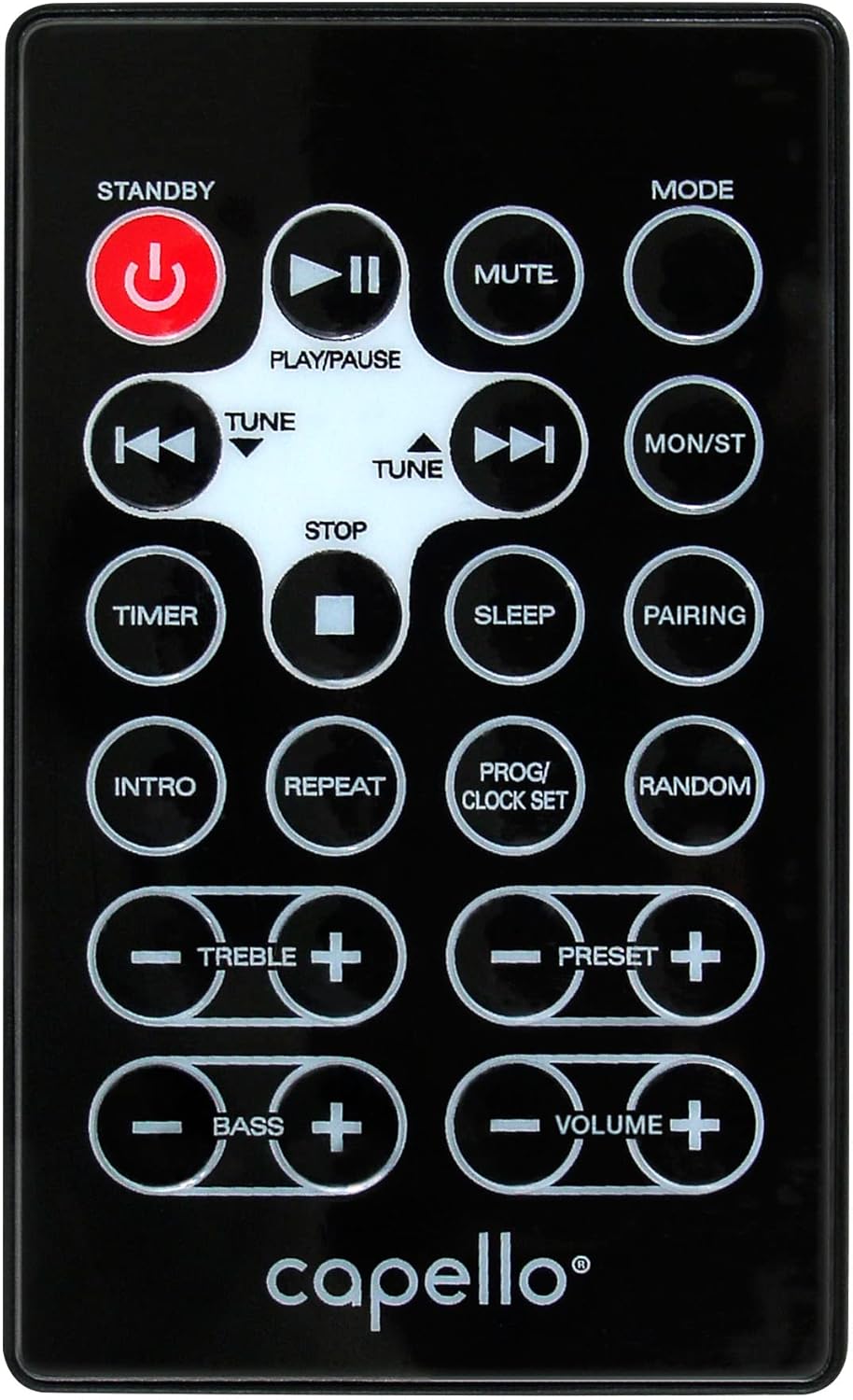
Abbildung 6.1: Layout of the remote control for the Capello Play it All speaker, showing buttons for Standby, Play/Pause, Mute, Mode, Skip/Tune, Stop, Timer, Sleep, Pairing, Intro, Repeat, Program/Clock Set, Random, Treble, Bass, and Volume controls.
- BEREITHALTEN: Einschalten / Ausschalten.
- WIEDERGABE/PAUSE: Audio abspielen oder anhalten.
- STUMM: Ton stumm schalten oder Stummschaltung aufheben.
- MODUS: Durchlaufen Sie die Eingangsmodi.
- SKIP/TUNE ◀◀ / ▶▶: Skip tracks or tune radio frequency.
- STOPPEN: Stoppen Sie die Wiedergabe.
- TIMER: Stellen Sie den Sleep-Timer ein.
- SCHLAFEN: Activate sleep function.
- PAARUNG: Bluetooth-Kopplung initiieren.
- EINLEITUNG: Play the first few seconds of each CD track.
- WIEDERHOLEN: Repeat current track or all tracks.
- PROG/CLOCK SET: Program CD tracks or set clock.
- ZUFÄLLIG: Spiele die CD-Titel in zufälliger Reihenfolge ab.
- HÖHEN +/-: Höhenpegel anpassen.
- Bässe +/-: Basspegel anpassen.
- LAUTSTÄRKE +/-: Passen Sie die Gesamtlautstärke an.
7. Wartung
7.1 Reinigung
- Trennen Sie das Gerät vor der Reinigung immer vom Stromnetz.
- Verwenden Sie ein weiches, trockenes Tuch, um die Außenflächen abzuwischen.
- Verwenden Sie keine Scheuermittel, Wachse oder Lösungsmittel, da diese die Oberfläche beschädigen können.
- Für die CD-Linse verwenden Sie eine spezielle CD-Linsenreinigungsscheibe.
7.2 Speicherung
If storing the unit for an extended period, unplug it from the power source and store it in a cool, dry place away from direct sunlight and extreme temperatures.
8. Fehlerbehebung
| Problem | Mögliche Ursache | Lösung |
|---|---|---|
| Kein Strom | Netzkabel nicht angeschlossen; Steckdose nicht aktiv. | Ensure power cord is securely plugged in; try a different outlet. |
| Kein Ton | Volume too low; incorrect mode selected; external device muted. | Increase volume; select correct input mode; check external device volume/mute. |
| Die CD springt oder spielt nicht ab. | Dirty or scratched CD; CD inserted incorrectly; dirty CD lens. | Clean or replace CD; insert CD label-side up; use a CD lens cleaner. |
| Die Bluetooth-Kopplung schlägt fehl | Device too far; Bluetooth not enabled on device; speaker not in pairing mode. | Move device closer; enable Bluetooth; ensure speaker is in BT pairing mode. |
| Schlechter UKW-Empfang | Antenne nicht ausgefahren; Störungen. | Fully extend and reposition FM antenna; move away from other electronics. |
| Fernbedienung funktioniert nicht | Batteries depleted; obstruction; not pointed at sensor. | Replace batteries; remove obstructions; point remote directly at the unit. |
9. Spezifikationen
| Besonderheit | Spezifikation |
|---|---|
| Marke | Capello |
| Modellnummer | CI302 |
| Konnektivitätstechnologie | Bluetooth |
| Lautsprechertyp | Stereo |
| Audioausgabemodus | Stereo |
| Unterstützte Audioformate | CD, MP3 |
| Nennausgangsleistung der Lautsprecher | 10 Watt |
| Maximale Ausgangsleistung der Lautsprecher | 10 Watt |
| Lautsprecher-Surround-Sound-Kanalkonfiguration | 2.0 |
| Stromquellentyp | Kabelgebundene Elektrik |
| Kompatible Geräte | Laptop, Smartphone, Tablet |
| Besondere Merkmale | Digital Display, Portable, USB Port |
| Materialtyp | Plastik |
| Montagetyp | Tischplatte |
| Artikelgewicht | 2.57 Kilogramm |
| Verpackungsabmessungen | 38.3 x 24.2 x 18.5 cm |
| Batterien im Lieferumfang enthalten | NEIN |
| Batterien erforderlich | NEIN |
10. Garantie und Support
This product is covered by a limited warranty. Please refer to the warranty card included in your package for specific terms and conditions. For technical support or customer service inquiries, please contact Capello customer support through their official webWebsite oder die Kontaktinformationen, die Sie mit Ihren Kaufunterlagen erhalten haben.