
1. Einleitung
The MASTECH MS8050 is a high-accuracy, high-stability digital multimeter designed for precise measurements in various applications. It features a 24-bit A/D converter and a direct digit display up to 53000 counts. This instrument supports DC, AC RMS, and mixed signal DC+AC RMS voltage measurements up to 1000V, and current measurements up to 10A. With a 1 microvolt DC and 20KHz AC frequency resolution, it meets diverse measurement requirements. It also functions as a frequency meter, capable of measuring pulses over 2MHz and linear frequencies up to 200KHz, including current frequency. The MS8050 offers measurements for large resistors up to 50MΩ, capacitors up to 5000µF, and includes functions for maximum, minimum, relative, average values, decibel measurements, diode tests, and continuity checks. Its color fluorescent digital display and 30-full storage function enhance usability. The device includes an RS-232C interface with PC software for data display, recording, and dynamic mapping, transforming it into a versatile measuring recorder. Misoperation protection ensures safety.

This image displays the MASTECH MS8050 Bench Digital Multimeter from a slightly elevated front-right angle, showcasing its green casing, large digital display, function buttons, and input terminals.
2. Hauptmerkmale
- 53000 counts measurement. Auto/Manual range. ACV and ACV measurements reach up to 1000V. DC measurement accuracy reaches up to 0.03%.
- 0.1Ω resistance and 1µV voltage resolution. Voltage/Current linear frequency measurement. Logic frequency/duty cycle measurement.
- Capacitance measurement from 0.01nF to 5000µF. AC/AC + DC true RMS/dBm measurement. MAX/MIN/MAX-MIN value, relative value, average value measurement.
- Data hold function. RS-232C interface and PC Windows software for data logging and analysis. Software calibrates automatically. Full overload protection.
- Color fluorescent double display. Full screen memory function. Insulating performance reaching 1000V CATII.
3. Einrichtung
Before operating the MASTECH MS8050, ensure proper setup to guarantee accurate measurements and user safety.
3.1 Auspacken und Prüfen
- Carefully remove the multimeter from its packaging.
- Inspect the device for any signs of physical damage. If damage is found, do not use the device and contact customer support.
- Verify that all accessories, including test leads, power cord, and RS-232C cable, are present.
3.2 Stromanschluss
- Ensure the multimeter's power switch is in the OFF position.
- Connect the provided power cord to the power input socket on the rear of the multimeter.
- Stecken Sie das andere Ende des Netzkabels in eine geeignete Wechselstromsteckdose.
3.3 Anschließen der Testleitungen
- Für die meisten Bändetage, resistance, and continuity measurements, insert the red test lead into the VΩ Eingangsklemme und das schwarze Testkabel in das COM (gemeinsamer) Eingangsanschluss.
- For current measurements, insert the red test lead into the mA or 10 A input terminal, depending on the expected current range, and the black test lead into the COM Terminal.
- Vor der Messung ist stets sicherzustellen, dass die Messleitungen fest angeschlossen sind.
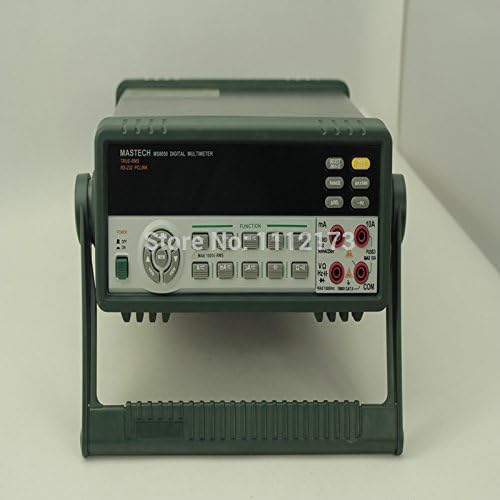
Eine direkte Front view of the MASTECH MS8050 Bench Digital Multimeter, highlighting the display, control panel, and input jacks. The integrated stand is visible at the bottom.
4. Bedienungsanleitung
This section details the operation of the MASTECH MS8050 for various measurement functions.
4.1 Ein-/Ausschalten
- To power on the device, press the green power button located on the front panel.
- Zum Ausschalten drücken Sie die Einschalttaste erneut.
4.2 Funktionsauswahl
Use the function buttons on the front panel to select the desired measurement mode:
- V™: DC-Voltage-Messung.
- V∼: AC-Voltage-Messung.
- A™: DC Current measurement.
- A∼: AC Current measurement.
- Ω: Widerstandsmessung.
- KAPPE: Capacitance measurement.
- Hz: Frequency measurement.
- DIODE: Diodentest.
- WEITER: Durchgangsprüfung.
4.3 Bereichsauswahl
The MS8050 supports both auto-ranging and manual ranging. Press the REICHWEITE button to switch between auto and manual modes. In manual mode, repeatedly press REICHWEITE to cycle through available ranges for the selected function.
4.4 Sonderfunktionen
- MAX/MIN: Press this button to record and display the maximum and minimum values measured during a session.
- REL (Relative): Press to set the current reading as a reference value, and subsequent measurements will be displayed as a deviation from this reference.
- AVG (Average): Calculates and displays the average of measurements over time.
- HALTEN: Freezes the current display reading. Press again to release.
- dBm: Measures decibels relative to 1 milliwatt.
- Echter Effektivwert: The multimeter automatically performs True RMS measurements for AC voltage und Stromstärke, wodurch genaue Messwerte auch für nicht-sinusförmige Wellenformen bereitgestellt werden.
4.5 PC Software and RS-232C Interface
The MS8050 includes an RS-232C interface for connection to a personal computer. Use the provided RS-232C cable and Windows software to:
- Display real-time measurement data on the computer screen.
- Record and log measurement data over time.
- Generate graphs and charts of measurement trends.
- Perform automatic calibration of the instrument via software.
Refer to the software's dedicated manual for detailed installation and operation instructions.
5. Wartung
Proper maintenance ensures the longevity and accuracy of your MASTECH MS8050 multimeter.
5.1 Reinigung
- Always disconnect the power cord and test leads before cleaning.
- Wipe the exterior of the multimeter with a soft, damp Tuch. Keine Scheuer- oder Lösungsmittel verwenden.
- Ensure no moisture enters the device through the input terminals or ventilation openings.
5.2 Kalibrierung
The MS8050 features software-based automatic calibration. Regular calibration, as recommended by MASTECH, helps maintain the instrument's high accuracy. Refer to the PC software manual for calibration procedures.
5.3 Speicherung
- Bewahren Sie das Multimeter an einem kühlen, trockenen Ort auf, fern von direkter Sonneneinstrahlung und extremen Temperaturen.
- Halten Sie das Gerät frei von Staub und Feuchtigkeit.
- If storing for extended periods, ensure the device is powered off and disconnected from all power sources.
6. Fehlerbehebung
This section provides solutions to common issues you might encounter with the MS8050 multimeter.
6.1 No Display or Power
- Check if the power cord is securely connected to both the multimeter and the AC outlet.
- Verify that the AC outlet is functional by plugging in another device.
- Ensure the power switch on the multimeter is in the ON position.
6.2 Incorrect or Unstable Readings
- Ensure test leads are correctly inserted into the appropriate input terminals for the selected function.
- Check for loose or damaged test leads. Replace if necessary.
- Verify that the correct measurement function and range are selected for the circuit being tested.
- Ensure good contact between the test probes and the circuit points.
- Environmental factors like strong electromagnetic interference can affect readings. Move the multimeter away from such sources.
6.3 Probleme mit der PC-Softwareverbindung
- Ensure the RS-232C cable is securely connected to both the multimeter and the computer.
- Verify that the correct COM port is selected in the PC software settings.
- Check if the necessary drivers for the RS-232C interface are installed on your computer.
- Restart both the multimeter and the computer, then try connecting again.
7. Spezifikationen
Detailed technical specifications for the MASTECH MS8050 Bench Digital Multimeter:
| Spezifikation | Wert |
|---|---|
| Marke | MASTECH |
| Modell | MS8050 |
| Messtyp | Multimeter |
| Anzahl anzeigen | 53000 |
| DC-Voltage Genauigkeit | 0.03 % |
| Max. Lautstärketage Messung | 1000V (DC/AC RMS) |
| Max Current Measurement | 10 A |
| Widerstandsauflösung | 0.1 Ω |
| Bandtage-Auflösung | 1µV |
| Kapazitätsmessbereich | 0.01 nF bis 5000 µF |
| Frequenzmessbereich | Pulse >2MHz, Linear 200KHz |
| Schnittstelle | RS-232C |
| Stromquelle | Manual (AC Power) |
| Stil | Digitales |
| Mindest. Betriebsvoltage | 1 Microvolts |
| UPC | 760970480348 |
| Hersteller | China |
| Artikelpaket Menge | 1 |
| Batterien enthalten? | NEIN |
| Batterien erforderlich? | NEIN |
| Datum der ersten Verfügbarkeit | 25. Januar 2018 |
8. Sicherheitshinweise
Always observe the following safety precautions when operating the MASTECH MS8050 multimeter to prevent personal injury or damage to the instrument:
- Die maximalen Eingangsgrenzen für keine Funktion dürfen überschritten werden.
- Nie anwenden voltage to the current input terminals (mA, 10A) when the function switch is set to a current range.
- Ensure the multimeter is in good working condition and that test leads are not damaged before use.
- Do not operate the multimeter in wet environments or with wet hands.
- Seien Sie vorsichtig im Umgang mit Vol.tagSpannungen über 30 V AC RMS, 42 V Spitze oder 60 V DC sind zu vermeiden, da sie eine Stromschlaggefahr darstellen.
- Vor dem Anschließen oder Abziehen der Messleitungen für Strommessungen muss immer die Stromzufuhr zum zu prüfenden Stromkreis unterbrochen werden.
- Verwenden Sie für Ihre Messungen die richtigen Anschlüsse, Funktionen und Messbereiche.
- Refer to the CAT rating of the instrument (1000V CATII) and ensure it is suitable for your application.
9. Eingeschränkte Garantie
MASTECH products are manufactured to high-quality standards. This product is covered by a limited warranty against defects in materials and workmanship. The specific terms and duration of the warranty may vary by region and retailer. Please retain your proof of purchase for warranty claims. For detailed warranty information, refer to the documentation included with your purchase or contact MASTECH customer support.
10. Kundendienst
For technical assistance, troubleshooting, or inquiries regarding your MASTECH MS8050 multimeter, please contact MASTECH customer support. Contact information can typically be found on the MASTECH official website or in the product packaging. When contacting support, please have your product model number (MS8050) and purchase details ready.