
Einführung
Thank you for choosing the BONTEC MWS02 Mobile Standing Desk. This versatile and ergonomic workstation is designed to enhance your productivity and comfort, whether you are sitting or standing. Its adjustable height, multiple shelves, and mobile design make it an ideal solution for various environments, including home offices, classrooms, and professional settings.
This manual provides essential information for the safe assembly, operation, and maintenance of your new desk. Please read these instructions carefully before use and retain them for future reference.

Image: The BONTEC MWS02 Mobile Standing Desk, showcasing its multi-level design and mobility.
Sicherheitshinweise
- Vor Gebrauch sicherstellen, dass alle Komponenten fest montiert sind. Lose Teile können zu Instabilität und Verletzungen führen.
- Do not exceed the maximum load capacity for each shelf as specified in the 'Specifications' section. Overloading can lead to structural failure.
- Keep children and pets away from the desk during assembly and adjustment to prevent accidents.
- Use the desk on a flat, stable surface. Uneven surfaces can compromise stability.
- When moving the desk, ensure the path is clear and all items on the shelves are secure to prevent them from falling. Lock the wheels once the desk is in its desired position.
- Avoid placing hot items directly on the desk surfaces without protective padding.
- Do not attempt to modify the desk structure. Unauthorized modifications may void the warranty and pose safety risks.
Packungsinhalt
Bitte überprüfen Sie vor Beginn der Montage, ob alle unten aufgeführten Teile vorhanden und unbeschädigt sind. Sollten Teile fehlen oder beschädigt sein, kontaktieren Sie bitte umgehend unseren Kundendienst.
- Desk Shelves (4 units: 2 large, 2 small)
- Main Support Columns (Vertical poles)
- Base Frame with Wheels (4 universal wheels, 2 with locking mechanism)
- Knöpfe zur Höhenverstellung
- Assembly Hardware (Screws, bolts, tools if provided)
- Bedienungsanleitung
Montageanleitung
The BONTEC MWS02 Mobile Standing Desk is designed for easy assembly. Follow these steps to set up your desk.
- Attach the Base Frame: Secure the main support columns to the base frame using the provided hardware. Ensure the wheels are properly oriented.
- Installieren Sie die Regale: Slide the shelves onto the support columns. The two larger shelves are typically for the monitor/laptop and keyboard, while the two smaller shelves are for accessories.
- Secure Height Adjustment Knobs: Insert and tighten the height adjustment knobs into the designated holes on the support columns to fix the shelves at your desired initial height.
- Endkontrolle: Once all components are assembled, gently shake the desk to ensure stability. Tighten any loose screws or connections.
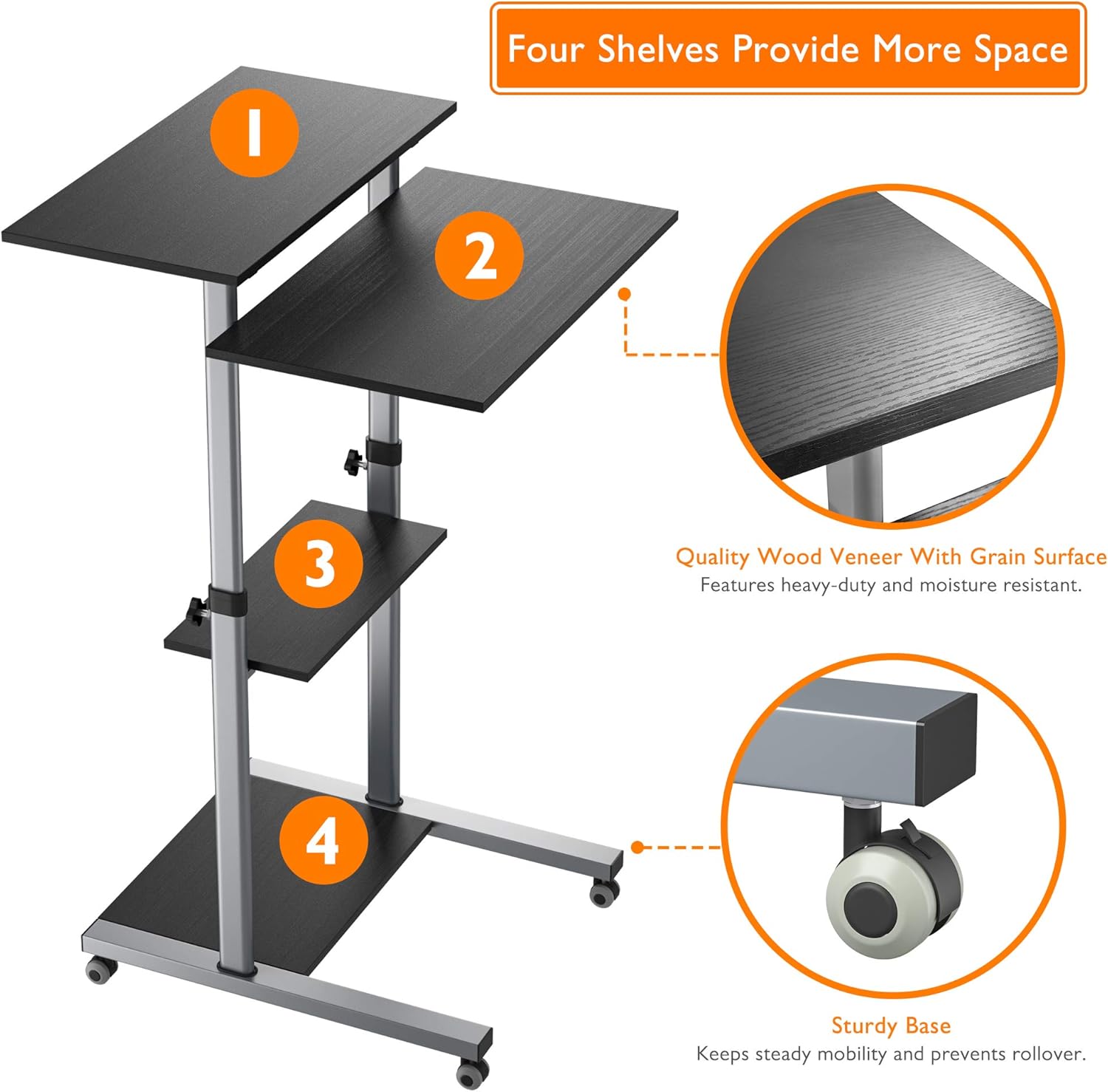
Image: Illustration of the four shelves and the sturdy base with lockable wheels.
Bedienungsanleitung
Höhenverstellung
The BONTEC MWS02 desk features stepless height adjustment, allowing you to easily switch between sitting and standing positions. The desk can be adjusted from a minimum height of 950 mm to a maximum height of 1390 mm.
- Freischalten: Loosen the height adjustment knobs located on the main support columns for the desired shelf.
- Anpassen: Carefully slide the shelf up or down to your preferred ergonomic height.
- Sperren: Once the desired height is reached, firmly tighten the adjustment knobs to secure the shelf in place. Ensure all knobs are fully tightened before placing items on the desk.

Image: Diagram showing the minimum (950mm) and maximum (1390mm) height adjustment range.
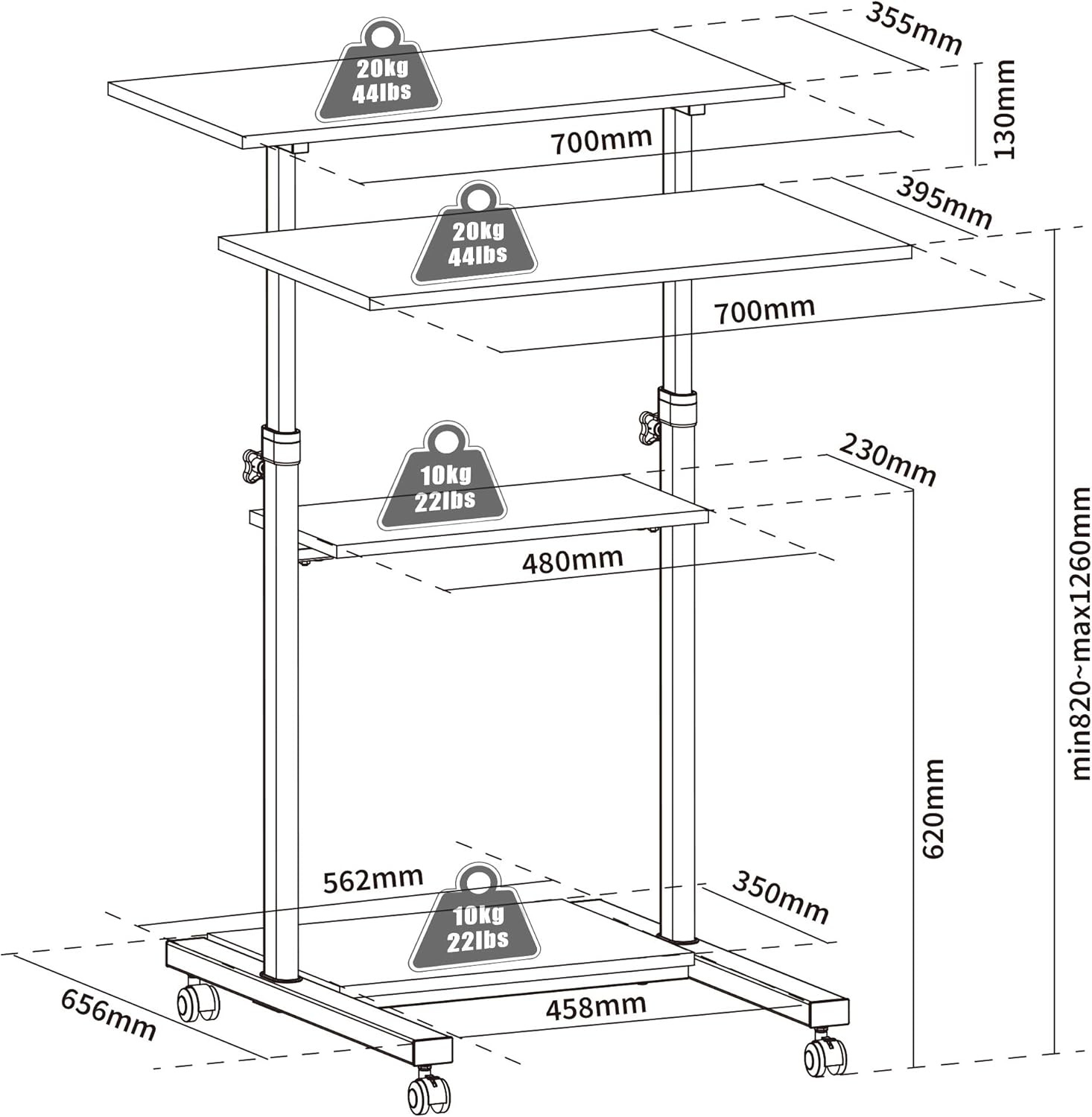
Image: Visual representation of comfortable sitting (950mm) and standing (1390mm) positions.
Mobility and Locking
The desk is equipped with four universal wheels for easy movement. Two of these wheels include a locking mechanism to keep the desk stationary.
- Bewegen: Ensure the wheel locks are disengaged. Gently push the desk to your desired location.
- Abschließen: Once the desk is in position, press down on the levers of the two locking wheels until they click into place. This will prevent unintended movement.
- So entsperren Sie: Lift the levers on the locking wheels to disengage the lock.
Shelf Usage and Load Capacity
The desk features four spacious platforms designed to accommodate various equipment. Adhere to the specified load capacities to ensure stability and longevity of the product.
- Top Shelf (Monitor/Laptop): Maximum load capacity of 20 kg (44 lbs).
- Second Shelf (Keyboard/Documents): Maximum load capacity of 20 kg (44 lbs).
- Middle Shelf (Accessories): Maximum load capacity of 10 kg (22 lbs). Suitable for books, small speakers, or personal items.
- Base Shelf (PC Tower/Printer): Maximum load capacity of 10 kg (22 lbs). Ideal for larger equipment.
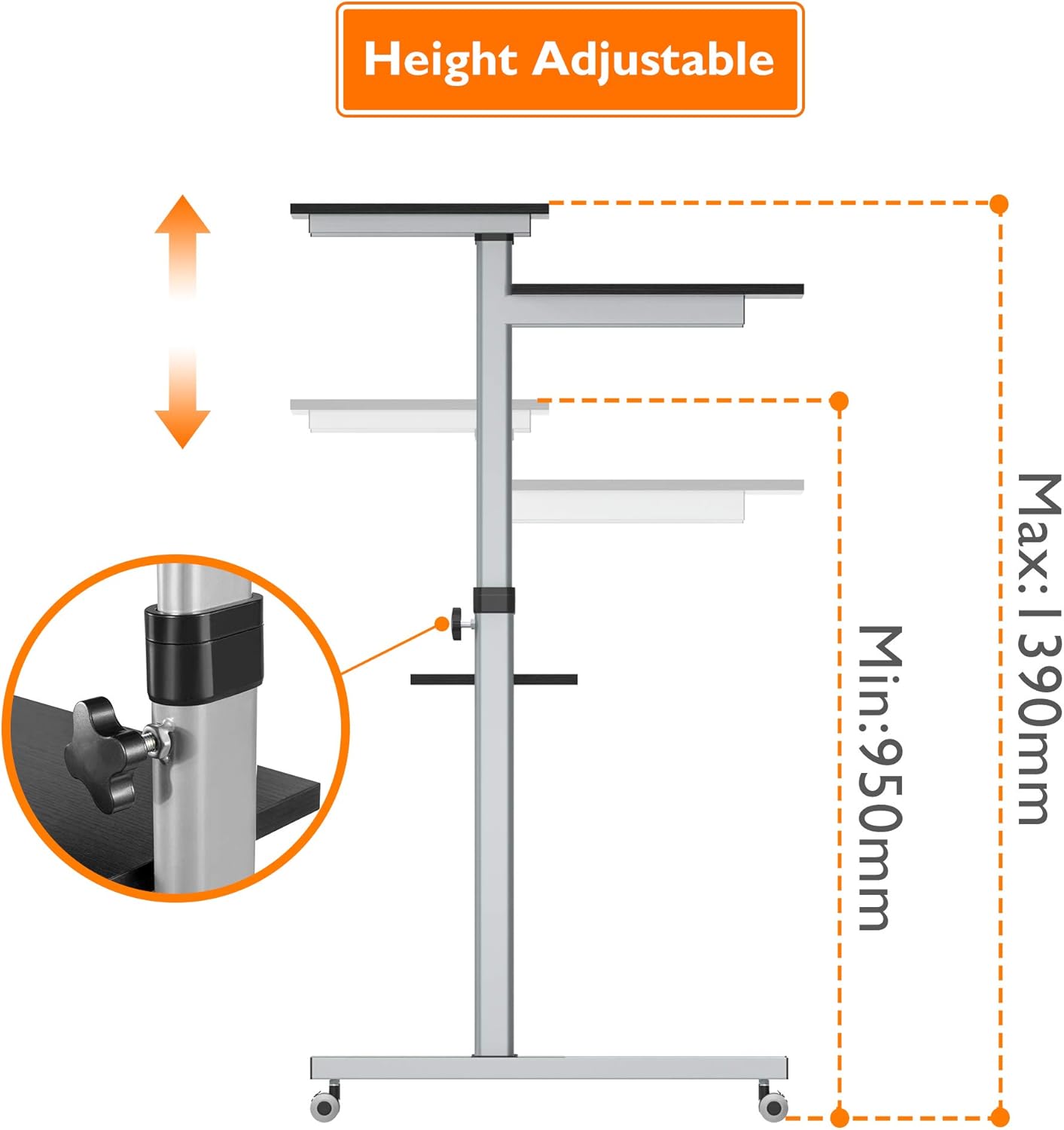
Image: The BONTEC MWS02 desk configured for a complete workstation, demonstrating practical use of its multiple shelves.
Wartung
- Reinigung: Wischen Sie Oberflächen mit einem weichen, damp Tuch. Vermeiden Sie Scheuermittel oder aggressive Chemikalien, die die Oberfläche beschädigen könnten.
- Inspektion: Überprüfen Sie regelmäßig alle Schrauben und Verbindungen, um sicherzustellen, dass sie fest sitzen. Ziehen Sie sie gegebenenfalls nach.
- Radpflege: Halten Sie die Räder frei von Schmutz, um einen reibungslosen Lauf zu gewährleisten. Schmieren Sie sie gegebenenfalls.
- Lagerung: If storing the desk for an extended period, ensure it is clean, dry, and stored in a stable environment.
Fehlerbehebung
| Problem | Mögliche Ursache | Lösung |
|---|---|---|
| Desk is unstable/wobbly. | Lose Schrauben oder unebene Oberfläche. | Check and tighten all assembly screws. Move the desk to a flat, level surface. |
| Schwierigkeiten bei der Höhenverstellung. | Die Einstellknöpfe sind zu fest angezogen oder der Mechanismus ist schwergängig. | Loosen knobs sufficiently before adjusting. Apply a small amount of silicone lubricant to the sliding mechanism if needed. |
| Die Räder rollen nicht reibungslos oder blockieren. | Debris in wheels or faulty locking mechanism. | Clean any debris from the wheels. Ensure the locking lever is fully engaged/disengaged. If issue persists, contact support. |
| Gegenstände rutschen aus den Regalen. | Desk is tilted or items are not placed securely. | Ensure the desk is on a level surface. Distribute weight evenly. Consider using non-slip mats for items. |
Technische Daten
| Besonderheit | Detail |
|---|---|
| Marke | BONTEC |
| Modellnummer | MWS02 |
| Farbe | Schwarz |
| Material | Steel frame, Wood Veneer (Grain Surface) shelves |
| Gesamtabmessungen (L x B x H) | 65.6 x 70 x 95-139 cm (25.8 x 27.6 x 37.4-54.7 Zoll) |
| Einstellbarer Höhenbereich | 950 mm - 1390 mm (37.4 - 54.7 Zoll) |
| Artikelgewicht | 19.46 kg |
| Tragfähigkeit der oberen Ablage | 20 kg |
| Second Shelf Load Capacity | 20 kg |
| Tragfähigkeit des mittleren Regals | 10 kg |
| Base Shelf Load Capacity | 10 kg |
| Merkmale | Compact, Ergonomic, Portable, Adjustable Height, Lockable Wheels |
| Empfohlene Verwendung | Office, Home Office, Multimedia Station |

Image: Technical diagram showing detailed dimensions and individual shelf load capacities.
Garantie und Support
For warranty information or technical support, please refer to the product packaging or contact BONTEC customer service directly. Keep your purchase receipt as proof of purchase.
For further assistance, please visit the official BONTEC website or contact their support team through the contact details provided with your product.