
Einführung
This manual provides instructions for the operation and maintenance of your Timex Expedition Digital Chrono Alarm Timer 33mm Watch, Model TW4B13100. This digital outdoor watch features a chronograph, alarm, and timer, designed for everyday use.

Abbildung 1: Front view of the Timex Expedition Digital Watch. The watch features a black case, a clear digital display showing the time and date, and a durable gray and blue striped fabric strap. Buttons for 'SET', 'MODE', 'START/SPLIT', and 'STOP/RESET' are visible on the sides of the watch case.
Aufstellen
Initial Activation and Time Setting
Upon first use, or after a battery replacement, you may need to activate the watch and set the time and date.
- If a plastic guard is present under the SET button, remove it.
- Halten Sie die SATZ button until the display flashes, indicating time setting mode.
- Verwenden Sie die START/ZWISCHENZEIT button to adjust the flashing segment (e.g., hours, minutes).
- Drücken Sie die MODUS button to advance to the next segment (e.g., minutes, AM/PM, month, day, year).
- Wiederholen Sie die Schritte 3 und 4, bis alle gewünschten Einstellungen konfiguriert sind.
- Drücken Sie die SATZ button again to exit time setting mode.
Batterieinformationen
Your watch comes with one product-specific battery included. When the display dims or functions become erratic, it may be time to replace the battery. Timex recommends having battery replacement performed by a qualified service center to maintain water resistance.
Betriebsarten
Die Uhr verfügt über mehrere Modi, die über die MODUS Taste.

Abbildung 2: Seite view of the Timex Expedition Digital Watch. This image highlights the textured buttons on the right side of the watch case, labeled 'START/SPLIT' and 'STOP/RESET', which are used for various functions across different modes.
Zeitmodus
Dies ist der Standardanzeigemodus, der die aktuelle Uhrzeit, den Wochentag und das Datum anzeigt.
Chronograph (Stoppuhr)
The chronograph measures elapsed time.
- Im Zeitmodus drücken MODUS bis "CHRONO" oder eine ähnliche Anzeige erscheint.
- Drücken START/ZWISCHENZEIT um mit der Zeitmessung zu beginnen.
- Drücken START/ZWISCHENZEIT again to record a split time (the display will freeze, but timing continues in the background). Press START/ZWISCHENZEIT again to return to current elapsed time.
- Drücken STOP/RESET um den Chronographen anzuhalten.
- With the chronograph paused, press STOP/RESET again to reset it to zero.
Timer (Countdown)
The countdown timer allows you to set a specific duration, after which an alarm will sound.
- Im Zeitmodus drücken MODUS until "TIMER" or a similar indicator appears.
- Drücken und halten SATZ bis die Anzeige blinkt.
- Verwenden START/ZWISCHENZEIT to adjust the hours, minutes, or seconds.
- Drücken MODUS Um zwischen Stunden, Minuten und Sekunden zu wechseln.
- Drücken SATZ um die Timereinstellung zu bestätigen.
- Drücken START/ZWISCHENZEIT um den Countdown zu starten.
- Drücken STOP/RESET to pause or resume the timer.
- Wenn der Timer Null erreicht, ertönt ein Alarm. Drücken Sie eine beliebige Taste, um ihn stummzuschalten.
Alarm
The watch features an alarm function to alert you at a set time.
- Im Zeitmodus drücken MODUS until "ALARM" or a similar indicator appears.
- Drücken und halten SATZ bis die Alarmzeit blinkt.
- Verwenden START/ZWISCHENZEIT um die Stunden und Minuten einzustellen.
- Drücken MODUS to move between hours, minutes, and AM/PM.
- Drücken SATZ um die Alarmzeit zu bestätigen.
- Zum Aktivieren/Deaktivieren des Alarms drücken Sie START/ZWISCHENZEIT while in Alarm Mode (a bell icon usually indicates activation).
- Wenn der Alarm ertönt, drücken Sie eine beliebige Taste, um ihn stummzuschalten.
INDIGLO Night-Light
The INDIGLO night-light illuminates the watch display for visibility in low-light conditions.
- Drücken Sie die INDIGLO button (typically located on the front of the watch, below the display) to activate the backlight.
- Das Licht bleibt einige Sekunden lang an.
Wartung
Wasserbeständigkeit
This watch is water resistant to 100 meters (330 feet). This means it is suitable for showering, swimming, and snorkeling. It is not suitable for scuba diving.
- Drücken Sie keine Knöpfe, solange die Uhr nass oder unter Wasser ist.
- Avoid exposing the watch to extreme temperature changes (e.g., hot shower then cold water).
- Nach Kontakt mit Salzwasser die Uhr mit Süßwasser abspülen und gründlich trocknen.
Reinigung
Clean your watch regularly to remove dirt and debris.
- For the case and crystal, use a soft, damp Tuch.
- For the fabric strap, it can be gently hand-washed with mild soap and water. Ensure it is completely dry before wearing.
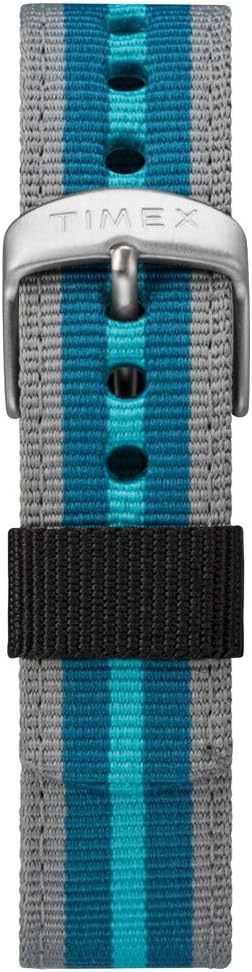
Abbildung 3: Nahaufnahme view of the Timex Expedition watch's fabric strap. The strap features alternating stripes of gray and two shades of blue, secured by a silver-colored buckle with the Timex logo.
Fehlerbehebung
| Problem | Mögliche Ursache | Lösung |
|---|---|---|
| Das Display ist leer oder dunkel. | Schwache oder leere Batterie. | Ersetzen Sie die Batterie. |
| Tasten reagieren nicht. | Watch may be in a locked mode or internal error. | Try pressing all buttons simultaneously for a few seconds to reset (if applicable). If problem persists, consult service. |
| Die Uhrzeit ist falsch. | Die Uhrzeit wurde nicht richtig eingestellt oder die Batterie ist schwach. | Re-set the time and date. If issue recurs, replace battery. |
Technische Daten
- Marke: Timex
- Modellnummer: TW4B13100
- Anzeigetyp: Digitales
- Gehäusedurchmesser: 33 mm
- Wasserbeständigkeit: 100 Meter (330 Fuß)
- Merkmale: Chronograph, Alarm, Timer, INDIGLO Night-Light
- Armbandmaterial: Stoff
- Batterie: 1 produktspezifische Batterie (im Lieferumfang enthalten)
- Abteilung: Unisex-Erwachsene
Produkt überview Video
For a visual guide on the Timex Expedition Digital watch, please refer to the video below.
Video 1: Ein Überview of the Timex Expedition Digital 33mm Nylon Strap watch. This video demonstrates the watch's design and features, providing a visual understanding of its appearance and basic functionalities.
Garantie und Support
Timex watches are manufactured to high standards and are backed by a limited warranty. For specific warranty details, registration, or support inquiries, please refer to the official Timex website or contact Timex customer service.
You can visit the official Timex store for more information: Timex-Shop bei Amazon