
1. Einleitung
Welcome to the user manual for your Xfinity XR15 Voice Control Remote. This remote is designed to enhance your Xfinity X1 experience by providing intuitive control over your entertainment system. With its advanced voice command capabilities and user-friendly design, navigating your TV content has never been easier.

Abbildung 1: Vorderseite view of the Xfinity XR15 Voice Control Remote.
2. Hauptmerkmale
- Sprachsteuerung: Find content, change channels, and control your DVR using simple voice commands.
- Tastatur mit Hintergrundbeleuchtung: Buttons illuminate automatically when the remote is moved, ideal for low-light environments.
- Aim Anywhere Feature: Operates without needing to be pointed directly at your TV Box.
- Automatische Kopplung: Simplifies the setup process with compatible Xfinity equipment.
- Zugänglichkeitsfunktionen: Easy access to Closed Captioning, video description, and voice guidance.
- TV Input Control: Manage your TV's input source directly from the remote.
3. Einrichtung und Kopplung
3.1. Einlegen der Batterie
The Xfinity XR15 remote requires two AAA batteries. To install:
- Suchen Sie das Batteriefach auf der Rückseite der Fernbedienung.
- Schieben Sie die Batterieabdeckung nach unten und nehmen Sie sie ab.
- Legen Sie zwei AAA-Batterien ein und achten Sie dabei auf die richtige Polarität (+ und -).
- Schieben Sie die Batterieabdeckung wieder an ihren Platz, bis sie sicher einrastet.

Abbildung 2: Lage des Batteriefachs.
3.2. Automatisches Pairing
The XR15 remote is designed for automatic pairing with Xfinity X1 TV Boxes (Xi6, Xi5, XG2, X1). Simply ensure your TV Box is powered on and follow these general steps:
- Point the remote at your TV Box.
- Halten Sie die Xfinity button (located below the directional pad) for 3-5 seconds.
- Follow any on-screen prompts that appear on your television.
- If prompted for a 3-digit pairing number, enter it even if it doesn't appear on screen.
The remote should automatically pair within a few minutes. If pairing is unsuccessful, ensure the remote is close to the TV and TV Box, and try again.
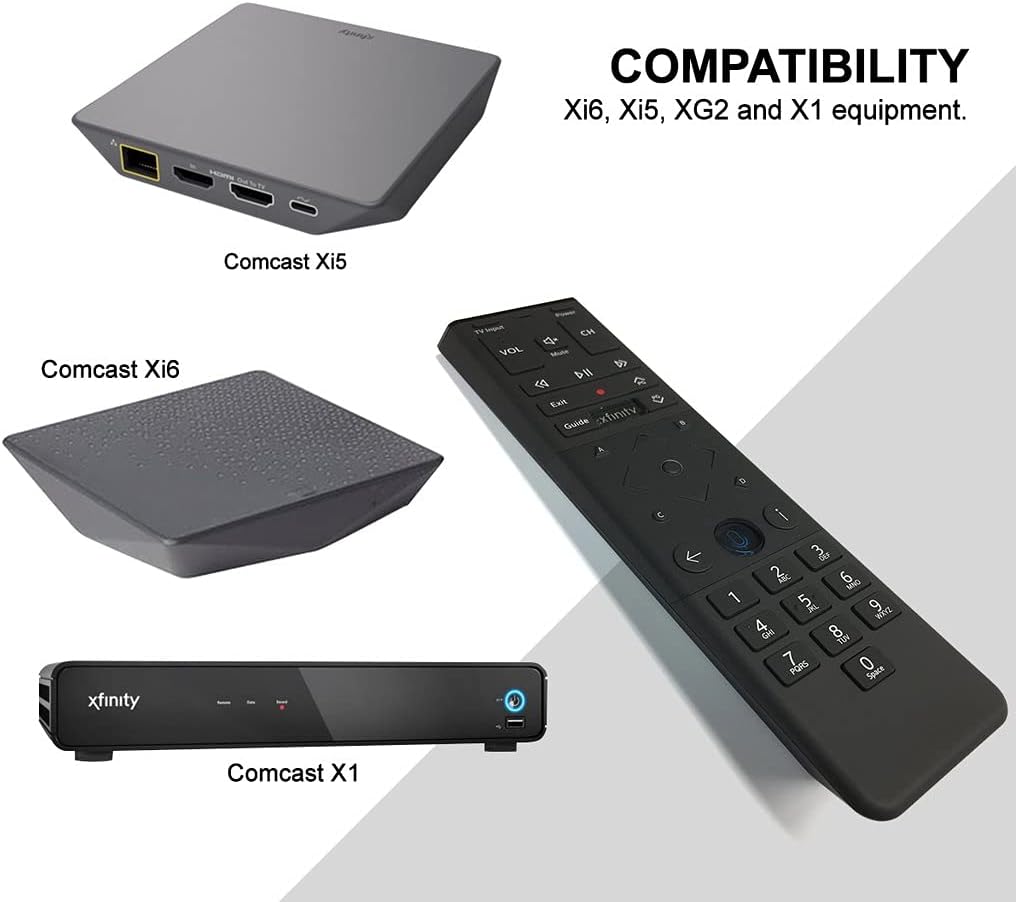
Figure 3: Compatible Xfinity TV Box models.
4. Tastenfunktionen
The XR15 remote features a comprehensive set of buttons for controlling your TV and Xfinity services. Refer to the diagram below for a visual guide.

Figure 4: Xfinity XR15 Remote Button Layout.
| Taste | Funktion |
|---|---|
| Leistung | Turns the TV and TV Box on or off. |
| TV-Eingang | Switches to the next available input on your TV. |
| LAUTSTÄRKE +/- | Erhöht oder verringert die Lautstärke. |
| Stumm | Turns sound off or on. |
| CH +/- | Wählt den nächsten oder vorherigen Kanal aus. |
| Abspielen/Pause | Plays or pauses live TV, Xfinity On Demand, or DVR content. |
| FF (Schnellvorlauf) | Fast forwards Xfinity On Demand or DVR content. |
| Rew (Rewind) | Rewinds Xfinity On Demand or DVR content. |
| Ausfahrt | Exits on-screen guides; stops and exits Xfinity On Demand and DVR content. |
| Record (red dot) | Records the current program or saves future programs to your DVR. |
| Xfinity | Displays the main menu of the guide, providing access to all guide features. |
| Führung | Displays TV listings. |
| Informationen (i) | Displays information about programs and notifications. |
| Zurück | Navigates back in menus or returns to previous screens. |
| Zifferntasten (0-9) | Used for direct channel entry or predictive text (T9) for content search. |
5. Sprachsteuerung
The voice control feature is a primary benefit of the XR15 remote. It allows you to quickly find content, change channels, and manage your DVR without typing.

Figure 5: Voice Control Button.
5.1. Using Voice Commands
- Halten Sie die Sprachsteuerung button (microphone icon) on the remote.
- Speak clearly into the microphone located at the top of the remote.
- Lassen Sie die Taste los, wenn Sie mit dem Sprechen fertig sind.
ExampAnzahl der Sprachbefehle:
- "Tune to CNN"
- "Finde Actionfilme"
- "Record this show"
- "What's on tonight?"
- "Netflix starten"
6. Spezifikationen
| Attribut | Detail |
|---|---|
| Technische Daten | 7 x 2 x 1 Zoll |
| Artikelgewicht | 3.52 Unzen |
| Modellnummer | 8541713007 |
| Batterien erforderlich | 2 AAA-Batterien (im Lieferumfang enthalten) |
| Kompatible Geräte | Xfinity X1 TV Boxes (Xi6, Xi5, XG2, X1) |
| Farbe | Schwarz |
| Besonderheit | Consolidated All Power and TV Power functionality |
7. Wartung
7.1. Batteriewechsel
When the remote's performance declines or the backlight feature becomes dim, it's time to replace the batteries. Follow the battery installation steps in Section 3.1.
7.2. Reinigung
To clean your remote, use a soft, dry cloth. Avoid using liquid cleaners or abrasive materials, as these can damage the remote's surface or internal components.
8. Unterstützung
For further assistance, please refer to the official Xfinity support resources or contact Xfinity customer service. Detailed troubleshooting guides and additional information can be found on the Xfinity webWebsite.