
1. Einleitung
The LogiLink PA0168 is a lightweight battery charger designed for AA, AAA, and 9V Ni-MH/Ni-Cd rechargeable batteries. It provides a convenient method for recharging batteries for both portable and home use.
This manual provides essential information for the safe and efficient use of your LogiLink PA0168 battery charger. Please read it thoroughly before first use and retain it for future reference.
2. Sicherheitshinweise
Um Personen- oder Sachschäden zu vermeiden, beachten Sie bitte stets die folgenden Sicherheitsvorkehrungen:
- This charger is designed exclusively for Ni-MH and Ni-Cd rechargeable batteries. Do not attempt to charge alkaline, carbon-zinc, lithium, or any other battery types, as this may lead to explosion, leakage, or personal injury.
- Do not mix different battery types, brands, or capacities within the charger simultaneously.
- Achten Sie beim Einlegen der Batterien in die Ladeschlitze auf die richtige Polarität (+/-).
- Das Ladegerät darf nicht zerlegt, verändert oder repariert werden. Alle Wartungsarbeiten dürfen nur von qualifiziertem Fachpersonal durchgeführt werden.
- Vermeiden Sie es, das Ladegerät Wasser, Feuchtigkeit oder extremen Temperaturen auszusetzen.
- Ziehen Sie den Stecker des Ladegeräts aus der Steckdose, wenn es nicht benutzt wird oder bevor Sie es reinigen.
- Außerhalb der Reichweite von Kindern aufbewahren.
3. Produktüberschreitungview
The LogiLink PA0168 charger features multiple charging slots and LED indicators for convenient battery charging.
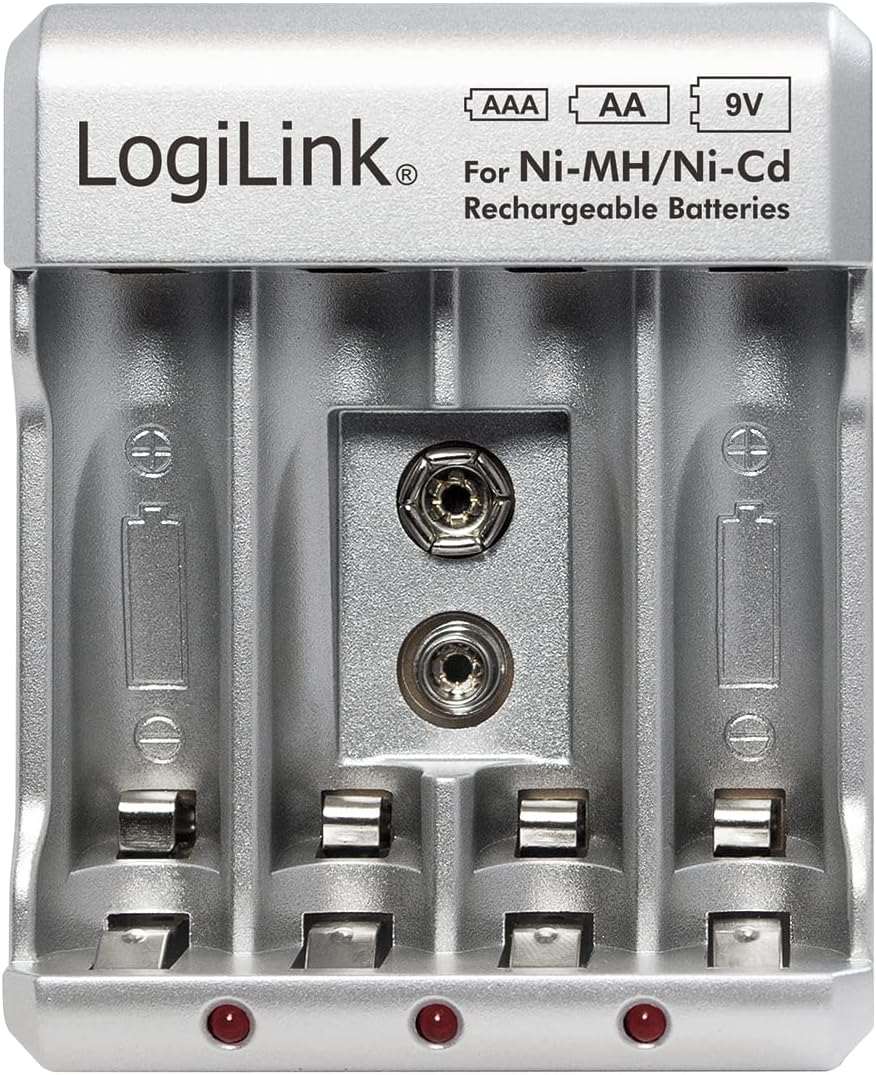
Bild 1: Vorderseite view of the LogiLink PA0168 Battery Charger, showing four slots for AA/AAA batteries and one slot for a 9V battery, along with LED indicators.

Bild 2: Schräg view of the LogiLink PA0168 Battery Charger, highlighting the foldable AC power plug on the side.
Komponenten:
- AA/AAA Charging Slots: Four individual slots for AA or AAA Ni-MH/Ni-Cd batteries.
- 9V Charging Slot: One dedicated slot for a 9V Ni-MH/Ni-Cd battery.
- LED-Anzeigen: Red LEDs illuminate to indicate charging status for each pair of AA/AAA batteries and the 9V battery.
- Klappbarer Netzstecker: Integrated plug for direct connection to a wall outlet.
4. Einrichtung
- Auspacken: Nehmen Sie das Ladegerät vorsichtig aus der Verpackung.
- Überprüfen: Prüfen Sie das Ladegerät auf sichtbare Beschädigungen. Verwenden Sie es nicht, wenn es beschädigt ist.
- An die Stromversorgung anschließen: Fold out the AC plug and insert the charger directly into a standard 100-240V AC wall outlet.
5. Bedienungsanleitung
Charging AA/AAA Batteries:
- Stellen Sie sicher, dass das Ladegerät an eine Steckdose angeschlossen ist.
- Insert 2 or 4 AA or AAA Ni-MH/Ni-Cd rechargeable batteries into the corresponding slots. Ensure correct polarity (+ and - terminals).
- The red LED indicator(s) for the respective battery pair will illuminate, indicating that charging has begun.
- Refer to the approximate charging times in the Specifications section. The LEDs will remain lit during the entire charging process.
- Once the estimated charging time has passed, remove the batteries from the charger. The charger features overcharge protection, but it is recommended to remove batteries once fully charged.

Image 3: The charger with four AA Ni-MH rechargeable batteries correctly inserted into their respective slots, showing the red LED indicators.
Charging 9V Batteries:
- Stellen Sie sicher, dass das Ladegerät an eine Steckdose angeschlossen ist.
- Insert one 9V Ni-MH/Ni-Cd rechargeable battery into the dedicated 9V slot. Ensure correct polarity.
- The red LED indicator for the 9V slot will illuminate, indicating that charging has begun.
- Refer to the approximate charging time in the Specifications section. The LED will remain lit during the entire charging process.
- Once the estimated charging time has passed, remove the 9V battery from the charger.

Image 4: The charger with a 9V Ni-MH rechargeable battery correctly inserted into its dedicated slot, showing the red LED indicator.
6. Wartung
- Reinigung: Disconnect the charger from the power outlet before cleaning. Use a soft, dry cloth to wipe the exterior. Do not use liquid cleaners or solvents.
- Lagerung: Bewahren Sie das Ladegerät bei Nichtgebrauch an einem kühlen, trockenen Ort fern von direkter Sonneneinstrahlung und Feuchtigkeit auf.
7. Fehlerbehebung
- LEDs leuchten nicht:
- Stellen Sie sicher, dass das Ladegerät fest an eine funktionierende Steckdose angeschlossen ist.
- Vergewissern Sie sich, dass die Batterien mit der richtigen Polarität eingelegt sind.
- Check if the batteries are Ni-MH or Ni-Cd rechargeable types. The charger will not charge other battery chemistries.
- The batteries might be completely discharged or faulty. Try charging different batteries.
- Akkus werden nicht vollständig geladen:
- Ensure the charging times specified in the manual are met.
- Old or heavily used rechargeable batteries may have reduced capacity and may not hold a full charge. Consider replacing them.
8. Spezifikationen

Image 5: Back label of the LogiLink PA0168 Battery Charger, displaying detailed input/output specifications and safety warnings.
| Besonderheit | Detail |
|---|---|
| Marke | LogiLink |
| Modell | PA0168 |
| Hersteller | 2direct GmbH |
| Eingang | 100-240 V AC, 50/60 Hz, 80 mA max |
| Ausgabe | 2.4 V DC 400 mA (AA: 200 mA x2/x4, AAA: 100 mA x2/x4), 9V: 30 mA x1 |
| Unterstützte Batterietypen | Ni-MH, Ni-Cd (AA, AAA, 9V) |
| Ungefähre Ladezeit | AA: 16 hours, AAA: 12 hours, 9V: 9 hours |
| Besondere Merkmale | Overcharge protection, LED indicators |
| Abmessungen (L x B x H) | 6.4 x 8 x 7.9 cm (2.5 x 3.1 x 3.1 Zoll) |
| Gewicht | 60 g |
| Ursprungsland | China |
| GTIN | 04052792047967 |
9. Garantie und Support
LogiLink products are manufactured with quality and reliability in mind. For information regarding warranty terms and conditions, please refer to the documentation provided with your purchase or contact your retailer.
For technical support or further assistance, please contact your point of purchase or visit the official LogiLink webWebsite für Kontaktinformationen.