
Einführung
This manual provides essential instructions for the Jam Audio Out There Active Noise Cancelling On-Ear Bluetooth Headphones. Please read this guide thoroughly to ensure proper use, maintenance, and to maximize your listening experience. These headphones offer active noise cancellation, Bluetooth connectivity, hands-free calling, and a comfortable on-ear design.
Lieferumfang
Prüfen Sie, ob alle Artikel in der Verpackung vorhanden sind:
- Out There Headphones
- AUX-Kabel (3.5 mm)
- USB-Ladekabel
- Schnellstartanleitung (ausführliche Anweisungen finden Sie in diesem Handbuch)

Image: Contents of the Jam Audio Out There headphone package, including the headphones, AUX cable, and USB charging cable.
Produkt überview und Kontrollen
Familiarize yourself with the headphone's layout and controls for optimal use.
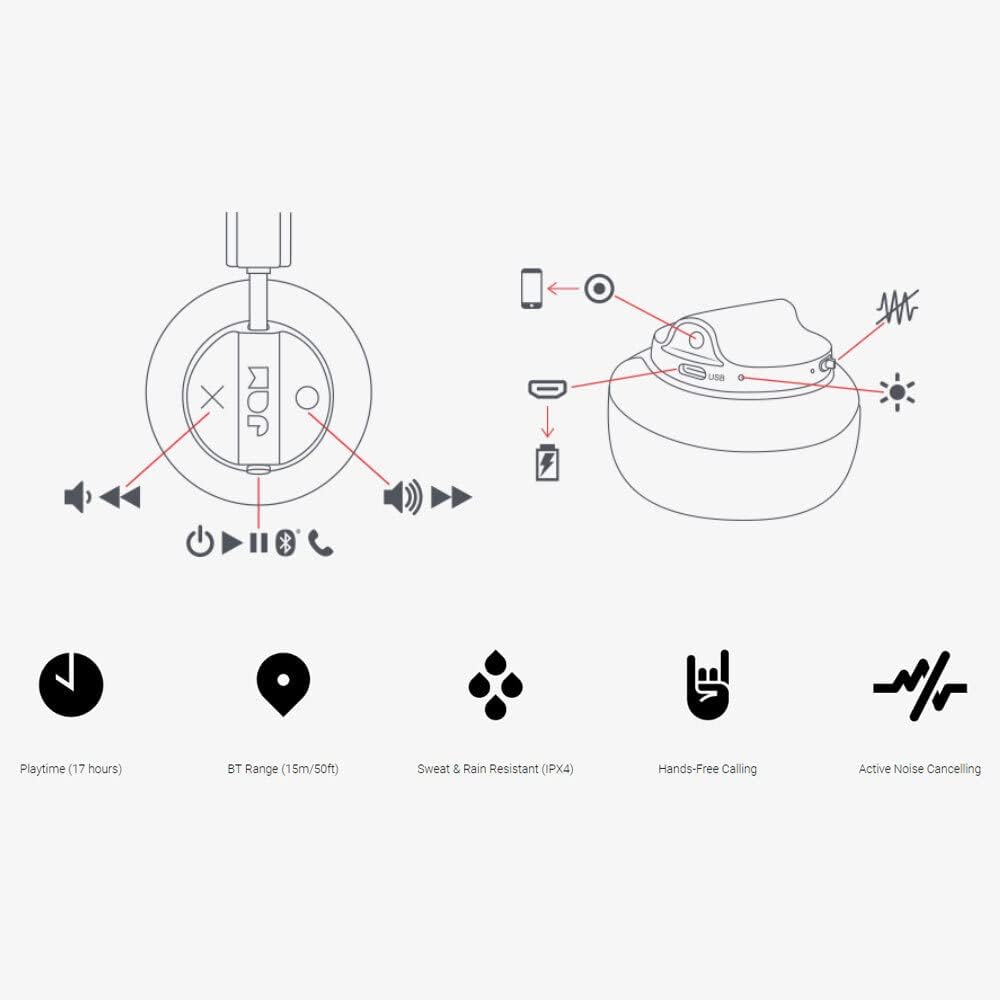
Image: Detailed diagram illustrating the control buttons and ports on the Jam Audio Out There headphones, including power, volume, track navigation, call management, and the charging port.
- Netzschalter: Zum Ein-/Ausschalten gedrückt halten.
- Lauter/Nächster Titel: Kurz drücken für Lautstärke erhöhen, lang drücken für nächsten Titel.
- Lautstärke verringern/vorheriger Titel: Kurzes Drücken verringert die Lautstärke, langes Drücken springt zum vorherigen Titel.
- Wiedergabe/Pause/Anruf annehmen: Einmaliges Drücken zum Abspielen/Pausieren der Musik oder zum Annehmen/Beenden eines Anrufs.
- Active Noise Cancelling (ANC) Switch: Toggle to activate or deactivate noise cancellation.
- Ladeanschluss: Micro-USB-Anschluss zum Aufladen.
- AUX-Eingangsanschluss: 3.5-mm-Klinkenbuchse für kabelgebundene Audioverbindung.
Aufstellen
1. Aufladen der Kopfhörer
Before first use, fully charge your headphones. Connect the provided USB charging cable to the charging port on the headphones and the other end to a USB power source. The LED indicator will show charging status and turn off when fully charged. A full charge takes approximately 2 hours and provides up to 17 hours of playtime.

Image: The Jam Audio Out There headphones provide up to 17 hours of playtime on a single charge.
2. Ein-/Ausschalten
- To power on: Press and hold the Power button for 3 seconds. The LED indicator will flash.
- Zum Ausschalten: Halten Sie den Netzschalter 3 Sekunden lang gedrückt. Die LED-Anzeige erlischt.
3. Bluetooth-Kopplung
- Stellen Sie sicher, dass die Kopfhörer ausgeschaltet sind.
- Press and hold the Power button for 5 seconds until the LED indicator flashes red and blue, indicating pairing mode.
- Aktivieren Sie auf Ihrem Gerät (Smartphone, Tablet, Computer) Bluetooth und suchen Sie nach verfügbaren Geräten.
- Select "JAM Out There" from the list of devices.
- Once paired, the LED indicator on the headphones will turn solid blue.
- The headphones have a Bluetooth range of up to 15 meters (50 feet).

Image: The Jam Audio Out There headphones offer Bluetooth compatibility, allowing a range of up to 15 meters or 50 feet from your connected device.
Bedienungsanleitung
Musikwiedergabe
- Abspielen/Pause: Drücken Sie einmal die Play/Pause-Taste.
- Nächster Titel: Die Lauter-Taste lange drücken.
- Vorheriges Lied: Die Leiser-Taste lange gedrückt halten.
- Lautstärkeregelung: Drücken Sie kurz die Lauter- oder Leiser-Taste.
Freisprechen
- Anruf annehmen/beenden: Drücken Sie einmal die Play/Pause-Taste.
- Anruf ablehnen: Halten Sie die Play/Pause-Taste 2 Sekunden lang gedrückt.
- Einen Anruf tätigen: Initiate the call from your connected device. The audio will automatically transfer to the headphones.
- Music will automatically pause during a call and resume after the call ends.
Aktive Geräuschunterdrückung (ANC)
- To activate ANC: Slide the ANC switch to the ON position. The ANC indicator light will illuminate.
- To deactivate ANC: Slide the ANC switch to the OFF position. The ANC indicator light will turn off.
- Using ANC can reduce ambient noise, enhancing your listening experience. Note that ANC can be used independently or with Bluetooth audio.
Wired Connection (AUX-in)
For a wired connection, use the provided 3.5mm AUX cable. Plug one end into the headphone's AUX-in port and the other into your audio device. This allows you to continue listening even if the headphone battery is depleted or if Bluetooth is not available.
Wartung
- Reinigung: Reinigen Sie die Kopfhörer mit einem weichen, trockenen Tuch. Verwenden Sie keine scharfen Chemikalien oder Scheuermittel.
- Lagerung: Bewahren Sie die Kopfhörer an einem kühlen, trockenen Ort fern von extremen Temperaturen auf.
- Wasserbeständigkeit: These headphones are IPX4 rated, meaning they are resistant to sweat and light splashes of water. Do not submerge them in water or expose them to heavy rain. Ensure the charging port cover is securely closed when not charging to maintain water resistance.
- Batteriepflege: Um die Akkulaufzeit zu verlängern, sollten Sie die Kopfhörer nicht häufig vollständig entladen. Laden Sie sie regelmäßig auf, auch wenn Sie sie längere Zeit nicht benutzen.
Fehlerbehebung
| Problem | Lösung |
|---|---|
| Kopfhörer schalten sich nicht ein | Stellen Sie sicher, dass die Kopfhörer aufgeladen sind. Verbinden Sie sie mithilfe des USB-Kabels mit einer Stromquelle. |
| Kopplung via Bluetooth nicht möglich |
|
| Kein Ton oder geringe Lautstärke |
|
| Active Noise Cancelling not working | Ensure the ANC switch is in the ON position and the ANC indicator light is illuminated. |
| Headphones falling apart or breaking | While the product is designed for durability, excessive force or improper handling can cause damage. Handle with care. If issues persist, refer to warranty information. |
Technische Daten
- Modellname: Draußen
- Modellnummer: HX-HP303BK
- Konnektivität: Bluetooth, 3.5 mm Jack (AUX-in)
- Drahtlose Reichweite: Bis zu 15 Meter (50 Fuß)
- Akkulaufzeit: Bis zu 17 Stunden
- Geräuschpegelkontrolle: Aktive Geräuschunterdrückung
- Wasserbeständigkeit: IPX4 Rated (Sweat and Rain Resistant)
- Ohrplatzierung: Am Ohr
- Material: Gummi, Silikon
- Artikelgewicht: 5.1 Unzen (0.32 Pfund)
- Produktabmessungen: 8.58 x 3.19 x 8.66 Zoll
- Enthaltene Komponenten: Headphones, Charging Cord, AUX Cable
Produktvideo überview
Sehen Sie sich dieses offizielle Produktvideo an, um einen visuellen Eindruck zu erhalten.view of the Jam Audio product line, including the Out There headphones.
Video: An official Jam Audio sizzle video showcasing various products, including the Out There headphones, highlighting their design and features.
Garantie und Support
For warranty information, product registration, or technical support, please refer to the official Jam Audio webBesuchen Sie die Website oder kontaktieren Sie den Kundenservice. Bewahren Sie Ihren Kaufbeleg für Garantieansprüche auf.