
Einführung
The Nitecore NU30 is a high-performance, lightweight rechargeable headlamp designed for various outdoor activities. It features a powerful primary white LED, high CRI auxiliary white LEDs for close-range illumination, and a red auxiliary LED for preserving night vision. With its integrated USB-C charging and durable construction, the NU30 provides reliable lighting for your adventures.

Bild: Vorderseite view of the Nitecore NU30 headlamp with its adjustable headband.
Packungsinhalt
Bitte prüfen Sie das Paket auf folgende Artikel:
- Nitecore NU30 Headlamp
- USB-C zu USB-C Ladekabel
- Stirnband
- Nitecore-Aufkleber
Produkt überview
The Nitecore NU30 features a dual-button interface for intuitive control over its various light sources and brightness levels. The headlamp unit is attached to an adjustable, elastic headband for comfortable wear.

Image: Diagram illustrating the location of the Power Button and Mode Button on the Nitecore NU30 headlamp.
Steuerung:
- Netzschalter: Controls power on/off and brightness levels for the primary white light.
- Modus-Taste: Switches between different light sources (primary white, auxiliary white, auxiliary red) and special modes.
Aufladen des Scheinwerfersamp
The NU30 headlamp is equipped with a built-in 1500mAh Li-ion battery and a USB-C charging port for convenient recharging. A power indicator will show the charging status.
- Suchen Sie den USB-C-Ladeanschluss an der Seite des Kopfhörers.amp.
- Connect the included USB-C to USB-C charging cable to the headlamp and a USB power source (e.g., wall adapter, power bank, computer).
- The power indicator will illuminate during charging.
- Charging is complete when the indicator light changes or turns off (refer to the power indicator section for details). A full charge typically takes approximately 2 hours.

Image: The Nitecore NU30 headlamp being charged via its USB-C port.
Bedienungsanleitung
The NU30 offers multiple light sources and modes for various lighting needs.

Image: Diagram illustrating the three distinct light sources available on the Nitecore NU30 headlamp.
Ein-/Ausschalten:
- Zum Einschalten: Press and hold the Power Button for 1 second. The headlamp will turn on in the previously used primary white light mode.
- Ausschalten: Wenn der Kopfamp is on, long press either the Power Button or the Mode Button until the light turns off.
Switching Light Sources:
Wenn der Kopfamp is on, short press the Mode Button to cycle through the light sources in the following order:
Primary White Light → Auxiliary White Light → Auxiliary Red Light → Primary White Light...
Adjusting Brightness (Primary White Light):
When the Primary White Light is active, short press the Power Button to cycle through brightness levels:
Low → Mid → High → Low...
Auxiliary White Light Modes:
When the Auxiliary White Light is active, short press the Power Button to cycle through:
Ultralow → Flood → Ultralow...

Image: Visual comparison demonstrating the wide and even illumination of the TrueVision+ flood beam.
Auxiliary Red Light Modes:
When the Auxiliary Red Light is active, short press the Power Button to cycle through:
Low → High → Slow Flashing → Low...
Spezialmodi (SOS / Beacon):
Wenn der Kopfamp is off, press and hold the Mode Button for 1 second to directly access SOS mode. While in SOS mode, short press the Power Button to switch to Beacon mode. Short press the Power Button again to return to SOS. Long press either button to turn off.
Betriebsanzeige:
The power indicator light provides information on the remaining battery power. Refer to the product's specific indicator patterns for detailed battery status (e.g., flashes for remaining power, solid for charging, off for fully charged).
Wartung
Proper maintenance ensures the longevity and optimal performance of your Nitecore NU30 headlamp.
- Reinigung: Wischen Sie den Kopf abamp mit einem weichen, damp Tuch. Vermeiden Sie die Verwendung von Scheuermitteln oder Lösungsmitteln.
- Lagerung: Bewahren Sie den Kopf aufamp in a cool, dry place when not in use. Recharge the battery every 3 months to maintain battery health if stored for extended periods.
- Wasserbeständigkeit: The NU30 is rated IP66, meaning it is protected against powerful water jets. Do not submerge the headlamp im Wasser. Stellen Sie sicher, dass die Abdeckung des USB-C-Anschlusses fest verschlossen ist, um die Wasserdichtigkeit zu gewährleisten.
Fehlerbehebung
If you encounter issues with your NU30 headlampVersuchen Sie folgende Lösungen:
- Kopflamp nicht einschalten: Stellen Sie sicher, dass der Akku geladen ist. Schließen Sie den Scheinwerfer an.amp to a power source using the USB-C cable and check if the charging indicator activates.
- Die Lichtausbeute ist gering: Der Akku ist möglicherweise schwach. Laden Sie den Scheinwerfer auf.amp voll.
- Ladevorgang funktioniert nicht: Check the USB-C cable for damage and ensure the power source is functional. Try a different cable or power adapter.
- Schaltflächen reagieren nicht: Stellen Sie sicher, dass der Kopfamp is not in a locked mode (if applicable, refer to specific product features for lock-out functions). If issues persist, contact customer support.
Technische Daten
Detailed technical specifications for the Nitecore NU30 headlamp:
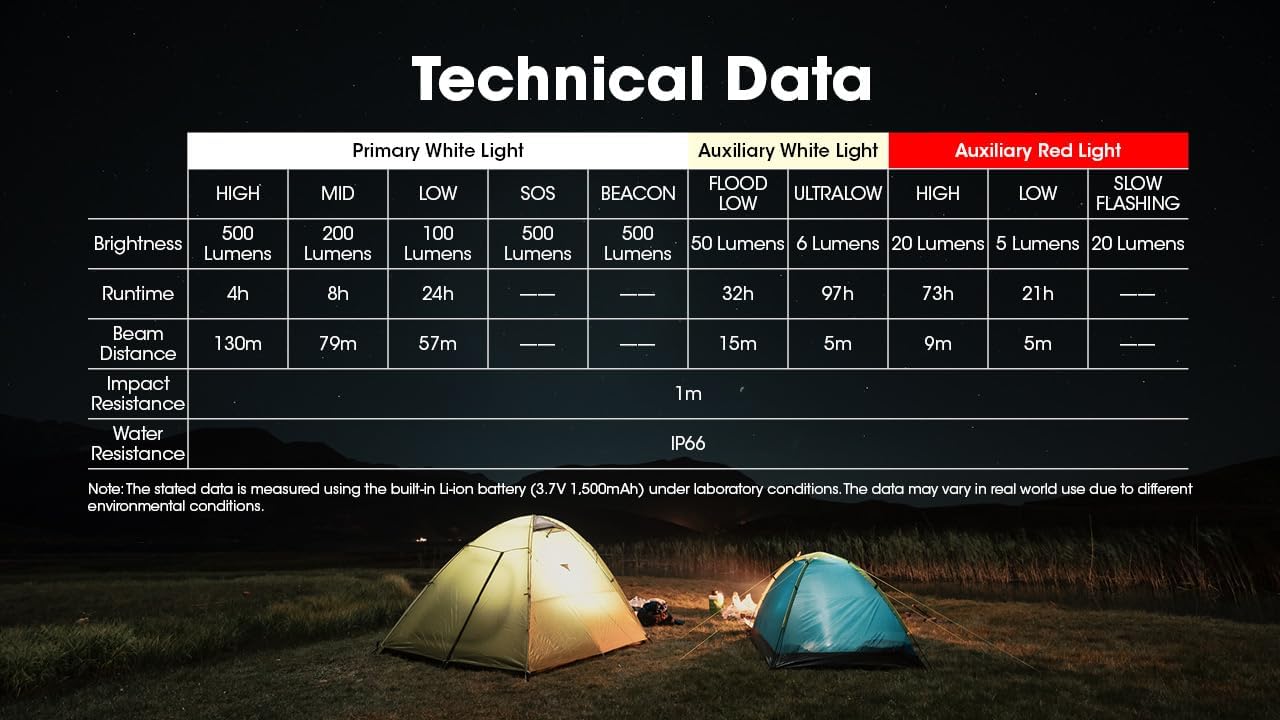
Image: Comprehensive table detailing the technical specifications of the Nitecore NU30 headlamp.
| Besonderheit | Detail |
|---|---|
| Maximale Helligkeit | 500 Lumen |
| Maximale Strahlreichweite | 130 Meter (142 Yards) |
| Akku-Typ | Eingebauter 1500mAh Lithium-Ionen-Akku |
| Ladeanschluss | USB-C |
| Max Laufzeit | Up to 97 hours (Ultralow Auxiliary White) |
| Schlagfestigkeit | 1 Meter |
| Wasserbeständigkeit | IP66 |
| Gewicht | 90 g |
| Material | Strapazierfähiges PC-Material |
Sicherheitshinweise
Please read and follow these safety guidelines to prevent injury or damage to the headlamp:
- Do not shine the light directly into eyes, as this may cause temporary vision impairment.
- Zerlegen oder modifizieren Sie den Kopf nichtampda dies zum Verlust der Garantie und zu Schäden führen kann.
- Außerhalb der Reichweite von Kindern aufbewahren.
- Vermeiden Sie, den Kopf freizulegenamp extremen Temperaturen oder direkter Sonneneinstrahlung über einen längeren Zeitraum ausgesetzt werden.
Garantie und Support
Nitecore products are backed by a warranty. For detailed warranty terms and conditions, please refer to the official Nitecore website or the warranty card included with your product. If you require technical support or have questions about your NU30 headlamp, please contact Nitecore customer service or your authorized dealer.
For more information, visit the official Nitecore webWebsite: www.nitecore.com