
1. Produktüberschreitungview
The MOCUTE 053 is a wireless gamepad designed for an enhanced gaming experience on Android devices. It features a comfortable ergonomic design, high-speed wireless connectivity, and a long-lasting battery, making it suitable for extended gaming sessions.
Hauptmerkmale:
- High-speed and reliable Wireless 3.0 connection with a transmission range of up to 8 meters.
- Integrated 400mAh li-ion battery providing 20-30 hours of continuous gaming.
- Ergonomic curve design for comfortable and prolonged use.
- Compatible with a wide range of Android mobile phones and devices.
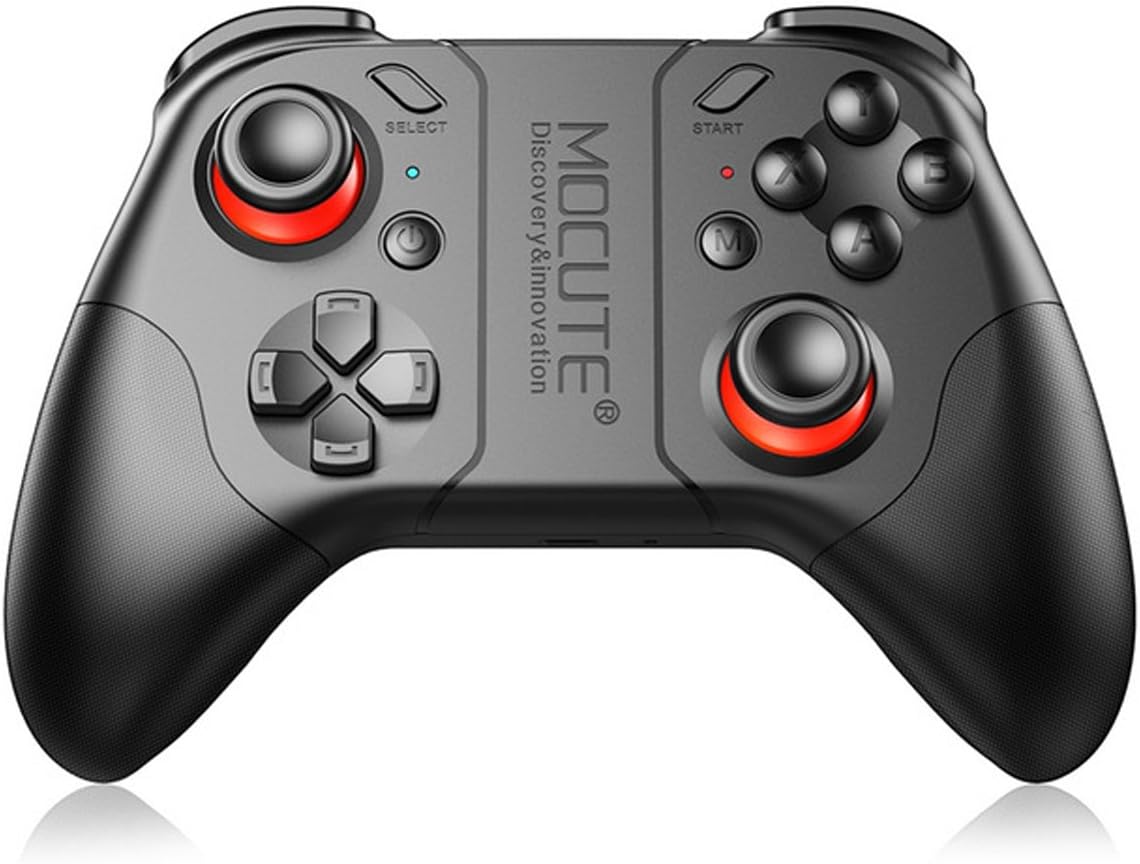
Abbildung 1: Vorderseite view of the MOCUTE 053 Wireless Gamepad, showcasing dank seines ergonomischen Designs und der Tastenanordnung.
2. Kompatibilität
The MOCUTE 053 Gamepad is designed for use with Android Wireless mobile phones and other Android devices, including tablets and TV Boxes. Compatible devices include, but are not limited to, Samsung Galaxy S9/S9+, S8/S8+, Note 8, GALAXY A9 Star, viv x21/x20, Y85/Y83, X PLAY6, HUAWEI Mate 10/10 Pro, P20/P20 Pro, P9/P9 Plus, P10/10 Plus, HUAWEI nova 3e, Tablet M5, PC, and OPPO A3/R15.
Wichtiger Hinweis: This product does not support iOS system devices.
3. Produktlayout und Bedienelemente
Familiarize yourself with the layout of the MOCUTE 053 Gamepad to optimize your gaming experience. The diagram below details the function of each button and control.

Figure 2: Diagram illustrating the function of each button and control on the MOCUTE 053 Gamepad.
The gamepad features dual analog sticks, a D-pad, standard action buttons (A, B, X, Y), shoulder buttons (L1, R1), and triggers (L2, R2). Additional buttons include SELECT, START, and a central M button for mode switching or special functions depending on the game.
4. Einrichtung
4.1 Aufladen des Gamepads
- Schließen Sie das mitgelieferte USB-Ladekabel an den Ladeanschluss des Gamepads an.
- Verbinden Sie das andere Ende des Kabels mit einer USB-Stromquelle (z. B. einem USB-Anschluss am Computer oder einem USB-Netzteil).
- Die Ladeanzeigeleuchte leuchtet auf.
- Eine vollständige Aufladung dauert in der Regel 2–3 Stunden. Die Kontrollleuchte ändert ihre Farbe oder erlischt, sobald der Ladevorgang abgeschlossen ist.
- A fully charged gamepad provides 20-30 hours of working time and up to 30 days of standby time.
4.2 Koppeln mit Ihrem Gerät
- Stellen Sie sicher, dass das Gamepad ausreichend geladen ist.
- Turn on the gamepad by pressing the Power button. The indicator light will start blinking, indicating it's in pairing mode.
- On your Android device, go to Settings > Bluetooth and turn Bluetooth on.
- Suchen nach available devices. The gamepad should appear as "MOCUTE 053" or similar.
- Select "MOCUTE 053" to initiate the pairing process.
- Once paired, the gamepad's indicator light will become solid, indicating a successful connection.
- Falls die Kopplung fehlschlägt, schalten Sie das Gamepad und die Bluetooth-Funktion Ihres Geräts aus und wiederholen Sie die Schritte.
5. Bedienungsanleitung
5.1 Ein-/Ausschalten
- Einschalten: Halten Sie den Ein-/Ausschalter einige Sekunden lang gedrückt, bis die Kontrollleuchte aufleuchtet.
- Ausschalten: Press and hold the Power button for a few seconds until the indicator light turns off. The gamepad will also automatically power off after a period of inactivity to conserve battery.
5.2 Gaming Usage
- Once paired, launch your desired game on your Android device.
- Most Android games with gamepad support will automatically recognize the MOCUTE 053.
- Refer to the game's settings for controller mapping and customization options.
- Use the analog sticks for movement and camera control, the D-pad for directional input, and the action buttons (A, B, X, Y) for in-game actions.
- The shoulder buttons (L1, R1) and triggers (L2, R2) are typically used for shooting, aiming, or other quick actions.
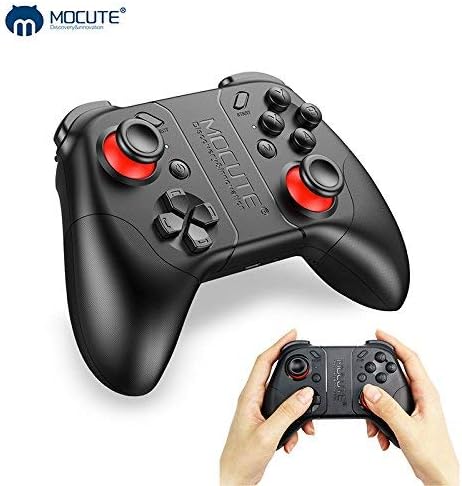
Figure 3: The MOCUTE 053 Wireless Gamepad held in hands, demonstrating its compact size and comfortable grip.
6. Wartung
Proper maintenance will extend the lifespan of your MOCUTE 053 Gamepad.
- Reinigung: Verwenden Sie ein weiches, trockenes Tuch, um die Oberfläche des Gamepads abzuwischen. Bei hartnäckigem Schmutz leicht andrücken.ampBefeuchten Sie das Tuch mit Wasser. Verwenden Sie keine scharfen Chemikalien oder Scheuermittel.
- Lagerung: Bewahren Sie das Gamepad an einem kühlen, trockenen Ort fern von direkter Sonneneinstrahlung, extremen Temperaturen und hoher Luftfeuchtigkeit auf.
- Batteriepflege: Avoid fully discharging the battery frequently. If storing for a long period, charge the gamepad to about 50% every few months to maintain battery health.
- Vermeiden Sie Tropfen: Schützen Sie das Gamepad vor Stürzen und Stößen, da diese die internen Komponenten beschädigen können.
7. Fehlerbehebung
If you encounter issues with your MOCUTE 053 Gamepad, refer to the following common problems and solutions:
| Problem | Mögliche Ursache/Lösung |
|---|---|
| Das Gamepad lässt sich nicht einschalten. | Battery is low or depleted. Charge the gamepad for 2-3 hours. |
| Kopplung mit dem Gerät nicht möglich. |
|
| Die Schaltflächen reagieren nicht oder nur verzögert. |
|
| Gamepad disconnects frequently. |
|
8. Technische Daten
| Besonderheit | Spezifikation |
|---|---|
| Modell | MOCUTE 053 |
| Kabellose Version | 3.0 |
| Material | ABS-Kunststoff |
| Batterie | 400 mAh Lithium-Ionen-Akku |
| Übertragungsdistanz | 2-8 Meter |
| Arbeitszeit | 20-30 Stunden |
| Ladezeit | 2-3 Stunden |
| Standby-Zeit | 30 Tage (voll aufgeladen) |
| Abmessungen (L x B x H) | 170 x 140 x 60 mm |
| Gewicht | 226g |
| Anzahl der Tasten | 17 |
| UPC | 611864734743 |
9. Garantie und Support
The MOCUTE 053 Wireless Gamepad comes with a standard manufacturer's warranty. For specific warranty terms and conditions, please refer to the documentation included with your purchase or contact MOCUTE customer support.
For technical assistance, troubleshooting beyond this manual, or warranty claims, please contact the manufacturer or your point of purchase. Keep your purchase receipt as proof of purchase.